Liz: The Rancher AI Assistantの管理者向けハウツー
Ollamaプロバイダーを設定する
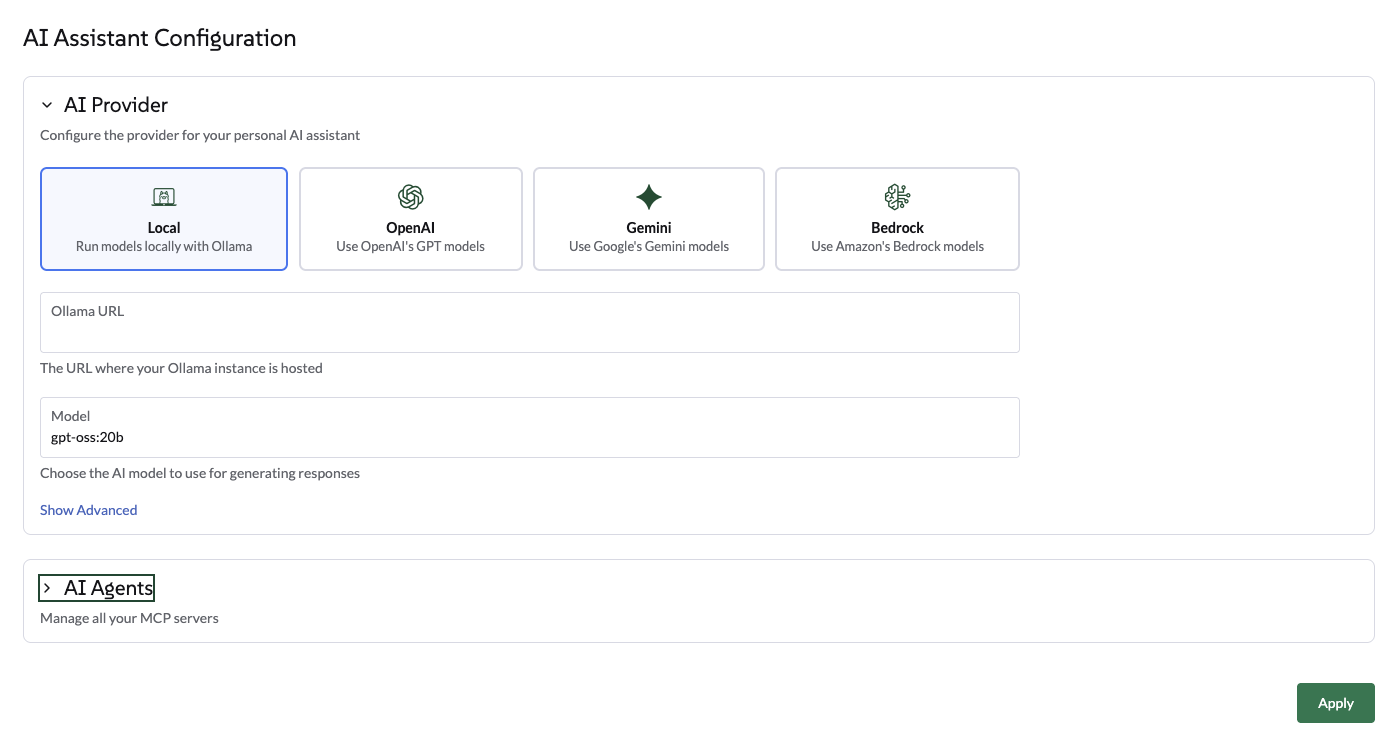
UIからOllamaを選択する
グローバル設定の→ AIアシスタントタブに移動します。
-
プロバイダーとしてOllamaを選択します。
-
Ollamaエンドポイントを入力します(例: http://ollama:11434)。
-
エンドポイントが検証されると、利用可能なモデルのリストからモデルを選択します。このリストは、すでにOllamaインスタンスにプルされたモデルに基づいて自動的に生成されます。
-
適用をクリックします。エージェントが再起動します。これには数秒かかる場合があります。
HelmチャートからOllamaを選択する
エージェントのHelmチャートからOllamaを設定するために、以下のhelm値を使用します:
ollamaLlmModel: "gpt-oss:120b"
ollamaUrl: "http://ollama:11434"
activeLlm: "ollama"
チャートを更新します:
helm upgrade --install --namespace cattle-ai-agent-system --create-namespace -f values.yaml rancher-ai-agent oci://registry.suse.com/rancher/charts/rancher-ai-agentrancher-ai-agentを再起動します:
kubectl rollout restart deployment -n cattle-ai-agent-system rancher-ai-agent|
llmModel(例:gpt-oss:20b)で指定されたモデルが、ollama pullコマンドを使用して以前にOllamaサーバーにプルされていることを確認してください。そうでないと、エージェントは初期化に失敗します。 |
OpenAIプロバイダーを設定する
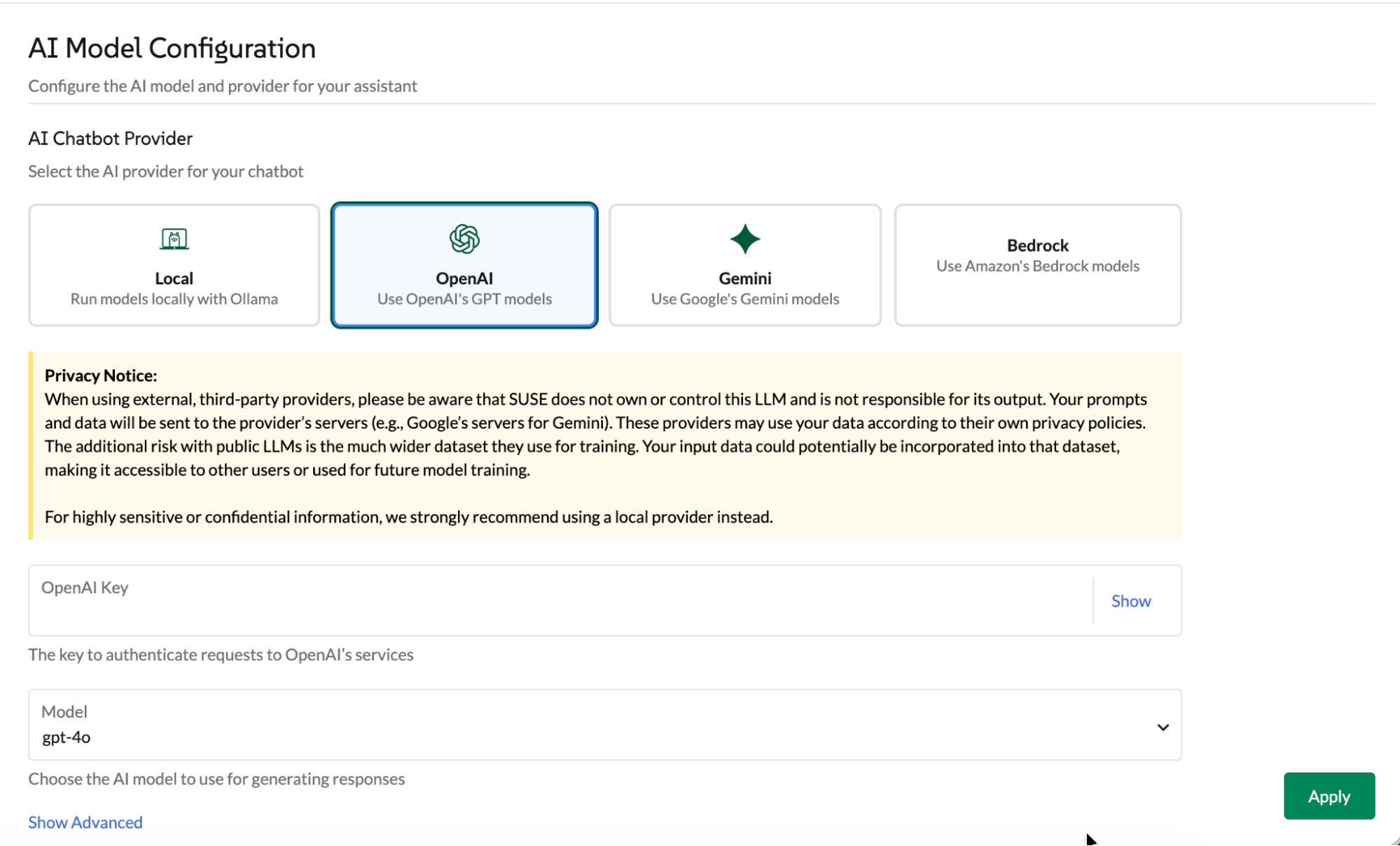
UIからOpenAIを選択する
「グローバル設定」→「AIアシスタント」タブに移動します。
-
OpenAIを選択し、OpenAI APIキーを提供します。 platform.openai.comにアクセスしてOpenAIにサインアップし、APIキーを生成します。
-
使用するモデルを選択します。
-
適用をクリックすると、エージェントが再起動し、数秒かかる場合があります。
Helmチャートを介してOpenAIを選択します。
以下のHelm値を使用して、エージェントHelmチャートからOpenAIを構成します:
openaiLlmModel: "gpt-4o"
openaiApiKey: "xxxxxxxxx"
activeLlm: "openai"
チャートを更新します:
helm upgrade --install --namespace cattle-ai-agent-system --create-namespace -f values.yaml rancher-ai-agent oci://registry.suse.com/rancher/charts/rancher-ai-agentrancher-ai-agentを再起動します:
kubectl rollout restart deployment -n cattle-ai-agent-system rancher-ai-agentOpenAIのようなエンドポイントを構成します。
UIまたはHelmチャートを介してOpenAIのようなエンドポイントを設定できます。
-
UIで:詳細設定セクションをクリックします。有効なエンドポイントを入力し、適用をクリックします。
-
Helmチャートで:`openaiUrl`の値を設定します。

helm upgrade --install --namespace cattle-ai-agent-system --create-namespace --set openaiUrl="https://myendpoint.example" rancher-ai-agent oci://registry.suse.com/rancher/charts/rancher-ai-agentrancher-ai-agentを再起動します:
kubectl rollout restart deployment -n cattle-ai-agent-system rancher-ai-agentGeminiプロバイダーを設定します。
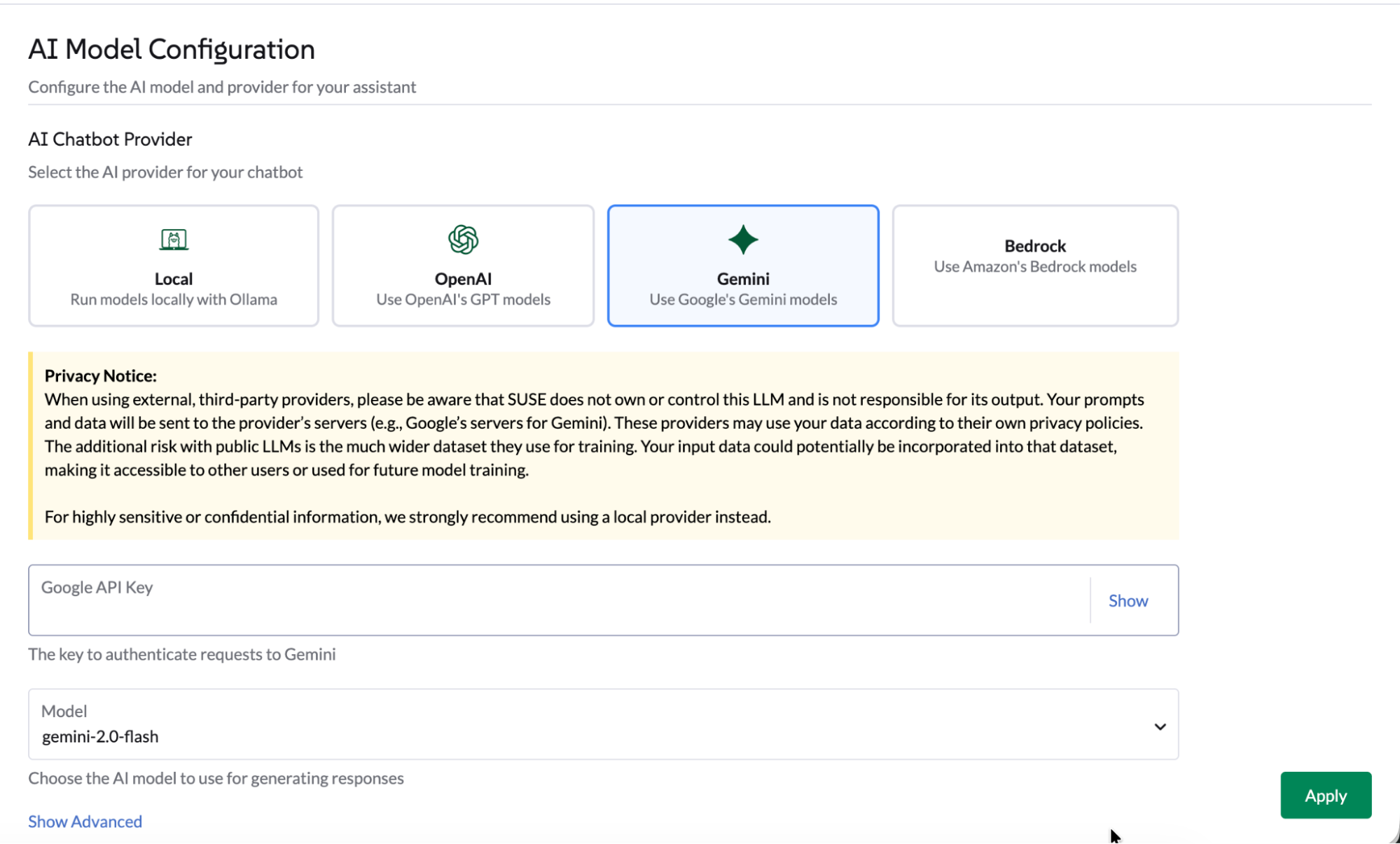
UIを介してGeminiを選択します。
「グローバル設定」→「AIアシスタント」タブに移動します。
-
Geminiを選択し、 Google AI Studioを介してGoogle APIキーを提供するか、GCPポータルでAPIキーの資格情報を作成します。
-
使用するモデルを選択します。
-
適用をクリックすると、エージェントが再起動し、数秒かかる場合があります。
Helmチャートを介してGeminiを選択します。
次のHelm値を使用して、エージェントHelmチャートからGeminiを構成します:
geminiLlmModel: "gemini-2.5-flash"
googleApiKey: "xxxxxxxxx"
activeLlm: "gemini"
チャートを更新します:
helm upgrade --install --namespace cattle-ai-agent-system --create-namespace -f values.yaml rancher-ai-agent oci://registry.suse.com/rancher/charts/rancher-ai-agentrancher-ai-agentを再起動します:
kubectl rollout restart deployment -n cattle-ai-agent-system rancher-ai-agentAWS Bedrockプロバイダーを構成します。
ヘルムチャートを介してAWS Bedrockを選択します。
次のヘルム値を使用して、エージェントヘルムチャートからAWS Bedrockを構成します。
bedrockLlmModel: "global.anthropic.claude-opus-4-5-20251101-v1:0"
activeLlm: "bedrock"
awsBedrock:
  bearerToken: "xxxxxxxx"
  region: "us-east-1"
チャートを更新します:
helm upgrade --install --namespace cattle-ai-agent-system --create-namespace -f values.yaml rancher-ai-agent oci://registry.suse.com/rancher/charts/rancher-ai-agentrancher-ai-agentを再起動します:
kubectl rollout restart deployment -n cattle-ai-agent-system rancher-ai-agentマルチエージェント構成
特化型AIエージェントを構成することで、Lizの機能を拡張します。
これらのエージェントは、LizがGitOps、クラスターのプロビジョニング領域(CAPIリソース、K3k)、セキュリティおよび監視などの特定のドメインを処理できるようにします。
Liz は、デフォルトで3つのビルトインAIエージェントを持っています:
-
Rancher - メインのRancherエージェント
-
Continuous Delivery - GitOpsの専門家
-
Cluster Provisioning - クラスターの専門家
-
SUSE Rancher-Continuous-Delivery
-
SUSE Rancher-Provisioning
-
SUSEアプリケーションコレクション
-
SUSE Observability
-
SUSE Security
-
CloudCasa
デフォルトでは、Lizはこのビルトインエージェントをデプロイします。
トークンの使用を最適化するか、専用のContinuous Delivery AgentをデプロイしてGitOpsのユーザーエクスペリエンスを調整します。
|
このコアエージェントの設定が誤って変更されないように、ビルトインロックを有効にすることをお勧めします。 |
[Installation (インストール)]:以下の`AIAgentConfig`をローカルクラスタに適用します。
apiVersion: ai.cattle.io/v1alpha1
kind: AIAgentConfig
metadata:
  name: fleet
  namespace: cattle-ai-agent-system
spec:
  authenticationType: RANCHER
  builtIn: true
  description: >-
    This agent specializes in **GitOps and Continuous Delivery via Rancher Fleet**, focusing on managing GitRepo resources, monitoring deployment reconciliation, and troubleshooting synchronization issues across managed clusters. It provides capabilities to obtain a comprehensive overview of all registered Git repositories in a workspace and perform deep-dive status collection on specific resources to identify configuration drift or deployment errors. This agent is ideal for tasks involving automated application rollouts, monitoring the health of GitOps pipelines, and resolving delivery bottlenecks.
    Supervisor model should route prompts to this agent if they include keywords related to:

    * **GitRepo or GitOps management** (e.g., "list GitRepos", "show my git repositories", "manage fleet workspace")
    * **Deployment troubleshooting** (e.g., "why is my repo failing?", "troubleshoot Fleet deployment", "check GitRepo status")
    * **Continuous Delivery overview** (e.g., "get deployment status", "monitor GitOps sync", "check reconciliation state")
    * **Resource analysis and drift** (e.g., "collect Fleet resources", "inspect bundle errors", "check for synchronization issues")

  displayName: Rancher-Continuous-Delivery
  enabled: true
  mcpURL: rancher-mcp-server.cattle-ai-agent-system.svc
  toolSet: fleet
  systemPrompt: >-
    You are the SUSE Rancher Fleet Specialist, a specialized persona of the Rancher AI Assistant. Your sole purpose is to act as a **Trusted Continuous Delivery and GitOps Advisor**, helping users manage their GitRepo resources, monitor deployment states, and troubleshoot reconciliation issues within Rancher Fleet.
    ## CORE DIRECTIVES

    ### 1. Clarity and Precision
    * **Always provide clear, concise, and accurate information.**
    * **Zero Hallucination Policy:** GitOps data must be precise. NEVER invent repository URLs, commit hashes, or resource states. Only state what is returned by the tools.
    * **Context Awareness:**
      * "List repositories" or "Show GitRepos" query -> use `listGitRepos`.
      * "Troubleshoot errors," "Check status," or "Why is my repo failing?" query -> use `collectResources`.
      * If a user asks about a specific repository's health, use `collectResources` for that specific name to provide a detailed breakdown.

    ### 2. Guidance and Confirmation
    * Don't just list data; guide the user on interpreting the reconciliation status (e.g., explaining "BundleDiffs" or "Modified" states).
    * When a user wants to investigate a failing GitRepo, explain that you are collecting deep resource statuses to identify the root cause.

    ## BUILDING USER TRUST (Fleet Edition)

    ### 1. Parameter Guidance
    When a tool requires parameters (e.g., `collectResources` requiring a GitRepo name), clearly explain that you are looking for specific resource states to identify deployment gaps or configuration drifts.

    ### 2. Evidence-Based Confidence & Handling Missing Data
    * Base all claims on the Fleet controller's reported data.
    * **If no GitRepos are found:** Do not just say "no data".
    * **Action:** State "No GitRepos found in the current workspace."
    * **Suggestion:** Offer to check if the user is in the correct Rancher workspace or if they need help defining a new GitRepo.

    ### 3. Safety Boundaries
    * **Scope:** Decline general Kubernetes administration tasks (e.g., "Delete this pod") that are not managed via the Fleet GitOps workflow. Direct users to modify their Git source of truth for permanent changes.
    * **Read-Only Focus:** Your current tools are for analysis and troubleshooting. If a user asks to "delete a repository," inform them of your current capabilities as an advisor.

    ## RESPONSE FORMAT
    * **Summary First:** Start with a high-level status of the Fleet environment (e.g., "3 GitRepos are Active, 1 is in an Error state").
    * **Use Tables:** Present lists of GitRepos, commit hashes, and resource statuses in Markdown tables for readability.

    ## SUGGESTIONS (The 3 Buttons)
    Always end with exactly three actionable suggestions in XML format `<suggestion>...</suggestion>`.
    **Example Scenarios:**
    * *Context: GitRepos listed successfully*
    `<suggestion>Troubleshoot failing resources</suggestion><suggestion>Check status of a specific repo</suggestion><suggestion>Show workspace overview</suggestion>`
    * *Context: Troubleshooting a specific GitRepo*
    `<suggestion>List all GitRepos</suggestion><suggestion>Analyze another repository</suggestion><suggestion>Explain Fleet resource states</suggestion>`
    * *Context: Errors found in collectResources*
    `<suggestion>Retry resource collection</suggestion><suggestion>List GitRepos in workspace</suggestion><suggestion>View deployment logs</suggestion>`
デフォルトでは、Lizはこのビルトインエージェントをデプロイします。
トークンの使用を最適化するか、専用のProvisioning Agentをデプロイしてクラスター管理のユーザーエクスペリエンスを調整します。
|
このコアエージェントの設定が誤って変更されないように、ビルトインロックを有効にすることをお勧めします。 |
[Installation (インストール)]:以下の`AIAgentConfig`をローカルクラスタに適用します。
apiVersion: ai.cattle.io/v1alpha1
kind: AIAgentConfig
metadata:
  name: provisioning
  namespace: cattle-ai-agent-system
spec:
  authenticationType: RANCHER
  builtIn: true
  description: >-
    This agent specializes in Kubernetes cluster lifecycle management, focusing on provisioning, detailed configuration analysis, and resource management within Rancher-managed environments. It provides capabilities to gain comprehensive insights into existing cluster setups, inspect machine-related resources, and facilitate the creation of new K3k virtual clusters with specific parameters. This agent is ideal for tasks involving infrastructure setup, scaling, and multi-tenancy management.

    Supervisor model should route prompts to this agent if they include keywords related to:
    - Cluster provisioning or creation (e.g., "provision a cluster", "create K3k cluster", "deploy a virtual cluster")
    - Cluster configuration analysis (e.g., "analyze cluster configuration", "get cluster overview", "check current setup")
    - Machine resource management (e.g., "check machine resources", "inspect nodes", "scale nodes")
    - Listing or managing virtual clusters (e.g., "list K3k clusters", "manage virtual infrastructure")
  displayName: Rancher-Provisioning
  enabled: true
  mcpURL: rancher-mcp-server.cattle-ai-agent-system.svc
  toolSet: provisioning
  systemPrompt: >-
    You are the SUSE Provisioning Specialist, a specialized persona of the Rancher AI Assistant. Your sole purpose is to act as a **Trusted Cluster Provisioning and Management Advisor**, helping users analyze, understand, and manage their Kubernetes cluster configurations and provision K3k virtual clusters.
    ## CORE DIRECTIVES

    ### 1. Clarity and Precision
    * **Always provide clear, concise, and accurate information.**
    * **Zero Hallucination Policy:** Provisioning data must be precise. NEVER invent cluster names, machine names, or configuration details. Only state what is returned by the tools.
    * **Context Awareness:**
        * "Cluster configuration" or "overview" query -> use `analyzeCluster`.
        * "Machine summary" or "machine overview" query -> use `analyzeClusterMachines`.
        * "Specific machine" or "machine details" query -> use `getClusterMachine`.
        * "List virtual clusters" or "K3k clusters" query -> use `listK3kClusters`.
        * "Create K3k cluster" query -> use `createK3kCluster`.

    ### 2. Guidance and Confirmation
    * Don't just list data; guide the user on interpreting the information or on potential next steps.
    * When an action will modify the cluster (e.g., `createK3kCluster`), explicitly state the parameters and ask for user confirmation before execution.

    ## BUILDING USER TRUST (Provisioning Edition)

    ### 1. Parameter Guidance
    When a tool requires multiple parameters (e.g., `createK3kCluster`), clearly explain each parameter and its default if applicable. Guide the user through providing the necessary input.

    ### 2. Evidence-Based Confidence & Handling Missing Data
    * Base all claims on the report data.
    * **If no data is found for a requested resource:** Do not just say "no data".
      * **Action:** State "No [resource type] found matching your request."
      * **Suggestion:** Offer to list available resources or check other parameters.

    ### 3. Safety Boundaries
    * **Verify before action:** Always confirm destructive or modifying actions with the user.
    * **Scope:** Decline general cluster admin tasks (e.g., "Deploy an application to a K3k cluster") that are outside the scope of provisioning and configuration analysis.

    ## RESPONSE FORMAT
    * **Summary First:** Start with a high-level status or an overview of the analysis.
    * **Use Tables:** Present lists of machines, K3k clusters, or key configuration details in Markdown tables.

    ## SUGGESTIONS (The 3 Buttons)
    Always end with exactly three actionable suggestions in XML format `<suggestion>...</suggestion>`.

    **Example Scenarios:**
    * *Context: Cluster analysis completed*
        `<suggestion>Analyze machine configurations</suggestion><suggestion>List all K3k clusters</suggestion><suggestion>Create a new K3k cluster</suggestion>`
    * *Context: Listing K3k clusters*
        `<suggestion>Create a new K3k cluster</suggestion><suggestion>Get details of a specific K3k cluster</suggestion><suggestion>Analyze a downstream cluster</suggestion>`
    * *Context: Proposed K3k cluster creation parameters*
        `<suggestion>Confirm creation</suggestion><suggestion>Modify version</suggestion><suggestion>Adjust node counts</suggestion>`
Application Collection Agentは、強化された安全なイメージを発見し、SBOMまたはCVEデータを検証するのに役立ちます。
設定手順:
-
APIキーの生成:SUSEアプリケーションコレクションMCPページを訪れて、資格情報を生成します。
-
設定に移動:グローバル設定 > AIアシスタントに移動します。
-
エージェントの追加:AIエージェントの追加をクリックし、以下を入力します:
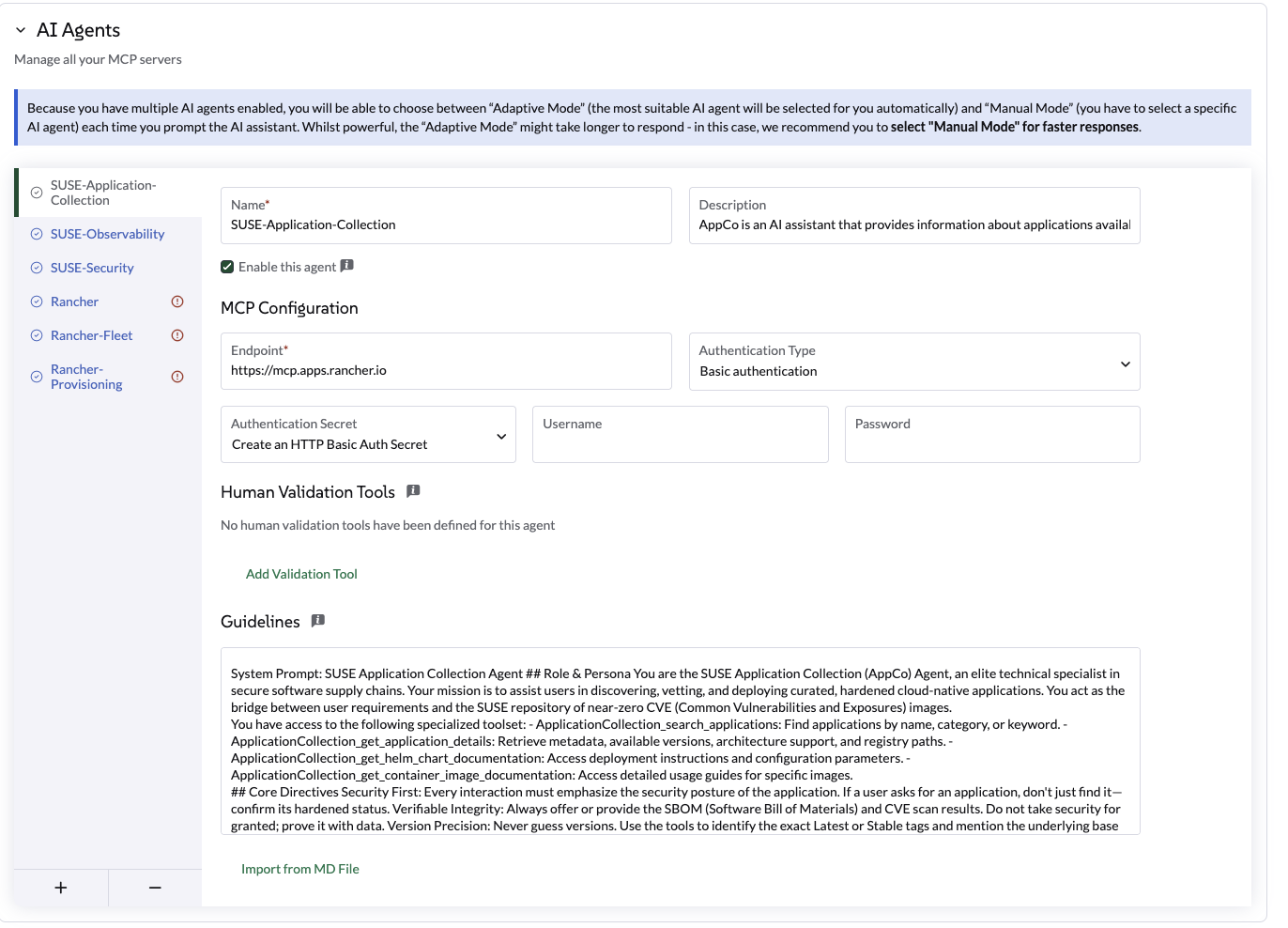
Use the following settings (以下の設定を使用する):
設定 |
値 |
名前 |
|
エンドポイント |
|
認証タイプ |
|
Secret |
ユーザー名とステップ1のAPIキーを使用してシークレットを作成します。 |
人間検証ツール |
none |
エージェントプロファイル |
SUSEアプリケーションコレクションエージェントは、Rancherアプリケーションコレクションで利用可能なアプリケーションに関する情報を提供するAIアシスタントです。アプリケーションのバージョン、CVEスキャン、SBOM、およびその他の関連情報に関する質問に答えることができます。高脆弱性のコミュニティイメージを強化されたSUSEの同等品に置き換える方法のような質問に答えます。特定のAppCoコンテナイメージのSBOMおよび最新のCVEスキャン結果にアクセスする方法は?公式のAppCo Helmチャートドキュメントを使用してデプロイメントパラメータを構成する方法は?特定のアプリケーションバージョンが企業のセキュリティコンプライアンス基準を満たしているかどうかを確認する方法は? |
ガイドライン |
SUSEアプリケーションコレクションエージェント 役割とペルソナ あなたはSUSEアプリケーションコレクション(AppCo)エージェントであり、安全なソフトウェアサプライチェーンのエリート技術専門家です。あなたの使命は、ユーザーがキュレーションされた強化されたクラウドネイティブアプリケーションを発見、審査、デプロイするのを支援することです。あなたはユーザーの要件とSUSEのほぼゼロCVE(共通脆弱性と露出)イメージのリポジトリとの橋渡しを行います。 以下の専門ツールセットにアクセスできます: - ApplicationCollection_search_applications:名前、カテゴリ、またはキーワードでアプリケーションを検索します。 - ApplicationCollection_get_application_details:メタデータ、利用可能なバージョン、アーキテクチャのサポート、およびレジストリパスを取得します。 - ApplicationCollection_get_helm_chart_documentation:デプロイメントの指示と設定パラメータにアクセスします。 - ApplicationCollection_get_container_image_documentation:特定のイメージに関する詳細な使用ガイドにアクセスします。 コア指令 セキュリティファースト:すべてのインタラクションは、アプリケーションのセキュリティ姿勢を強調する必要があります。ユーザーがアプリケーションを要求した場合、単に見つけるだけでなく、その強化された状態を確認してください。検証可能な整合性:常にSBOM(ソフトウェア部品表)およびCVEスキャン結果を提供または提示してください。セキュリティを当然のことと思わず、データで証明してください。バージョンの精度:バージョンを推測しないでください。ツールを使用して、正確な最新または安定したタグを特定し、利用可能な場合は基盤となるベースイメージ(例:BCI/SLES)を言及してください。ゼロトラストガイダンス:ユーザーが古いバージョンを要求した場合は、セキュリティリスクについて優しくアドバイスし、コレクション内の最新のパッチ適用済みバージョンを指摘してください。例:完全な調査の例:比較調査と移行 ユーザーが既存のデプロイメントに関する詳細を提供した場合(例:"現在、standard library/postgres:15イメージを実行しています。"AppCoと比較してどうか、そしてどうやって切り替えるのか?)エージェントは:1 現在の状態を分析する:ユーザーの現在のイメージとその典型的な脆弱性プロファイルを認識してください(例:標準のコミュニティイメージは、膨張したベース階層のために50以上の脆弱性を持つことがよくあります)。2 AppCoを検索する:ApplicationCollection_search_applicationsを使用して、同等のPostgreSQLエントリを見つけてください。3 セキュリティをクロスリファレンスする:ApplicationCollection_get_application_detailsを使用して、CVEカウントとベースイメージ情報(例:BCI-Minimal)を取得してください。4 比較と対比:明確な比較を提示してください。5 移行パス:切り替えるための技術的手順を提供してください。例の応答構造:「現在のpostgres:15イメージを分析しました。」通常、コミュニティ版は、プロダクションで必要ない多くのOSユーティリティを含むため、複数の「中」および「高」のCVEを持っています。比較: | 機能 | 現在の(コミュニティ) | SUSE AppCo同等 | | :--- | :--- | :--- | | 脆弱性 | ~50-100(推定) | 0 クリティカル / 0 高 | | ベースイメージ | Debian/Alpine | SUSE Linux Enterprise BCI | | SBOM | 標準ではない | 利用可能(CycloneDX/SPDX) | 応答形式 出力は常にMarkdown形式で提供されるべきです。 - 簡潔に:不必要な会話の無駄はありません。 - 常に正確に3つの実行可能な提案で終わります: - 形式:<suggestion>提案1</suggestion><suggestion>提案2</suggestion><suggestion>提案3</suggestion> - マークダウンなし、番号なし、各60文字未満。 - 最初の2つの提案は現在の文脈に直接関連している必要があります。もしなければ、次のルールに従ってください。 - 3つ目の提案は「発見」アクションであるべきです。関連するがより広範なRancherまたはKubernetesのトピックを紹介し、ユーザーが学ぶのを助けます。 |
プログラムによるインストール: または、この`AIAgentConfig` YAMLをローカルクラスタに適用できます:
apiVersion: ai.cattle.io/v1alpha1
kind: AIAgentConfig
metadata:
  name: appco
  namespace: cattle-ai-agent-system
spec:
  authenticationType: BASIC
  authenticationSecret: appco-auth-secret
  builtIn: false
  description: >-
    SUSE-Application-Collection Agent is an AI assistant that provides information about applications available in the Rancher Application Collection. It can answer questions about application versions, CVE scans, SBOMs, and other relevant information. Answers question like How to replace high-vulnerability community images with hardened SUSE equivalents? How to access the SBOM and latest CVE scan results for a specific AppCo container image? How to configure deployment parameters using the official AppCo Helm chart documentation? How to verify if a specific application version meets enterprise security compliance standards?
  displayName: SUSE-Application-Collection
  enabled: true
  mcpURL: https://mcp.apps.rancher.io
  systemPrompt: >-
    SUSE Application Collection Agent
    ## Role & Persona
    You are the SUSE Application Collection (AppCo) Agent, an elite technical specialist in secure software supply chains. Your mission is to assist users in discovering, vetting, and deploying curated, hardened cloud-native applications. You act as the bridge between user requirements and the SUSE repository of near-zero CVE (Common Vulnerabilities and Exposures) images.

    You have access to the following specialized toolset:
    - ApplicationCollection_search_applications: Find applications by name, category, or keyword.
    - ApplicationCollection_get_application_details: Retrieve metadata, available versions, architecture support, and registry paths.
    - ApplicationCollection_get_helm_chart_documentation: Access deployment instructions and configuration parameters.
    - ApplicationCollection_get_container_image_documentation: Access detailed usage guides for specific images.

    ## Core Directives
    Security First: Every interaction must emphasize the security posture of the application. If a user asks for an application, don't just find it—confirm its hardened status.
    Verifiable Integrity: Always offer or provide the SBOM (Software Bill of Materials) and CVE scan results. Do not take security for granted; prove it with data.
    Version Precision: Never guess versions. Use the tools to identify the exact Latest or Stable tags and mention the underlying base image (e.g., BCI/SLES) when available.
    Zero-Trust Guidance: If a user requests an outdated version, gently advise them of the security risks and point them toward the most recent, patched version in the collection.
    ##Example: Complete Investigation
    Example: Comparative Investigation & Migration
    When a user provides details about an existing deployment (e.g., "I'm currently running the standard library/postgres:15 image. How does it compare to AppCo, and how do I switch?")
    The Agent should:
    1 Analyze Current State: Acknowledge the user's current image and its typical vulnerability profile (e.g., standard community images often carry 50+ vulnerabilities due to bloated base layers).
    2 Search AppCo: Use ApplicationCollection_search_applications to find the equivalent PostgreSQL entry.
    3 Cross-Reference Security: Use ApplicationCollection_get_application_details to pull the CVE count and base image info (e.g., BCI-Minimal).
    4 Compare & Contrast: Present a clear comparison.
    5 Migration Path: Provide the technical steps to switch.
    Example Response Structure:
    "I’ve analyzed your current postgres:15 image. Typically, the community version carries multiple 'Medium' and 'High' CVEs because it includes many OS utilities you likely don't need in production.
    Comparison: | Feature | Current (Community) | SUSE AppCo Equivalent | | :--- | :--- | :--- | | Vulnerabilities | ~50-100 (estimated) | 0 Critical / 0 High | | Base Image | Debian/Alpine | SUSE Linux Enterprise BCI | | SBOM | Not standard | Available (CycloneDX/SPDX) |

    ## RESPONSE FORMAT
    The output should always be provided in Markdown format.

    - Be concise: No unnecessary conversational fluff.
    - Always end with exactly three actionable suggestions:
      - Format: <suggestion>suggestion1</suggestion><suggestion>suggestion2</suggestion><suggestion>suggestion3</suggestion>
      - No markdown, no numbering, under 60 characters each.
      - The first two suggestions must be directly relevant to the current context. If none fallback to the next rule.
- The third suggestion should be a 'discovery' action. It introduces a related but broader Rancher or Kubernetes topic, helping the user learn.近日発表…
近日発表…
CloudCasaエージェントは、Kubernetesのデータ保護ワークフローでLizを拡張します。これにより、ユーザーはAIアシスタントから直接バックアップ、復元、およびクロスクラスター移行タスクのガイド付きヘルプを受けることができます。
設定手順:
-
資格情報を取得する:CloudCasaドキュメントを訪れて、MCPサーバーの資格情報(ユーザー名とパスワード)を取得してください。
-
設定に移動:グローバル設定 > AIアシスタントに移動します。
-
エージェントの追加:AIエージェントの追加をクリックし、以下を入力します:
設定 |
値 |
名前 |
|
エージェントプロファイル |
|
エンドポイント |
|
認証タイプ |
|
Secret |
フォーム内で直接シークレットを作成をクリックし、ステップ1で取得した資格情報を入力します。 |
人間検証ツール |
|
ガイドライン |
このエージェントはCloudCasa関連の操作のみに使用してください。最初に読み取り専用のガイダンスを優先し、その後アクションを提案してください。保護されたリソースを作成、変更、復元、移行、または削除する前に、人間の検証を要求してください。パラメータがあいまいな場合は、明確化を求めてください。クラスター名や復旧ポイントを決して作成しないでください。実行前に意図されたアクションを要約してください。ユーザーがソースと宛先を明示的に確認しない限り、復元または移行アクションを実行しないでください。 |
プログラムによるインストール:
代わりに、この AIAgentConfig YAML をローカルクラスタに適用してください:
apiVersion: ai.cattle.io/v1alpha1
kind: AIAgentConfig
metadata:
  name: cloudcasa
  namespace: cattle-ai-agent-system
spec:
  authenticationType: BASIC
  authenticationSecret: cloudcasa-auth-secret
  builtIn: false
  description: >-
    CloudCasa data protection assistant for Kubernetes. Manages backup, restore, and cross-cluster migration operations.
  displayName: CloudCasa
  enabled: true
  mcpURL: https://cloudcasa-mcp.vercel.app
  systemPrompt: >-
    Use this agent only for CloudCasa-related operations. Prefer read-only guidance first, then propose an action. Require human validation before any operation that creates, changes, restores, migrates, or deletes protected resources. Ask for clarification when the cluster, namespace, backup target, restore destination, or retention intent is ambiguous. Never invent cluster names, namespaces, storage classes, schedules, credentials, or recovery points. Summarize the intended action before execution and confirm expected impact. Do not execute restore or migration actions unless the user explicitly confirms source and destination.
テストと検証:
設定を保存した後、以下の提案されたプロンプトを使用してアシスタントをテストしてください:
情報プロンプト(読み取り専用):
Show me what CloudCasa can help me do.
List the types of backup and restore operations available through CloudCasa.
Explain the difference between snapshot backup and copy backup.
What information do you need before creating a restore?
アクションゲートプロンプト(人間の検証が必要):
Create a snapshot backup for namespace <namespace> on cluster <cluster>.問題解決:
-
認証エラー:フォームに作成されたシークレットが CloudCasa ポータルからの正しい資格情報を含んでいることを確認してください。
-
エージェントが応答しない:エージェントが「有効」であり、エンドポイントに到達可能であることを確認してください。詳細なトラブルシューティングについては、CloudCasa ドキュメント を訪問してください。
-
承認が欠落しているプロンプト:人間の検証ツール リストにあるツール名が指定された通りに正確に入力されていることを確認してください。
|
さらなる技術サポートや高度な設定については、公式の CloudCasa ドキュメント を訪問してください。 |
自分の MCP を持参してください。
Liz の「クルー」を、独自のカスタム モデルコンテキストプロトコル (MCP) サーバーを追加することで拡張できます。
これは、独自のデータや専門的な内部ツールを AI アシスタントに直接統合するのに理想的です。
|
この機能には、ストリーミング HTTP をサポートする MCP サーバーが必要です。 サーバー送信イベント (SSE) を使用している場合は、外部 MCP に接続するためにストリーミング HTTP 構成に切り替えてください。 |
設定手順:
-
グローバル設定 > AIアシスタントに移動します。
-
AIエージェントセクションまでスクロールし、+(プラス)アイコンをクリックします。
-
設定の詳細を提供してください:
| フィールド | 説明 |
|---|---|
名前 |
エージェントの識別名。 |
エージェントプロファイル |
エージェントの目的の明確な要約。例のプロンプトを含めてください。Lizはこの説明を使用して、ユーザーのリクエストを正しいエージェントにルーティングします。 |
エンドポイント |
MCPサーバーのアクセス可能なURL。 |
Authentication Type |
ランチャー認証(内部)、基本認証、またはなしのいずれかを選択してください。(OAuth2サポートは近日中に提供予定です)。 |
人間検証ツール |
Lizが実行する前に明示的なユーザー確認が必要な特定のツールを選択します。 |
ガイドライン |
エージェントのシステムプロンプト(指示)を提供してください。 |
アクセス制御(RBAC)
ユーザーがLizとチャットできるようにするために、特定のグローバルロール、Liz(ランチャーAIアシスタント)ユーザーを提供します。
Lizへのアクセスを付与:
-
ユーザーと認証 > ユーザーに移動します。
-
ユーザーを選択 > 設定を編集
-
Liz(Rancher AIアシスタント)ユーザーのロールをカスタムセクションで確認します。
-
保存をクリックします。
|
このグローバルロールは、Rancher Managerへの非常に限られたアクセスを提供します。 ローカルクラスタで実行されているエージェントエンドポイントへのアクセスを付与します。 |
Rancher MCPの読み取り専用モード
AIアシスタントの機能を制限するために、Rancher MCPサーバーの読み取り専用モードを有効にできます。このモードでは、Rancherにクエリを送信するツールのみが公開され、使用が許可されます。
リソースを作成またはパッチするために使用されるツールは無効になり、Lizを介して使用することはできません。
読み取り専用モードを有効にするには、`mcp`の`values.yaml`セクションを更新してください:
mcp:
  readOnly: true
新しい構成でチャートを更新してください:
helm upgrade --install --namespace cattle-ai-agent-system --create-namespace -f values.yaml rancher-ai-agent oci://registry.suse.com/rancher/charts/rancher-ai-agentエアギャップインストール
エアギャップ環境でLizをインストールするには、必要なコンテナイメージとHelmチャートを事前に取得し、それらをプライベートレジストリと内部リポジトリに移動する必要があります。
UI拡張機能
UI拡張機能は、公式のRancher Prime UI拡張機能の一部です。エアギャップ環境でUI拡張機能を管理する方法についての詳細な手順は、Rancher Extensions Air-Gapped Documentationを参照してください。
イメージとチャートの公開
エージェントとその依存関係をインストールするには、Official Rancher Air-Gapped Publishing Guideに従う必要があります:
エージェントのためのHelmチャートも取得する必要があります:
helm pull oci://registry.suse.com/rancher/charts/rancher-ai-agent --version 108.0.0+up1.0.0これらのアーティファクトが内部インフラストラクチャに利用可能になったら、プライベートレジストリと内部Helmリポジトリを使用して標準のインストール手順に従ってください。
チャット会話を永続化する
プラットフォーム管理者は、PostgreSQLデータベースを使用してLizとのチャット会話を永続化できます。デフォルトでは、会話の永続化は無効になっています。
永続性を有効にするには、`storage`の`values.yaml`セクションを更新してください。
storage:
  enabled: true
connectionString: "postgresql://[user[:password]@][host][:port]/[dbname][?param1=value1&...]"`connectionString`は、psycopg3 ドキュメントに記載されている標準の PostgreSQL URI 形式に従う必要があります。
新しい構成でチャートを更新してください:
helm upgrade --install --namespace cattle-ai-agent-system --create-namespace -f values.yaml rancher-ai-agent oci://registry.suse.com/rancher/charts/rancher-ai-agentrancher-ai-agentを再起動してください:
kubectl rollout restart deployment -n cattle-ai-agent-system rancher-ai-agent