6 High Availability setup #
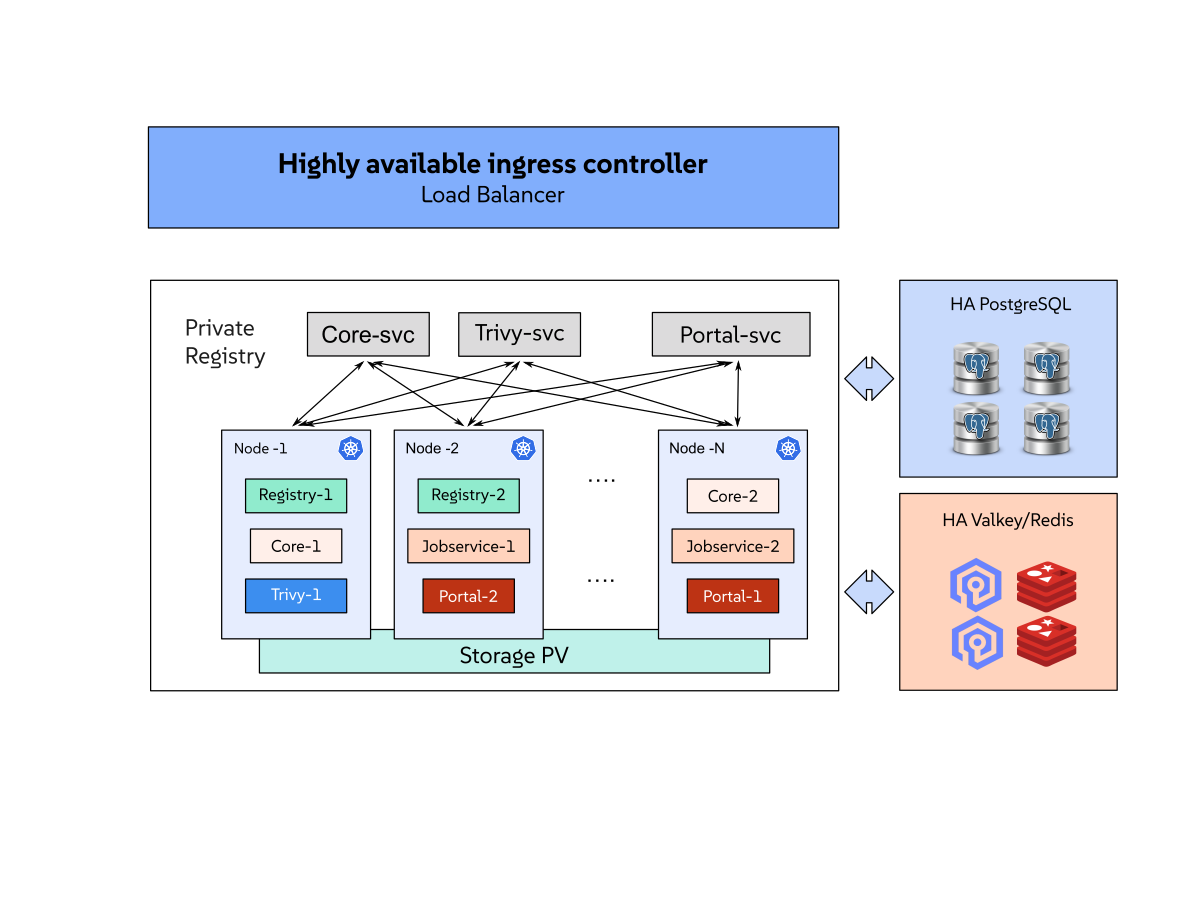
You can use Helm to deploy the highly available (HA) Private Registry on a Kubernetes cluster. An HA deployment reduces interruptions when a pod or worker node becomes unavailable. It does not protect the registry from every failure. The database, cache, image storage, Ingress endpoint, and Kubernetes cluster must also remain available.
This topic describes the Private Registry-specific choices and trade-offs. For Kubernetes control-plane and worker-node design, see the Kubernetes production environment documentation. For Rancher-managed clusters, see the Rancher production installation checklist.
6.1 Understanding the HA setup #
Most Private Registry application components are stateless. You can run multiple replicas and distribute them across worker nodes or failure domains. This protects the application from a pod or node failure, but only when the replicas do not share the same failure domain.
The stateful parts of the deployment require separate resilience decisions:
PostgreSQL stores registry metadata, projects, users, and configuration.
Valkey or Redis stores sessions, queues, and cache data.
Image and chart storage holds the registry content.
Persistent volumes hold database data, job logs, and scanner data when the corresponding chart settings use PVCs.
The Ingress controller, load balancer, DNS, and TLS endpoint provide access to the registry.
Private Registry does not deploy or manage HA for these external endpoints and services.
6.2 Choosing a resilience model #
Choose a model based on the kinds of failure that the deployment must tolerate:
| Model | Configuration | Trade-off |
|---|---|---|
Pod availability | Run two or more replicas of the stateless Private Registry components on separate worker nodes. | Protects against failures affecting pods or worker nodes, but does not protect the database, cache, storage, or Ingress endpoint. |
Production availability | Combine distributed application replicas with HA PostgreSQL, HA Valkey or Redis, durable image storage, and a highly available Ingress endpoint. | Reduces more failure modes, but requires you to operate or purchase these services separately. |
Disaster recovery | Keep backups in a separate environment and prepare a recovery Kubernetes cluster with compatible storage and networking. | Protects against cluster loss, but recovery is not automatic and has a defined recovery point and recovery time. |
Increasing the replica count alone does not create a resilient deployment. For example, two replicas on the same worker node are both affected when that node fails.
6.3 Distributing Private Registry components #
The example in Appendix B, Example of a Private Registry HA setup Helm chart sets three replicas for the portal, core, job service, and registry components, together with the corresponding nodeSelector and topologySpreadConstraints values.
These settings are available for the Private Registry components in Appendix A, Overriding the SUSE Private Registry Helm chart.
Use the following scheduling principles:
Label a dedicated or reliable worker-node pool and select it with
nodeSelectoror node affinity.Use pod anti-affinity or topology spread constraints to place replicas on different nodes or failure domains.
Reserve enough CPU and memory for another replica when one node is unavailable.
Use taints and tolerations when only selected workloads should run on the registry nodes.
Test node drains and upgrades with the planned replica count and storage configuration.
Kubernetes does not automatically spread replicas across failure domains unless the workload includes suitable scheduling rules. For more information, see the Kubernetes pod assignment and topology spread constraints documentation.
The chart can create a pod disruption budget for each component with <COMPONENT>.podDisruptionBudget.enabled, which is disabled by default.
Node-drain policy remains a cluster-level control.
Define it with the platform tools used by your organization and verify that the disruption budgets do not prevent planned maintenance.
Size the worker-node pool with at least one node more than the replica count.
With whenUnsatisfiable: DoNotSchedule and a pool the same size as the replica count, draining a node leaves one replica of every component unschedulable until the node returns.
The registry stays available on the remaining replicas, but the deployment runs without spare capacity for the duration of the maintenance.
6.4 Providing a highly available endpoint #
Use a highly available Ingress controller or load balancer in front of the Private Registry services.
The endpoint provides the redundancy; DNS only needs a stable record that resolves reliably to it, and the TLS certificate only needs to remain valid when pods or worker nodes change.
The externalURL value and expose.ingress.hosts.core value must identify the same registry address.
Private Registry does not manage the external endpoint. Configure health checks, endpoint failover, certificate renewal, and DNS availability with the Ingress or load-balancer provider.
When expose.type is ingress, the chart does not deploy its own nginx proxy, and increasing nginx.replicas has no effect.
Endpoint redundancy then comes entirely from the Ingress controller.
Increase nginx.replicas only when expose.type is clusterIP, nodePort, or loadBalancer.
6.5 Prerequisites #
An HA deployment has the same base prerequisites as a standard deployment. For the supported Kubernetes versions, the required Helm version, and the subscription requirement, see Section 2.1, “Prerequisites”.
An HA deployment additionally requires the following:
Enough worker nodes and spare capacity to distribute the replicas and to keep the registry running while one node is unavailable
A highly available Ingress controller or load balancer with stable DNS and TLS
HA PostgreSQL 9.6+; Private Registry does not deploy or manage the HA database
HA Valkey or Redis; Private Registry does not deploy or manage HA Valkey or Redis
Persistent storage that remains available after a worker-node failure, or supported external object storage
SUSE Customer Center (SCC) mirroring credentials stored as a Kubernetes pull secret, as described in Section 4.1, “Obtaining Kubernetes secrets from the SUSE Customer Center”
6.6 Choosing resilient dependencies and storage #
The following table summarizes the main dependency choices:
| Dependency | What it stores or provides | Recommended production choice | Failure consideration |
|---|---|---|---|
PostgreSQL | Registry metadata, users, projects, and configuration. | Use an HA external service or a database platform with tested failover and backups. | A database outage affects registry operations even when all registry pods are healthy. After a failover, verify that the components reconnect to the new primary; restart the affected deployments if they do not. |
Valkey or Redis | Sessions, queues, and cache data. | Use an HA external service. Configure a supported direct or Sentinel connection in the chart. Cluster mode is not supported. | Users may lose sessions during recovery. Queued or in-progress tasks may need review. |
Image and chart storage | Container images and Helm charts. | Use supported durable object storage or storage that survives node failure. | If image storage is unavailable, users cannot reliably push or pull artifacts. |
Ingress and DNS | The external connection to the registry. | Use a redundant controller or load balancer with stable DNS and TLS. | An unavailable endpoint prevents access even when the application is running. |
External managed services reduce the operational work inside the Kubernetes cluster, but introduce network, credential, and provider dependencies. In-cluster stateful services keep the deployment self-contained, but you must design their replication, storage, upgrades, monitoring, and backups. Private Registry does not provide those HA implementations.
For the supported connection and storage values, see Appendix B, Example of a Private Registry HA setup Helm chart and Appendix A, Overriding the SUSE Private Registry Helm chart.
When you use file system storage, confirm that the storage class can make the volume available after a node failure.
Shared ReadWriteMany access is not automatically required for every deployment, but the access mode must match the selected chart configuration and storage implementation.
When you use object storage, protect the object store with its own availability, access-control, retention, and backup policies.
To configure file system storage, set the storage class and access mode in the values file. For example:
persistence:
  enabled: true
  persistentVolumeClaim:
    registry:
      storageClass: <STORAGE_CLASS_NAME>
      accessMode: ReadWriteMany
      size: 500Gi
Use ReadWriteMany only when the storage implementation supports simultaneous access from the nodes that run the registry pods.
Verify that the StorageClass supports the requested access mode and provides the required durability and failure behavior before using it in production.
When the storage implementation does not support ReadWriteMany, you must set updateStrategy.type to Recreate.
That strategy stops the running pods before it starts the new ones, which causes downtime during an upgrade and prevents the registry components from running more than one replica per volume.
This applies even to a component that runs a single replica.
With the default RollingUpdate strategy, the replacement pod is created before the running pod stops, and it stays Pending indefinitely: the ReadWriteOnce volume ties it to one node, and the topologySpreadConstraints of the component keep it off that node while the running pod is still there.
Use object storage or a ReadWriteMany volume when the deployment must stay available during upgrades.
Select the storage class and the access mode before the first installation.
The specification of a PersistentVolumeClaim cannot be changed afterwards, so an upgrade that modifies storageClass or accessMode for an existing release fails with spec is immutable after creation and leaves the release in a failed state.
Recover from it with helm rollback.
Only the size can be increased, and only when the storage class allows volume expansion.
To move the registry to a different storage class or access mode, copy the data to the new volume, delete the claim, and let the chart create it again.
Note that a claim created with persistence.resourcePolicy set to keep also survives helm uninstall and must be deleted explicitly.
Installing the chart again with the same release name in the same namespace reuses the surviving claims and preserves their data.
Use the sizing recommendations in Chapter 2, Requirements as a starting point. Increase capacity based on artifact growth, scan activity, job logs, retention, and replication traffic.
6.7 Using CloudNativePG with Private Registry #
Private Registry supports connecting to an external PostgreSQL database.
You can deploy CloudNativePG (CNPG) to provide a Kubernetes-native, highly available PostgreSQL cluster.
CloudNativePG runs one primary instance and one or more streaming standbys.
It manages failover, rolling updates and backups declaratively through a Cluster custom resource.
Using CloudNativePG for the external database provides several advantages:
Dedicated primary and standby topology independent of the Private Registry release lifecycle.
Kubernetes-native failover using Lease-based leader election and PostgreSQL WAL streaming without external HA proxies.
Dedicated Kubernetes services for read-write, read-only and any-instance traffic.
Declarative backup, restore and upgrade operations managed through custom resources.
6.7.1 Prerequisites and version selection #
Before deploying CloudNativePG, verify the following prerequisites:
A Kubernetes cluster with a storage class that supports dynamic volume provisioning.
kubectland Helm installed and configured for the cluster.The
kubectl cnpgplugin for status inspection and maintenance tasks.Access to the CloudNativePG Helm chart, such as the Rancher Prime Application Collection (
oci://dp.apps.rancher.io/charts/cloudnative-pg) or upstream.Sufficient node capacity for at least three PostgreSQL instances (one primary and two standbys), each with dedicated storage.
Verify supported versions before deploying:
Operator chart version: Check available chart versions from your repository. Cross-reference the version against the CloudNativePG release compatibility table for your Kubernetes version.
PostgreSQL container image: Review available container images in the CloudNativePG container repository. Choose a version supported by the PostgreSQL versioning policy.
Set environment variables for the selected versions:
> export CNPG_VERSION=<chart-version>
> export CNPG_IMAGE=ghcr.io/cloudnative-pg/postgresql:<tag>
6.7.2 Installing the CloudNativePG operator #
Deploy the operator using Helm:
> helm upgrade --install cnpg oci://dp.apps.rancher.io/charts/cloudnative-pg \
  --version "$CNPG_VERSION" \
  --namespace cnpg-system --create-namespace \
  --set config.clusterWide=true \
  --set crds.create=true \
  --wait
When your registry requires authentication, configure image pull secrets and specify global.imagePullSecrets in your Helm values.
For example, create an image pull secret if you use the Rancher Prime Application Collection.
To generate credentials and create the secret, see the Application Collection authentication documentation.
Verify that the operator deployment and custom resource definitions (CRDs) are ready:
> kubectl -n cnpg-system rollout status deployment -l app.kubernetes.io/name=cloudnative-pg
> kubectl wait --for=condition=Established crd/clusters.postgresql.cnpg.io --timeout=5m
6.7.3 Creating a PostgreSQL cluster #
Deploy a Cluster custom resource in the Private Registry namespace or in a reachable namespace.
The following example configures a three-instance cluster with anti-affinity across nodes:
> kubectl apply -f - <<EOF
apiVersion: postgresql.cnpg.io/v1
kind: Cluster
metadata:
  name: spr-postgres
  namespace: <PRIVATE_REGISTRY_NAMESPACE>
spec:
  instances: 3
  imageName: ${CNPG_IMAGE}
  postgresUID: 26
  postgresGID: 26
  enableSuperuserAccess: false
  affinity:
    enablePodAntiAffinity: true
    podAntiAffinityType: required
    topologyKey: kubernetes.io/hostname
  bootstrap:
    initdb:
      database: registry
      owner: harbor
  postgresql:
    parameters:
      max_connections: "300"
  storage:
    size: 8Gi
    storageClass: <STORAGE_CLASS_NAME>
EOF
Wait for the cluster to become ready:
> kubectl -n <PRIVATE_REGISTRY_NAMESPACE> wait --for=condition=Ready cluster.postgresql.cnpg.io/spr-postgres --timeout=15m
> kubectl cnpg status spr-postgres -n <PRIVATE_REGISTRY_NAMESPACE>
The operator automatically creates the following resources:
A Secret named
spr-postgres-appcontaining the database credentials and connection parameters.Three Services:
spr-postgres-rw(read-write for the primary),spr-postgres-ro(read-only for standbys) andspr-postgres-r(read-only across any instance).
6.7.4 Configuring Private Registry to use CloudNativePG #
Configure Private Registry to connect to the spr-postgres-rw Service and reuse the generated application Secret in suse_registry_override.yaml:
database:
  type: external
  maxIdleConns: 5
  maxOpenConns: 20
  external:
    host: spr-postgres-rw.<PRIVATE_REGISTRY_NAMESPACE>.svc.cluster.local
    port: 5432
    username: harbor
    coreDatabase: registry
    existingSecret: spr-postgres-app
    sslmode: verify-full
Always point database.external.host to the -rw Service.
The -rw Service automatically directs traffic to the active primary pod during switchover and failover.
6.7.5 Best practices and recommendations #
Follow these recommendations when running CloudNativePG with Private Registry:
Always route writes through the
-rwService. Do not configure thecorecomponent to use-roServices, because it requires immediate read-after-write consistency.Distribute instances across failure domains. Enable
affinity.enablePodAntiAffinitywithpodAntiAffinityType: requiredso that a node failure does not affect multiple PostgreSQL pods.Run at least three instances. Deploying three instances ensures that a standby remains available even if one node fails.
Size connection pools appropriately. Sum
maxOpenConnsacross all component replicas and ensure the total remains well belowmax_connectionsin the database configuration.Restrict database privileges. Keep
enableSuperuserAccess: falseto reduce the blast radius if application credentials leak.Preserve user IDs and image repositories. Keep
postgresUIDandpostgresGIDset to26for upstream images and avoid major-version image changes without proper migration.Enforce TLS encryption. Use
sslmode: verify-fullwith trusted certificates. If you configurerequire, understand that it encrypts traffic without validating the server certificate.Configure disruption budgets. Ensure pod disruption budgets prevent multiple instances from being evicted simultaneously during maintenance.
Test switchover and failover. Run
kubectl cnpg promote spr-postgres <CLUSTER_INSTANCE> -n <PRIVATE_REGISTRY_NAMESPACE>during testing to verify that Private Registry recovers cleanly from a primary change.Monitor database metrics. Export Prometheus metrics and create alerts for replication lag, degraded instance counts and backup failures.
6.7.6 Backing up and restoring with Velero #
When backing up Private Registry with Velero, manage the CloudNativePG database as an external database:
Exclude database volumes from Velero backups. Generic file-system or CSI snapshots do not coordinate with PostgreSQL replication states. Label the PostgreSQL pods and claims to exclude them:
> kubectl -n <PRIVATE_REGISTRY_NAMESPACE> label pod -l cnpg.io/cluster=spr-postgres velero.io/exclude-from-backup=true
> kubectl -n <PRIVATE_REGISTRY_NAMESPACE> label pvc -l cnpg.io/cluster=spr-postgres velero.io/exclude-from-backup=true
Use native CloudNativePG backups. Configure WAL archiving and scheduled base backups to object storage using CloudNativePG
Backupresources. For more information, see the CloudNativePG backup documentation.Follow the correct recovery sequence. During disaster recovery:
Reinstall the CloudNativePG operator on the destination cluster.
Restore the
Clusterresource using CloudNativePG recovery mechanisms.Restore the Private Registry Velero backup into the namespace.
Verify that the generated database Secret matches the restored deployment settings before starting Private Registry.
For more information on Velero procedures, see Chapter 10, Backing up and restoring with Velero.
6.7.7 Limitations #
Keep the following limitations in mind:
Replication protects against node or pod failure, but does not protect against accidental data deletion or table corruption.
Standard asynchronous replication can lose unreplicated in-flight transactions during an unplanned primary failure.
Node-local storage classes bind each PostgreSQL instance to a single node. Standbys on other nodes are necessary to survive node loss.
Reducing the instance count does not reduce
max_connectionsor resource requests automatically.
6.8 Deploying Private Registry with HA #
Complete the SCC mirroring credential and Kubernetes secret steps described in Section 4.1, “Obtaining Kubernetes secrets from the SUSE Customer Center”.
Log in to SUSE Registry using the SCC mirroring credentials.
> head -1 ./password.txt | helm registry login registry.suse.com \
  --username <SUSE_REGISTRY_USERNAME> --password-stdin
Create a
suse_registry_override.yamlvalues file that matches your requirements. Refer to Appendix B, Example of a Private Registry HA setup Helm chart for an example values file for a Private Registry HA setup. Refer to Appendix A, Overriding the SUSE Private Registry Helm chart for a complete list of values to specify or override.Install the Private Registry Helm chart with your values file. Replace
<APP_VERSION>with the application version to install, for example,1.2. Replace<RELEASE_NAME>with your custom release name for the Helm chart deployment.> helm install <RELEASE_NAME> \ oci://registry.suse.com/private-registry/<APP_VERSION>/private-registry-helm \ --namespace <PRIVATE_REGISTRY_NAMESPACE> \ -f suse_registry_override.yaml
6.9 Performing maintenance and upgrades #
Follow this procedure for planned maintenance, such as a node drain or a rolling upgrade:
Verify that the registry has enough available capacity to run during a node drain.
Upgrade one failure domain at a time.
After each change, verify pod readiness, registry API health, and image pulls and pushes. For example, log in and push and pull a test image to confirm that the registry serves traffic correctly:
> docker login <SUSE_PRIVATE_REGISTRY_URL> -u <REGISTRY_USERNAME>
> docker pull <SUSE_PRIVATE_REGISTRY_URL>/library/<TEST_IMAGE>:<TAG>
> docker push <SUSE_PRIVATE_REGISTRY_URL>/library/<TEST_IMAGE>:<TAG>
Set persistence.resourcePolicy to keep when PVCs must remain after a Helm release is deleted, for example when a release is reinstalled as part of maintenance.
This setting does not replace backups and does not protect PVCs from deletion outside Helm.
Before placing the deployment into production, test the failure of one pod and one worker node, and test the documented recovery procedure with a non-production backup.
6.10 Configuring retention and garbage collection #
Retention and garbage-collection settings are standing configuration, not steps in the maintenance procedure in Section 6.9, “Performing maintenance and upgrades”. Set them up once, independently of any planned maintenance, and let them run on their own schedule.
Configure image retention policies and schedule garbage collection in the Private Registry administrator interface.
Garbage collection removes unreferenced image data after retention policies or artifact deletions run.
Review the reclaimable storage before a production garbage-collection run and monitor storage growth afterward.
The registry upload-purging settings also remove leftover data from incomplete or interrupted image uploads (as opposed to garbage collection, which removes unreferenced but otherwise complete image data); see Appendix A, Overriding the SUSE Private Registry Helm chart for the available registry.upload_purging values.
6.11 Monitoring the deployment #
Monitor the following conditions:
Available replicas for each Private Registry deployment.
Pending or restarting pods and PVCs that are not bound.
Database, cache, object-storage, and Ingress health.
Artifact storage growth, job queues, scan failures, and replication failures.
Enable the chart’s Prometheus metrics and configure a ServiceMonitor when your cluster runs the Prometheus Operator:
metrics:
  enabled: true
  serviceMonitor:
    enabled: true
Create alerts for unavailable replicas, repeated pod restarts, storage capacity, failed scans, failed jobs, and dependency health.
Use metrics.serviceMonitor.additionalLabels when your monitoring stack requires a label to discover the ServiceMonitor.
6.12 Managing network traffic #
Ensure that the worker-node and load-balancer networks provide enough bandwidth for peak image pushes, pulls, replication, and vulnerability database updates. Monitor network throughput and connection errors during normal and peak workloads.
If the registry requires a corporate proxy, configure the proxy URL, excluded addresses, and affected components in the Helm values:
proxy:
  httpProxy: <HTTP_PROXY_URL>
  httpsProxy: <HTTPS_PROXY_URL>
  noProxy: 127.0.0.1,localhost,.local,.internal
  components:
    - core
    - jobservice
    - trivy
Include the registry services, database, cache, object storage, Kubernetes API, and monitoring endpoints in noProxy when they must not use the proxy.
Verify proxy access for each component that downloads external content or connects to an external service.
6.13 Planning backup and recovery #
HA reduces downtime during selected failures. It does not replace backups or protect against accidental deletion, data corruption, or loss of the entire cluster. Define the required recovery point objective (RPO) and recovery time objective (RTO) before selecting backup schedules and storage.
For a complete recovery plan:
Back up PostgreSQL with an application-consistent database method.
Protect external image and chart storage with the provider’s backup and retention features.
Store Kubernetes resource and volume backups outside the primary cluster.
Preserve the chart version, application version, Helm values, connection information, and required secret references.
Prepare a recovery cluster with compatible Kubernetes versions,
StorageClassnames, networking, and Ingress configuration.
For the detailed Velero procedure, see Chapter 10, Backing up and restoring with Velero. The procedure also describes expected recovery behavior, including lost Valkey or Redis sessions, interrupted tasks, internal PostgreSQL consistency requirements, and the need to preserve chart-generated secrets.
6.14 Reviewing the deployment before production #
Confirm the following items before you rely on the deployment for production workloads:
Replicas are distributed across worker nodes or failure domains.
Worker nodes have enough reserved capacity for a node failure.
The Ingress endpoint is redundant, and DNS reliably resolves to it.
The TLS certificate is valid on every endpoint instance and renews automatically before it expires.
PostgreSQL and Valkey or Redis have tested failover and backup procedures.
Image and chart storage remains available during a worker-node failure.
Monitoring detects unavailable replicas, dependency failures, storage exhaustion, and failed jobs.
A Velero backup, together with the external database and object-storage backups, has been restored successfully in a test environment. See Chapter 10, Backing up and restoring with Velero.