Modern Virtualization with SUSE and Everpure #
Integrating Portworx Enterprise and Everpure FlashArray Storage with SUSE Virtualization

In this getting started guide, learn how to integrate SUSE® Virtualization with Portworx Enterprise® by Everpure™ and an Everpure™ FlashArray™ to provide a flexible, enterprise platform that enables running both containers and virtual machines with unparalleled high availability, data protection, hybrid-cloud mobility, and multi-cluster support.
Documents published as part of the series SUSE Technical Reference Documentation have been contributed voluntarily by SUSE employees and third parties. They are meant to serve as examples of how particular actions can be performed. They have been compiled with utmost attention to detail. However, this does not guarantee complete accuracy. SUSE cannot verify that actions described in these documents do what is claimed or whether actions described have unintended consequences. SUSE LLC, its affiliates, the authors, and the translators may not be held liable for possible errors or the consequences thereof.
1 Introduction #
Organizations are modernizing their IT infrastructure to gain the benefits of cloud-native technologies, like containers and Kubernetes. Often, however, they still need to support legacy workloads in traditional, virtual machine infrastructure. This can lead to duplicate hardware infrastructure and siloed operations. What organizations need is an enterprise platform that unifies traditional and cloud-native infrastructure.
SUSE® Virtualization, built on a modern, Kubernetes stack, solves this challenge by enabling organizations to run both virtual machines and containerized applications on the same infrastructure platform. When combined with Portworx Enterprise® by Everpure™, enterprises can unlock advanced storage capabilities, ensuring seamless data management across diverse environments, enabling high availability and data protection, and supporting hybrid-cloud mobility and multi-cluster environments.
In this document, administrators and platform engineers learn how to deploy, configure, and validate a SUSE Virtualization environment with Portworx Enterprise and Everpure FlashArray storage, enabling them to deliver resilient, scalable, and efficient storage services for mission-critical workloads.
This integrated solution addresses a wide range of scenarios, including:
Application Modernization: Seamlessly migrating or running legacy VM workloads and stateful cloud-native applications on the same infrastructure.
Hybrid and Multi-Cloud Deployments: Enabling workload and data mobility across on-premises, public cloud, and edge locations.
Business Continuity and Disaster Recovery: Providing cross-site failover and failback for both VMs and containers.
Dev/Test and Self-Service Environments: Allowing developers to quickly provision persistent, production-grade storage for any workload type.
Data-Intensive Workloads: Supporting databases, analytics, and AI/ML apps that require high availability and consistent performance.
1.1 Scope #
This document provides instructions for installing Portworx Enterprise on a SUSE Virtualization cluster with an Everpure FlashArray. It details the necessary steps for configuring multipathing, deploying the Portworx Operator, defining the Portworx StorageCluster, and updating SUSE Virtualization to use this storage for backing VMs and containers.
1.2 Audience #
This guide is intended for system administrators, platform engineers, DevOps engineers, and IT professionals responsible for designing, deploying, managing, and maintaining a modern infrastructure environment for container and virtual machine workloads. A basic understanding of Kubernetes and storage concepts is assumed.
2 Overview #
By deploying SUSE Virtualization with Portworx Enterprise by Everpure, you gain robust Kubernetes data storage and data management capabilities. These include automated data operations, elastic scalability, and flexible deployment options across hybrid, multi-cloud, and on-premises environments. With the integrated Portworx Container Storage Interface (CSI), you can leverage Everpure FlashArray storage to deliver unified, high-performance block storage to back your mission-critical VMs and containers in SUSE Virtualization. This is illustrated in the diagram below.

Key components of this architecture are:
- SUSE Virtualization
SUSE Virtualization (formerly Harvester) is a modern, open, and interoperable hyperconverged infrastructure (HCI) solution built on Kubernetes. SUSE Virtualization leverages other components (such as SUSE Linux Micro and RKE2) to deliver a secure, resilient, and scalable platform for managing virtual machine and container workloads. Access the SUSE Virtualization documentation for detailed technical information, including Hardware and Network Requirements and installation guidance. This guide references SUSE Virtualization v1.6.0 and later.
- Portworx Enterprise by Everpure
Portworx Enterprise delivers elastic scalability, industry-leading availability, and self-service access to any storage infrastructure for the most widely used Kubernetes distribution. This fully-integrated storage solution offers automated capacity management, thin provisioning, and flexibility across hybrid, multi-cloud, and on-premises deployments. Portworx Enterprise installation, configuration, and updates are handled through the Portworx Operator. This guide references Portworx Enterprise 3.5 or later and Portworx Operator 25.5.0 or later.
- Everpure FlashArray
An Everpure FlashArray delivers high-performance, scalable, all-flash storage. Your FlashArray must be configured to meet the Portworx Enterprise environment prerequisites and must be accessible from the SUSE Virtualization cluster nodes.
In the following pages, you will learn how to configure your SUSE Virtualization environment with Portworx Enterprise to leverage Everpure FlashArray for virtual machine storage. This includes:
Preparing the SUSE Virtualization cluster nodes and the Everpure FlashArray
Deploying the Portworx Operator to install and configure Portworx Enterprise
Defining the Portworx StorageClass
Creating a virtual machine with FlashArray-backed persistent storage
3 Preparing the environment #
Before starting the installation, perform the following preparatory steps:
Enable multipath support on the SUSE Virtualization cluster nodes.
Create a Harvester CloudInit resource file to deploy the required node-level configuration with the following contents:
apiVersion: node.harvesterhci.io/v1beta1
kind: CloudInit
metadata:
  name: pure-multipath
spec:
  contents: |
    stages:
      network:
      - name: "Configure pure storage"
        files:
        - path: /etc/udev/rules.d/99-pure-storage.rules
          permissions: 0644
          content: |
            #ACTION=="change", SUBSYSTEM=="scsi", ENV{SDEV_UA}=="INQUIRY_DATA_HAS_CHANGED", TEST=="rescan", ATTR{rescan}="x"
            ACTION=="change", SUBSYSTEM=="scsi", ENV{SDEV_UA}=="CAPACITY_DATA_HAS_CHANGED", TEST=="rescan", ATTR{rescan}="x"
            #ACTION=="change", SUBSYSTEM=="scsi", ENV{SDEV_UA}=="THIN_PROVISIONING_SOFT_THRESHOLD_REACHED", TEST=="rescan", ATTR{rescan}="x"
            #ACTION=="change", SUBSYSTEM=="scsi", ENV{SDEV_UA}=="MODE_PARAMETERS_CHANGED", TEST=="rescan", ATTR{rescan}="x"
            ACTION=="change", SUBSYSTEM=="scsi", ENV{SDEV_UA}=="REPORTED_LUNS_DATA_HAS_CHANGED", RUN+="scan-scsi-target $env{DEVPATH}"
        - path: /etc/multipath.conf
          content: |
            defaults {
              user_friendly_names no
              enable_foreign "^$"
                    polling_interval    10
            }
            devices {
                device {
                    vendor                      "NVME"
                    product                     "Pure Storage FlashArray"
                    path_selector               "queue-length 0"
                    path_grouping_policy        group_by_prio
                    prio                        ana
                    failback                    immediate
                    fast_io_fail_tmo            10
                    user_friendly_names         no
                    no_path_retry               0
                    features                    0
                    dev_loss_tmo                60
                }
                device {
                    vendor                   "PURE"
                    product                  "FlashArray"
                    path_selector            "service-time 0"
                    hardware_handler         "1 alua"
                    path_grouping_policy     group_by_prio
                    prio                     alua
                    failback                 immediate
                    path_checker             tur
                    fast_io_fail_tmo         10
                    user_friendly_names      no
                    no_path_retry            0
                    features                 0
                    dev_loss_tmo             600
                }
            }
            blacklist_exceptions {
                    property "(SCSI_IDENT_|ID_WWN)"
            }
            blacklist {
                  devnode "^pxd[0-9]*"
                  devnode "^pxd*"
                  device {
                    vendor "VMware"
                    product "Virtual disk"
                  }
            }
          permissions: 0644
      - name: "Start multipathd service"
        systemctl:
          enable:
          - multipathd
          start:
          - multipathd
  filename: 99_multipathd.yaml
  matchSelector: {}
Apply the CloudInit resource to the SUSE Virtualization cluster.
kubectl apply -f pure-multipath.yamlRestart the SUSE Virtualization cluster nodes.
Configure user access in the Everpure FlashArray.
Create a Kubernetes secret, named
px-pure-secret, to securely store your FlashArray credentials.
Create a file, named
pure.json, containing your FlashArray credentials.Add the secret to your
portworxnamespace.kubectl create secret generic px-pure-secret --namespace portworx --from-file=pure.json
4 Generating the Portworx spec #
The Portworx Operator is designed to efficiently manage the installation and upgrade workflow of all Portworx Enterprise components, but it must be configured for your environment. This is accomplished by generating a Portworx spec.
Log in to Portworx Central.
Select Portworx Enterprise → Generate Spec.
Choose the Portworx Version and
Pure FlashArrayfor Platform, then click Customize.On the Basic tab:
 Figure 2: Portworx: Generate Spec - Basic #
Validate or fill in values for each of the following fields:
Portworx Version
Kubernetes Version
Namespace (for example,
portworx)
Select the
Built-inoption for etcd.Click Next.
On the Storage tab, make the following choices:
 Figure 3: Portworx: Generate Spec - Storage #
Set Select Cloud Platform to
Pure FlashArray.Set Select type of disk to
Create Using a Spec.Enable PX-StoreV2.
Select
Fiber Channelfor Type of storage area network.Enter the desired Size of the disk to be mapped to the SUSE Virtualization cluster.
Update the Max storage nodes per availability zone to
3(for your 3-node cluster).Click Next.
On the Network tab, configure the Portworx service port, then click Next.
 Note
NoteThe default port is
9001. Figure 4: Portworx: Generate Spec - Network #
On the Customize tab, select
Rancher Kubernetes Engine (RKE)then click Finish. Figure 5: Portworx: Generate Spec - Customize #
The generator presents you with two Kubectl commands. The first is for deploying the Portworx Operator, and the second is for deploying the Portworx StorageCluster. Save these commands, as you will need them in the following section.
5 Deploying the Portworx Operator and Portworx StorageCluster #
The Portworx Operator efficiently manages the installation and upgrade workflow of all Portworx Enterprise components. To deploy the Portworx Operator, you use the first of the Kubectl commands you generated in Section 4, “Generating the Portworx spec” as detailed below.
Log in to the SUSE Virtualization management node command line interface (CLI) with root access.
Run the first Kubectl command saved from the previous section to install the Portworx Operator.
The command should be similar to:
kubectl apply -f 'https://install.portworx.com/3.3?comp=pxoperator&kbver=1.3.0&ns=portworx'You should see output like:
namespace/portworx created
serviceaccount/portworx-operator created
clusterrole.rbac.authorization.k8s.io/portworx-operator created
clusterrolebinding.rbac.authorization.k8s.io/portworx-operator created
deployment.apps/portworx-operator created
If you are using SUSE Virtualization v1.6.0 or later, add a Stork Snapshot StorageClass.
Create the YAML file,
stork-snapshot-sc.yaml, with the following contents:apiVersion: storage.k8s.io/v1 kind: StorageClass metadata: name: stork-snapshot-sc annotations: cdi.harvesterhci.io/storageProfileVolumeModeAccessModes: '{"Block":["ReadWriteOnce"]}' provisioner: stork-snapshot allowVolumeExpansion: true reclaimPolicy: Delete volumeBindingMode: ImmediateApply the YAML file to add the Stork Snapshot StorageClass.
kubectl apply -f stork-snapshot-sc.yamlYou should see this output:
storageclass.storage.k8s.io/stork-snapshot-sc created
Execute the second of the Portworx spec Kubectl commands you generated in Section 4, “Generating the Portworx spec” to deploy the Portworx StorageCluster.
The command should look something like:kubectl apply -f 'https://install.portworx.com/3.3?operator=true&mc=false&kbver=1.3.0&ns=portworx&b=true&iop=6&mz=3&s=%22size%3D1000%22&pureSanType=FC&ce=pure&dmthin=true&c=px-cluster-82af5d7d-f249-4f45-9e80-d1590e7bfce4&stork=true&csi=true&mon=true&tel=true&st=k8s&promop=true'If successful, the command generates output like:
storagecluster.core.libopenstorage.org/px-cluster-82af5d7d-f249-4f45-9e80-d1590e7bfce4 created
6 Adding the Portworx StorageClass #
Ensure you are still logged in to the SUSE Virtualization management CLI as root.
Create the YAML file,
portworx-storageclass.yaml, with the following contents:allowVolumeExpansion: true apiVersion: storage.k8s.io/v1 kind: StorageClass metadata: annotations: storageclass.kubernetes.io/is-default-class: "true" name: data-disk-storage parameters: cdi.kubevirt.io/storage.contentType: kubevirt nodiscard: "true" repl: "2" provisioner: pxd.portworx.com reclaimPolicy: Delete volumeBindingMode: ImmediateApply this YAML file to add the Portworx StorageClass.
kubectl apply -f portworx-storageclass.yamlYou should see:
storageclass.storage.k8s.io/data-disk-storage created

You may see a “request is invalid” error, such as:
The request is invalid: default StorageClass, 'harvester-longhorn', already exists.
Please reset it first before setting 'data-disk-storage' as default.
If this happens:
Unset the default
harvester-longhornStorageClass using the command:kubectl patch storageclass harvester-longhorn -p '{"metadata": {"annotations":{"storageclass.kubernetes.io/is-default-class":"false"}}}'Re-apply the Portworx StorageClass.
kubectl apply -f portworx-storageclass.yaml
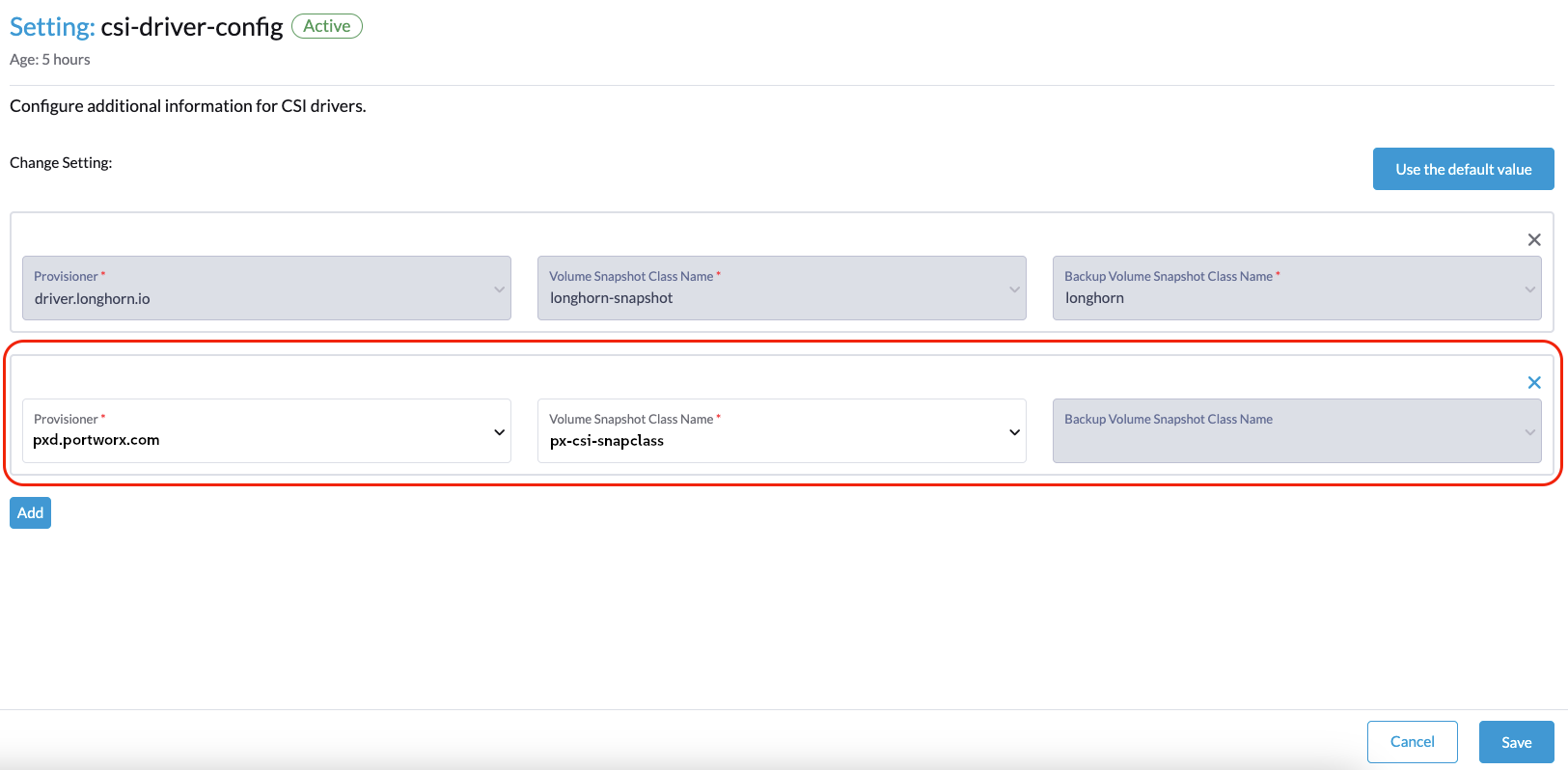
7 Updating the Portworx CSI driver configuration #
Log in to the SUSE Virtualization UI.
Navigate to Advanced > Settings.
Locate
csi-driver-config, click the three dots (for more options), then select Edit Setting.Set the Provisioner to
pxd.portworx.com.Set the Volume Snapshot Class Name to
px-csi-snapclass.
This setting points to the name of the VolumeSnapshotClass used for creating volume snapshots or VM snapshots.
8 Validating the integration #
Ensure that Portworx Enterprise is correctly integrated with SUSE Virtualization by verifying that a virtual machine (VM) can be provisioned with storage backed by the FlashArray.
Create a new VM.
For guidance, refer to the SUSE Virtualization: Create a Virtual Machine and be sure to select the StorageClass provisioned by Portworx (data-disk-storage) for your VM disk volume.Verify that the VM was provisioned with Portworx storage in the SUSE Virtualization UI.
Open Virtual Machines.
Select your VM.
Open Volumes.
Confirm that the attached disk is using the
data-disk-storageStorageClass.
You can also verify the VM’s storage from the CLI.
Log in to the SUSE Virtualization management CLI.
List the PersistentVolumeClaims (PVCs) in the VM’s namespace.
kubectl get pvc -n <namespace>NAME STATUS VOLUME CAPACITY ACCESS MODES STORAGECLASS AGE vm1-rootdisk Bound pvc-8f3c8b2c-6e1e-4c6a-a83e-9d6c34ac3b21 40Gi RWX data-disk-storage 2mConfirm that the STORAGECLASS column shows
data-disk-storage.As an additional check, confirm that the volume is provisioned by
pxd.portworx.com.kubectl describe pv pvc-8f3c8b2c-6e1e-4c6a-a83e-9d6c34ac3b21Name: pvc-8f3c8b2c-6e1e-4c6a-a83e-9d6c34ac3b21 StorageClass: data-disk-storage Annotations: pv.kubernetes.io/provisioned-by: pxd.portworx.com Status: Bound Reclaim Policy: Delete VolumeMode: Block Source: Type: CSI (a Container Storage Interface (CSI) volume source) Driver: pxd.portworx.com FSType: VolumeHandle: 424582431912071110 ReadOnly: false VolumeAttributes: attached=ATTACH_STATE_EXTERNAL error= parent= readonly=false secure=false shared=false shared_mode=BLOCK sharedv4=false state=VOLUME_STATE_DETACHED type=px-raw-volume
Upon successful completion of these checks, you have validated the integration of SUSE Virtualization with Portworx and the Everpure FlashArray.
9 Summary #
SUSE and Everpure deliver the infrastructure platform modern enterprises seek. Integrating SUSE Virtualization with Portworx Enterprise by Everpure and an Everpure FlashArray provides a flexible, resilient, and scalable platform for running container and virtual machine workloads side-by-side. This unified landscape helps streamline operations and can lower both operational and capital costs.
This guide provides an overview of a reference architecture for the combined solution with detailed steps for implementation and validation.
10 Legal notice #
Copyright © 2006–2026 SUSE LLC and contributors. All rights reserved.
Permission is granted to copy, distribute and/or modify this document under the terms of the GNU Free Documentation License, Version 1.2 or (at your option) version 1.3; with the Invariant Section being this copyright notice and license. A copy of the license version 1.2 is included in the section entitled "GNU Free Documentation License".
SUSE, the SUSE logo and YaST are registered trademarks of SUSE LLC in the United States and other countries. For SUSE trademarks, see https://www.suse.com/company/legal/.
Linux is a registered trademark of Linus Torvalds. All other names or trademarks mentioned in this document may be trademarks or registered trademarks of their respective owners.
Documents published as part of the series SUSE Technical Reference Documentation have been contributed voluntarily by SUSE employees and third parties. They are meant to serve as examples of how particular actions can be performed. They have been compiled with utmost attention to detail. However, this does not guarantee complete accuracy. SUSE cannot verify that actions described in these documents do what is claimed or whether actions described have unintended consequences. SUSE LLC, its affiliates, the authors, and the translators may not be held liable for possible errors or the consequences thereof.
11 GNU Free Documentation License #
Copyright © 2000, 2001, 2002 Free Software Foundation, Inc. 51 Franklin St, Fifth Floor, Boston, MA 02110-1301 USA. Everyone is permitted to copy and distribute verbatim copies of this license document, but changing it is not allowed.
0. PREAMBLE#
The purpose of this License is to make a manual, textbook, or other functional and useful document "free" in the sense of freedom: to assure everyone the effective freedom to copy and redistribute it, with or without modifying it, either commercially or noncommercially. Secondarily, this License preserves for the author and publisher a way to get credit for their work, while not being considered responsible for modifications made by others.
This License is a kind of "copyleft", which means that derivative works of the document must themselves be free in the same sense. It complements the GNU General Public License, which is a copyleft license designed for free software.
We have designed this License in order to use it for manuals for free software, because free software needs free documentation: a free program should come with manuals providing the same freedoms that the software does. But this License is not limited to software manuals; it can be used for any textual work, regardless of subject matter or whether it is published as a printed book. We recommend this License principally for works whose purpose is instruction or reference.
1. APPLICABILITY AND DEFINITIONS#
This License applies to any manual or other work, in any medium, that contains a notice placed by the copyright holder saying it can be distributed under the terms of this License. Such a notice grants a world-wide, royalty-free license, unlimited in duration, to use that work under the conditions stated herein. The "Document", below, refers to any such manual or work. Any member of the public is a licensee, and is addressed as "you". You accept the license if you copy, modify or distribute the work in a way requiring permission under copyright law.
A "Modified Version" of the Document means any work containing the Document or a portion of it, either copied verbatim, or with modifications and/or translated into another language.
A "Secondary Section" is a named appendix or a front-matter section of the Document that deals exclusively with the relationship of the publishers or authors of the Document to the Document’s overall subject (or to related matters) and contains nothing that could fall directly within that overall subject. (Thus, if the Document is in part a textbook of mathematics, a Secondary Section may not explain any mathematics.) The relationship could be a matter of historical connection with the subject or with related matters, or of legal, commercial, philosophical, ethical or political position regarding them.
The "Invariant Sections" are certain Secondary Sections whose titles are designated, as being those of Invariant Sections, in the notice that says that the Document is released under this License. If a section does not fit the above definition of Secondary then it is not allowed to be designated as Invariant. The Document may contain zero Invariant Sections. If the Document does not identify any Invariant Sections then there are none.
The "Cover Texts" are certain short passages of text that are listed, as Front-Cover Texts or Back-Cover Texts, in the notice that says that the Document is released under this License. A Front-Cover Text may be at most 5 words, and a Back-Cover Text may be at most 25 words.
A "Transparent" copy of the Document means a machine-readable copy, represented in a format whose specification is available to the general public, that is suitable for revising the document straightforwardly with generic text editors or (for images composed of pixels) generic paint programs or (for drawings) some widely available drawing editor, and that is suitable for input to text formatters or for automatic translation to a variety of formats suitable for input to text formatters. A copy made in an otherwise Transparent file format whose markup, or absence of markup, has been arranged to thwart or discourage subsequent modification by readers is not Transparent. An image format is not Transparent if used for any substantial amount of text. A copy that is not "Transparent" is called "Opaque".
Examples of suitable formats for Transparent copies include plain ASCII without markup, Texinfo input format, LaTeX input format, SGML or XML using a publicly available DTD, and standard-conforming simple HTML, PostScript or PDF designed for human modification. Examples of transparent image formats include PNG, XCF and JPG. Opaque formats include proprietary formats that can be read and edited only by proprietary word processors, SGML or XML for which the DTD and/or processing tools are not generally available, and the machine-generated HTML, PostScript or PDF produced by some word processors for output purposes only.
The "Title Page" means, for a printed book, the title page itself, plus such following pages as are needed to hold, legibly, the material this License requires to appear in the title page. For works in formats which do not have any title page as such, "Title Page" means the text near the most prominent appearance of the work’s title, preceding the beginning of the body of the text.
A section "Entitled XYZ" means a named subunit of the Document whose title either is precisely XYZ or contains XYZ in parentheses following text that translates XYZ in another language. (Here XYZ stands for a specific section name mentioned below, such as "Acknowledgements", "Dedications", "Endorsements", or "History".) To "Preserve the Title" of such a section when you modify the Document means that it remains a section "Entitled XYZ" according to this definition.
The Document may include Warranty Disclaimers next to the notice which states that this License applies to the Document. These Warranty Disclaimers are considered to be included by reference in this License, but only as regards disclaiming warranties: any other implication that these Warranty Disclaimers may have is void and has no effect on the meaning of this License.
2. VERBATIM COPYING#
You may copy and distribute the Document in any medium, either commercially or noncommercially, provided that this License, the copyright notices, and the license notice saying this License applies to the Document are reproduced in all copies, and that you add no other conditions whatsoever to those of this License. You may not use technical measures to obstruct or control the reading or further copying of the copies you make or distribute. However, you may accept compensation in exchange for copies. If you distribute a large enough number of copies you must also follow the conditions in section 3.
You may also lend copies, under the same conditions stated above, and you may publicly display copies.
3. COPYING IN QUANTITY#
If you publish printed copies (or copies in media that commonly have printed covers) of the Document, numbering more than 100, and the Document’s license notice requires Cover Texts, you must enclose the copies in covers that carry, clearly and legibly, all these Cover Texts: Front-Cover Texts on the front cover, and Back-Cover Texts on the back cover. Both covers must also clearly and legibly identify you as the publisher of these copies. The front cover must present the full title with all words of the title equally prominent and visible. You may add other material on the covers in addition. Copying with changes limited to the covers, as long as they preserve the title of the Document and satisfy these conditions, can be treated as verbatim copying in other respects.
If the required texts for either cover are too voluminous to fit legibly, you should put the first ones listed (as many as fit reasonably) on the actual cover, and continue the rest onto adjacent pages.
If you publish or distribute Opaque copies of the Document numbering more than 100, you must either include a machine-readable Transparent copy along with each Opaque copy, or state in or with each Opaque copy a computer-network location from which the general network-using public has access to download using public-standard network protocols a complete Transparent copy of the Document, free of added material. If you use the latter option, you must take reasonably prudent steps, when you begin distribution of Opaque copies in quantity, to ensure that this Transparent copy will remain thus accessible at the stated location until at least one year after the last time you distribute an Opaque copy (directly or through your agents or retailers) of that edition to the public.
It is requested, but not required, that you contact the authors of the Document well before redistributing any large number of copies, to give them a chance to provide you with an updated version of the Document.
4. MODIFICATIONS#
You may copy and distribute a Modified Version of the Document under the conditions of sections 2 and 3 above, provided that you release the Modified Version under precisely this License, with the Modified Version filling the role of the Document, thus licensing distribution and modification of the Modified Version to whoever possesses a copy of it. In addition, you must do these things in the Modified Version:
Use in the Title Page (and on the covers, if any) a title distinct from that of the Document, and from those of previous versions (which should, if there were any, be listed in the History section of the Document). You may use the same title as a previous version if the original publisher of that version gives permission.
List on the Title Page, as authors, one or more persons or entities responsible for authorship of the modifications in the Modified Version, together with at least five of the principal authors of the Document (all of its principal authors, if it has fewer than five), unless they release you from this requirement.
State on the Title page the name of the publisher of the Modified Version, as the publisher.
Preserve all the copyright notices of the Document.
Add an appropriate copyright notice for your modifications adjacent to the other copyright notices.
Include, immediately after the copyright notices, a license notice giving the public permission to use the Modified Version under the terms of this License, in the form shown in the Addendum below.
Preserve in that license notice the full lists of Invariant Sections and required Cover Texts given in the Document’s license notice.
Include an unaltered copy of this License.
Preserve the section Entitled "History", Preserve its Title, and add to it an item stating at least the title, year, new authors, and publisher of the Modified Version as given on the Title Page. If there is no section Entitled "History" in the Document, create one stating the title, year, authors, and publisher of the Document as given on its Title Page, then add an item describing the Modified Version as stated in the previous sentence.
Preserve the network location, if any, given in the Document for public access to a Transparent copy of the Document, and likewise the network locations given in the Document for previous versions it was based on. These may be placed in the "History" section. You may omit a network location for a work that was published at least four years before the Document itself, or if the original publisher of the version it refers to gives permission.
For any section Entitled "Acknowledgements" or "Dedications", Preserve the Title of the section, and preserve in the section all the substance and tone of each of the contributor acknowledgements and/or dedications given therein.
Preserve all the Invariant Sections of the Document, unaltered in their text and in their titles. Section numbers or the equivalent are not considered part of the section titles.
Delete any section Entitled "Endorsements". Such a section may not be included in the Modified Version.
Do not retitle any existing section to be Entitled "Endorsements" or to conflict in title with any Invariant Section.
Preserve any Warranty Disclaimers.
If the Modified Version includes new front-matter sections or appendices that qualify as Secondary Sections and contain no material copied from the Document, you may at your option designate some or all of these sections as invariant. To do this, add their titles to the list of Invariant Sections in the Modified Version’s license notice. These titles must be distinct from any other section titles.
You may add a section Entitled "Endorsements", provided it contains nothing but endorsements of your Modified Version by various parties—for example, statements of peer review or that the text has been approved by an organization as the authoritative definition of a standard.
You may add a passage of up to five words as a Front-Cover Text, and a passage of up to 25 words as a Back-Cover Text, to the end of the list of Cover Texts in the Modified Version. Only one passage of Front-Cover Text and one of Back-Cover Text may be added by (or through arrangements made by) any one entity. If the Document already includes a cover text for the same cover, previously added by you or by arrangement made by the same entity you are acting on behalf of, you may not add another; but you may replace the old one, on explicit permission from the previous publisher that added the old one.
The author(s) and publisher(s) of the Document do not by this License give permission to use their names for publicity for or to assert or imply endorsement of any Modified Version.
5. COMBINING DOCUMENTS#
You may combine the Document with other documents released under this License, under the terms defined in section 4 above for modified versions, provided that you include in the combination all of the Invariant Sections of all of the original documents, unmodified, and list them all as Invariant Sections of your combined work in its license notice, and that you preserve all their Warranty Disclaimers.
The combined work need only contain one copy of this License, and multiple identical Invariant Sections may be replaced with a single copy. If there are multiple Invariant Sections with the same name but different contents, make the title of each such section unique by adding at the end of it, in parentheses, the name of the original author or publisher of that section if known, or else a unique number. Make the same adjustment to the section titles in the list of Invariant Sections in the license notice of the combined work.
In the combination, you must combine any sections Entitled "History" in the various original documents, forming one section Entitled "History"; likewise combine any sections Entitled "Acknowledgements", and any sections Entitled "Dedications". You must delete all sections Entitled "Endorsements".
6. COLLECTIONS OF DOCUMENTS#
You may make a collection consisting of the Document and other documents released under this License, and replace the individual copies of this License in the various documents with a single copy that is included in the collection, provided that you follow the rules of this License for verbatim copying of each of the documents in all other respects.
You may extract a single document from such a collection, and distribute it individually under this License, provided you insert a copy of this License into the extracted document, and follow this License in all other respects regarding verbatim copying of that document.
7. AGGREGATION WITH INDEPENDENT WORKS#
A compilation of the Document or its derivatives with other separate and independent documents or works, in or on a volume of a storage or distribution medium, is called an "aggregate" if the copyright resulting from the compilation is not used to limit the legal rights of the compilation’s users beyond what the individual works permit. When the Document is included in an aggregate, this License does not apply to the other works in the aggregate which are not themselves derivative works of the Document.
If the Cover Text requirement of section 3 is applicable to these copies of the Document, then if the Document is less than one half of the entire aggregate, the Document’s Cover Texts may be placed on covers that bracket the Document within the aggregate, or the electronic equivalent of covers if the Document is in electronic form. Otherwise they must appear on printed covers that bracket the whole aggregate.
8. TRANSLATION#
Translation is considered a kind of modification, so you may distribute translations of the Document under the terms of section 4. Replacing Invariant Sections with translations requires special permission from their copyright holders, but you may include translations of some or all Invariant Sections in addition to the original versions of these Invariant Sections. You may include a translation of this License, and all the license notices in the Document, and any Warranty Disclaimers, provided that you also include the original English version of this License and the original versions of those notices and disclaimers. In case of a disagreement between the translation and the original version of this License or a notice or disclaimer, the original version will prevail.
If a section in the Document is Entitled "Acknowledgements", "Dedications", or "History", the requirement (section 4) to Preserve its Title (section 1) will typically require changing the actual title.
9. TERMINATION#
You may not copy, modify, sublicense, or distribute the Document except as expressly provided for under this License. Any other attempt to copy, modify, sublicense or distribute the Document is void, and will automatically terminate your rights under this License. However, parties who have received copies, or rights, from you under this License will not have their licenses terminated so long as such parties remain in full compliance.
10. FUTURE REVISIONS OF THIS LICENSE#
The Free Software Foundation may publish new, revised versions of the GNU Free Documentation License from time to time. Such new versions will be similar in spirit to the present version, but may differ in detail to address new problems or concerns. See http://www.gnu.org/copyleft/.
Each version of the License is given a distinguishing version number. If the Document specifies that a particular numbered version of this License "or any later version" applies to it, you have the option of following the terms and conditions either of that specified version or of any later version that has been published (not as a draft) by the Free Software Foundation. If the Document does not specify a version number of this License, you may choose any version ever published (not as a draft) by the Free Software Foundation.
ADDENDUM: How to use this License for your documents#
Copyright (c) YEAR YOUR NAME.
   Permission is granted to copy, distribute and/or modify this document
   under the terms of the GNU Free Documentation License, Version 1.2
   or any later version published by the Free Software Foundation;
   with no Invariant Sections, no Front-Cover Texts, and no Back-Cover Texts.
   A copy of the license is included in the section entitled “GNU
   Free Documentation License”.
If you have Invariant Sections, Front-Cover Texts and Back-Cover Texts, replace the “ with…Texts.” line with this:
with the Invariant Sections being LIST THEIR TITLES, with the
   Front-Cover Texts being LIST, and with the Back-Cover Texts being LIST.
If you have Invariant Sections without Cover Texts, or some other combination of the three, merge those two alternatives to suit the situation.
If your document contains nontrivial examples of program code, we recommend releasing these examples in parallel under your choice of free software license, such as the GNU General Public License, to permit their use in free software.