SUSE Telco Cloud on Intel Xeon 6 SoC-based Supermicro Systems #
Validated reference design for high-density, low-latency, AI-ready telco edge deployments

This joint solution showcases the SUSE® Telco Cloud platform running on Intel® Xeon® 6 SoC–based SUPERMICRO® IoT SuperServer systems to deliver an AI-accelerated 5G telco platform. It enables vRAN and edge AI workloads using cloud-native automation, deterministic low latency, and strong performance-per-watt, helping operators modernize networks for AI-driven services.
Documents published as part of the series SUSE Technical Reference Documentation have been contributed voluntarily by SUSE employees and third parties. They are meant to serve as examples of how particular actions can be performed. They have been compiled with utmost attention to detail. However, this does not guarantee complete accuracy. SUSE cannot verify that actions described in these documents do what is claimed or whether actions described have unintended consequences. SUSE LLC, its affiliates, the authors, and the translators may not be held liable for possible errors or the consequences thereof.
1 Introduction #
Telecommunications operators are transforming their networks to support 5G-Advanced, ORAN, massive MEC scale-out, and AI-driven automation. These transformations demand infrastructure that simultaneously delivers extreme packet-processing performance, deterministic low latency, integrated AI acceleration, and dramatically lower power and space footprints.
This reference configuration documents the successful validation of the SUSE® Telco Cloud stack, featuring SUSE® Rancher Prime, running on a Supermicro IoT SuperServer powered by Intel® Xeon® 6 SoC processors. This solution proves that a single-socket, CPU-only platform can replace legacy accelerator-heavy designs.
1.1 Scope #
This document details a validated reference configuration for deploying SUSE® Telco Cloud on Supermicro IoT SuperServer systems powered by Intel® Xeon® 6 SoC processors. It covers the solution architecture, hardware and software components, deployment methodology, and performance validation for CPU-only, AI-ready telco edge and vRAN use cases.
1.2 Audience #
This reference configuration is intended for:
telecommunications network architects, infrastructure and platform engineers, and operations teams responsible for designing, deploying, and managing 5G and AI-enabled telco edge infrastructure.
technical decision-makers evaluating platform modernization strategies, including IT and network leadership seeking to reduce infrastructure complexity, power consumption, and total cost of ownership.
system integrators, solution architects, and other partner organizations involved in designing or validating telco edge solutions.
1.3 Acknowledgments #
The authors wish to acknowledge the contributions of the following individuals to the creation of this document:
Vesselin Matev, Partner Solutions Manager, SUSE
Terry Smith, Ecosystem Solution Innovation Director, SUSE
Suresh S, Partner Solution Architect, SUSE
2 Market challenge #
Telecommunications operators today face an unprecedented convergence of pressures that legacy infrastructure was never designed to handle. Traffic volumes are exploding, driven by nationwide 5G rollout, massive IoT deployments, ultra-high-definition video streaming, private 5G networks, and enterprise edge services. At the same time, service-level agreements have become far more stringent. Sub-millisecond end-to-end latency and microsecond-level jitter are now mandatory for ORAN fronthaul/midhaul transport, Ultra-Reliable Low-Latency Communication (URLLC), industrial automation, and Extended Reality (XR) applications.
Compounding this is the rapid integration of artificial intelligence into every layer of the network. Modern RAN and core functions increasingly rely on embedded machine-learning models for dynamic beamforming, traffic prediction, interference management, anomaly detection, and closed-loop automation through RIC platforms. These AI-driven capabilities demand significant inferencing throughput directly at the edge, yet most existing deployments still depend on fixed-function RAN infrastructure defined before the AI boom.
Power consumption, cooling capacity, and physical space have emerged as hard limits at thousands of edge and far-edge sites. Rising energy prices and sustainability mandates are pushing OPEX ever higher, while the continued reliance on specialized appliances, external accelerators, and vendor-locked platforms dramatically inflates both CAPEX and lifecycle management overhead. Validation cycles lengthen, software updates become risky, and multi-vendor interoperability remains a constant friction point.
At the same time, regulators and enterprises are imposing stricter requirements for data sovereignty, hardware-rooted confidential computing, and verifiable platform integrity. Operators must modernize at speed while simultaneously reducing cost, power, complexity, and risk - an equation that traditional architectures can no longer solve.
3 Solution #
The combination of Intel Xeon 6 SoC based telco-optimized systems by Supermicro and the SUSE Telco Cloud stack directly addresses every dimension of these challenges with a single, fully integrated platform that is ready for massive scale-out today.
At the foundation sits the Intel Xeon 6 SoC, a purpose-built processor family that delivers up to 72 Performance-cores, enormous per-core caches for deterministic packet processing, and fully integrated Intel vRAN Boost. Native Intel AMX matrix extensions provide massive AI inferencing throughput without external accelerators, while on-die Intel QAT handles compression and cryptography at line rate. With up to 128 PCIe Gen5 lanes and CXL 2.0 readiness, the platform offers unmatched I/O flexibility and future-proof expansion.
The 1U SUPERMICRO® IoT SuperServer SYS-112D-42C-FN8P and 2U SUPERMICRO® IoT SuperServer SYS-212D-72C-FN8P IoT SuperServer systems turn these silicon advantages into deployable reality. Outdoor-rated and air-cooled compact designs with redundant Titanium power supplies fit perfectly into constrained edge sites. The integrated E830 NIC delivers nanosecond-accurate Precision Time Protocol (PTP) and SyncE synchronization essential for vRAN and ORAN deployments. The 1U system is already an official O-RAN Alliance hardware reference design for outdoor macrocells.
SUSE completes the solution with SUSE Telco Cloud, its hardened, modular, cloud-native software stack. Specifically designed to meet the strict demands of the telecommunications industry, it enables operators to host both VNFs and CNFs on the same platform. Built on SUSE Linux Micro, RKE2, and SUSE Rancher Prime, the platform provides a secure, carrier-grade foundation for 5G, fixed access, OSS/BSS, and edge infrastructure. SUSE Telco Cloud is built entirely on open source and has been rigorously validated to deliver reliable performance at scale. Its AI-ready, disaggregated architecture supports zero-touch automation and the flexibility to integrate best-of-breed network functions efficiently and sustainably.
SUSE Telco Cloud offers automated lifecycle management for infrastructure components, support for multi-cloud and edge deployments with consistent operations, and enhanced observability through integrated monitoring tools. Furthermore, it ensures security at scale, from OS hardening to container scanning, while its foundation in open standards and ecosystem support effectively prevents vendor lock-in. A key differentiator is SUSE’s robust edge computing capabilities, as SUSE Telco Cloud is optimized for constrained environments. This allows telcos to deploy CNFs and VNFs in remote or decentralized locations with minimal overhead - a flexibility essential for new 5G-powered services like smart city infrastructure and industrial IoT. The solution also facilitates zero-touch provisioning and seamless orchestration at the edge, which dramatically reduces operational complexity and deployment times. Ultimately, with its modular, open architecture, SUSE Telco Cloud allows operators to unlock efficiencies in the core, deploy innovative services at the edge, and adapt rapidly to future market demands.
The solution unites Intel’s fully-integrated vRAN Boost and AI acceleration, Supermicro’s rugged edge-system engineering and global supply-chain excellence, and SUSE’s zero-touch, GitOps-driven telco cloud stack. The result is a true single-box, CPU-only telco cloud node that simultaneously replaces the legacy BBU, external L1 accelerator (FPGA/in-line card), SmartNIC, timing card, and discrete AI inference appliances. Under a 95% CPU load on the isolated cores, the platform successfully achieves a measure of latency of sub 5 µs. This achievement demonstrates that a consolidated, CPU-only architecture in a single, outdoor-rated system can deliver guaranteed, deterministic, low-latency performance. Thus, it meets the requirements of the most demanding 5G and ORAN use cases that previously had to be spread across multiple devices.
With this, operators can realize dramatic gains:
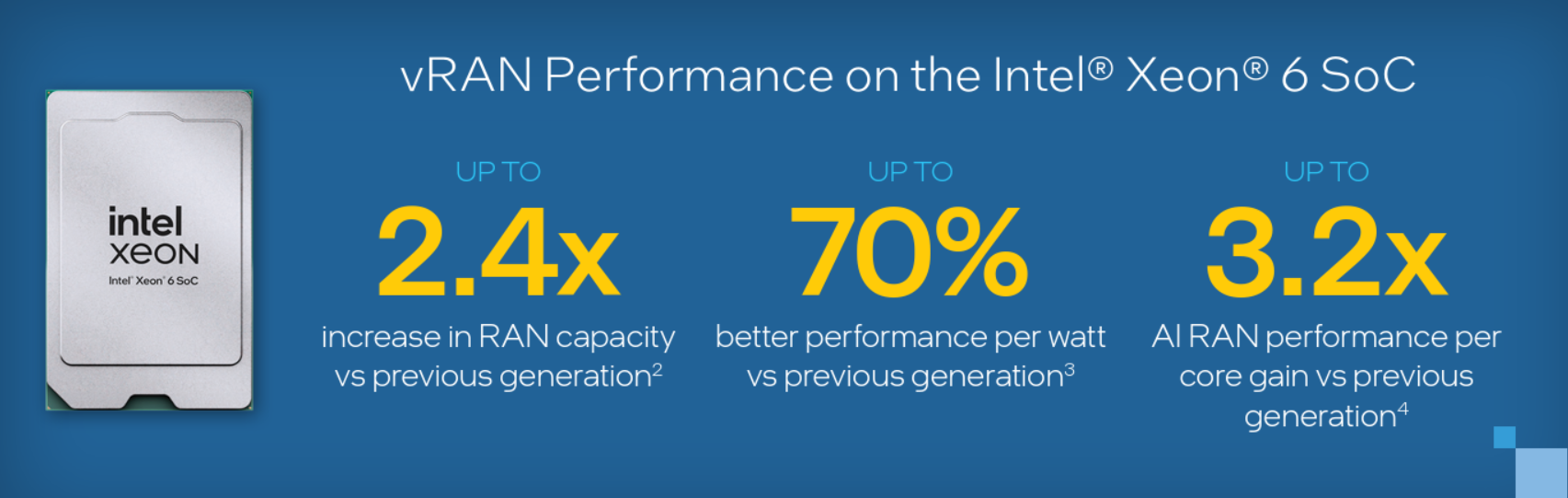
Up to 2.4x higher increase in RAN capacity (compared to the previous generation) per node
Up to 70% lower power consumption, better performance per watt (compared to the previous generation) per site
Up to 3.2x AI RAN inference performance per core[NP1] gain (compared to the previous generation)
Moreover, the supply-chain risk is minimized through Supermicro’s Tier-1 scale and regional manufacturing, while SUSE Telco Cloud enables fully-automated, reproducible deployments across tens of thousands of sites with zero touch provisioning. The entire platform is open, disaggregated, and future-proof, supporting everything from today’s RAN deployments to tomorrow’s AI-native 6G edge networks.
4 Solution component overview #
4.1 Intel® Xeon® 6 SoC #
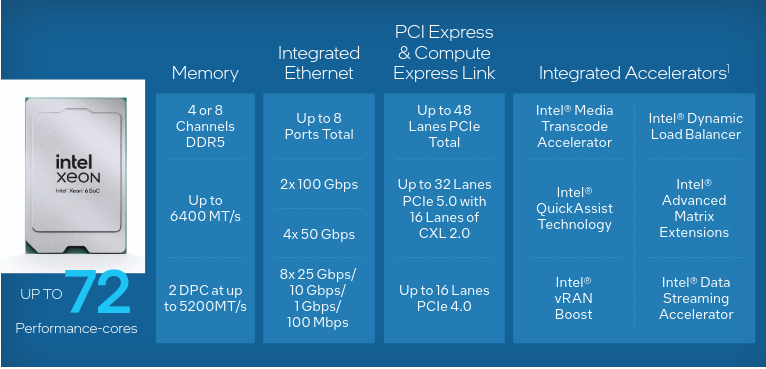
The Intel Xeon 6 SoC provides outstanding energy-efficient performance across networking use cases, including vRAN deployments. The Performance-cores (P-cores) are optimized for high throughput and low latency, with built-in acceleration for packet and signal processing, load balancing, and AI.
Intel Xeon 6 SoC features are detailed in the figure below.
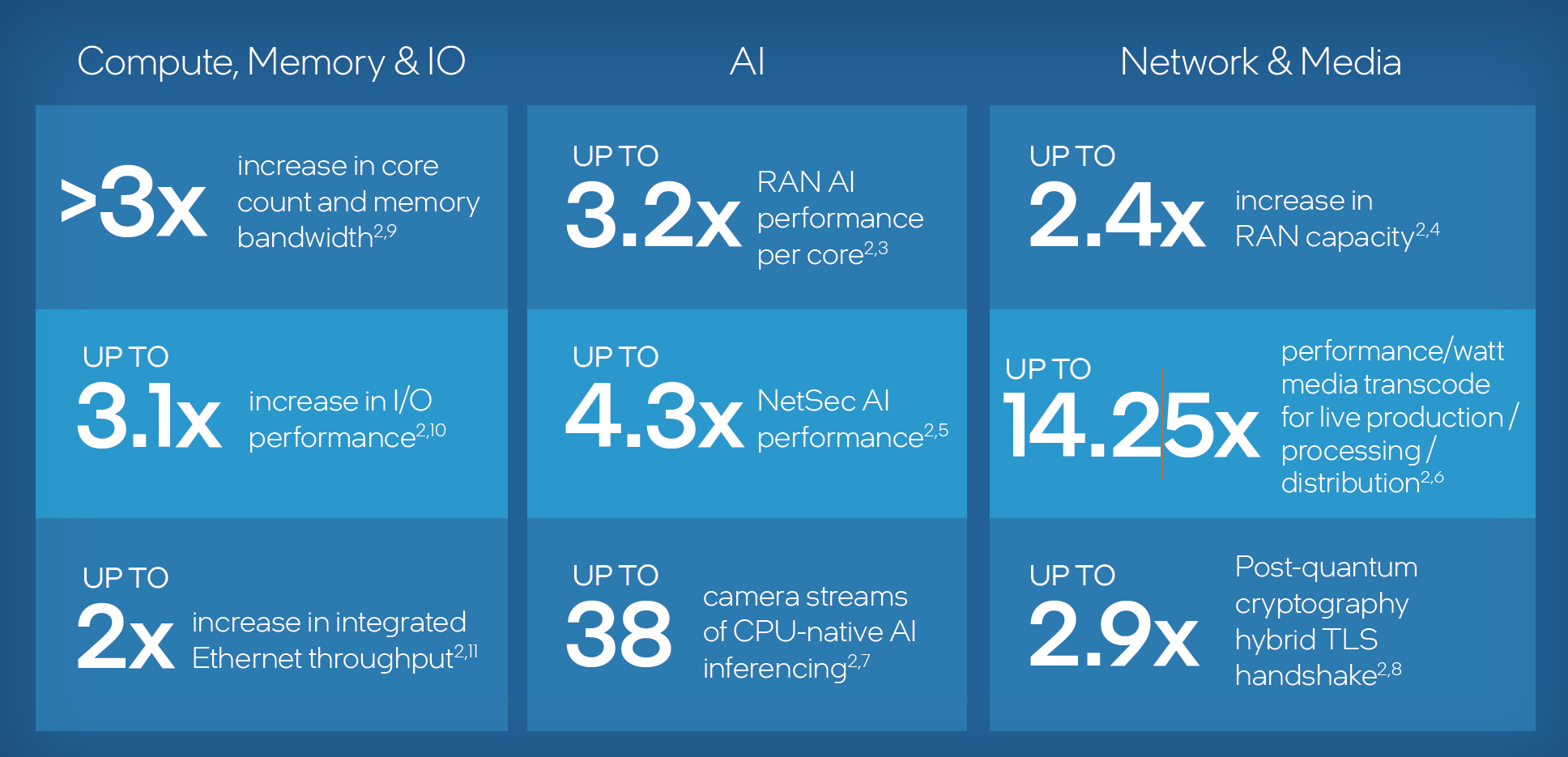
By leveraging Intel Xeon 6 SoC processors, enterprises and network operators can scale up performance for AI and analytics workloads at the edge. Performance expectations are detailed in the following figure.
Building on this foundation, Intel vRAN Boost integrates vRAN acceleration directly into the SoC. Intel vRAN Boost is sized to provide ample headroom, even in the most intense use-cases and with high-core-count options. This overhead allows for future software optimizations that increase server capacity without the risk of hitting acceleration limits. And, independent software vendors and developers using the O-RAN Acceleration Abstraction Layer standardized DPDK interface can optimize their vRAN software stacks for vRAN Boost hardware acceleration and easily move from one generation of Intel vRAN Boost to the next.
4.2 SUPERMICRO® IoT SuperServer #
The 1U SUPERMICRO® IoT SuperServer SYS-112D-42C-FN8P is designed for telco edge applications.
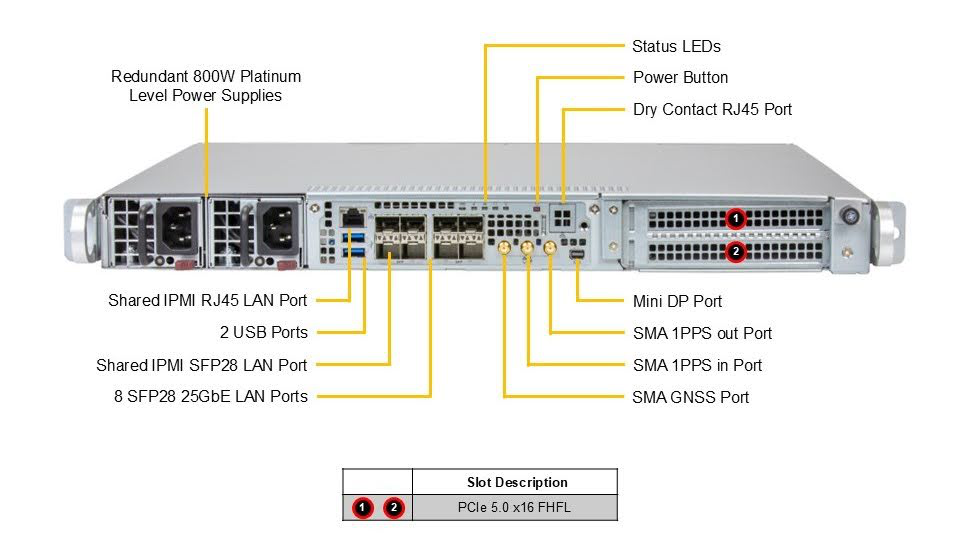
Key features are noted in the table below.
| SUPERMICRO® IoT SuperServer SYS-112D-42C-FN8P | |
|---|---|
CPU | Intel® Xeon® 6 SoC 6726P-B |
Networking | Integrated Intel E830 |
Form factor | 1U short-depth server (43 × 437 × 399 mm) |
Power | Redundant 800W Platinum-level power supplies |
SUPERMICRO offers both 1U and 2U options. For more details, visit the product pages:
4.3 SUSE® Telco Cloud #
The SUSE Telco Cloud platform provides a validated, carrier-grade, cloud-native foundation. Its disaggregated, AI-ready architecture allows telco enterprises to scale infrastructure sustainably while seamlessly deploying GenAI, predictive AI, and latency-sensitive applications at the edge.
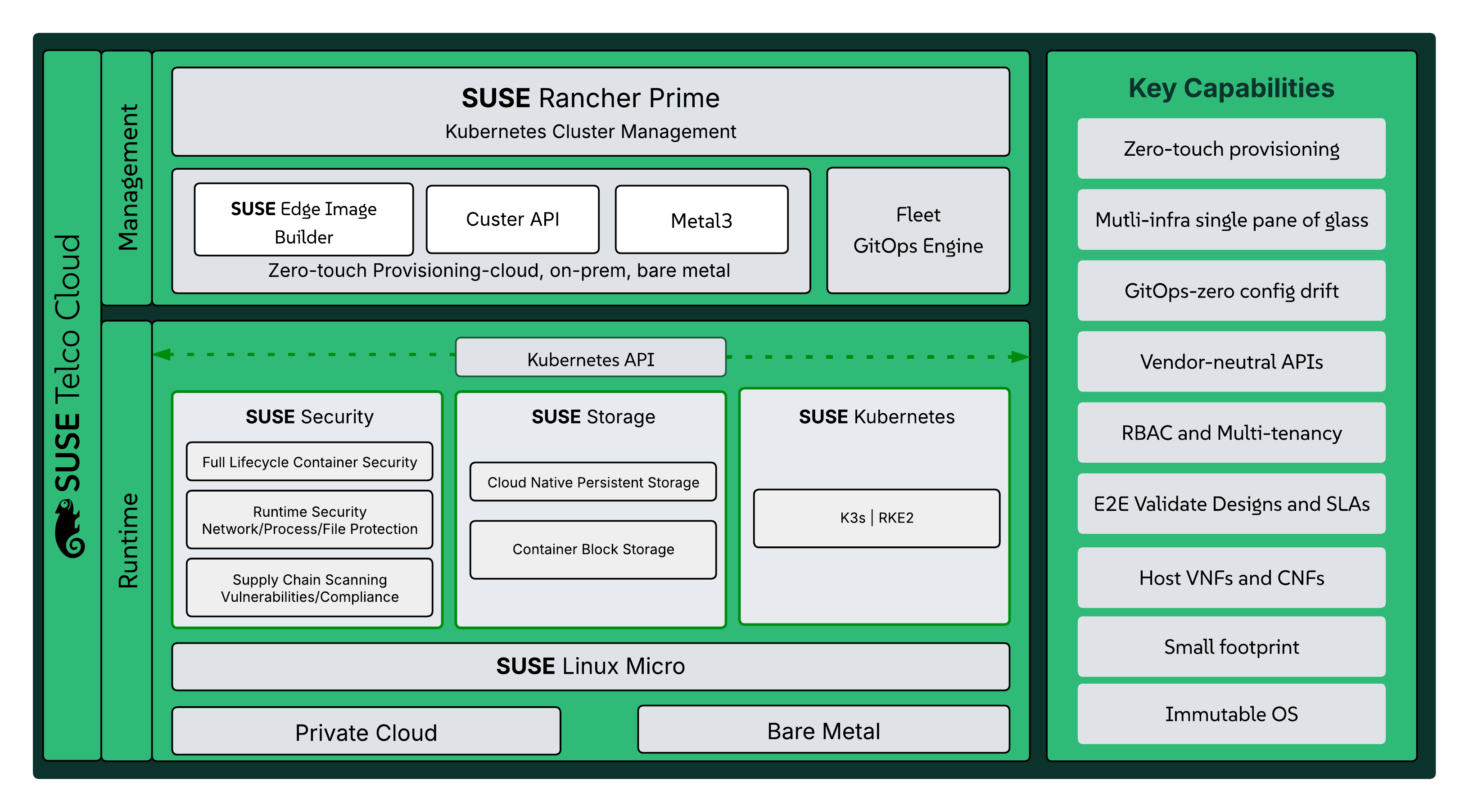
Key capabilities of SUSE Telco Cloud include:
| Capability | Strategic Value |
|---|---|
Unified Management Plane | Centralized control and observability for Kubernetes clusters running on RKE2, K3s, and other CNCF-certified Kubernetes distributions, including AKS, EKS, and GKE |
Fleet GitOps Automation | Declarative management for thousands of clusters, preventing configuration drift |
Zero-Touch Provisioning | Automated deployment and lifecycle management for telco-grade workloads across core, cloud, and far-edge environments |
Edge Optimization | Lightweight K3s-based architecture and hardened SUSE Linux Micro operating system for consistency and high performance in resource-constrained or disconnected edge sites |
Policy-Driven Governance | Consistent compliance and security across multi-tenant telco environments |
Carrier Grade Security | FIPS 140-3 validated cryptography, CIS Benchmark compliance, and centralized RBAC/SSO to meet stringent telco security standards |
See the SUSE Telco Cloud documentation for more information.
5 Deployment prerequisites and requirements #
Some specific considerations for SUSE Telco Cloud deployments are highlighted here. For further details, see SUSE Telco Cloud: Requirements & Assumptions.
5.1 Hardware #
Some hardware deployment considerations are listed below.
Management Cluster
Must have network connectivity to the target server management/BMC API.
Must have network connectivity to the target server control plane network.
For multi-node Management Clusters, an additional reserved IP address is required.
Managed hosts
Must support out-of-band management via Redfish, iDRAC, or iLO interfaces.
Must support deployment via virtual media (PXE is not currently supported).
Must have network connectivity to the Management Cluster for access to the Metal3 provisioning APIs.
5.2 Software #
You will need some software tools to deploy and manage the environment. They can be installed either on the Management Cluster or on a host with access to the Management Cluster. They include:
Container runtime, such as Podman or Rancher Desktop
Additionally, the SUSE Linux Micro OS image must be downloaded from the SUSE Customer Center or SUSE SUSE Linux Micro Downloads page.
The selected image file at the time of publication is SL-Micro.x86_64-6.1-Base-GM.raw.xz.
5.3 Network #
Follow the official SUSE Telco Cloud guidelines and recommendations described in SUSE Telco Cloud: Network Requirements.
5.4 Ports #
For details on port requirements, see SUSE Telco Cloud: Port Requirements.
5.5 Services #
For details on supported services, such as DHCP and DNS, see the SUSE Telco Cloud: Services (DHCP, DNS, etc.).

For telco workloads, it is important to disable or configure properly some of the services running on the nodes to avoid any impact on the workload performance running on the nodes.
See SUSE Telco Cloud: Disabling Systemd Services for details.
6 Edge Image Builder #
For the long-term stability and maintainability of the environment, it is paramount to have easily auditable, reproducible, and customized base images. Edge Image Builder (EIB), one of the components of SUSE Telco Cloud, helps mitigate these concerns by providing a simple and quick mechanism to customize SUSE Linux Micro base images for a variety of scenarios. EIB can produce an image that contains all of the configuration and workload artifacts (such as, RPMs and container images) needed for telco deployments. EIB can enable true zero-touch provisioning, even in low-bandwidth connections and air-gapped environments. A single image can be reused across multiple nodes, including advanced situations such as deploying HA Kubernetes clusters and individualized network configurations per node. By leveraging a declarative, YAML-based definition format, EIB easily fits into existing GitOps and CI/CD pipelines, generating reproducible images with full accountability of their contents.
EIB is an open source project. Visit the official EIB repository for more information.
6.1 Management Cluster EIB definition #
Follow the steps outlined in this section to generate the EIB ISO image for the Management Cluster. For further details, see SUSE Telco Cloud: Setting up the Management Cluster.
Generate the
eib-imagedirectory structure as illustrated below.You can find examples of the directory structure and files in the SUSE® Edge GitHub repository, under
telco cloud examples.. ├── base-images ├── custom │ ├── files │ │ ├── basic-setup.sh │ │ ├── metal3.sh │ │ ├── mgmt-stack-setup.service │ │ └── rancher.sh │ └── scripts │ ├── 02-tmpfs-cni.sh │ ├── 99-alias.sh │ └── 99-mgmt-setup.sh ├── kubernetes │ ├── config │ │ └── server.yaml │ ├── helm │ │ └── values │ │ ├── certmanager.yaml │ │ ├── longhorn.yaml │ │ ├── metal3.yaml │ │ ├── neuvector.yaml │ │ └── rancher.yaml │ └── manifests │ └── neuvector-namespace.yaml ├── mgmt-cluster-34-61-defaultNet.yaml └── network └── mgmt-cluster-network.yamlImportantThe SUSE Linux Micro OS image must be downloaded from the SUSE Customer Center or SUSE Linux Micro Downloads page, and it must be located under the
base-imagesdirectory.Follow Building updated SUSE Linux Micro images with KIWI to create your KIWI ISO image.
Add your KIWI ISO image to the
base-imagesdirectory.Update the following files:
In the
kubernetes/helm/values/metal3.yamlfile, changeironicIPto your mgmt cluster IP address (for example, 172.30.8.11).In the
kubernetes/helm/values/rancher.yamlfile, changehostnameto your mgmt cluster IP address (for example, 172.30.8.11).In the
network/mgmt-cluster-network.yamlfile, update the network settings to match your environment.See the example listing below:
routes:
  config:
    - destination: 0.0.0.0/0
      metric: 100
      next-hop-address: 172.30.0.1
      next-hop-interface: eth0
      table-id: 254
dns-resolver:
  config:
    server:
      - 8.8.8.8
interfaces:
  - name: eth0
    type: ethernet
    state: up
    mac-address: 3C:EC:EF:C0:4E:56
    ipv4:
      address:
        - ip: 172.30.8.11
          prefix-length: 20
          dhcp: false
          enabled: true
    ipv6:
      enabled: false
Modify the
eib/mgmt-cluster-34-61-defaultNet.yamlfile as follows:For the encryptedPassword parameter, replace
$ROOT_PASSWORDwith the root password for your Management Cluster. Tip
TipGenerate this password with:
openssl passwd -6 PASSWORDBe sure to replace
PASSWORDwith your desired password. Note
NoteThe final SUSE Rancher password will be configured from the file,
custom/files/basic-setup.sh.For the sccRegistrationCode parameter, replace
$SCC_REGISTRATION_CODEwith your registration code for SUSE Linux Micro from the SUSE Customer Center.
Build the EIB image using
podman.podman run --rm --privileged -it -v $PWD:/eib \ registry.suse.com/edge/3.4/edge-image-builder:1.3.0 \ build --definition-file mgmt-cluster-34-61-defaultNet.yamlYou should see output like the following as the EIB image is built:
SELinux is enabled in the Kubernetes configuration. The necessary RPM packages will be
downloaded.
Downloading file: rancher-public.key 100% |
SUSE Telco Cloud … * (<75 characters) Your Guide Title
the value in the file.
██████████████████████████████████████████████████████████████████████████|
(2.4/2.4 kB, 17 MB/s)
Setting up Podman API listener...
Pulling selected Helm charts... 100% |
██████████████████████████████████████████████████████████████████████████|
(8/8, 3 it/s)
Generating image customization components...
Identifier ................... [SUCCESS]
Custom Files ................. [SUCCESS]
Time ......................... [SKIPPED]
Network ...................... [SUCCESS]
Groups ....................... [SKIPPED]
Users ........................ [SUCCESS]
Proxy ........................ [SKIPPED]
Resolving package dependencies...
Rpm .......................... [SUCCESS]
Os Files ..................... [SKIPPED]
Systemd ...................... [SKIPPED]
Fips ......................... [SKIPPED]
Elemental .................... [SKIPPED]
Suma ......................... [SKIPPED]
Populating Embedded Artifact Registry... 100% |
███████████████████████████████████████████████████████████████████████████|
(19/19, 21 it/min)
Embedded Artifact Registry ... [SUCCESS]
Keymap ....................... [SUCCESS]
Configuring Kubernetes component...
Downloading file: rke2_installer.sh
Downloading file: rke2-images-core.linux-amd64.tar.zst 100% |
████████████████████████████████████████████████████████████████████████████|
(701/701 MB, 82 MB/s)
Downloading file: rke2-images-calico.linux-amd64.tar.zst 100% |
████████████████████████████████████████████████████████████████████████████|
(362/362 MB, 470 MB/s)
Downloading file: rke2-images-multus.linux-amd64.tar.zst 100% |
████████████████████████████████████████████████████████████████████████████|
(39/39 MB, 468 MB/s)
Downloading file: sha256sum-amd64.txt 100% |
████████████████████████████████████████████████████████████████████████████|
(4.3/4.3 kB, 32 MB/s)
Kubernetes ................... [SUCCESS]
Certificates ................. [SKIPPED]
Cleanup ...................... [SKIPPED]
Building ISO image...
Kernel Params ................ [SKIPPED]
Build complete, the image can be found at: eib-mgmt-cluster-x86_64-image-61-34.iso
6.2 Downstream Cluster EIB definition #
Follow the steps below to generate the EIB RAW image for Downstream Clusters.
The directory
eib-edge-34-61contains all the necessary files to generate the EIB RAW image for Downstream Clusters with some telco packages and performance scripts.You can get a copy of the file contents in Fully automated directed network provisioning.
.
├── base-images
│   └── SL-Micro.x86_64-6.1-Base-RT-Kiwi.raw
├── custom
│   ├── files
│   │   ├── performance-settings.sh
│   │   └── sriov-auto-filler.sh
│   └── scripts
│       ├── 01-fix-growfs.sh
│       ├── 02-tmpfs-cni.sh
│       ├── 03-performance.sh
│       └── 04-sriov.sh
├── edge-cluster.yaml
└── network
    └── configure-network.sh
Add your KIWI ISO image as a base-image in the
base-imagesdirectory.The configuration file,
edge-cluster.yaml, details the packages and scripts that will be included in the image. As with the Management Cluster, modify the following parameters inedge-cluster.yamlaccording to your environment:For the encryptedPassword parameter, replace
$ROOT_PASSWORDwith the root password for your Management Cluster.For the sccRegistrationCode parameter, replace
$SCC_REGISTRATION_CODEwith your registration code for SUSE Linux Micro from the SUSE Customer Center.
Build the EIB image.
podman run --rm --privileged -it -v $PWD:/eib \
registry.suse.com/edge/3.4/edge-image-builder:1.3.0 \
build --definition-file edge-cluster.yaml
The output should be similar to:
Setting up Podman API listener...
Generating image customization components...
Identifier ................... [SUCCESS]
Custom Files ................. [SUCCESS]
Time ......................... [SKIPPED]
Network ...................... [SUCCESS]
Groups ....................... [SKIPPED]
Users ........................ [SUCCESS]
Proxy ........................ [SKIPPED]
Resolving package dependencies...
Rpm .......................... [SUCCESS]
Os Files ..................... [SKIPPED]
Systemd ...................... [SUCCESS]
Fips ......................... [SKIPPED]
Elemental .................... [SKIPPED]
Suma ......................... [SKIPPED]
Embedded Artifact Registry ... [SKIPPED]
Keymap ....................... [SUCCESS]
Kubernetes ................... [SKIPPED]
Certificates ................. [SKIPPED]
Cleanup ...................... [SUCCESS]
Building RAW image...
Kernel Params ................ [SUCCESS]
Build complete, the image can be found at: eibimage-34-61-rt-telco.raw
7 Deployment details #
Recommended deployment patterns include:
vRAN Consolidation Nodes
Use Intel® Xeon® 6 SoC to migrate from accelerator-heavy architectures to single-socket.
Edge AI + Network Services Nodes
Deploy compact nodes at MEC sites for RAN intelligence, telemetry analysis, and enterprise edge computing.
Telco operators can use the following deployment checklist:
Performance and sizing
Profile RAN, Core, and Edge workloads (packet rate, concurrency, inference rate).
Select Intel® Xeon® 6 SoC SKUs based on core density and memory requirements.
Validate CPU-only acceleration options for vRAN.
Ecosystem and integration
Use OEM-validated RAN and Core blueprints.
Verify compatibility with cloud-native orchestration stacks (K8s, CNF frameworks).
Validate DPDK, vRAN Boost and AI acceleration paths.
Power and thermal design
Update site power budgets for higher consolidation ratios.
Plan airflow and thermal envelopes for high-density edge PoPs.
Security and compliance
Enable hardware security features and confidential computing.
Map regulatory requirements for data protection and sovereignty.
Operational deployment
Verify telemetry and observability frameworks.
Test fail-over, redundancy and RAN real-time behavior.
Align lifecycle refresh with OEM roadmaps.
7.1 SUSE Telco Cloud direct network provisioning #
Directed network provisioning is a feature that allows you to automate the provisioning of Downstream Clusters. This is a useful feature when you have many Downstream Clusters to provision and want to automate the process. Metal3 is an open source project that provides tools for managing bare-metal infrastructure in Kubernetes. With its Cluster API (CAPI) integrations, Metal3 can manage infrastructure resources across many infrastructure providers via broadly adopted vendor-neutral APIs.
7.1.1 Management Cluster deployment #
The process of deploying the Management Cluster is outlined here.
Load the Management Cluster EIB ISO generated previously in the SUPERMICRO BMC.
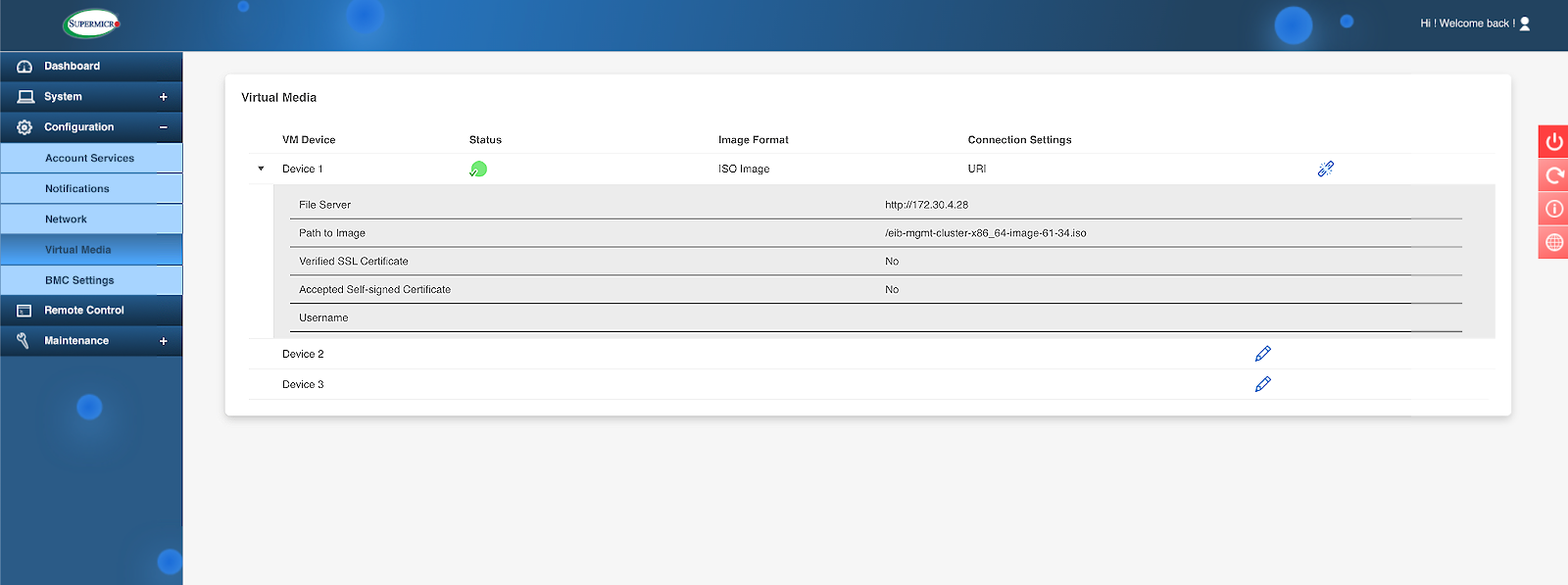 Figure 6: Set the path to the Management Cluster EIB ISO image #
Boot the server from Virtual Media function.
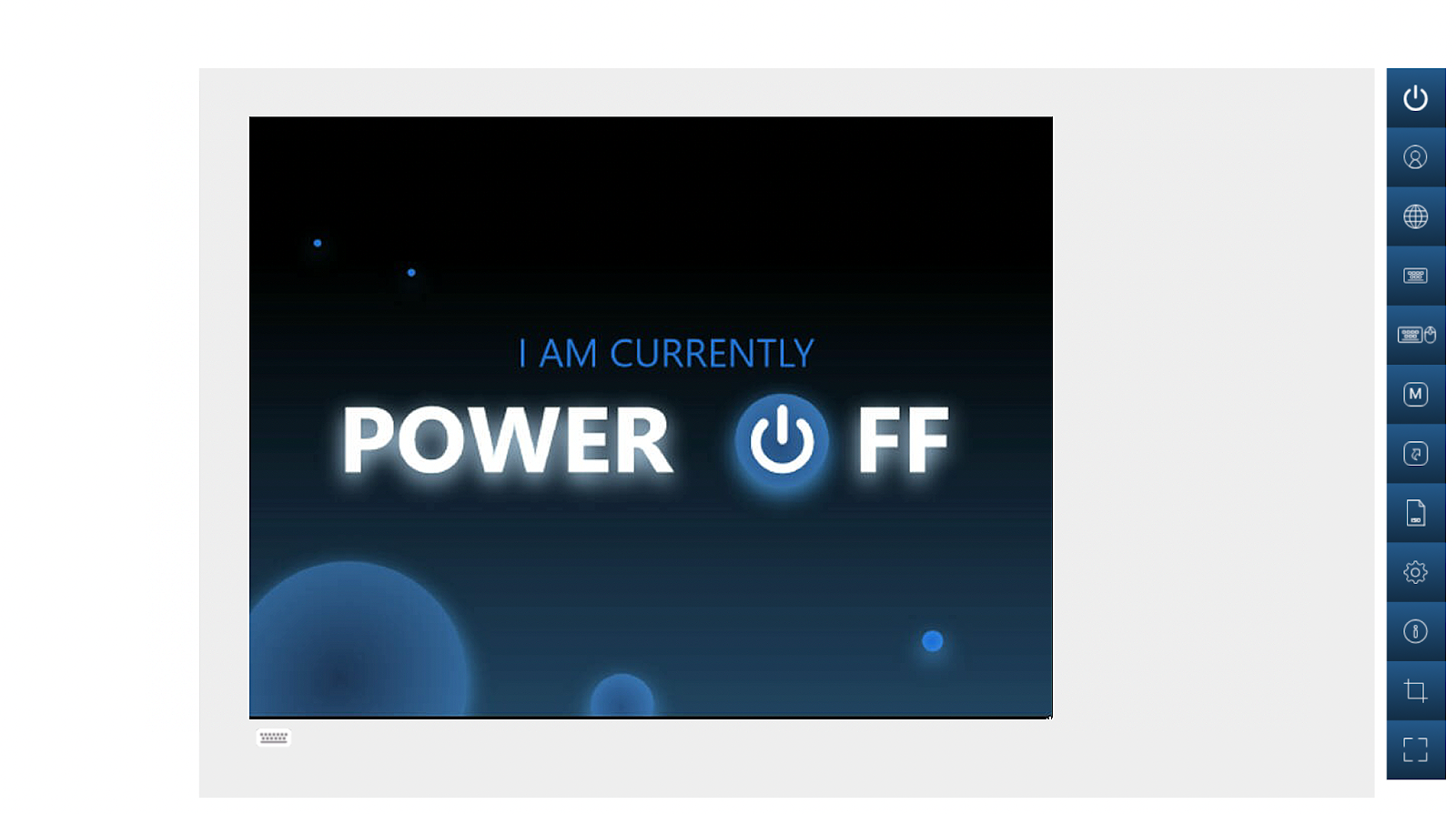 Figure 7: Power on the server #
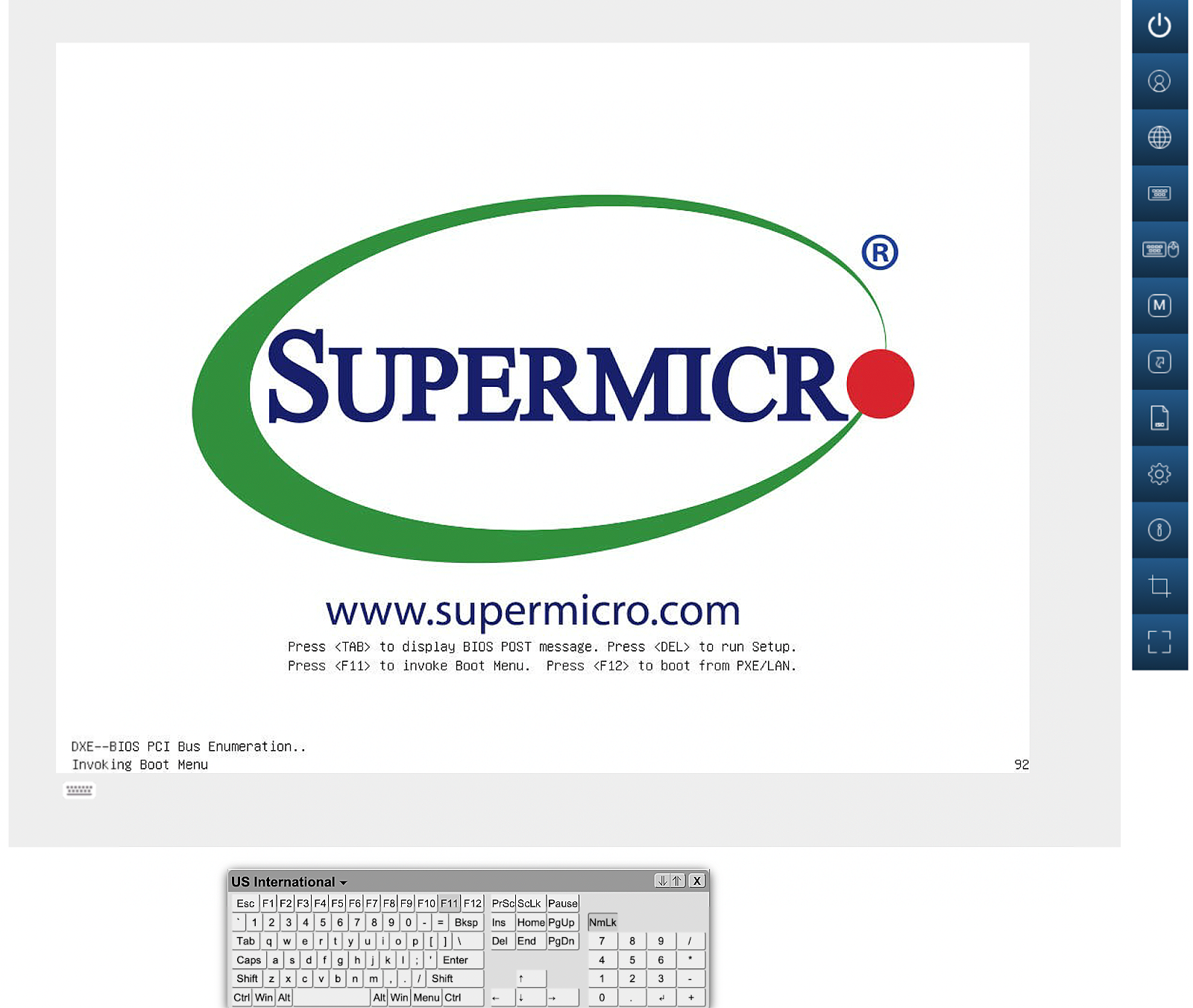 Figure 8: Boot the ISO image #
The installation starts automatically without any manual interaction. This includes installation and configuration of SUSE Linux Micro and RKE2 with all required Helm charts. This process is illustrated in the following screenshots.
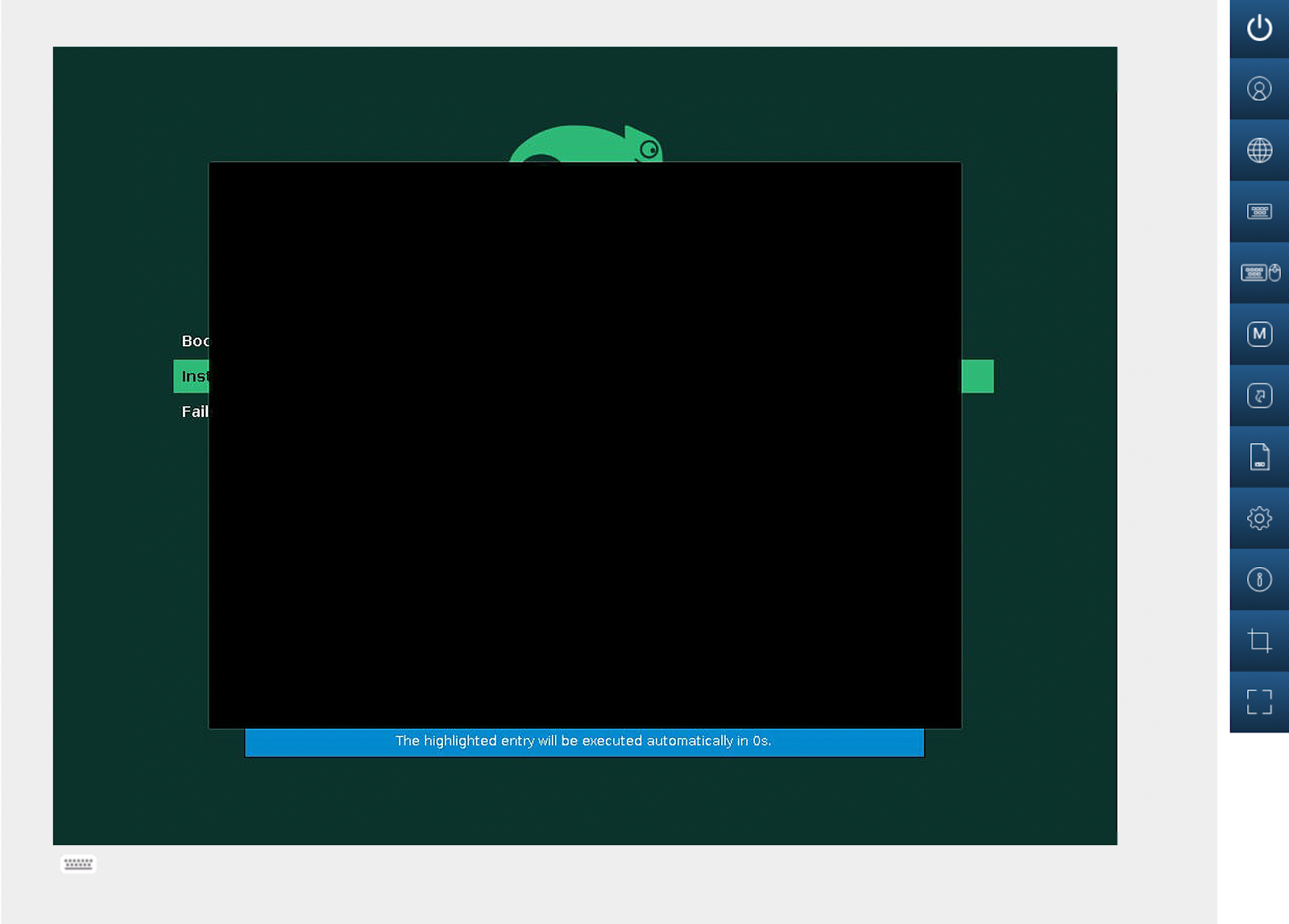 Figure 9: Boot the installer #
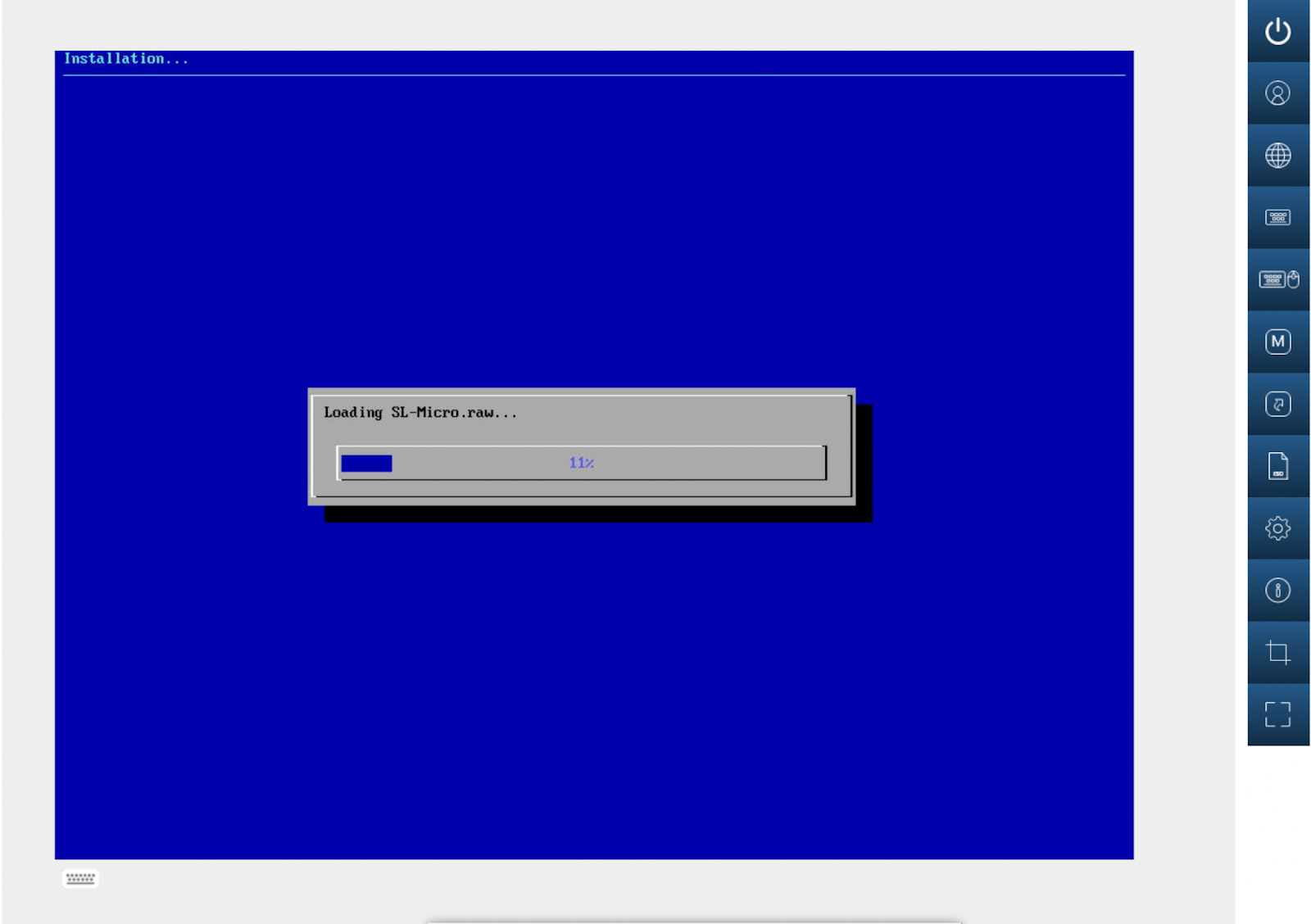 Figure 10: Load the SUSE Linux Micro raw image #
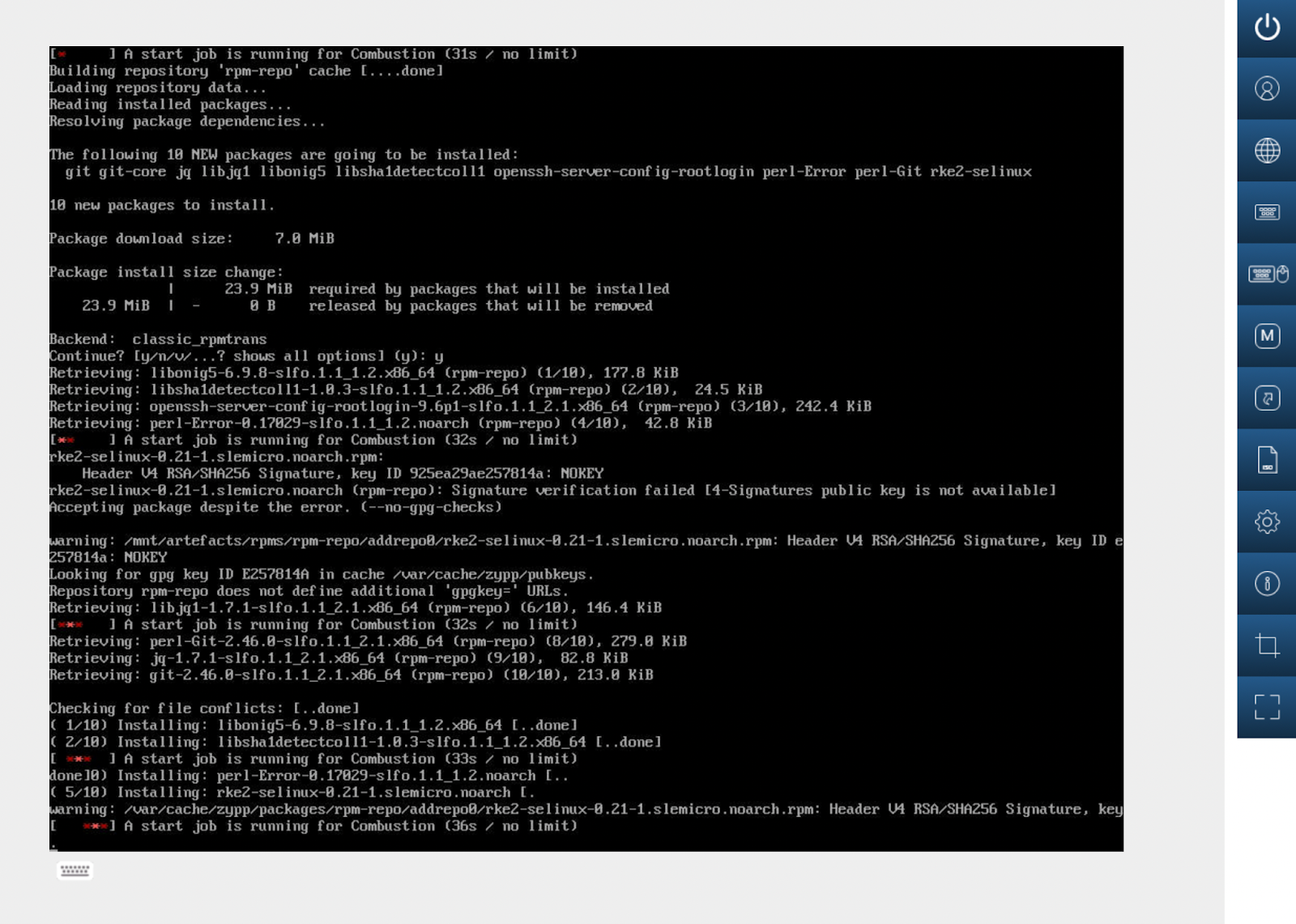 Figure 11: Install components #
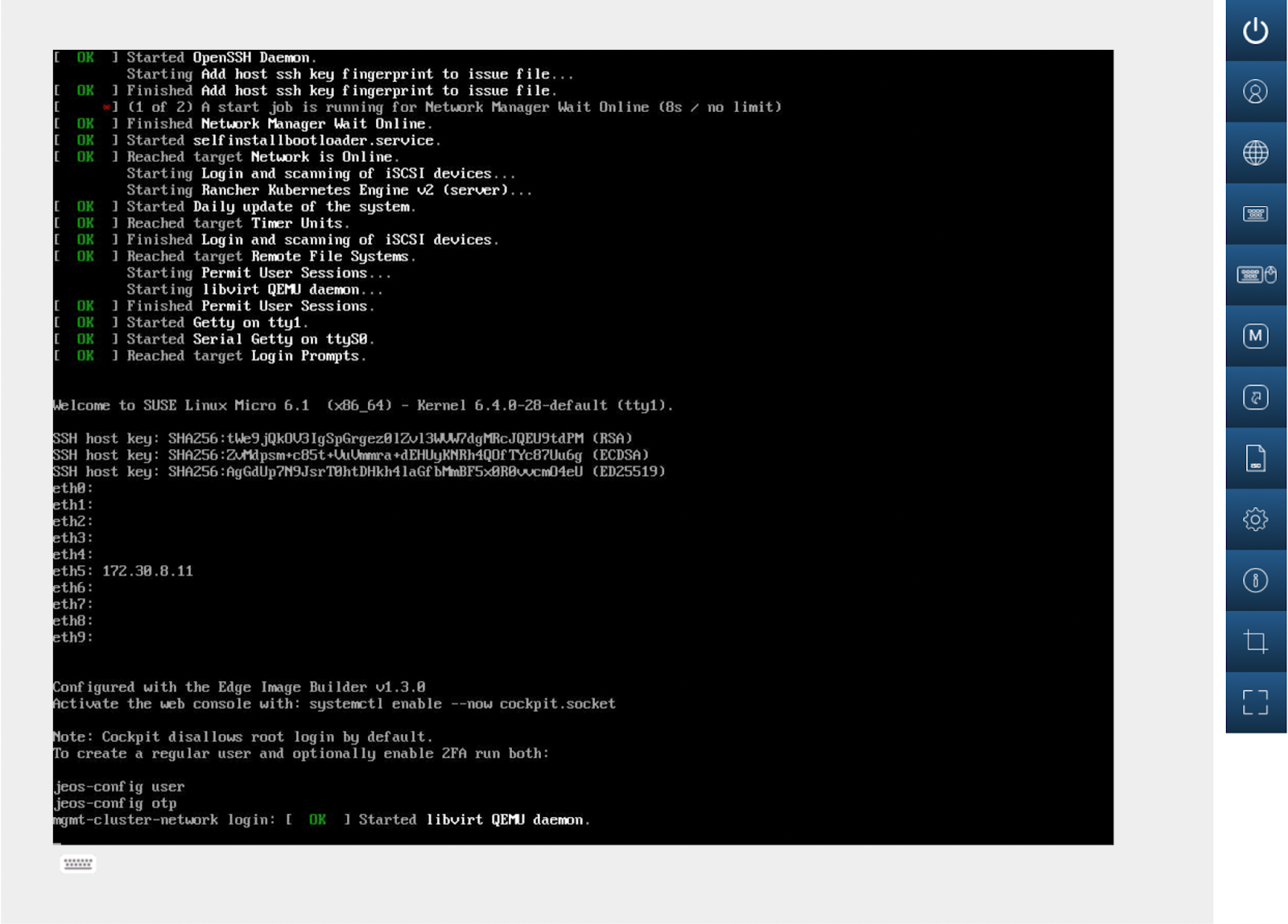 Figure 12: Start services and complete installation #
At this stage, the system is ready and the Management Cluster has been deployed. Kubeconfig is configured with the user provided in the EIB definition file by default.
Verify that the cluster is ready.
kubectl get nodesYou should see output similar to the following:
NAME                   STATUS   ROLES                       AGE   VERSION
mgmt-cluster-network   Ready    control-plane,etcd,master   37s   v1.33.3+rke2r1
Verify that SUSE Rancher Prime is available.
Access the SUSE Rancher Prime UI by opening your Web browser to
https://rancher-172.30.8.11.sslip.io:8443/.Log in with the credentials configured in the file,
custom/files/basic-setup.sh, during the EIB process.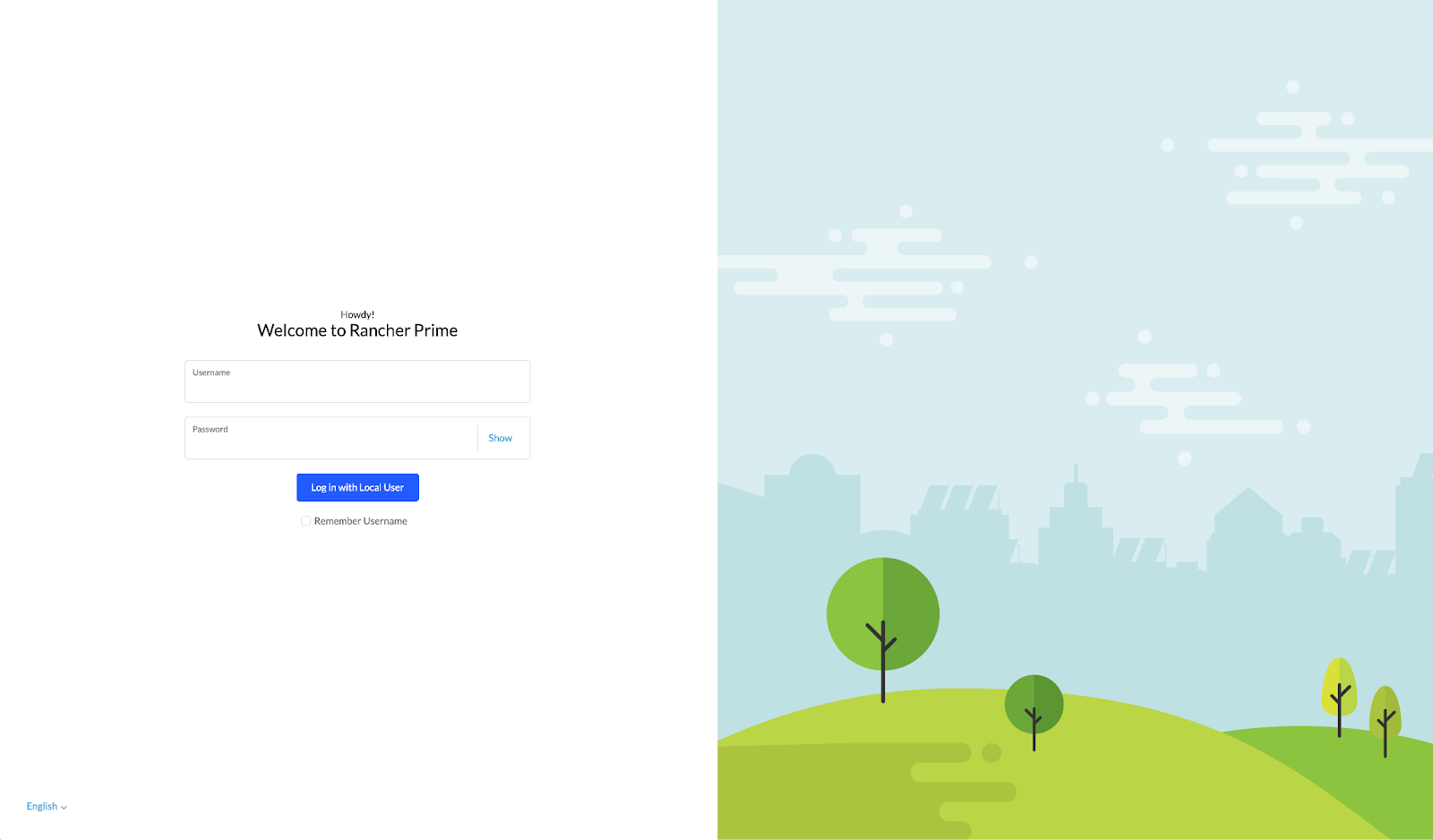 Figure 13: SUSE Rancher Prime UI login screen #
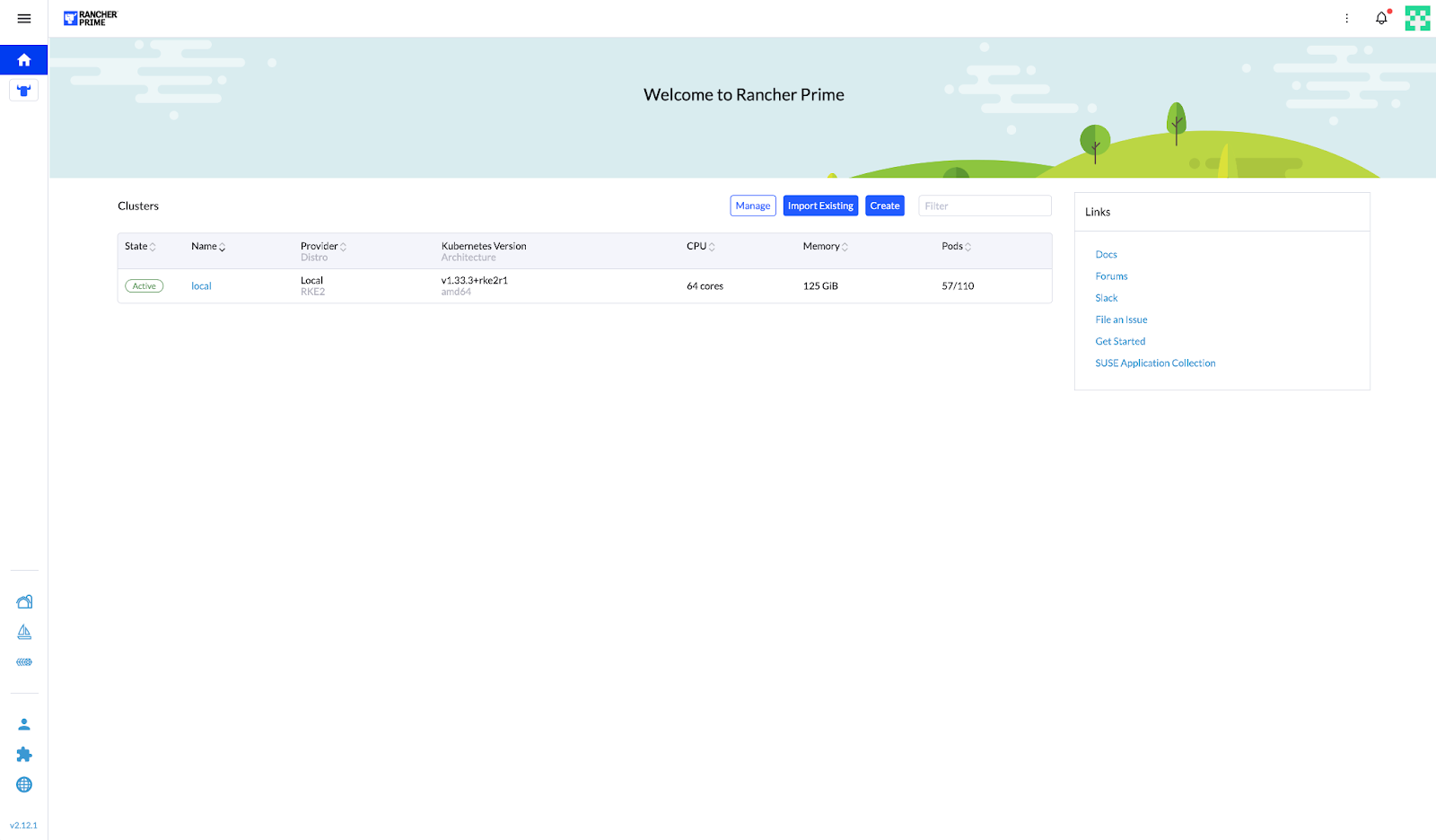 Figure 14: SUSE Rancher Prime UI dashboard #
7.1.2 Downstream Cluster deployment #
To deploy the Downstream Cluster (provision the operating system and RKE2 cluster automatically), you need to create manifest files from the Management Cluster.
These files include the BareMetalHost definition file (bmh.yaml) and the Provision file (capi.yaml).
Create a BaremetalHost definition file (
bmh.yaml).For reference, see Section 11.1.1, “Sample BareMetalHost definition file (
bmh.yaml)”.Apply the manifests using kubectl (alternatively it could be applied using Rancher UI): The manifests should be applied using kubectl (an alternative method is to apply them via the Rancher UI):
kubectl apply -f manifests-examples/bmh.yamlCheck that inspection has started to retrieve all hardware information from the server to fill the BareMetalHost object in RKE2.
mgmt-cluster-network:~ # kubectl get bmhNAME STATE CONSUMER ONLINE ERROR AGE lab-sm1 inspecting true 11s
You can retrieve the configuration and hardware details of the downstream cluster hosts with:
kubectl get bmh lab-sm1 -o yamlFor reference, see Section 11.1.2, “Sample BareMetalHost details”.
The same information is represented now in the SUSE Rancher Prime UI:
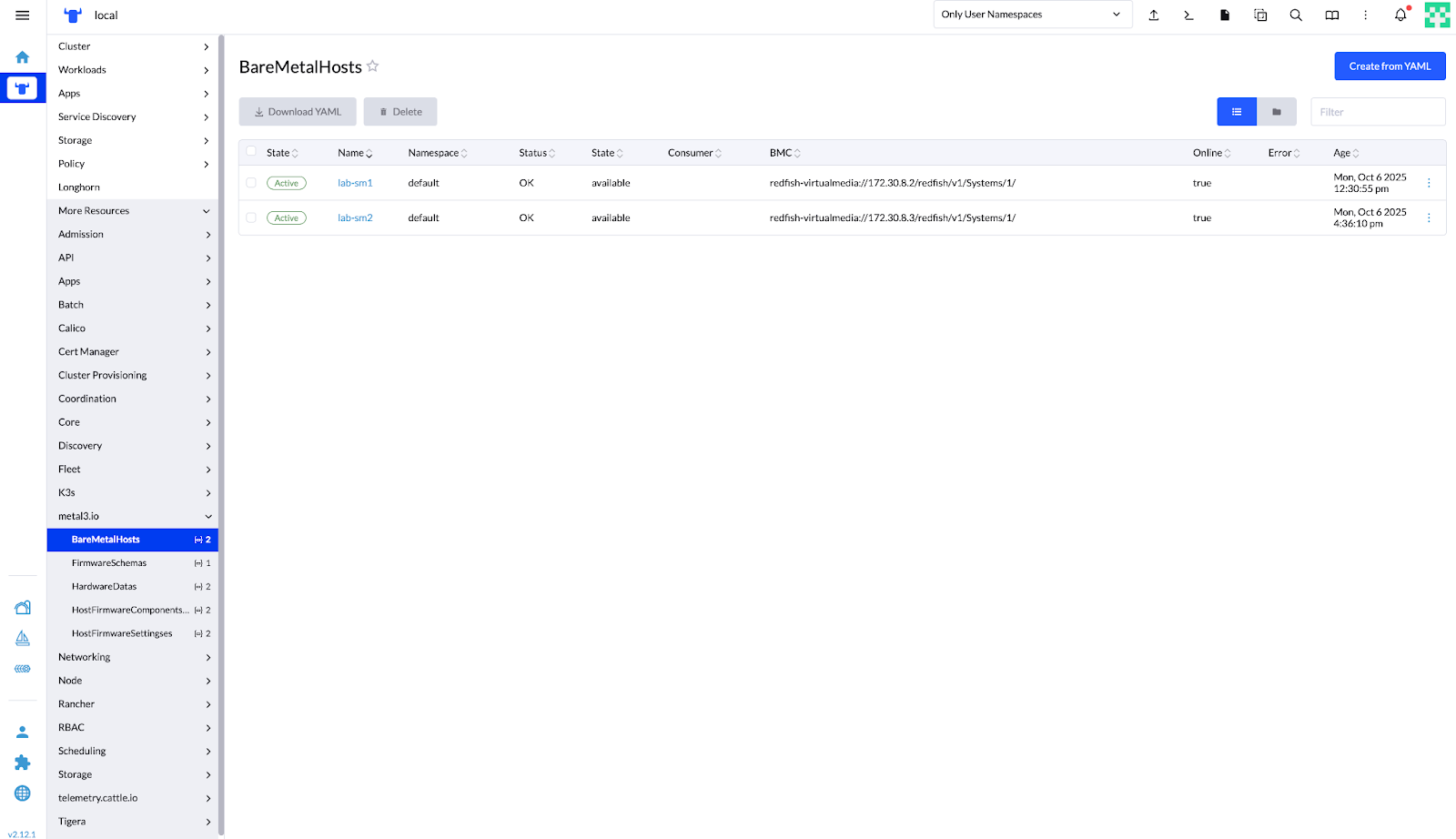 Figure 15: SUSE Rancher Prime – Bare Metal Hosts Management View #
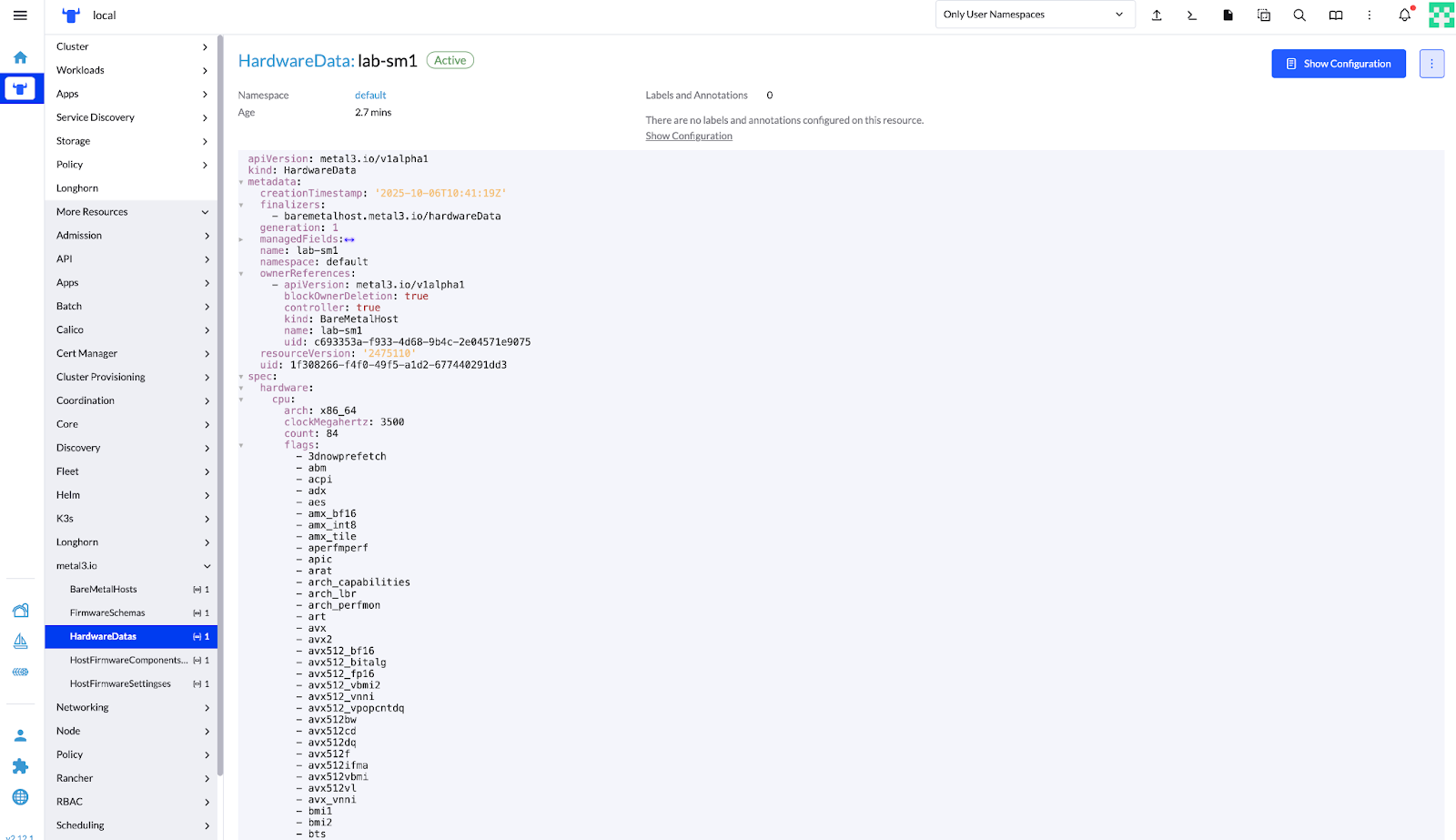 Figure 16: SUSE Rancher Prime – Hardware Data Details for Discovered BareMetalHost #
Apply the Provision file (
capi.yaml) to provision the Downstream Cluster hosts with the operating system and RKE2 cluster. This also applies telco features, such as DPDK, SR-IOV, CPU isolation, huge pages, and kernel parameter tuning.See Section 11.1.3, “Sample Provision file (
capi.yaml)” for reference.Verify the BareMetalHost (BMH) provisioning status.
kubectl get bmhThe output of the command will change as the provisioning progresses.
NAME      STATE          CONSUMER                               ONLINE   ERROR   AGE
lab-sm1   provisioning   multinode-cluster-controlplane-kf8lg   true             21h
lab-sm2   available                                             true             17h
NAME      STATE         CONSUMER                               ONLINE   ERROR   AGE
lab-sm1   provisioned   multinode-cluster-controlplane-97266   true             38m
lab-sm2   available                                            true             30m
NAME      STATE         CONSUMER                                ONLINE   ERROR   AGE
lab-sm1   provisioned   multinode-cluster-controlplane-97266    true             49m
lab-sm2   provisioned   multinode-cluster-workers-dxhgg-54cq4   true             41m
After provisioning completes, the nodes join the Downstream Cluster and transition to the Ready state.
Verify this with:
kubectl get nodesNAME STATUS ROLES AGE VERSION multinode-cluster-t4rwk Ready control-plane,etcd,master 12m v1.33.3+rke2r1 multinode-cluster-workers-dxhgg-54cq4 Ready <none> 45s v1.33.3+rke2r1
Verify that the cluster is provisioned and active with the SUSE Rancher Prime UI.
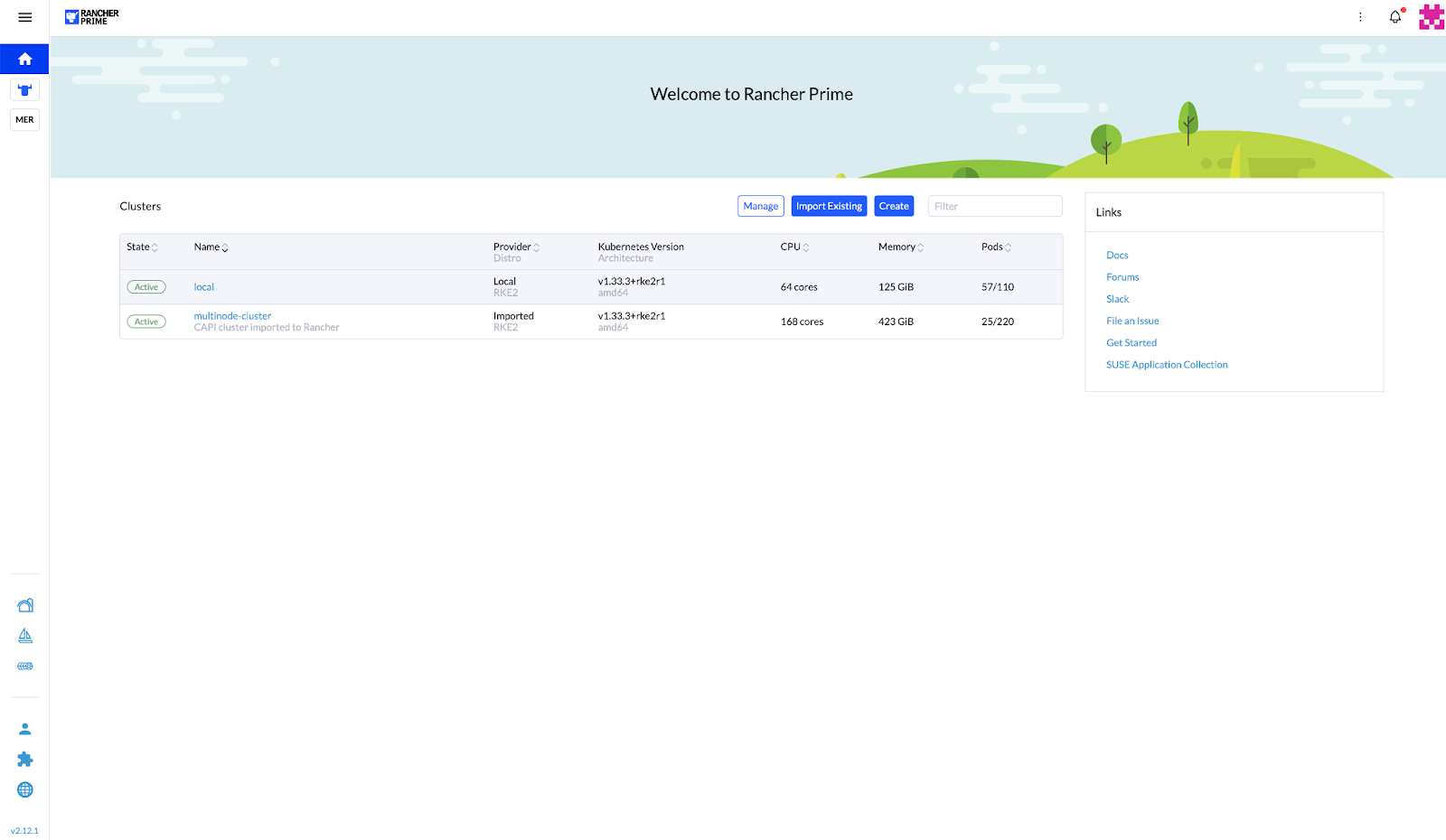 Figure 17: SUSE Rancher Prime – Clusters Overview Showing Active Downstream Cluster #
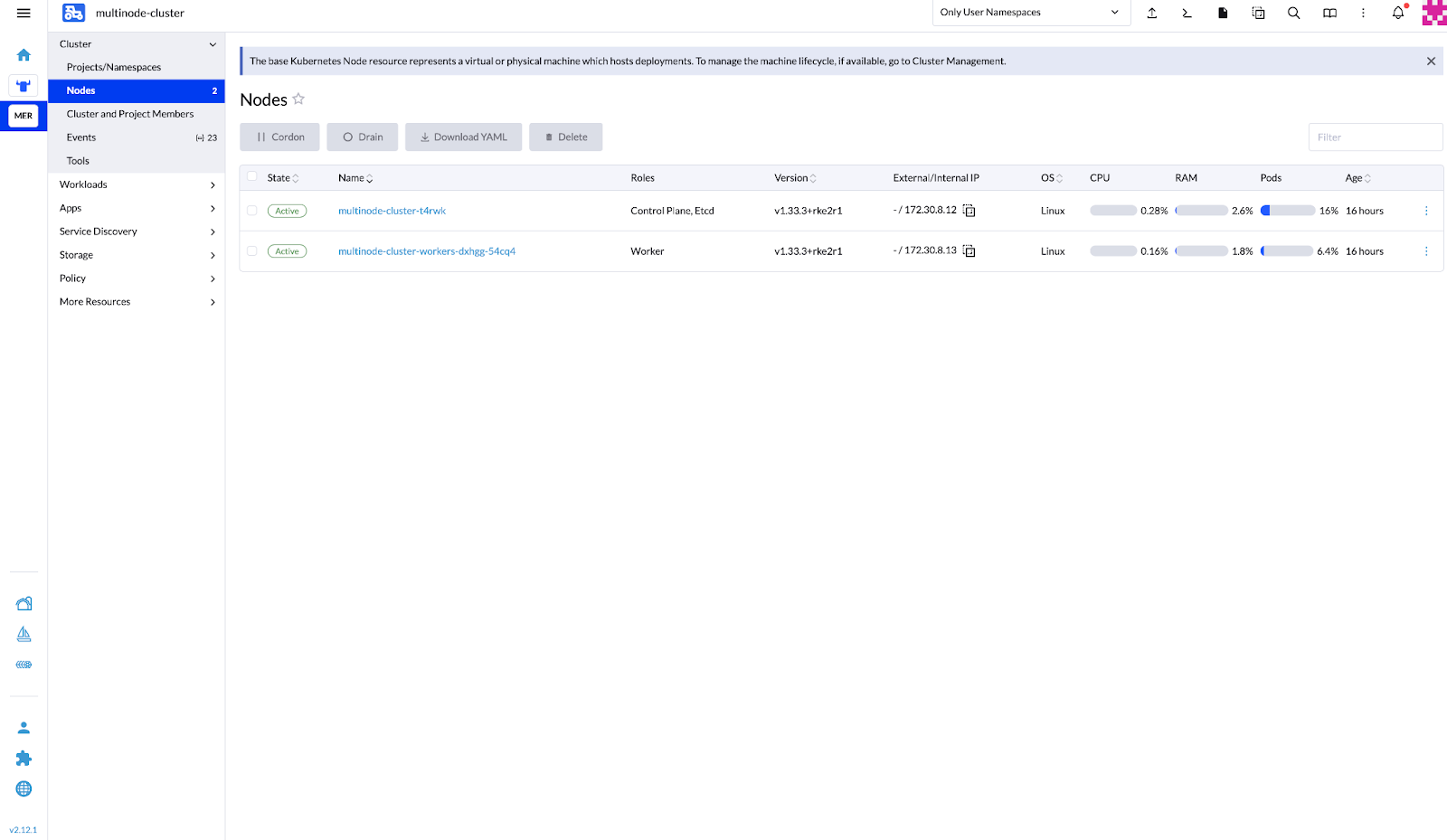 Figure 18: SUSE Rancher Prime – Downstream Cluster Nodes in Active State #
8 Performance testing #
For performance testing, you can use a real-time simulator to replicate specific workloads per CPU during defined time periods.
Then, measure CPU latency in scheduling new tasks on both isolated and housekeeping cores.
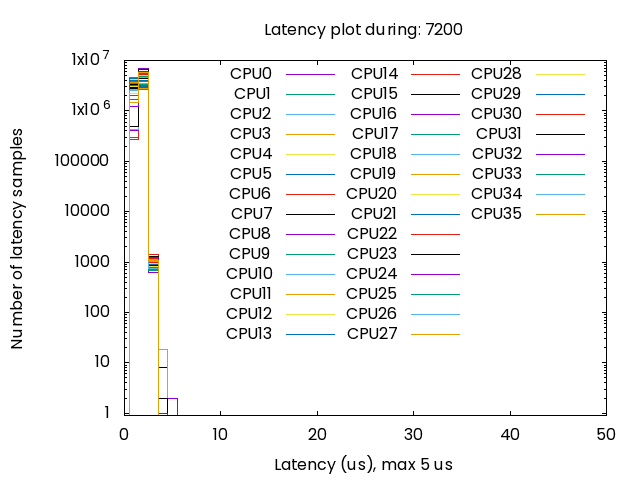
You can use cyclictest (see SLE RT Hardware Testing), along with a configured a JSON file to simulate a particular CPU load percentage and quantify the latency associated with scheduling tasks concurrently.
You an also use cyclictest to produce a histogram to visualize the results, as shown below.
For this document, the authors deployed the described reference configuration with the telco tunings provided in the Section 11.1.3, “Sample Provision file (capi.yaml)”) and using SUPERMICRO® IoT SuperServer SYS-112D-42C-FN8P hosts.
Host details provided by hostnamectl:
   Static hostname: (unset)
Transient hostname: suse-wl2.shared.i14y-lab.com
         Icon name: computer-server
           Chassis: server 🖳
        Machine ID: f0a7cf72a88948968d537e0d471c4656
           Boot ID: f2391ee36fcb4caf89508b9be07ca940
  Operating System: SUSE Linux Micro 6.1
       CPE OS Name: cpe:/o:suse:sl-micro:6.1
            Kernel: Linux 6.4.0-30-rt
      Architecture: x86-64
   Hardware Vendor: Supermicro
    Hardware Model: SYS-112D-42C-FN8P
  Firmware Version: 1.0
     Firmware Date: Mon 2025-08-25
      Firmware Age: 1month 2w 1d
The authors applied a CPU load of 95 percent on isolated cores with a duration of 7200 seconds, using the command:
cyclictest -F /tmp/cyclictest-monitor.pipe -p98 -t36 --affinity=6-41 --mainaffinity=1 :--interval=1000 --histogram=60 --spike=10 --duration=7200 --quietThe results, plotted below, show that latency remains below five microseconds for the duration of the test.
9 Conclusions and next steps #
This validated reference design illustrates a high-performance telco edge platform built on SUSE® Telco Cloud, SUPERMICRO® IoT SuperServers, and Intel® Xeon® 6 SoC processors. By utilizing a CPU-only architecture, the design meets stringent telco standards and requirements and scales effectively for AI-native, low-latency workloads. By replacing legacy accelerator-heavy designs with an integrated architectures, operators can significantly improve RAN capacity, power efficiency, and AI inference performance while reducing physical footprint, deployment complexity, and operational risk. Moreover, SUSE Telco Cloud provides a hardened, cloud-native foundation with zero-touch provisioning, consistent lifecycle management, and support for both VNFs and CNFs across core, edge, and far-edge environments.
Together, SUSE, SUPERMICRO, and Intel enable operators to modernize their networks without compromise. This partnership helps scale AI-driven services, and prepare users for next-generation 5G-Advanced and 6G use cases, all while lowering TCO and improving sustainability.
Continue your learning journey with these resources:
To move forward with transforming your network, contact your SUSE, Intel, or SUPERMICRO account team to arrange a joint solution workshop and receive expert sizing assistance tailored to your specific deployment needs.
10 Frequently Asked Questions (FAQs) #
What is the AI-Accelerated 5G Telco Platform?
It is a joint solution combining the SUSE Telco Cloud Platform and Intel® Xeon® 6 SoC-based systems by Supermicro to enable AI-powered vRAN and edge workloads with cloud-native operations, low latency, and high efficiency.
How does the SUSE Telco Cloud Platform support 5G edge deployments?
It provides a Kubernetes-based, cloud-native foundation optimized for telecom environments, enabling automated lifecycle management, scalability, and reliable operation of distributed edge and network workloads.
Why is Intel® Xeon® 6 SoC important for this solution?
Intel Xeon 6 SoC processors deliver integrated capabilities for vRAN processing and AI inference, helping achieve deterministic low latency, strong performance, and improved performance-per-watt on SoC-based systems.
What is the role of Supermicro systems in this solution?
Supermicro systems provide the carrier-grade server platforms optimized for edge and telecom environments. They deliver the compute density, I/O capabilities, and thermal efficiency required to run AI inference, vRAN, and edge workloads reliably at distributed 5G edge sites.
What types of workloads can run on this platform?
The platform supports cloud-native network functions (CNFs), AI inference applications, vRAN workloads, and modern edge services required for 5G and ORAN environments.
How does this architecture help improve power efficiency?
By consolidating AI, vRAN, and edge workloads on a SoC-based platform with optimized performance-per-watt, operators can reduce hardware sprawl and improve energy efficiency.
How does this solution support ORAN and modern 5G architectures?
The cloud-native platform supports containerized network functions and open, software-defined components aligned with ORAN and modern 5G design principles.
What value does this joint solution bring to telecom operators?
It delivers a validated, integrated platform that accelerates AI-enabled 5G deployment, supports new intelligent services, improves operational efficiency, and provides a future-ready foundation for telco innovation.
11 Appendix #
The following sections provide additional information and resources.
11.1 Sample files and output #
11.1.1 Sample BareMetalHost definition file (bmh.yaml) #
apiVersion: v1
kind: Secret
metadata:
  name: lab-sm1-credentials
type: Opaque
data:
  username: <<< user in base64 >>>
  password: <<< password in base64 >>>
---
apiVersion: metal3.io/v1alpha1
kind: BareMetalHost
metadata:
  name: lab-sm1
  labels:
    cluster-role: control-plane
spec:
  online: true
  bootMACAddress: 7C:C2:55:ED:67:7A
  rootDeviceHints:
    deviceName: /dev/nvme0n1
  bmc:
    address: redfish-virtualmedia://172.30.8.2/redfish/v1/Systems/1/
    disableCertificateVerification: true
    credentialsName: lab-sm1-credentials
11.1.2 Sample BareMetalHost details #
apiVersion: v1
items:
- apiVersion: metal3.io/v1alpha1
  kind: BareMetalHost
  metadata:
    annotations:
      kubectl.kubernetes.io/last-applied-configuration: |
        {"apiVersion":"metal3.io/v1alpha1","kind":"BareMetalHost","metadata":{"annotations":{},"labels":{"cluster-role":"control-plane"},"name":"lab-sm1","namespace":"default"},"spec":{"bmc":{"address":"redfish-virtualmedia://172.30.8.2/redfish/v1/Systems/1/","credentialsName":"lab-sm1-credentials","disableCertificateVerification":true},"bootMACAddress":"7C:C2:55:ED:67"
        "online":true,"rootDeviceHints":{"deviceName":"/dev/nvme0n1"}}}
    creationTimestamp: "2025-10-06T10:30:55Z"
    finalizers:
    - baremetalhost.metal3.io
    generation: 2
    labels:
      cluster-role: control-plane
    name: lab-sm1
    namespace: default
    resourceVersion: "2475116"
    uid: c693353a-f933-4d68-9b4c-2e04571e9075
  spec:
    architecture: x86_64
    automatedCleaningMode: metadata
    bmc:
      address: redfish-virtualmedia://172.30.8.2/redfish/v1/Systems/1/
      credentialsName: lab-sm1-credentials
      disableCertificateVerification: true
    bootMACAddress: 7C:C2:55:ED:67:7A
    online: true
    rootDeviceHints:
      deviceName: /dev/nvme0n1
  status:
    errorCount: 0
    errorMessage: ""
    goodCredentials:
      credentials:
        name: lab-sm1-credentials
        namespace: default
      credentialsVersion: "2469066"
    hardware:
      cpu:
        arch: x86_64
        clockMegahertz: 3500
        count: 84
        flags:
        - 3dnowprefetch
        - abm
        - acpi
        - adx
        - aes
        - amx_bf16
        - amx_int8
        - amx_tile
        - aperfmperf
        - apic
        - arat
        - arch_capabilities
        - arch_lbr
        - arch_perfmon
        - art
        - avx
        - avx2
        - avx512_bf16
        - avx512_bitalg
        - avx512_fp16
        - avx512_vbmi2
        - avx512_vnni
        - avx512_vpopcntdq
        - avx512bw
        - avx512cd
        - avx512dq
        - avx512f
        - avx512ifma
        - avx512vbmi
        - avx512vl
        - avx_vnni
        - bmi1
        - bmi2
        - bts
        - bus_lock_detect
        - cat_l2
        - cat_l3
        - cdp_l2
        - cdp_l3
        - cldemote
        - clflush
        - clflushopt
        - clwb
        - cmov
        - constant_tsc
        - cpuid
        - cpuid_fault
        - cqm
        - cqm_llc
        - cqm_mbm_local
        - cqm_mbm_total
        - cqm_occup_llc
        - cx16
        - cx8
        - dca
        - de
        - ds_cpl
        - dtes64
        - dtherm
        - dts
        - enqcmd
        - epb
        - ept
        - ept_ad
        - erms
        - est
        - f16c
        - flexpriority
        - flush_l1d
        - fma
        - fpu
        - fsgsbase
        - fsrm
        - fxsr
        - gfni
        - hle
        - ht
        - hwp
        - hwp_act_window
        - hwp_epp
        - hwp_pkg_req
        - ibpb
        - ibrs
        - ibrs_enhanced
        - ibt
        - ida
        - intel_ppin
        - intel_pt
        - invpcid
        - la57
        - lahf_lm
        - lm
        - mba
        - mca
        - mce
        - md_clear
        - mmx
        - monitor
        - movbe
        - movdir64b
        - movdiri
        - msr
        - mtrr
        - nonstop_tsc
        - nopl
        - nx
        - ospke
        - pae
        - pat
        - pbe
        - pcid
        - pclmulqdq
        - pconfig
        - pdcm
        - pdpe1gb
        - pebs
        - pge
        - pku
        - pln
        - pni
        - popcnt
        - pse
        - pse36
        - pts
        - rdpid
        - rdrand
        - rdseed
        - rdt_a
        - rdtscp
        - rep_good
        - rtm
        - sdbg
        - sep
        - serialize
        - sha_ni
        - smap
        - smep
        - smx
        - split_lock_detect
        - ss
        - ssbd
        - sse
        - sse2
        - sse4_1
        - sse4_2
        - ssse3
        - stibp
        - syscall
        - tm
        - tm2
        - tme
        - tpr_shadow
        - tsc
        - tsc_adjust
        - tsc_deadline_timer
        - tsc_known_freq
        - tsxldtrk
        - umip
        - user_shstk
        - vaes
        - vme
        - vmx
        - vnmi
        - vpclmulqdq
        - vpid
        - waitpkg
        - wbnoinvd
        - x2apic
        - xgetbv1
        - xsave
        - xsavec
        - xsaveopt
        - xsaves
        - xtopology
        - xtpr
        model: GENUINE INTEL(R) XEON(R)
      firmware:
        bios:
          date: 06/18/2025
          vendor: American Megatrends International, LLC.
          version: T20250618140143
      hostname: suse-wl1.shared.i14y-lab.com
      nics:
      - mac: 7c:c2:55:ed:60:17
        model: 0x8086 0x579e
        name: eno7np1
        speedGbps: 25
      - mac: 7c:c2:55:ed:60:18
        model: 0x8086 0x579e
        name: eno8np2
        speedGbps: 25
      - mac: 7c:c2:55:ed:60:19
        model: 0x8086 0x579e
        name: eno9np3
        speedGbps: 25
      - mac: 7c:c2:55:ed:60:12
        model: 0x8086 0x579e
        name: eno2np0
        speedGbps: 25
      - mac: 7c:c2:55:ed:60:13
        model: 0x8086 0x579e
        name: eno3np1
        speedGbps: 25
      - mac: 7c:c2:55:ed:60:14
        model: 0x8086 0x579e
        name: eno4np2
        speedGbps: 25
      - mac: 7c:c2:55:ed:60:15
        model: 0x8086 0x579e
        name: eno5np3
        speedGbps: 25
      - ip: 172.30.8.12
        mac: 7c:c2:55:ed:5f:38
        model: 0x8086 0x1533
        name: eno1
        speedGbps: 1
      - ip: fe80::3163:b4a6:5840:3b6f%eno1
        mac: 7c:c2:55:ed:5f:38
        model: 0x8086 0x1533
        name: eno1
        speedGbps: 1
      - mac: 7c:c2:55:ed:60:16
        model: 0x8086 0x579e
        name: eno6np0
        speedGbps: 25
      ramMebibytes: 262144
      storage:
      - alternateNames:
        - /dev/nvme1n1
        - /dev/disk/by-path/pci-0000:b4:00.0-nvme-1
        model: SAMSUNG MZQL2960HCJR-00A07
        name: /dev/disk/by-path/pci-0000:b4:00.0-nvme-1
        serialNumber: S64FNS0X801971
        sizeBytes: 960197124096
        type: NVME
        wwn: eui.36344630588019710025385300000001
      - alternateNames:
        - /dev/nvme0n1
        - /dev/disk/by-path/pci-0000:b5:00.0-nvme-1
        model: SAMSUNG MZQL2960HCJR-00A07
        name: /dev/disk/by-path/pci-0000:b5:00.0-nvme-1
        serialNumber: S64FNS0X801972
        sizeBytes: 960197124096
        type: NVME
        wwn: eui.36344630588019720025385300000001
      systemVendor:
        manufacturer: Supermicro
        productName: SYS-112D-42C-FN8P (To be filled by O.E.M.)
        serialNumber: S956463X5705960
    hardwareProfile: unknown
    lastUpdated: "2025-10-06T10:41:19Z"
    operationHistory:
      deprovision:
        end: null
        start: null
      inspect:
        end: "2025-10-06T10:41:19Z"
        start: "2025-10-06T10:31:06Z"
      provision:
        end: null
        start: null
      register:
        end: "2025-10-06T10:31:06Z"
        start: "2025-10-06T10:30:55Z"
    operationalStatus: OK
    poweredOn: true
    provisioning:
      ID: a031479c-ffde-4cea-8fdb-334fc5e85f67
      bootMode: UEFI
      image:
        url: ""
      rootDeviceHints:
        deviceName: /dev/nvme0n1
      state: available
    triedCredentials:
      credentials:
        name: lab-sm1-credentials
        namespace: default
      credentialsVersion: "2469066"
kind: List
metadata:
  resourceVersion: ""
11.1.3 Sample Provision file (capi.yaml) #
apiVersion: cluster.x-k8s.io/v1beta1
kind: Cluster
metadata:
  name: multinode-cluster
  namespace: default
  labels:
    cluster-api.cattle.io/rancher-auto-import: "true"
spec:
  clusterNetwork:
    pods:
      cidrBlocks:
        - 192.168.0.0/18
    services:
      cidrBlocks:
        - 10.96.0.0/12
  controlPlaneRef:
    apiVersion: controlplane.cluster.x-k8s.io/v1beta1
    kind: RKE2ControlPlane
    name: multinode-cluster
  infrastructureRef:
    apiVersion: infrastructure.cluster.x-k8s.io/v1beta1
    kind: Metal3Cluster
    name: multinode-cluster
---
apiVersion: infrastructure.cluster.x-k8s.io/v1beta1
kind: Metal3Cluster
metadata:
  name: multinode-cluster
  namespace: default
spec:
  controlPlaneEndpoint:
    host: 172.30.8.12
    port: 6443
  noCloudProvider: true

## Control Plane
---
apiVersion: controlplane.cluster.x-k8s.io/v1beta1
kind: RKE2ControlPlane
metadata:
  name: multinode-cluster
  namespace: default
spec:
  infrastructureRef:
    apiVersion: infrastructure.cluster.x-k8s.io/v1beta1
    kind: Metal3MachineTemplate
    name: multinode-cluster-controlplane
  replicas: 1
  version: v1.33.3+rke2r1
  rolloutStrategy:
    type: "RollingUpdate"
    rollingUpdate:
      maxSurge: 0
  registrationMethod: "control-plane-endpoint"
  serverConfig:
    cni: calico
    cniMultusEnable: true
  agentConfig:
    format: ignition
    additionalUserData:
      config: |
        variant: fcos
        version: 1.4.0
        kernel_arguments:
          should_exist:
            - intel_iommu=on
            - iommu=pt
            - idle=poll
            - mce=off
            - hugepagesz=1G hugepages=40
            - hugepagesz=2M hugepages=0
            - default_hugepagesz=1G
            - irqaffinity=0-5
            - isolcpus=domain,nohz,managed_irq,6-41
            - nohz_full=16-41
            - rcu_nocbs=16-41
            - rcu_nocb_poll
            - nosoftlockup
            - nowatchdog
            - nohz=on
            - nmi_watchdog=0
            - skew_tick=1
            - quiet
            - rcupdate.rcu_cpu_stall_suppress=1
            - rcupdate.rcu_expedited=1
            - rcupdate.rcu_normal_after_boot=1
            - rcupdate.rcu_task_stall_timeout=0
            - rcutree.kthread_prio=99
        systemd:
          units:
            - name: rke2-preinstall.service
              enabled: true
              contents: |
                [Unit]
                Description=rke2-preinstall
                Wants=network-online.target
                Before=rke2-install.service
                ConditionPathExists=!/run/cluster-api/bootstrap-success.complete
                [Service]
                Type=oneshot
                User=root
                ExecStartPre=/bin/sh -c "mount -L config-2 /mnt"
                ExecStart=/bin/sh -c "sed -i \"s/BAREMETALHOST_UUID/$(jq -r .uuid /mnt/openstack/latest/meta_data.json)/\" /etc/rancher/rke2/config.yaml"
                ExecStart=/bin/sh -c "echo \"node-name: $(jq -r .name /mnt/openstack/latest/meta_data.json)\" >> /etc/rancher/rke2/config.yaml"
                ExecStartPost=/bin/sh -c "umount /mnt"
                [Install]
                WantedBy=multi-user.target
            - name: cpu-partitioning.service
              enabled: true
              contents: |
                [Unit]
                Description=cpu-partitioning
                Wants=network-online.target
                After=network.target network-online.target
                [Service]
                Type=oneshot
                User=root
                ExecStart=/bin/sh -c "echo isolated_cores=6-41 > /etc/tuned/cpu-partitioning-variables.conf"
                ExecStartPost=/bin/sh -c "tuned-adm profile cpu-partitioning"
                ExecStartPost=/bin/sh -c "systemctl enable tuned.service"
                [Install]
                WantedBy=multi-user.target
            - name: performance-settings.service
              enabled: true
              contents: |
                [Unit]
                Description=performance-settings
                Wants=network-online.target
                After=network.target network-online.target cpu-partitioning.service
                [Service]
                Type=oneshot
                User=root
                ExecStart=/bin/sh -c "/opt/performance-settings/performance-settings.sh"
                [Install]
                WantedBy=multi-user.target
    kubelet:
      extraArgs:
        - provider-id=metal3://BAREMETALHOST_UUID
    nodeName: "Node-multinode-cluster"
---
apiVersion: infrastructure.cluster.x-k8s.io/v1beta1
kind: Metal3MachineTemplate
metadata:
  name: multinode-cluster-controlplane
  namespace: default
spec:
  template:
    spec:
      dataTemplate:
        name: multinode-cluster-controlplane-template
      hostSelector:
        matchLabels:
          cluster-role: control-plane
      image:
        checksum: http://172.30.4.28/eibimage-34-61-rt-telco.raw.sha256
        checksumType: sha256
        format: raw
        url: http://172.30.4.28/eibimage-34-61-rt-telco.raw
---
apiVersion: infrastructure.cluster.x-k8s.io/v1beta1
kind: Metal3DataTemplate
metadata:
  name: multinode-cluster-controlplane-template
  namespace: default
spec:
  clusterName: multinode-cluster
  metaData:
    objectNames:
      - key: name
        object: machine
      - key: local-hostname
        object: machine
      - key: local_hostname
        object: machine
## Workers
---
apiVersion: cluster.x-k8s.io/v1beta1
kind: MachineDeployment
metadata:
  labels:
    cluster.x-k8s.io/cluster-name: multinode-cluster
  name: multinode-cluster-workers
  namespace: default
spec:
  clusterName: multinode-cluster
  replicas: 1
  selector:
    matchLabels:
      cluster.x-k8s.io/cluster-name: multinode-cluster
  template:
    metadata:
      labels:
        cluster.x-k8s.io/cluster-name: multinode-cluster
    spec:
      bootstrap:
        configRef:
          apiVersion: bootstrap.cluster.x-k8s.io/v1beta1
          kind: RKE2ConfigTemplate
          name: multinode-cluster-workers
      clusterName: multinode-cluster
      infrastructureRef:
        apiVersion: infrastructure.cluster.x-k8s.io/v1beta1
        kind: Metal3MachineTemplate
        name: multinode-cluster-workers
      nodeDrainTimeout: 0s
      version: v1.33.3+rke2r1
---
apiVersion: bootstrap.cluster.x-k8s.io/v1beta1
kind: RKE2ConfigTemplate
metadata:
  name: multinode-cluster-workers
  namespace: default
spec:
  template:
    spec:
      agentConfig:
        format: ignition
        kubelet:
          extraArgs:
            - provider-id=metal3://BAREMETALHOST_UUID
        nodeName: "Node-multinode-cluster-worker"
        additionalUserData:
          config: |
            variant: fcos
            version: 1.4.0
            kernel_arguments:
              should_exist:
                - intel_iommu=on
                - iommu=pt
                - idle=poll
                - mce=off
                - hugepagesz=1G hugepages=40
                - hugepagesz=2M hugepages=0
                - default_hugepagesz=1G
                - irqaffinity=0-5
                - isolcpus=domain,nohz,managed_irq,6-41
                - nohz_full=16-41
                - rcu_nocbs=16-41
                - rcu_nocb_poll
                - nosoftlockup
                - nowatchdog
                - nohz=on
                - nmi_watchdog=0
                - skew_tick=1
                - quiet
                - rcupdate.rcu_cpu_stall_suppress=1
                - rcupdate.rcu_expedited=1
                - rcupdate.rcu_normal_after_boot=1
                - rcupdate.rcu_task_stall_timeout=0
                - rcutree.kthread_prio=99
            systemd:
              units:
                - name: rke2-preinstall.service
                  enabled: true
                  contents: |
                    [Unit]
                    Description=rke2-preinstall
                    Wants=network-online.target
                    Before=rke2-install.service
                    ConditionPathExists=!/run/cluster-api/bootstrap-success.complete
                    [Service]
                    Type=oneshot
                    User=root
                    ExecStartPre=/bin/sh -c "mount -L config-2 /mnt"
                    ExecStart=/bin/sh -c "sed -i \"s/BAREMETALHOST_UUID/$(jq -r .uuid /mnt/openstack/latest/meta_data.json)/\" /etc/rancher/rke2/config.yaml"
                    ExecStart=/bin/sh -c "echo \"node-name: $(jq -r .name /mnt/openstack/latest/meta_data.json)\" >> /etc/rancher/rke2/config.yaml"
                    ExecStartPost=/bin/sh -c "umount /mnt"
                    [Install]
                    WantedBy=multi-user.target
                - name: cpu-partitioning.service
                  enabled: true
                  contents: |
                    [Unit]
                    Description=cpu-partitioning
                    Wants=network-online.target
                    After=network.target network-online.target
                    [Service]
                    Type=oneshot
                    User=root
                    ExecStart=/bin/sh -c "echo isolated_cores=6-41 > /etc/tuned/cpu-partitioning-variables.conf"
                    ExecStartPost=/bin/sh -c "tuned-adm profile cpu-partitioning"
                    ExecStartPost=/bin/sh -c "systemctl enable tuned.service"
                    [Install]
                    WantedBy=multi-user.target
                - name: performance-settings.service
                  enabled: true
                  contents: |
                    [Unit]
                    Description=performance-settings
                    Wants=network-online.target
                    After=network.target network-online.target cpu-partitioning.service
                    [Service]
                    Type=oneshot
                    User=root
                    ExecStart=/bin/sh -c "/opt/performance-settings/performance-settings.sh"
                    [Install]
                    WantedBy=multi-user.target
---
apiVersion: infrastructure.cluster.x-k8s.io/v1beta1
kind: Metal3MachineTemplate
metadata:
  name: multinode-cluster-workers
  namespace: default
spec:
  template:
    spec:
      dataTemplate:
        name: multinode-cluster-workers-template
      hostSelector:
        matchLabels:
          cluster-role: worker
      image:
        checksum: http://172.30.4.28/eibimage-34-61-rt-telco.raw.sha256
        checksumType: sha256
        format: raw
        url: http://172.30.4.28/eibimage-34-61-rt-telco.raw
---
apiVersion: infrastructure.cluster.x-k8s.io/v1beta1
kind: Metal3DataTemplate
metadata:
  name: multinode-cluster-workers-template
  namespace: default
spec:
  clusterName: multinode-cluster
  metaData:
    objectNames:
      - key: name
        object: machine
      - key: local-hostname
        object: machine
      - key: local_hostname
        object: machine
12 Legal notice #
Copyright © 2006–2026 SUSE LLC and contributors. All rights reserved.
Permission is granted to copy, distribute and/or modify this document under the terms of the GNU Free Documentation License, Version 1.2 or (at your option) version 1.3; with the Invariant Section being this copyright notice and license. A copy of the license version 1.2 is included in the section entitled "GNU Free Documentation License".
SUSE, the SUSE logo and YaST are registered trademarks of SUSE LLC in the United States and other countries. For SUSE trademarks, see https://www.suse.com/company/legal/.
Linux is a registered trademark of Linus Torvalds. All other names or trademarks mentioned in this document may be trademarks or registered trademarks of their respective owners.
Documents published as part of the series SUSE Technical Reference Documentation have been contributed voluntarily by SUSE employees and third parties. They are meant to serve as examples of how particular actions can be performed. They have been compiled with utmost attention to detail. However, this does not guarantee complete accuracy. SUSE cannot verify that actions described in these documents do what is claimed or whether actions described have unintended consequences. SUSE LLC, its affiliates, the authors, and the translators may not be held liable for possible errors or the consequences thereof.
13 GNU Free Documentation License #
Copyright © 2000, 2001, 2002 Free Software Foundation, Inc. 51 Franklin St, Fifth Floor, Boston, MA 02110-1301 USA. Everyone is permitted to copy and distribute verbatim copies of this license document, but changing it is not allowed.
0. PREAMBLE#
The purpose of this License is to make a manual, textbook, or other functional and useful document "free" in the sense of freedom: to assure everyone the effective freedom to copy and redistribute it, with or without modifying it, either commercially or noncommercially. Secondarily, this License preserves for the author and publisher a way to get credit for their work, while not being considered responsible for modifications made by others.
This License is a kind of "copyleft", which means that derivative works of the document must themselves be free in the same sense. It complements the GNU General Public License, which is a copyleft license designed for free software.
We have designed this License in order to use it for manuals for free software, because free software needs free documentation: a free program should come with manuals providing the same freedoms that the software does. But this License is not limited to software manuals; it can be used for any textual work, regardless of subject matter or whether it is published as a printed book. We recommend this License principally for works whose purpose is instruction or reference.
1. APPLICABILITY AND DEFINITIONS#
This License applies to any manual or other work, in any medium, that contains a notice placed by the copyright holder saying it can be distributed under the terms of this License. Such a notice grants a world-wide, royalty-free license, unlimited in duration, to use that work under the conditions stated herein. The "Document", below, refers to any such manual or work. Any member of the public is a licensee, and is addressed as "you". You accept the license if you copy, modify or distribute the work in a way requiring permission under copyright law.
A "Modified Version" of the Document means any work containing the Document or a portion of it, either copied verbatim, or with modifications and/or translated into another language.
A "Secondary Section" is a named appendix or a front-matter section of the Document that deals exclusively with the relationship of the publishers or authors of the Document to the Document’s overall subject (or to related matters) and contains nothing that could fall directly within that overall subject. (Thus, if the Document is in part a textbook of mathematics, a Secondary Section may not explain any mathematics.) The relationship could be a matter of historical connection with the subject or with related matters, or of legal, commercial, philosophical, ethical or political position regarding them.
The "Invariant Sections" are certain Secondary Sections whose titles are designated, as being those of Invariant Sections, in the notice that says that the Document is released under this License. If a section does not fit the above definition of Secondary then it is not allowed to be designated as Invariant. The Document may contain zero Invariant Sections. If the Document does not identify any Invariant Sections then there are none.
The "Cover Texts" are certain short passages of text that are listed, as Front-Cover Texts or Back-Cover Texts, in the notice that says that the Document is released under this License. A Front-Cover Text may be at most 5 words, and a Back-Cover Text may be at most 25 words.
A "Transparent" copy of the Document means a machine-readable copy, represented in a format whose specification is available to the general public, that is suitable for revising the document straightforwardly with generic text editors or (for images composed of pixels) generic paint programs or (for drawings) some widely available drawing editor, and that is suitable for input to text formatters or for automatic translation to a variety of formats suitable for input to text formatters. A copy made in an otherwise Transparent file format whose markup, or absence of markup, has been arranged to thwart or discourage subsequent modification by readers is not Transparent. An image format is not Transparent if used for any substantial amount of text. A copy that is not "Transparent" is called "Opaque".
Examples of suitable formats for Transparent copies include plain ASCII without markup, Texinfo input format, LaTeX input format, SGML or XML using a publicly available DTD, and standard-conforming simple HTML, PostScript or PDF designed for human modification. Examples of transparent image formats include PNG, XCF and JPG. Opaque formats include proprietary formats that can be read and edited only by proprietary word processors, SGML or XML for which the DTD and/or processing tools are not generally available, and the machine-generated HTML, PostScript or PDF produced by some word processors for output purposes only.
The "Title Page" means, for a printed book, the title page itself, plus such following pages as are needed to hold, legibly, the material this License requires to appear in the title page. For works in formats which do not have any title page as such, "Title Page" means the text near the most prominent appearance of the work’s title, preceding the beginning of the body of the text.
A section "Entitled XYZ" means a named subunit of the Document whose title either is precisely XYZ or contains XYZ in parentheses following text that translates XYZ in another language. (Here XYZ stands for a specific section name mentioned below, such as "Acknowledgements", "Dedications", "Endorsements", or "History".) To "Preserve the Title" of such a section when you modify the Document means that it remains a section "Entitled XYZ" according to this definition.
The Document may include Warranty Disclaimers next to the notice which states that this License applies to the Document. These Warranty Disclaimers are considered to be included by reference in this License, but only as regards disclaiming warranties: any other implication that these Warranty Disclaimers may have is void and has no effect on the meaning of this License.
2. VERBATIM COPYING#
You may copy and distribute the Document in any medium, either commercially or noncommercially, provided that this License, the copyright notices, and the license notice saying this License applies to the Document are reproduced in all copies, and that you add no other conditions whatsoever to those of this License. You may not use technical measures to obstruct or control the reading or further copying of the copies you make or distribute. However, you may accept compensation in exchange for copies. If you distribute a large enough number of copies you must also follow the conditions in section 3.
You may also lend copies, under the same conditions stated above, and you may publicly display copies.
3. COPYING IN QUANTITY#
If you publish printed copies (or copies in media that commonly have printed covers) of the Document, numbering more than 100, and the Document’s license notice requires Cover Texts, you must enclose the copies in covers that carry, clearly and legibly, all these Cover Texts: Front-Cover Texts on the front cover, and Back-Cover Texts on the back cover. Both covers must also clearly and legibly identify you as the publisher of these copies. The front cover must present the full title with all words of the title equally prominent and visible. You may add other material on the covers in addition. Copying with changes limited to the covers, as long as they preserve the title of the Document and satisfy these conditions, can be treated as verbatim copying in other respects.
If the required texts for either cover are too voluminous to fit legibly, you should put the first ones listed (as many as fit reasonably) on the actual cover, and continue the rest onto adjacent pages.
If you publish or distribute Opaque copies of the Document numbering more than 100, you must either include a machine-readable Transparent copy along with each Opaque copy, or state in or with each Opaque copy a computer-network location from which the general network-using public has access to download using public-standard network protocols a complete Transparent copy of the Document, free of added material. If you use the latter option, you must take reasonably prudent steps, when you begin distribution of Opaque copies in quantity, to ensure that this Transparent copy will remain thus accessible at the stated location until at least one year after the last time you distribute an Opaque copy (directly or through your agents or retailers) of that edition to the public.
It is requested, but not required, that you contact the authors of the Document well before redistributing any large number of copies, to give them a chance to provide you with an updated version of the Document.
4. MODIFICATIONS#
You may copy and distribute a Modified Version of the Document under the conditions of sections 2 and 3 above, provided that you release the Modified Version under precisely this License, with the Modified Version filling the role of the Document, thus licensing distribution and modification of the Modified Version to whoever possesses a copy of it. In addition, you must do these things in the Modified Version:
Use in the Title Page (and on the covers, if any) a title distinct from that of the Document, and from those of previous versions (which should, if there were any, be listed in the History section of the Document). You may use the same title as a previous version if the original publisher of that version gives permission.
List on the Title Page, as authors, one or more persons or entities responsible for authorship of the modifications in the Modified Version, together with at least five of the principal authors of the Document (all of its principal authors, if it has fewer than five), unless they release you from this requirement.
State on the Title page the name of the publisher of the Modified Version, as the publisher.
Preserve all the copyright notices of the Document.
Add an appropriate copyright notice for your modifications adjacent to the other copyright notices.
Include, immediately after the copyright notices, a license notice giving the public permission to use the Modified Version under the terms of this License, in the form shown in the Addendum below.
Preserve in that license notice the full lists of Invariant Sections and required Cover Texts given in the Document’s license notice.
Include an unaltered copy of this License.
Preserve the section Entitled "History", Preserve its Title, and add to it an item stating at least the title, year, new authors, and publisher of the Modified Version as given on the Title Page. If there is no section Entitled "History" in the Document, create one stating the title, year, authors, and publisher of the Document as given on its Title Page, then add an item describing the Modified Version as stated in the previous sentence.
Preserve the network location, if any, given in the Document for public access to a Transparent copy of the Document, and likewise the network locations given in the Document for previous versions it was based on. These may be placed in the "History" section. You may omit a network location for a work that was published at least four years before the Document itself, or if the original publisher of the version it refers to gives permission.
For any section Entitled "Acknowledgements" or "Dedications", Preserve the Title of the section, and preserve in the section all the substance and tone of each of the contributor acknowledgements and/or dedications given therein.
Preserve all the Invariant Sections of the Document, unaltered in their text and in their titles. Section numbers or the equivalent are not considered part of the section titles.
Delete any section Entitled "Endorsements". Such a section may not be included in the Modified Version.
Do not retitle any existing section to be Entitled "Endorsements" or to conflict in title with any Invariant Section.
Preserve any Warranty Disclaimers.
If the Modified Version includes new front-matter sections or appendices that qualify as Secondary Sections and contain no material copied from the Document, you may at your option designate some or all of these sections as invariant. To do this, add their titles to the list of Invariant Sections in the Modified Version’s license notice. These titles must be distinct from any other section titles.
You may add a section Entitled "Endorsements", provided it contains nothing but endorsements of your Modified Version by various parties—for example, statements of peer review or that the text has been approved by an organization as the authoritative definition of a standard.
You may add a passage of up to five words as a Front-Cover Text, and a passage of up to 25 words as a Back-Cover Text, to the end of the list of Cover Texts in the Modified Version. Only one passage of Front-Cover Text and one of Back-Cover Text may be added by (or through arrangements made by) any one entity. If the Document already includes a cover text for the same cover, previously added by you or by arrangement made by the same entity you are acting on behalf of, you may not add another; but you may replace the old one, on explicit permission from the previous publisher that added the old one.
The author(s) and publisher(s) of the Document do not by this License give permission to use their names for publicity for or to assert or imply endorsement of any Modified Version.
5. COMBINING DOCUMENTS#
You may combine the Document with other documents released under this License, under the terms defined in section 4 above for modified versions, provided that you include in the combination all of the Invariant Sections of all of the original documents, unmodified, and list them all as Invariant Sections of your combined work in its license notice, and that you preserve all their Warranty Disclaimers.
The combined work need only contain one copy of this License, and multiple identical Invariant Sections may be replaced with a single copy. If there are multiple Invariant Sections with the same name but different contents, make the title of each such section unique by adding at the end of it, in parentheses, the name of the original author or publisher of that section if known, or else a unique number. Make the same adjustment to the section titles in the list of Invariant Sections in the license notice of the combined work.
In the combination, you must combine any sections Entitled "History" in the various original documents, forming one section Entitled "History"; likewise combine any sections Entitled "Acknowledgements", and any sections Entitled "Dedications". You must delete all sections Entitled "Endorsements".
6. COLLECTIONS OF DOCUMENTS#
You may make a collection consisting of the Document and other documents released under this License, and replace the individual copies of this License in the various documents with a single copy that is included in the collection, provided that you follow the rules of this License for verbatim copying of each of the documents in all other respects.
You may extract a single document from such a collection, and distribute it individually under this License, provided you insert a copy of this License into the extracted document, and follow this License in all other respects regarding verbatim copying of that document.
7. AGGREGATION WITH INDEPENDENT WORKS#
A compilation of the Document or its derivatives with other separate and independent documents or works, in or on a volume of a storage or distribution medium, is called an "aggregate" if the copyright resulting from the compilation is not used to limit the legal rights of the compilation’s users beyond what the individual works permit. When the Document is included in an aggregate, this License does not apply to the other works in the aggregate which are not themselves derivative works of the Document.
If the Cover Text requirement of section 3 is applicable to these copies of the Document, then if the Document is less than one half of the entire aggregate, the Document’s Cover Texts may be placed on covers that bracket the Document within the aggregate, or the electronic equivalent of covers if the Document is in electronic form. Otherwise they must appear on printed covers that bracket the whole aggregate.
8. TRANSLATION#
Translation is considered a kind of modification, so you may distribute translations of the Document under the terms of section 4. Replacing Invariant Sections with translations requires special permission from their copyright holders, but you may include translations of some or all Invariant Sections in addition to the original versions of these Invariant Sections. You may include a translation of this License, and all the license notices in the Document, and any Warranty Disclaimers, provided that you also include the original English version of this License and the original versions of those notices and disclaimers. In case of a disagreement between the translation and the original version of this License or a notice or disclaimer, the original version will prevail.
If a section in the Document is Entitled "Acknowledgements", "Dedications", or "History", the requirement (section 4) to Preserve its Title (section 1) will typically require changing the actual title.
9. TERMINATION#
You may not copy, modify, sublicense, or distribute the Document except as expressly provided for under this License. Any other attempt to copy, modify, sublicense or distribute the Document is void, and will automatically terminate your rights under this License. However, parties who have received copies, or rights, from you under this License will not have their licenses terminated so long as such parties remain in full compliance.
10. FUTURE REVISIONS OF THIS LICENSE#
The Free Software Foundation may publish new, revised versions of the GNU Free Documentation License from time to time. Such new versions will be similar in spirit to the present version, but may differ in detail to address new problems or concerns. See http://www.gnu.org/copyleft/.
Each version of the License is given a distinguishing version number. If the Document specifies that a particular numbered version of this License "or any later version" applies to it, you have the option of following the terms and conditions either of that specified version or of any later version that has been published (not as a draft) by the Free Software Foundation. If the Document does not specify a version number of this License, you may choose any version ever published (not as a draft) by the Free Software Foundation.
ADDENDUM: How to use this License for your documents#
Copyright (c) YEAR YOUR NAME.
   Permission is granted to copy, distribute and/or modify this document
   under the terms of the GNU Free Documentation License, Version 1.2
   or any later version published by the Free Software Foundation;
   with no Invariant Sections, no Front-Cover Texts, and no Back-Cover Texts.
   A copy of the license is included in the section entitled “GNU
   Free Documentation License”.
If you have Invariant Sections, Front-Cover Texts and Back-Cover Texts, replace the “ with…Texts.” line with this:
with the Invariant Sections being LIST THEIR TITLES, with the
   Front-Cover Texts being LIST, and with the Back-Cover Texts being LIST.
If you have Invariant Sections without Cover Texts, or some other combination of the three, merge those two alternatives to suit the situation.
If your document contains nontrivial examples of program code, we recommend releasing these examples in parallel under your choice of free software license, such as the GNU General Public License, to permit their use in free software.