5 Configure Rancher as an OIDC Identity Provider #
This guide explains how to configure Rancher to act as an OIDC Identity Provider, allowing users to authenticate into external applications such as SUSE Private Registry using their Rancher credentials.
5.1 Step 1: Enable the oidc-provider feature flag #
Log in to the Rancher UI as an administrator.
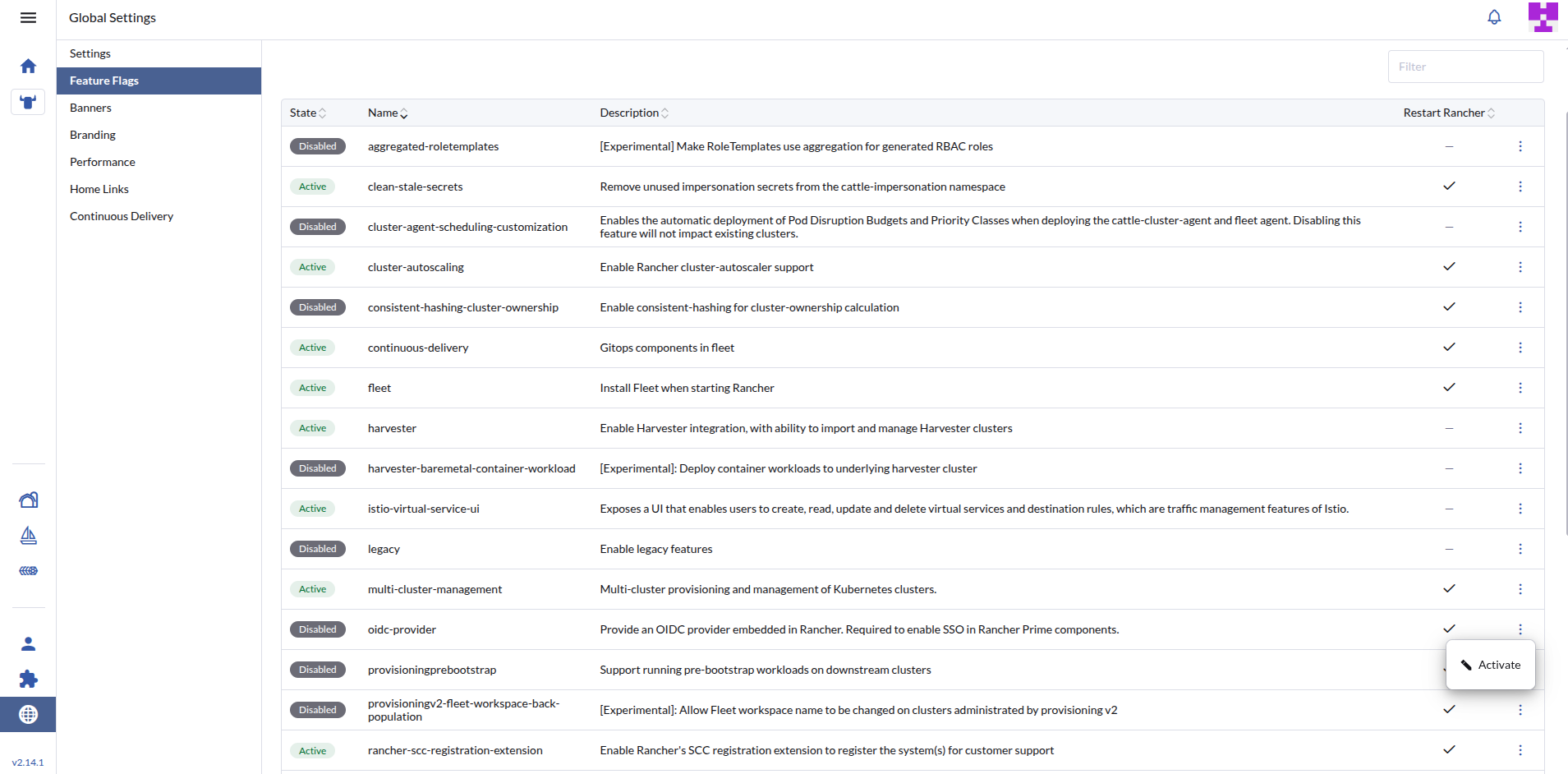
Click the three-line menu (☰) in the upper left and go to › .
Find the
oidc-providerflag, click the More Actions icon (⋮), and click Activate.
5.2 Step 2: Create an OIDCClient resource #
Rancher uses an OIDCClient Custom Resource to register downstream applications.
Create a file named
rancher-oidc-client.yamlwith the following content:apiVersion: management.cattle.io/v3 kind: OIDCClient metadata: name: spr-client spec: tokenExpirationSeconds: 600 refreshTokenExpirationSeconds: 3600 redirectURIs: # Replace this with the actual callback URL of your SUSE private registry instance - "https://<SUSE_PRIVATE_REGISTR_URL>/c/oidc/callback"Apply the file to the cluster where Rancher is running:
> kubectl apply -f rancher-oidc-client.yaml
5.3 Step 3: Retrieve the Client ID and Secret #
Once the resource is created, Rancher automatically populates the clientID and provisions a Kubernetes Secret containing the clientSecret.
Get the generated Client ID:
> kubectl get oidcclient spr-client -o jsonpath="{.status.clientID}"Fetch the Client Secret. Remember to replace
<YOUR_CLIENT_ID>with the ID retrieved in the previous step:> kubectl get secret <YOUR_CLIENT_ID> -n cattle-oidc-client-secrets -o jsonpath="{.data.client-secret-1}" | base64 -d
5.4 Step 4: Configure SUSE Private Registry #
You can configure SUSE Private Registry to use Rancher as its OIDC provider by passing the values via Helm.
Use the core.configureUserSettings block in your values-oidc.yaml configuration.
The following is an example block using your Rancher endpoint and the credentials retrieved above.
Replace the values of <YOUR_CLIENT_ID> and <YOUR_CLIENT_SECRET>.
core:
  configureUserSettings: |
    {
      "auth_mode": "oidc_auth",
      "oidc_name": "Rancher",
      "oidc_endpoint": "<RANCHER_URL>/oidc",
      "oidc_client_id": "<YOUR_CLIENT_ID>",
      "oidc_client_secret": "<YOUR_CLIENT_SECRET>",
      "oidc_scope": "openid,profile,offline_access",
      "oidc_verify_cert": false,
      "oidc_auto_onboard": true,
      "oidc_user_claim": "preferred_username",
      "oidc_groups_claim": "groups",
      "oidc_admin_group": "spr-admins"
    }
Ensure oidc_verify_cert is set to false if your Rancher instance is using self-signed certificates.
By specifying oidc_admin_group, any Rancher user belonging to the spr-admins group will automatically be granted System Administrator privileges in SUSE Private Registry.