2 Installation overview #
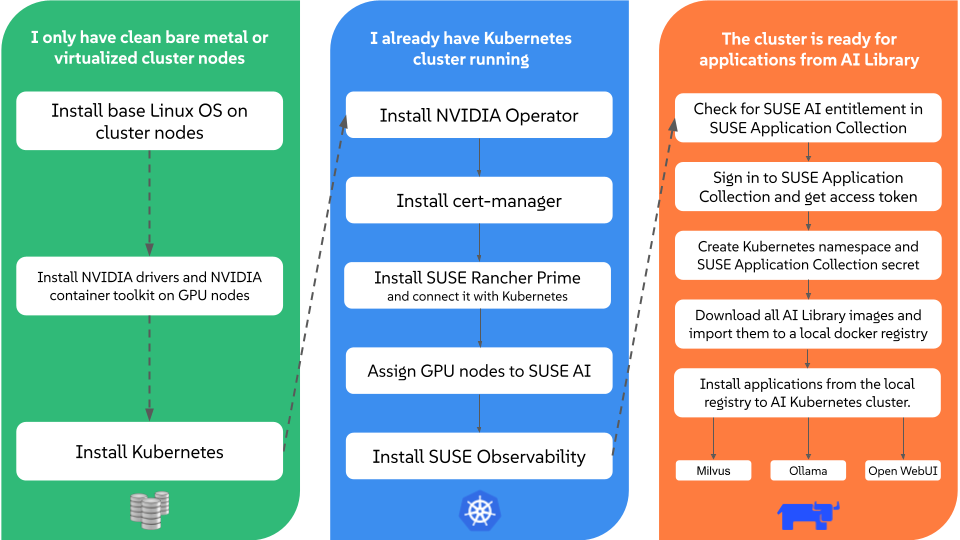
This chart illustrates important steps involved in the installation process of SUSE AI.
The chart focuses on the following possible scenarios:
You have clean cluster nodes prepared without a supported Linux operating system installed.
You have a supported Linux operating system and Kubernetes distribution installed on cluster nodes.
You have SUSE Rancher Prime and all supportive components installed on the Kubernetes cluster and are prepared to install the required applications from the AI Library.
2.1 SUSE AI air-gapped stack #
The air-gapped stack is a set of scripts that ease the successful air-gap installation of certain SUSE AI components. To use them, you need to clone or download them from the stack’s GitHub repository.
2.1.1 What scripts does the stack include? #
The following scripts are included in the air-gapped stack:
SUSE-AI-mirror-nvidia.shMirrors all RPM packages from a specified Web URLs.
SUSE-AI-get-images.shDownloads Docker images of SUSE AI applications from SUSE Application Collection.
SUSE-AI-load-images.shLoads downloaded Docker images into a custom Docker image registry.
2.1.2 Where do the scripts fit into the air-gap installation? #
The scripts are required in several places during the SUSE AI air-gapped installation. The following simplified workflow outlines the intended usage:
Use
SUSE-AI-mirror-nvidia.shon a remote host to download the required NVIDIA RPM packages. Transfer the downloaded content to an air-gapped local host and add it as a Zypper repository to install NVIDIA drivers on local GPU nodes.Use
SUSE-AI-get-images.shon a remote host to download Docker images of required SUSE AI components. Transfer them to an air-gapped local host.Use
SUSE-AI-load-images.shto load the transferred Docker images of SUSE AI components into a custom local Docker image registry.Install AI Library applications on the local Kubernetes cluster from the local custom Docker registry.