3 Monitoring Open WebUI #
The preferred way of retrieving relevant telemetry data from Open WebUI is to use the SUSE AI Filter. It requires enabling and configuring Open WebUI Pipelines.
Verify that the Open WebUI installation override file
owui_custom_overrides.yamlincludes the following content.pipelines: enabled: true persistence: storageClass: longhorn 1 extraEnvVars: 2 - name: PIPELINES_URLS 3 value: "https://raw.githubusercontent.com/SUSE/suse-ai-observability-extension/refs/tags/v2.0.0/integrations/oi-filter/suse_ai_filter.py" - name: OTEL_SERVICE_NAME 4 value: "Open WebUI" - name: OTEL_EXPORTER_HTTP_OTLP_ENDPOINT 5 value: "http://opentelemetry-collector.suse-observability.svc.cluster.local:4318" - name: PRICING_JSON 6 value: "https://raw.githubusercontent.com/SUSE/suse-ai-observability-extension/refs/tags/v2.0.0/integrations/oi-filter/pricing.json" extraEnvVars: - name: OPENAI_API_KEY 7 value: "0p3n-w3bu!" Note
NoteIn the above example, there are two
extraEnvVarsblocks: one at the root level and another inside thepipelinesconfiguration. The root-levelextraEnvVarsis fed into Open WebUI to configure the communication between Open WebUI and Open WebUI Pipelines. TheextraEnvVarsinside the configuration are injected into the container that acts as a runtime for thepipelines.longhornorlocal-path.The environment variables that you are making available to the pipeline’s runtime container.
A list of pipeline URLs to be downloaded and installed by default. Individual URLs are separated by a semicolon (
;).For air-gapped deployments, you must provide the pipelines at URLs that are accessible from the local host, such as an internal GitLab instance.
The service name that appears in traces and topological representations in SUSE Observability.
The endpoint for the OpenTelemetry collector. Make sure to use the HTTP port of your collector.
A file for the model multipliers in cost estimation. You can customize it to match your actual infrastructure experimentally.
For air-gapped deployments, you must provide the pipelines at URLs that are accessible from the local host, such as an internal GitLab instance.
The value for the API key between Open WebUI and Open WebUI Pipelines. The default value is
0p3n-w3bu!.After you fill the override file with correct values, install or update Open WebUI.
> helm upgrade \ --install open-webui oci://dp.apps.rancher.io/charts/open-webui \ -n SUSE_AI_NAMESPACE \ --create-namespace \ --version 7.2.0 \ -f owui_custom_overrides.yaml Tip
TipMake sure to set the version, namespace and other options to the proper values.
After the installation is successful, you can access tracing data in SUSE Observability for each chat.
TipYou can verify that a new connection was created with correct credentials in › › .
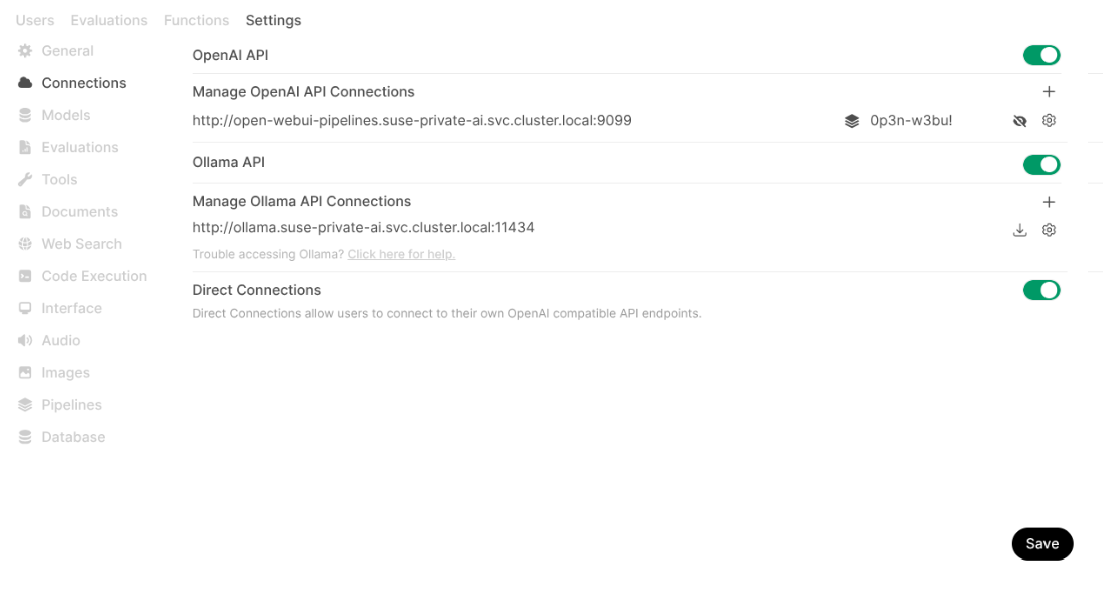 Figure 3.1: New connection added for the pipeline #
3.1 Configuring a pipeline filter in Open WebUI (recommended) #
If you already have a running instance of Open WebUI with the pipelines enabled and configured, you can set up the SUSE AI Filter in its Web user interface.
You must have Open WebUI administrator privileges to access configuration screens or settings mentioned in this section.
In the bottom left of the Open WebUI window, click your avatar icon to open the user menu and select .
Click the tab and select from the left menu.
In the section, enter
https://raw.githubusercontent.com/SUSE/suse-ai-observability-extension/refs/tags/v2.0.0/integrations/oi-filter/suse_ai_filter.pyand click the upload button on the right to upload the pipeline from the URL.After the upload is finished, you can review the configuration of the pipeline. Confirm with .
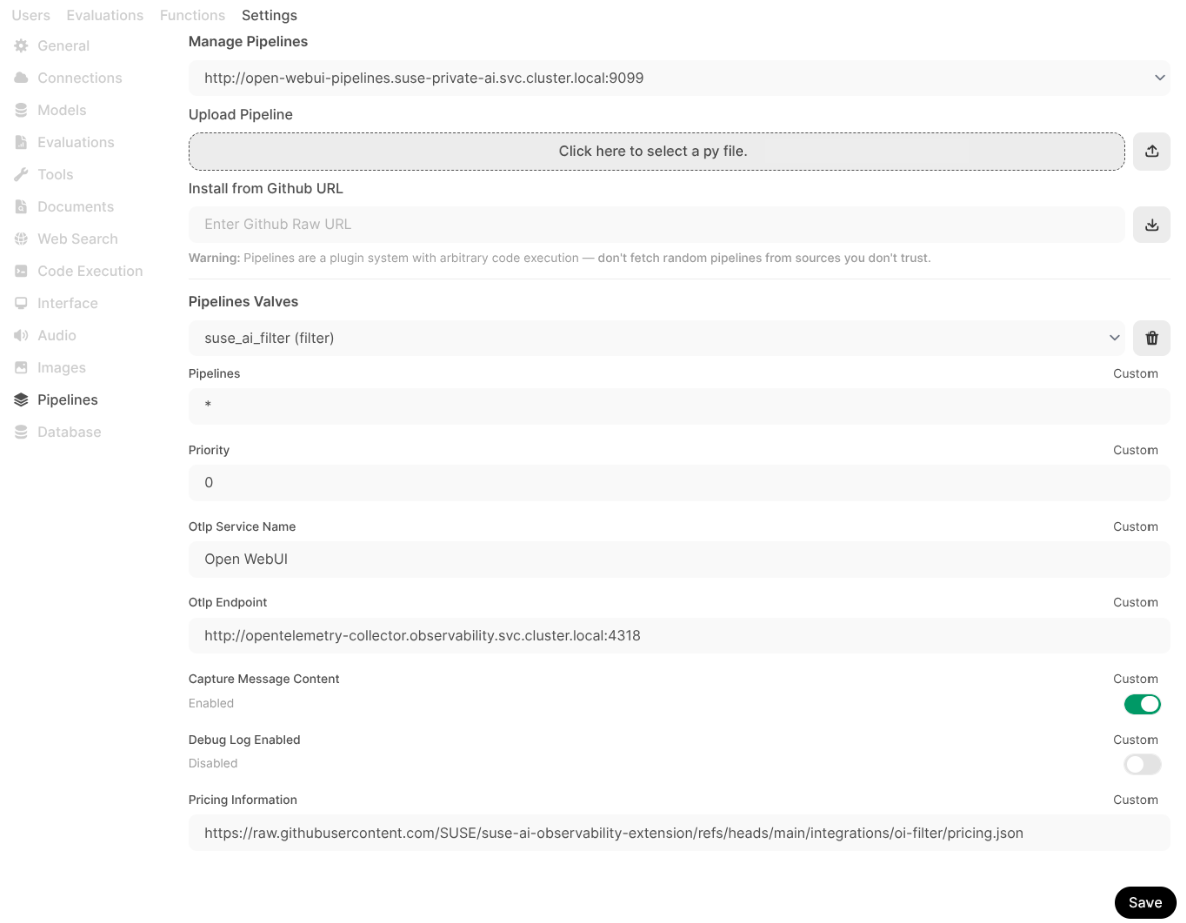 Figure 3.2: Adding SUSE AI filter pipeline #
3.2 Configuring default Open WebUI metrics and traces (advanced) #
Open WebUI also offers certain built-in OpenTelemetry integration for traces and metrics. These signals are related to the API consumption but do not provide details about the GenAI monitoring. That is, why we need to configure the SUSE AI filter as described in Configuring pipeline filter during Open WebUI installation (recommended).
Append the following environment variables to your
extraEnvVarssection in theowui_custom_overrides.yamlfile mentioned in Configuring pipeline filter during Open WebUI installation (recommended).extraEnvVars: - name: OPENAI_API_KEY value: "0p3n-w3bu!" - name: ENABLE_OTEL value: "true" - name: ENABLE_OTEL_METRICS value: "true" - name: OTEL_EXPORTER_OTLP_INSECURE value: "false" 1 - name: OTEL_EXPORTER_OTLP_ENDPOINT value: CUSTOM_OTEL_ENDPOINT 2 - name: OTEL_SERVICE_NAME value: CUSTOM_OTEL_IDENTIFYER 3
Set to "true" for testing or controlled environments, and "false" for production deployments with TLS communication.
Enter your custom OpenTelemetry collector endpoint URL, such as "http://opentelemetry-collector.suse-observability.svc.cluster.local:4318".
Specify a custom identifier for the OpenTelemetry service, such as
OI Core.Save the enhanced override file and update Open WebUI:
> helm upgrade \
  --install open-webui oci://dp.apps.rancher.io/charts/open-webui \
  -n <replaceable>SUSE_AI_NAMESPACE</replaceable> \
  --create-namespace \
  --version 7.2.0 \
  -f owui_custom_overrides.yaml