Enterprise AI Lifecycle with SUSE AI and ClearML #
Delivering a Secure, Scalable, and Observable Platform for Managing AI Workloads

This document provides an opinionated reference design for an enterprise, AI lifecycle management platform using SUSE AI and ClearML to streamline and accelerate AI operations with focus on scalability, security, observability, and operational consistency across environments.
Documents published as part of the series SUSE Technical Reference Documentation have been contributed voluntarily by SUSE employees and third parties. They are meant to serve as examples of how particular actions can be performed. They have been compiled with utmost attention to detail. However, this does not guarantee complete accuracy. SUSE cannot verify that actions described in these documents do what is claimed or whether actions described have unintended consequences. SUSE LLC, its affiliates, the authors, and the translators may not be held liable for possible errors or the consequences thereof.
1 Introduction #
This technical reference provides a validated design for building an enterprise-grade AI compute and machine learning operations (MLOps) platform using SUSE® AI integrated with ClearML. It describes an opinionated but flexible architecture, designed to help organizations deploy, operate, and scale machine learning workloads in a secure, consistent, and observable manner across on-premises, cloud, and hybrid environments.
As enterprises increasingly adopt artificial intelligence to drive business value, many face challenges in moving from isolated experimentation to reliable, repeatable production deployments. Common obstacles include fragmented tooling, inconsistent environments, limited lifecycle visibility, and difficulties in scaling GPU-enabled workloads while maintaining security and governance. SUSE AI and ClearML together address these challenges by providing a Kubernetes-native foundation for AI workloads combined with end-to-end MLOps capabilities.
This reference configuration focuses on platform-level concerns rather than data science methodologies. It outlines how platform teams can standardize machine learning workflows, manage shared AI infrastructure, and enable multiple data science teams to work efficiently within a governed and observable environment at enterprise scale. It includes discussion of the business context and its value. It also covers technical architecture and provides operational guidance.
1.1 Scope #
This document covers:
The business and technical drivers for adopting an AI infrastructure management platform
A reference architecture for SUSE AI and ClearMLintegration
Core software and infrastructure components and their roles
Deployment considerations and validation guidance
Security, scalability, and observability best practices
This document does not cover:
Detailed machine learning algorithms or data science workflows
Application-specific model tuning
Vendor-specific hardware performance benchmarking
Step-by-step installation instructions already documented by SUSE or ClearML
1.2 Audience #
This reference is intended for professionals involved in designing, deploying, or operating enterprise AI platforms, including:
Platform engineers
Infrastructure architects
DevOps and MLOps engineers
Cloud-native administrators
To successfully follow this guide, you should have:
Working knowledge of Kubernetes and containerized workloads
Experience administering Linux-based systems
Familiarity with cloud-native concepts
A basic understanding of the machine learning lifecycle and core MLOps concepts
1.3 Acknowledgments #
The following individuals contributed to the creation of this document:
Adam Wolf, Product Marketing Engineer, ClearML
Tina Naro, Senior Director of Product Marketing, ClearML
Victor Gregorio, AI Solution Innovation Director, SUSE
Martina Ilieva, Partner Alliance Manager, SUSE
2 Business aspect #
Enterprises increasingly invest in AI infrastructure to support process automation, AI model development, and management. While many organizations succeed in acquiring powerful hardware, they often struggle to operate it efficiently, securely, and at scale.
Without a centralized infrastructure management layer, AI resources are frequently underutilized, fragmented across teams, and difficult to govern. Inconsistent access controls, limited visibility into usage, and ad hoc workload orchestration lead to poor utilization of expensive compute and increased operational overhead, resulting in lost ROI.
This reference configuration addresses these challenges by providing an enterprise-ready AI infrastructure management platform based on SUSE AI and ClearML. The solution enables organizations to operate shared compute as a controlled, multi-tenant platform while offering essential tools that support AI builders without requiring a separate MLOps stack.
2.1 Business problem #
Organizations attempting to scale machine learning commonly encounter the following challenges:
Limited visibility - Without centralized observability, teams struggle to understand resource allocation, workload placement, and actual compute consumption across the organization.
Infrastructure underutilization - Organizations invest heavily in AI compute but lack centralized control to ensure resources are efficiently shared, scheduled, and fully utilized across teams.
Operational complexity - Running AI workloads across multiple clusters and environments introduces manual processes, fragile configurations, and increased operational risk for platform teams.
Security and governance challenges - Shared AI infrastructure requires consistent enforcement of isolation, access control, and policies to protect sensitive data and intellectual property.
Scalability and resource flexibility - AI workloads demand elastic access to compute resources and require a uniform resource access interface across hybrid environments.
Multi-tenancy - Enterprise platforms must support multiple teams with shared infrastructure while maintaining isolation, resource governance, and access control.
Fragmented model development and deployment tooling - Teams need a consistent toolset to develop, test, and deploy models, but fragmented tools and workflows slow iteration and increase operational friction.
These challenges affect multiple personas, including data scientists, platform teams, IT operations, and business stakeholders responsible for risk and compliance.
2.2 Business value #
This reference configuration addresses these challenges by providing a standardized, enterprise-ready MLOps platform that delivers the following benefits:
Accelerated time to value - Streamlined and repeatable machine learning workflows reduce friction from experimentation to production.
Improved operational consistency - A Kubernetes-native platform ensures consistent deployment and operation of ML workloads across environments, improving infrastructure ROI.
Enhanced security and governance - Integrated security and observability capabilities help protect models, data, and pipelines throughout the lifecycle, suitable for sovereign AI initiatives.
Scalable AI infrastructure - The solution supports growth by enabling elastic scaling of compute resources, including GPU-enabled workloads when required.
Future-ready architecture - A modular and cloud-agnostic design allows organizations to adapt to evolving AI use cases and infrastructure strategies.
This solution is designed as a strong foundation for operationalizing AI while maintaining control, visibility, and security at enterprise scale.
2.3 Representative customer use cases #
The following representative customer scenarios illustrate how SUSE AI and ClearML address common enterprise AI infrastructure challenges across regulated, distributed, and high-growth environments. These examples highlight the operational patterns that this reference configuration is intended to support, including secure isolation, efficient GPU utilization, centralized orchestration, and scalable execution across on-premises and hybrid environments.
2.3.1 On-premises Air-Gapped Defense Environment #
Business Challenge
A defense organization operating in an air-gapped environment needed to support confidential AI projects while maintaining strict isolation between teams. Resource management was heavily manual, and limited visibility into GPU occupancy made it difficult to determine which resources were available, in use, or assigned to specific users. As a result, AI projects were often allocated entire clusters, reducing overall utilization and slowing research progress.
The Solution
By deploying ClearML Infrastructure Control Plane, the organization gained centralized visibility into compute utilization and introduced policy-based GPU allocation. Resource access was governed through quotas, with controlled access to additional capacity when available. ClearML was integrated directly into the experimentation workflow so that jobs could be submitted and tracked through a centralized interface, even in an air-gapped deployment. This improved GPU utilization, increased transparency for development teams, and reduced the need to rerun experiments, helping accelerate time to market.
2.3.2 Automatic Identity Verification for Financial Services #
Business Challenge
A financial services organization supporting remote machine learning teams needed to execute large-scale AI workloads across distributed GPU infrastructure while managing datasets larger than 10 TB. As experimentation scaled, the team faced challenges in allocating GPUs efficiently, coordinating work across environments, and maintaining reproducibility. Operational overhead increased, and compute resources were not being used as effectively as required.
The Solution
The organization deployed ClearML to orchestrate experiments, schedule workloads across on-premises GPUs, and automate cloud bursting during periods of peak demand. Centralized workload and compute management improved GPU utilization by more than 20 percent and enabled efficient handling and versioning of datasets 10x larger than previously managed. This reduced the complexity of running distributed machine learning workloads while improving consistency and operational control.
2.3.3 Fine-Tuning Language-Specific LLMs #
Business Challenge
A global research organization developing customized LLM-based translation models required a platform that could support experimentation while also providing a reliable path to production. The team was running workloads on an on-premises GPU cluster and needed a solution that could improve resilience, scale automatically, and reduce dependence on manual operational intervention.
The Solution
The organization deployed ClearML to manage experiment tracking, orchestration, and workload execution across research and production environments. ClearML enabled centralized control of experiments and infrastructure, automated execution on available GPUs, and improved the reliability of the translation service. As a result, the organization was able to serve 3.5x more customers without adding hardware or increasing day-to-day operational burden.
3 Architectural overview #
The solution integrates SUSE AI and ClearML to provide a unified AI infrastructure platform. It supports the full lifecycle of AI workloads—from experimentation and training to deployment and monitoring—while ensuring consistency, security, and operational visibility. Its architecture follows a layered, Kubernetes-native design that allows clear separation of responsibilities. This results in highly flexible, AI infrastructure that can scale across on-premises, hybrid, and multi-cloud environments.
At a high level, the architecture consists of the following layers:
Compute or hardware infrastructure
Container management
AI and MLOps platform
Security and observability
The following diagram illustrates the details of this architecture.
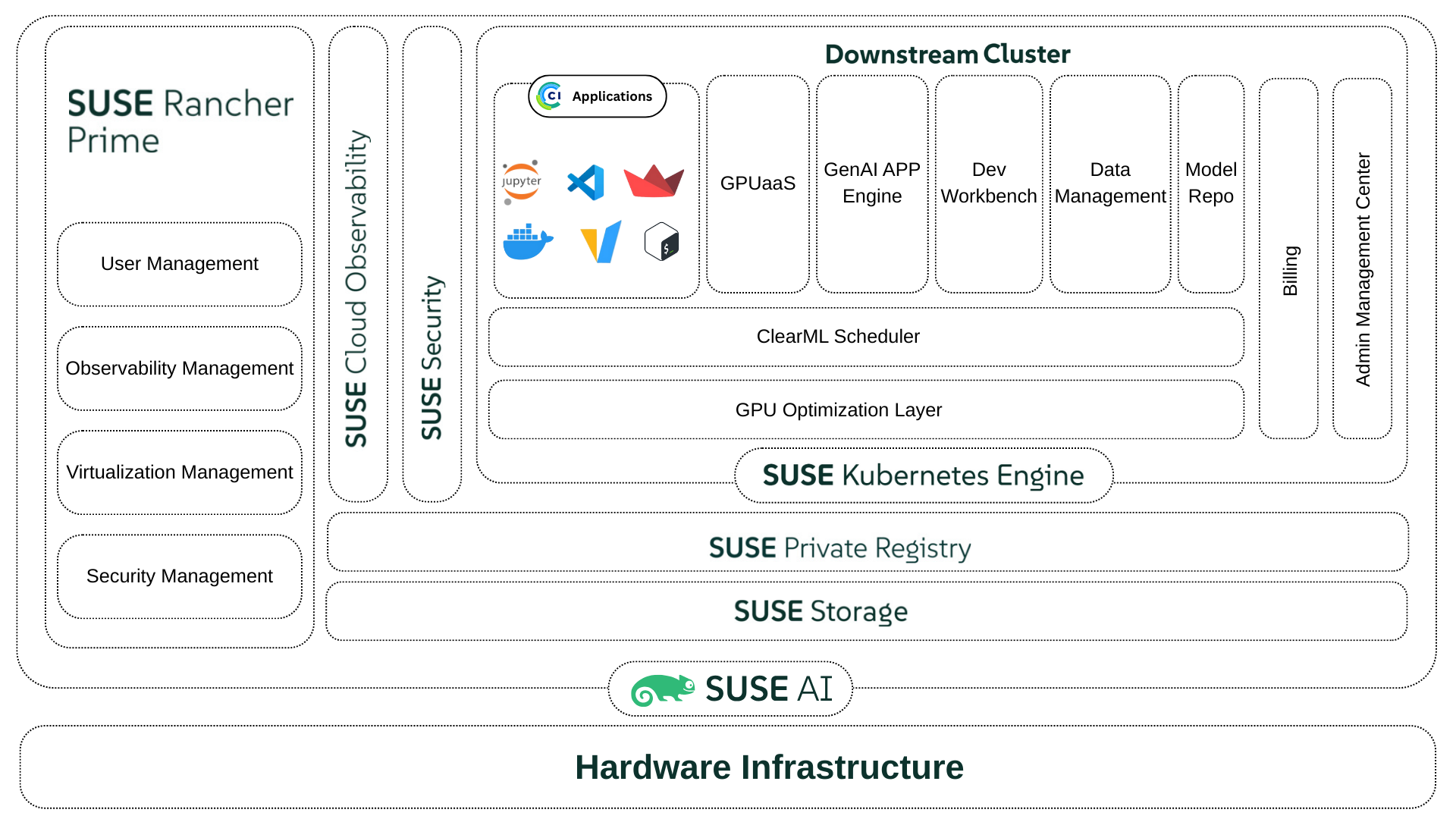

This reference configuration focuses on architectural patterns and integration points. For installation details and hardware-specific guidance, refer to the official SUSE and ClearML documentation.
The key components of the solution are:
Software
ClearML - Delivers AI infrastructure management capabilities that enable GPU optimization, AI workload orchestration and scheduling, policy-driven resource governance, and full lifecycle control of AI workloads and models.
SUSE® AI - Provides the enterprise-grade Kubernetes foundation and runtime environment for AI and machine learning workloads.
SUSE® Rancher Prime - Enables centralized Kubernetes cluster management, access control, and lifecycle operations.
SUSE® Security - Provides container image scanning, runtime security, and network visibility.
SUSE® Private Registry - Acts as the secure container image registry for training and inference workloads.
SUSE® Storage - Provides distributed, cloud-native persistent storage for platform services and AI workloads.
SUSE® Kubernetes Engine (RKE2) - Provide the secure Kubernetes orchestration layer to run platform services, training jobs, and inference workloads.
SUSE® Linux Enterprise Server - Provides the secure, stable, and enterprise-grade operating system foundation for Kubernetes nodes and supporting infrastructure. SUSE Linux Enterprise Server delivers a hardened Linux environment with long-term support, integrated security updates, and certified compatibility with SUSE AI, RKE2, and GPU drivers. This ensures consistent and reliable operation of AI platform services and workloads.
Compute platform - Supplies computational, networking, and storage hardware (whether on-premises, including air-gapped, or cloud) to support infrastructure and workload requirements.
Each component is further described in the next sections.
4 Software components #
This section describes the primary software components that compose the solution, including their roles in infrastructure and workload management.
4.1 ClearML #
ClearML provides the AI infrastructure management and workload orchestration capabilities required to manage the AI training, building, and inferencing lifecycle. It integrates with SUSE AI to deliver infrastructure optimization, resource allocation, experiment tracking, pipeline orchestration, and model governance on top of the Kubernetes platform.
Within this reference design, ClearML is responsible for:
Tracking experiments, pipelines metrics, parameters, and models
Managing datasets and data lineage
Managing built-in multi-tenancy and billing
Optimizing infrastructure with dynamic, fractional GPUs and ClearML’s Unified Memory Technology
Defining resource quotas, over-quotas, priorities and spillovers
ClearML consists of three layers:
Infrastructure Control Plane - allowing you to manage and optimize AI infrastructure – whether on-premises, in the cloud, or both - ensuring high performance and cost optimization
AI Developer Center - providing a robust environment for developing, training, and testing AI models, accessible from anywhere
GenAI Application Engine - deploying and managing AI workloads and AI agents with preconfigured networking, authentication, and security
These layers are implemented by deploying three main components into the resource cluster:
ClearML Enterprise Server - control plane that provides back-end services and the UI
ClearML Agent - manages the orchestration of workloads on the Kubernetes cluster
ClearML Application Gateway - controls the networking, authentication and authorization into and out of ClearML-provisioned pods
ClearML operates as the primary interface for AI builders, while relying on SUSE AI for secure and scalable workload execution.
4.2 SUSE® AI #
SUSE AI provides the enterprise-grade foundation for running AI and machine learning workloads on Kubernetes. It delivers a validated, supported platform that enables consistent execution of AI workloads across environments.
SUSE AI is responsible for:
Providing a Kubernetes-native environment optimized for AI workloads
Enabling consistent deployment of training and inference workloads
Supporting GPU-enabled workloads where required
Integrating with container management, security, and observability services
SUSE AI serves as the control plane and execution environment for all machine learning workloads described in this architecture.
4.3 SUSE® Rancher Prime #
SUSE Rancher Prime provides centralized management and lifecycle control for the Kubernetes clusters that host the platform and run the workloads.
SUSE Rancher is used to:
Provision and manage Kubernetes clusters across environments
Enforce consistent cluster configuration and access control
Provide centralized visibility into cluster health and resource utilization
Support multi-cluster and multi-tenant operations
SUSE Rancher enables platform teams to operate infrastructure at scale while maintaining consistency and governance.
4.4 SUSE® Kubernetes Engine (RKE2) #
SUSE RKE2 (RKE2) provides the secure, enterprise-ready Kubernetes distribution used to run all platform services and machine learning workloads in this architecture. It delivers a CNCF-compliant Kubernetes environment that is hardened by default and suitable for regulated and enterprise environments.
RKE2 is responsible for:
Providing the Kubernetes orchestration layer for SUSE AI and ClearML
Running platform services, training jobs, and inference workloads
Enforcing Kubernetes-native scheduling, networking, and resource isolation
Supporting GPU-enabled workloads where required
Integrating with SUSE Rancher for centralized lifecycle management
RKE2 forms the foundational orchestration layer for the platform and enables consistent workload execution across on-premises, hybrid, and multi-cloud environments.
4.5 SUSE® Storage #
SUSE Storage, powered by Longhorn, provides distributed, cloud-native persistent storage for the platform. It delivers highly available and resilient storage that supports stateful platform services and machine learning workloads running on Kubernetes.
SUSE Storage is responsible for:
Storing ClearML metadata, artifacts, and logs
Providing persistent volumes for platform and workloads
Supporting data replication and high availability
Enabling snapshotting and backup of critical platform data
SUSE Storage is deployed on RKE2 clusters and backed by local or network-attached disks. It provides consistent, Kubernetes-native storage that supports performance, durability, and operational requirements across environments.
4.6 SUSE® Security #
SUSE Security, powered by NeuVector, provides container and runtime security for the platform and workloads.
SUSE Security is used to:
Perform vulnerability scanning of container images
Enforce runtime security policies for AI workloads
Monitor network traffic between platform components
Provide real-time threat detection and response
SUSE Security ensures that machine learning workloads and supporting services operate within enterprise security and compliance requirements.
4.7 SUSE® Private Registry #
SUSE Private Registry provides a secure container image registry for storing and distributing container images used by the platform.
SUSE Private Registry is used for:
Storing base images for training and inference workloads
Managing versioned application and model images
Integrating with vulnerability scanning and access controls
Supporting secure image promotion across environments
Using a centralized registry helps ensure consistency and traceability across development, testing, and production workflows.
4.8 SUSE® Linux Enterprise Server #
SUSE Linux Enterprise Server provides the secure, stable, and enterprise-grade operating system foundation for the platform. It serves as the base operating system for Kubernetes control plane and worker nodes, and for supporting infrastructure components used by SUSE AI and ClearML.
SUSE Linux Enterprise Server is responsible for:
Providing a hardened and supported Linux operating system for Kubernetes nodes
Ensuring compatibility with RKE2, container runtimes, and GPU drivers
Delivering long-term stability through enterprise lifecycle management and security updates
Supporting high-performance compute workloads, including GPU-accelerated training and inference
Enabling consistent operating system configuration across on-premises, cloud, and hybrid environments
SUSE Linux Enterprise Server underpins the reliability, security, and operational consistency of the entire AI platform, ensuring that Kubernetes, SUSE AI, and ClearML services run on a certified and enterprise-supported operating system foundation.
4.9 Compute platform #
The solution is deployed on a production-grade, Kubernetes cluster. The underlying compute infrastructure may be based on virtual machines, bare-metal servers, or cloud-native infrastructure, provided it meets enterprise availability and performance requirements.
A baseline, production deployment should include the following considerations:
Kubernetes Control Plane
At least three control-plane nodes for high availability quorum
Application / Platform Nodes
At least three worker nodes on Kubernetes cluster to host platform services with high availability
Execution / Worker Nodes (ClearML Agents)
A minimum node count will be based on technical and business requirements, such as concurrency, SLAs, dedicated pools for CPU and GPU workloads, and so on.
Worker node sizing must account for:
CPU and memory requirements per job
GPU requirements (if applicable)
Dataset size and I/O throughput
Expected concurrent task execution
Additional considerations for enterprise environments with strict availability requirements include:
Multi-node control plane (minimum three nodes)
Replicated application services
Persistent storage with redundancy
Load-balanced ingress
Detailed resource requirements, node sizing, storage specifications, and scaling considerations for individual components and clusters are defined in their respective sections of this guide. However, final node counts and configurations must be derived from workload analysis and capacity planning.
5 Deployment #
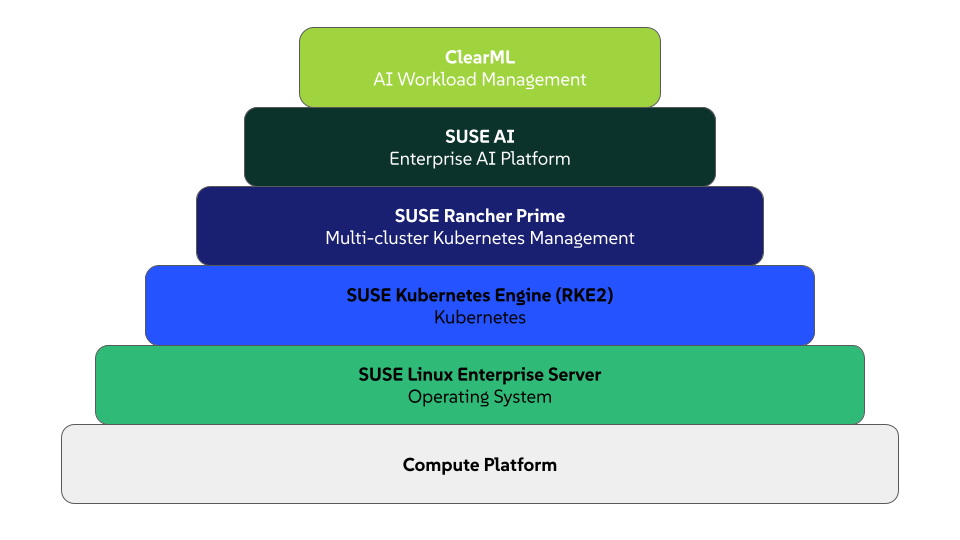
This section provides a high-level overview for deploying ClearML into your SUSE AI environment. It describes deployment considerations for the major compute platform and software layers to form a functional platform for AI workloads. The solution is represented as a layered stack, where each layer depends on the services provided by the layer below it. Deployment is performed in a bottom-up sequence, ensuring that each foundational capability is in place before higher-level services are introduced.
5.1 SUSE Linux Enterprise Server #
At the base of the software stack is SUSE Linux Enterprise Server. You can download SUSE Linux Enterprise Server as an ISO file or virtual machine image from SUSE Linux Enterprise Server Downloads or from the SUSE Customer Center (SCC). Be sure to select the appropriate, supported version of SUSE Linux Enterprise Server by reviewing the SUSE Rancher support matrix.
You will need to register your installed system with SUSE Customer Center to obtain software packages and patches. You can do this by configuring each node in one of the following ways:
directly access the SUSE Customer Center through an external network
use your organization’s internal, SUSE® Multi-Linux Manager infrastructure
leverage a local server running an instance of SUSE Remote Mirroring Tool (RMT)

During OS installation, you can point each node to the respective update service. This can also be accomplished post-installation with the command line tool, SUSEConnect.
In production environments, you can optimize deployment and reduce manual interaction with unattended, automated deployments. See Automated Installation Using Agama.
Ensure these additional considerations are configured on each node:
Domain Name Service (DNS) - an external network-accessible service to map IP Addresses to host names
Network Time Protocol (NTP) - an external network-accessible service to obtain and synchronize system times to aid in time stamp consistency
Ensure connectivity by configuring the firewall to allow necessary inbound RKE2 ports or, depending on your security compliance requirements, disable the firewall service.
5.2 SUSE RKE2 #
SUSE RKE2 provides the Kubernetes layer to host SUSE Rancher Prime. For a stable, secure, and scalable RKE2 deployment, consider the following:
Version - Identify the appropriate, supported version of RKE2 by reviewing the SUSE Rancher: Support Matrix.
Availability - For production deployments, use an odd number of control plane / etcd nodes (minimum three) to maintain etcd quorum and prevent loss of cluster availability. When deploying multiple control-plane nodes, use an external load balancer to distribute traffic across the Kubernetes API servers.
Networking - Ensure that all required Kubernetes, etcd, and container runtime ports are open between cluster nodes. Latency and packet loss between nodes—especially etcd members—can negatively impact cluster stability and performance.
etcd Data Protection - etcd stores all Kubernetes cluster state and configuration. Enable regular etcd snapshots and store backups outside the cluster to support disaster recovery and cluster restoration.
Security - Restrict SSH access to cluster nodes using key-based authentication only. Use least-privilege access for the SSH user specified in the
cluster.ymlfile. Protect the generatedcluster.ymlfile, as it provides administrative access to the cluster.Scalability - Additional worker or control-plane nodes can be added to the cluster after initial deployment by updating the
cluster.ymlfile and re-running the rke up command. Plan IP addressing, DNS, and load balancer capacity accordingly.Certificate Management - RKE2 automatically generates and manages Kubernetes certificates. If a load balancer or external endpoint is used, ensure all required IP addresses and FQDNs are included in the
cluster.ymlfile to avoid certificate validation issues.Operating System Configuration - Disable swap and ensure required kernel modules are loaded on all nodes. Apply consistent OS configuration across nodes to avoid unpredictable behavior.
Upgrade Strategy - Before upgrading Kubernetes or RKE2 versions, review the supported version matrix and perform upgrades in a test environment. Back up etcd data prior to any upgrade operation.
Logging and Monitoring - Plan for cluster-level monitoring and logging early in the deployment lifecycle to simplify troubleshooting and operational visibility.
RKE2 installation requires a client system (an administrative workstation) that has been configured with kubectl utility.
The deployment process includes the major steps outlined below.
Select your installation method.
RKE2 supports multiple installation methods, including TAR archive installation, RPM-based installation, and manual binary installation. The TAR archive installation method is recommended for most deployment scenarios because of its flexibility and consistency across environments. Refer to the official RKE2: Installation Methods documentation for details.
Install RKE2 on the control plane nodes.
Install RKE2 on each server node by following the official guidance in RKE2: Installation Quickstart.
Configure high availability by following guidance provided in RKE2: Installation High Availability.
NoteFor multi-node control plane deployments, you will need to provision an external load balancer to distribute traffic across server nodes.
Ensure that the load balancer IP address or fully qualified domain name (FQDN) is included in the TLS Subject Alternative Name (SAN) configuration to prevent certificate validation issues.
Install the appropriate agent on your worker nodes.
Instructions for installing the Linux or Windows Agent are provided in RKE2: Installation Quickstart.
TipEnsure that each worker node meets documented system requirements and can securely communicate with the server nodes.
5.3 SUSE Rancher Prime #
Before installing SUSE Rancher Prime onto your RKE2 cluster, consider the following:
Deployment Strategy - Understand and select a SUSE Rancher: Deployment Strategy for your requirements.
Availability - Deploy SUSE Rancher to achieve your availability requirements. High availability, for example, can be achieved by deploying SUSE Rancher on a highly available RKE2 cluster.
Backup/Restore and Disaster Recovery - Implement backup/restore and disaster recovery strategies to protect your infrastructure and workloads. This will include leveraging a distributed storage solution, such as SUSE Storage, and third-party backup/restore and disaster recovery solutions certified for SUSE Rancher.
Network Handling and Security - Ensure your network configuration can properly and securely handle incoming network traffic. A few recommendations include:
DNS should resolve to a layer 4 load balancer.
The load balancer should forward port TCP/80 and TCP/443 to all nodes in the host RKE2 cluster.
The ingress controller should forward traffic to the pod in the SUSE Rancher deployment.
The ingress controller should redirect HTTP to HTTPS protocol and terminate TLS/SSL on port TCP/443.
NoteBy default, SUSE Rancher can generate an SSL certificate for encrypting network traffic. You can also configure Let’s Encrypt or provide your own certificate.
For more further considerations, review Best Practices for the SUSE Rancher Prime Server.
Once you have defined your deployment requirements, proceed with the installation by following the detailed guidance provided in Installing SUSE Rancher Prime.
5.4 SUSE Storage #
SUSE Storage provides persistent storage for Kubernetes workloads running on SUSE RKE2 and managed by SUSE Rancher Prime. It enables high availability, scalability, and data protection for stateful applications.
For a stable and production-ready deployment, consider the following:
Cluster Requirement – Deploy SUSE Storage on a running RKE2 cluster managed by SUSE Rancher Prime. Storage nodes must meet the documented hardware, disk, and network requirements. Use dedicated disks only. Refer to SUSE Storage: Requirements.
High Availability – Use a minimum of three storage nodes to maintain quorum and ensure data availability. Distribute storage across failure domains where possible.
Disk and Performance Planning – Select SSD or HDD based on workload performance needs. Configure replication settings carefully to balance performance and data protection.
Capacity Planning – Monitor storage usage and plan for expansion by adding disks or nodes as required.
Backup and Recovery – Enable snapshots and integrate with enterprise backup solutions to protect persistent data and support disaster recovery.
Deploy SUSE Storage using a supported method in SUSE Rancher Prime. For detailed installation and configuration steps, refer to the SUSE Storage: Installation.
5.5 SUSE Security #
SUSE Security provides runtime container security, Kubernetes workload protection, vulnerability scanning, continuous compliance validation, and policy enforcement for workloads running on SUSE RKE2 and managed by SUSE Rancher Prime. It delivers visibility, threat detection, and automated policy control across the container lifecycle.
For a stable and production-ready deployment, consider the following:
System Requirements – Validate component requirements (Controllers, Scanners, Enforcers, Managers). Review supported operating systems, CPU, memory, and platform compatibility. Follow documented minimum and recommended specifications to ensure performance and reliability. Refer to SUSE Security: System Requirements.
Cluster Requirements – Deploy SUSE Security on a running RKE2 cluster managed by SUSE Rancher Prime. Ensure the cluster meets documented CPU, memory, and networking requirements. Verify node connectivity to required container registries (public or private).
Namespace and Deployment Scope – Deploy SUSE Security in the dedicated namespace (for example, "cattle-neuvector-system"). This isolates security components from application workloads and simplifies lifecycle management.
High Availability – Distribute controllers and enforcers across multiple worker nodes. Avoid single points of failure. Maintain protection during node failures or maintenance events.
Runtime Protection and Admission Control – Enable runtime security and admission control. Start policies in monitor mode. Move to enforce mode after validation to prevent unintended workload disruption.
Vulnerability and Compliance Scanning – Enable image scanning and continuous compliance checks. Apply required compliance templates (for example, CIS Benchmarks) based on organizational or regulatory requirements.
Resource Planning – Account for CPU and memory consumption from scanning and monitoring components. Size worker nodes appropriately, especially in high-density workload environments.
Logging and Monitoring Integration – Integrate alerts, events, and audit logs with centralized logging and monitoring platforms to improve visibility, response time, and audit readiness.
Backup and Disaster Recovery – Include SUSE Security policies and configurations in the cluster backup strategy. Ensure etcd backups capture security-related Kubernetes resources. Validate restore procedures periodically.
For detailed, version-aligned installation and configuration steps, refer to SUSE Security: Rancher Deployment.
5.6 SUSE AI #
SUSE AI provides a cloud-native, scalable platform for deploying Generative AI workloads on Kubernetes. It includes modular AI components (middleware, vector databases, inference engines, and UI services) that can be deployed individually or as a full stack using the "SUSE Deployer meta-chart". SUSE AI integrates with SUSE Rancher and aligns with SUSE entitlement and cluster requirements.
For a stable and production-ready deployment, consider the following:
Cluster Requirement – Deploy SUSE AI on a running Kubernetes cluster (for example, SUSE Rancher with RKE2). Ensure all nodes are registered and healthy.
GPU and Node Preparation – Provision GPU-enabled nodes with NVIDIA drivers and CUDA installed. Label nodes appropriately for AI workloads. Refer to SUSE AI: Requirements.
Entitlement and Registry Access – Maintain a valid SUSE AI subscription. Ensure access to the SUSE Application Collection registry for Helm charts and container images. Keep credentials current.
Namespace Isolation – Create a dedicated namespace (for example, "suse-ai") to isolate AI workloads from other cluster applications.
Registry Credentials Configuration – Create Kubernetes image pull secrets for the SUSE Application Collection registry using entitlement credentials. Validate image pull access before deployment.
Helm Registry Access – Authenticate to the Helm OCI registry hosting SUSE AI charts prior to installation.
cert-manager Dependency – Install cert-manager in the cluster before deploying SUSE AI components that require certificate management.
Deployment Method – Deploy SUSE AI using the SUSE Deployer Helm chart. Use SUSE-provided override templates (production or minimal profiles) and customize values based on workload requirements.
Installation Order and Dependencies – Install foundational components (such as cert-manager) first, followed by core AI services. Deploy optional components (for example, GPU-based or framework-specific services) after core services are operational.
Resource Planning – AI components, including inference engines and vector databases, are resource intensive. Plan CPU, memory, storage, and GPU capacity based on expected workload size and concurrency.
Monitoring and Logging Integration – Configure SUSE Observability to collect metrics, logs, and traces for SUSE AI components. Monitor GPU utilization, inference latency, memory consumption, and storage performance. Integrate alerts for proactive incident response. Refer to SUSE AI: Monitoring and Observability.
Operational Validation – After deployment, verify all pods and services are in a healthy state. Confirm GPU allocation, storage availability, and external access endpoints before onboarding workloads.
Deploy SUSE AI to the dedicated namespace using Helm and the SUSE AI Deployer, a meta Helm chart that takes care of downloading and installing individual AI Library components. For detailed, version-aligned installation steps and configuration guidance, refer to the Deploying and Installing SUSE AI.
5.7 ClearML Enterprise Server #
5.7.1 Preparation #
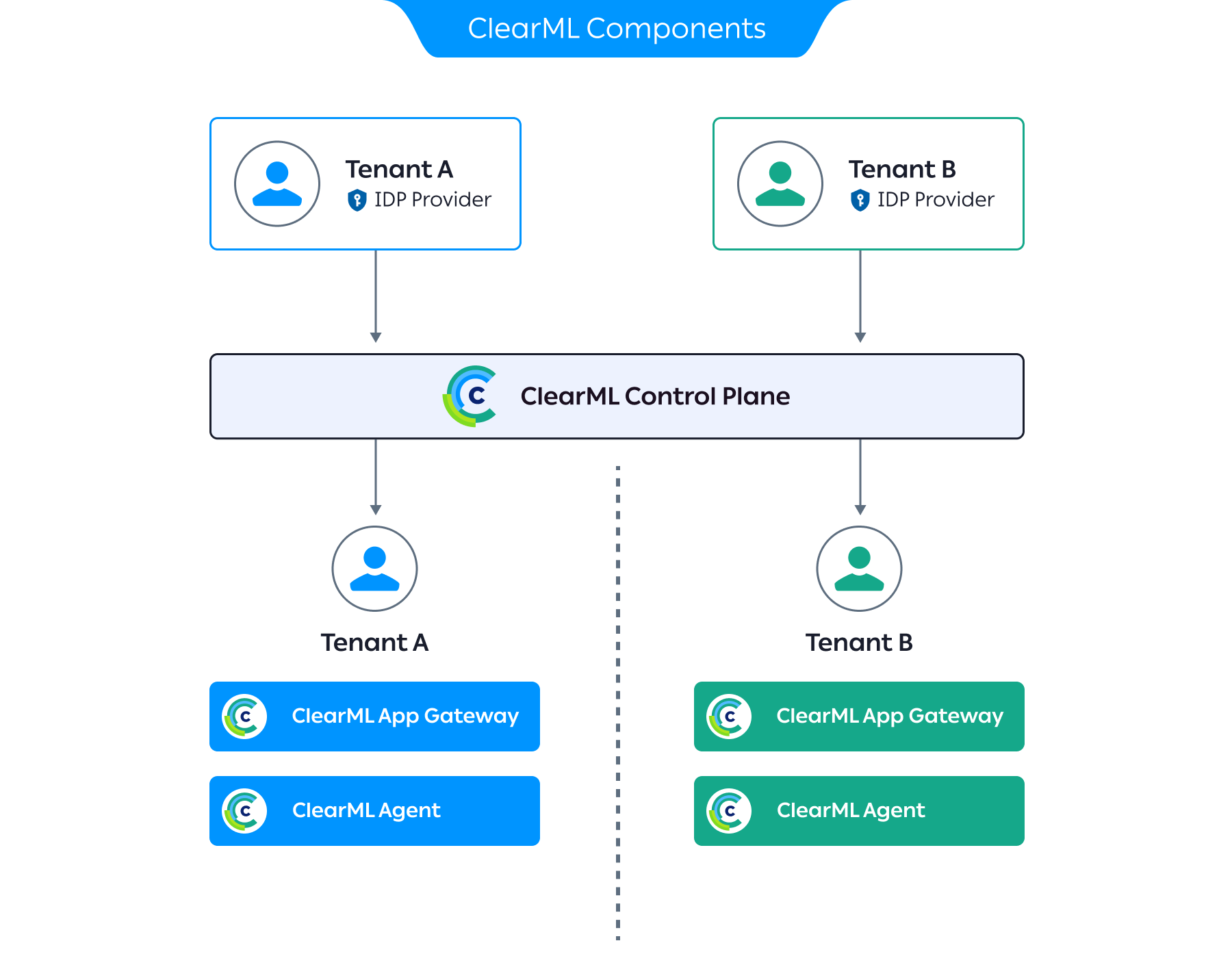
ClearML Enterprise Server provides ClearML Control Plane. Ensure that the cluster for the ClearML Enterprise Server consists of at least three nodes that meet these minimum specifications:
8 vCPUs
32 GB RAM
500 GB storage
Be sure you have access to the Kubectl and Helm CLI tools.
Use a supported Kubernetes distribution, such as RKE2.
At the time of publication, the minimum Kubernetes version is 1.23.0-0.
Ensure your cluster has access to the ClearML software dependencies via their Helm charts.
At the time of publication, these include:
elasticsearch
mongodb
dragonfly
To obtain a current list, log in to the ClearML Docker repository and issue the following command:
helm show readme oci://docker.io/clearml/clearml-enterprise > file.mdThis will return output similar to:
Repository Name Version elasticsearch
8.5.1
mckMongodb(mongodb-kubernetes)
1.6.1
mongodb
15.6.26
drangonfly
v1.36.0
Provision or configure networking as follows:
Ingress controller
An ingress controller (such as, nginx-ingress) is required. If exposing services externally, configure a load balancer (such as, MetalLB).
Port specification
The designated nodes for the ClearML Control Plane servers and workers should be able to communicate through HTTP/S (TCP ports 80 and 443). Any additional ports to be used in the deployment (TCP sessions) should also be preconfigured (see Section 5.9, “ClearML Application Gateway”).
DNS configuration
A domain with subdomain support is required (referred hereafter as "<BASE_DOMAIN>"), ideally with trusted TLS certificates. All entries must be resolvable by the ingress controller.
Some example subdomains include:
Control Plane servers:
api.<BASE_DOMAIN>
app.<BASE_DOMAIN>
files.<BASE_DOMAIN>
Application Gateway:
router.<BASE_DOMAIN>
tcp-router.<BASE_DOMAIN> (optional, for TCP sessions)
For advanced deployments, configure a CNI.
For multi-tenant deployment, set up IdP per tenant.
Configure storage with:
a StorageClass to an accessible storage backend for the ClearML control plane
a PVC (ReadWriteMany policy) and PV for the ClearML workers
Configure the ClearML Artifactories.
To install the different ClearML components, credentials to ClearML’s artifact repositories are required. The following are provided by the ClearML team:
DockerHub registry credentials (referenced hereafter as "<CLEARML_DOCKERHUB_TOKEN>")
5.7.2 Deploying the ClearML Control Plane #
The ClearML Control Plane is the back-end service infrastructure that allows multiple users to collaborate and manage their tasks by working seamlessly with the ClearML Python package and ClearML Agent.
For current, detailed installation guidance, refer to ClearML: Enterprise Server Kubernetes Deployment.
Login to the ClearML OCI registry
helm registry login docker.io --username allegroaienterprise --password <CLEARML_DOCKERHUB_TOKEN>See https://clear.ml/docs/latest/docs/deploying_clearml/enterprise_deploy/k8s#installation
Configure deployment parameters.
The installation procedure uses a tailored Helm chart to deploy the ClearML control plane components. Deployment-specific parameters are set through a custom
clearml-values.override.yamlfile.Create a
clearml-values.override.yamlfile with the baseline ClearML service settings as shown below. Be sure to replace the<BASE_DOMAIN>placeholders with the domain you have assigned to the cluster’s ingress controller. This will be the base domain for reaching your ClearML installation.imageCredentials: password: "<CLEARML_DOCKERHUB_TOKEN>" clearml: cookieDomain: "<BASE_DOMAIN>" apiserver: ingress: enabled: true hostName: "api.<BASE_DOMAIN>" service: type: ClusterIP fileserver: ingress: enabled: true hostName: "files.<BASE_DOMAIN>" service: type: ClusterIP webserver: ingress: enabled: true hostName: "app.<BASE_DOMAIN>" service: type: ClusterIP clearmlApplications: enabled: trueEnable a multi-tenant configuration.
Establish an initial supervisor tenant with a supervisor user. This user will have the authority to create and remove other tenants, and access information across all tenants. Do this by updating the
clearml-values.override.yamlwith the following:apiserver: extraEnvs: - name: CLEARML__services__organization__features__user_management_advanced value: "true" - name: CLEARML__services__workers__resource_usages__supervisor_company value: "<SUPERVISOR_COMPANY_ID>" - name: CLEARML__secure__credentials__supervisor__role value: "system" - name: CLEARML__secure__credentials__supervisor__allow_login value: "true" - name: CLEARML__secure__credentials__supervisor__user_key value: "<SUPERVISOR_USER_KEY>" - name: CLEARML__secure__credentials__supervisor__user_secret value: "<SUPERVISOR_USER_SECRET>" - name: CLEARML__secure__credentials__supervisor__sec_groups value: "[\"users\", \"admins\", \"queue_admins\"]" - name: CLEARML__secure__credentials__supervisor__email value: "\"<SUPERVISOR_USER_EMAIL>\"" - name: CLEARML__apiserver__company__unique_names value: "true"Be sure to replace
<SUPERVISOR_COMPANY_ID>,<SUPERVISOR_USER_KEY>,<SUPERVISOR_USER_SECRET>, and<SUPERVISOR_USER_EMAIL>with desired values. The<SUPERVISOR_USER_KEY>and<SUPERVISOR_USER_SECRET>can be used to log in as the supervisor user to the ClearML Web UI athttps://app.<BASE_DOMAIN.NoteThe <SUPERVISOR_USER_EMAIL> value must be explicitly quoted (for example, "\"email@example.com\"").
Install the ClearML Enterprise Control Plane using the configuration in your
clearml-values.override.yaml.helm upgrade -i -n clearml clearml clearml-enterprise/clearml-enterprise --create-namespace -f clearml-values.override.yamlCreate a tenant.
Using the values defined earlier, define environment variables for configuring the server via API.
APISERVER_URL="https://api.<BASE_DOMAIN>"
APISERVER_KEY="<SUPERVISOR_USER_KEY>"
APISERVER_SECRET="<SUPERVISOR_USER_SECRET>"
Call the API server with the tenant’s name.
Be sure to replace
<TENANT_NAME>in the command below with an appropriate value.curl $APISERVER_URL/system.create_company \ -H "Content-Type: application/json" \ -u $APISERVER_KEY:$APISERVER_SECRET \ -d '{"name":"<TENANT_NAME>"}'After executing this command, the API returns the new tenant ID (
<COMPANY_ID>).Validate tenant creation by listing existing tenants.
curl -u $APISERVER_KEY:$APISERVER_SECRET $APISERVER_URL/system.get_companiesCreate a utility administrator user to facilitate tenant configuration.
In the command below, replace
<COMPANY_ID>with the value returned when creating the tenant. Also, replace<ADMIN_USER_NAME>and<ADMIN_USER_EMAIL>with suitable values.curl $APISERVER_URL/auth.create_user \ -H "Content-Type: application/json" \ -u $APISERVER_KEY:$APISERVER_SECRET \ -d '{"name":"<ADMIN_USER_NAME>","company":"<COMPANY_ID>", \ "email":"<ADMIN_USER_EMAIL>","role":"admin","internal":"true"}'Create utility API credentials for the administrator user.
curl $APISERVER_URL/auth.create_credentials \
  -H "Content-Type: application/json" \
  -H "X-{cml}-Impersonate-As: <USER_ID>" \
  -u $APISERVER_KEY:$APISERVER_SECRET
The returned key and secret pair can be used for additional API configuration of the tenant.
TipYou can onboard users through an Identity Provider (IdP).
ClearML supports a wide range of protocols and providers. In ClearML, each tenant is associated with its own IdP to authenticate and authorize access to the ClearML platform.
Refer to ClearML Identity Providers for further information.
Verify installation of ClearML Enterprise Control Plane by opening a Web browser to
https://app.<BASE_DOMAIN>.If the deployment is successful, you should see the ClearML login screen.
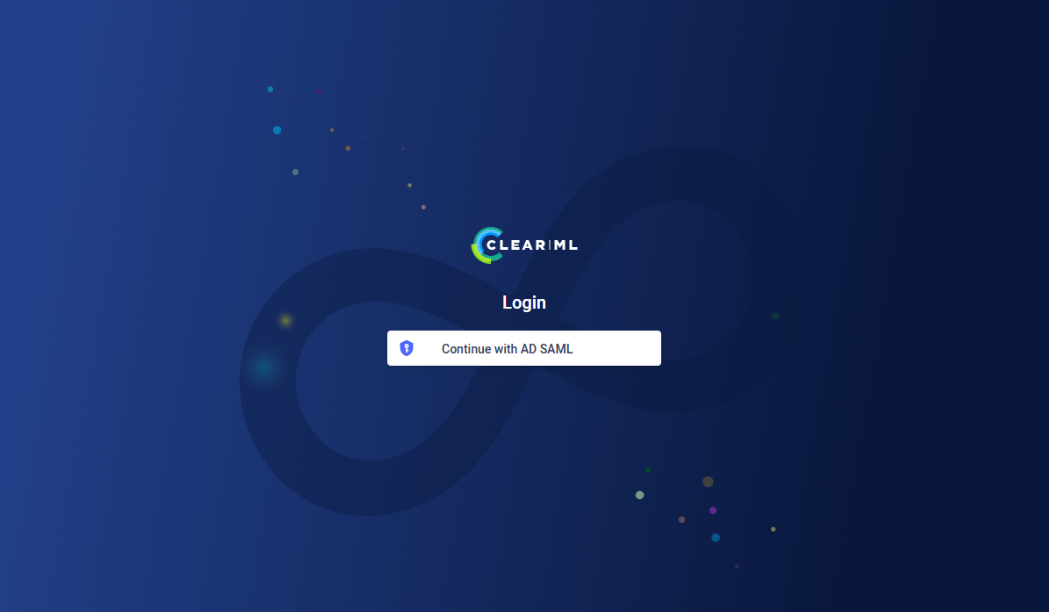 Figure 4: ClearML login screen #
5.8 ClearML worker nodes #
5.8.1 Overview #
The ClearML Agent is installed on Kubernetes using a Helm chart. This sets up a controller pod that listens to ClearML queues and launches jobs as needed. The Agent can be deployed on the same Kubernetes cluster as the ClearML Control Plane or on a separate one.
The Controller pod:
Pulls jobs from ClearML execution queues.
Prepares a Kubernetes job based on the provided YAML template.
Inside each job pod, the ClearML Agent:
Installs the required environment for the task.
Executes and monitors the task process.
Logs task data to the ClearML Server.
5.8.2 Prerequisites #
In a multi-tenant deployment, tenant isolation is achieved by creating a dedicated Kubernetes namespace for each tenant, and deploying a dedicated ClearML agent for each tenant (using a tenant admin’s API credentials).
A running ClearML Enterprise Control plane
Each worker environment must be able to access the ClearML server over the same network.
5.8.3 Setting up the ClearML worker nodes #
(Optional) Configure the NVIDIA GPU Operator.
When using NVIDIA GPUs, configure the NVIDIA GPU Operator according to recommended security settings.
Add the NVIDIA GPU Operator Helm repository.
helm repo add nvidia https://nvidia.github.io/gpu-operatorUpdate the local repository.
helm repo updateCreate a
gpu-operator.override.yamlfile with NVIDIA GPU configuration settings as shown below:toolkit: env: - name: ACCEPT_NVIDIA_VISIBLE_DEVICES_ENVVAR_WHEN_UNPRIVILEGED value: "false" - name: ACCEPT_NVIDIA_VISIBLE_DEVICES_AS_VOLUME_MOUNTS value: "true" devicePlugin: env: - name: PASS_DEVICE_SPECS value: "true" - name: FAIL_ON_INIT_ERROR value: "true" - name: DEVICE_LIST_STRATEGY # Use volume-mounts value: volume-mounts - name: DEVICE_ID_STRATEGY value: uuid - name: NVIDIA_VISIBLE_DEVICES value: all - name: NVIDIA_DRIVER_CAPABILITIES value: allNoteThese values were chosen to prevent unprivileged containers from bypassing the Kubernetes Device Plugin API.
Install the NVIDIA GPU Operator.
helm install -n gpu-operator gpu-operator nvidia/gpu-operator --create-namespace -f gpu-operator.override.yamlClearML supports various silicon vendors such as NVIDIA, AMD and Intel. For detailed configuration instructions refer to ClearML’s online documentation.
Deploy ClearML Agent.
Log in to the ClearML OCI registry.
helm registry login docker.io \
--username allegroaienterprise \
--password <CLEARML_DOCKERHUB_TOKEN>
Update the local repository.
helm repo updateCreate a
clearml-agent-values.override.yamlfile with the agent settings as follows:imageCredentials: password: "<CLEARML_DOCKERHUB_TOKEN>" clearml: agentk8sglueKey: "<ACCESS_KEY>" agentk8sglueSecret: "<SECRET_KEY>" agentk8sglue: apiServerUrlReference: "<CLEARML_API_SERVER_REFERENCE>" fileServerUrlReference: "<CLEARML_FILE_SERVER_REFERENCE>" webServerUrlReference: "<CLEARML_WEB_SERVER_REFERENCE>" createQueues: true queues: exampleQueue: templateOverrides: {} queueSettings: {} dashboardReportMaxGpu: <MAX_AVAILABLE_GPUS>Be sure to:
replace
<ACCESS_KEY>and<SECRET_KEY>with the tenant admin API credentials created in the control plane setup procedure.set the
<CLEARML_API_SERVER_REFERENCE>,<CLEARML_FILE_SERVER_REFERENCE>, and<CLEARML_WEB_SERVER_REFERENCE>values to match your ClearML server URL ( "https://api.<BASE_DOMAIN>" ).replace
<MAX_AVAILABLE_GPUS>with the total number of GPUs made available to ClearML agents on this cluster.
For more advanced configurations, refer to ClearML’s online documentation
Install the ClearML Agent.
helm upgrade -i <RELEASE_NAME> \
-n <WORKLOAD_NAMESPACE> \
oci://docker.io/clearml/clearml-enterprise-app-gateway \
-f clearml-agent-values.override.yaml
Verify the installation.
To verify that the ClearML Agent has been deployed to your cluster:
Open your Web browser to "https://app.<BASE_DOMAIN>".
Log in as the initial administrator configured in the control plane setup.
Navigate to Orchestration > Queues.
Confirm that configured queues are listed.
5.9 ClearML Application Gateway #
The ClearML Application Gateway enables access to AI workload applications, such as remote IDEs (like VSCode and Jupyter Lab), model API interfaces, and so on. It acts as a proxy, identifying ClearML tasks running within its Kubernetes namespace and making them available for network access. In a multi-tenant deployment, tenant isolation is achieved by creating a dedicated Kubernetes namespace for each tenant, and deploying a dedicated ClearML Application Gateway for each tenant (using a tenant administrator’s API credentials).
Log in to the ClearML OCI registry.
helm registry login docker.io \
--username allegroaienterprise \
--password <CLEARML_DOCKERHUB_TOKEN>
Update the local repository.
helm repo updateCreate a
clearml-app-gateway-values.override.yamlfile with the agent settings in the following form:imageCredentials: password: "<CLEARML_DOCKERHUB_TOKEN>" clearml: apiKey: "<ACCESS_KEY>" apiSecret: "<SECRET_KEY>" apiServerUrlReference: "<CLEARML_API_SERVER_REFERENCE>" authCookieName: "" ingress: enabled: true hostName: "" tcpSession: routerAddress: "" service: type: LoadBalancer portRange: start: end:Be sure to update the following fields with values appropriate for your environment:
clearml.password: the ClearML DockerHub access tokenclearml.apiKeyandclearml.apiSecret: the ClearML tenant administrator API credentials (created in the control plane deployment)clearml.apiServerUrlReference: the ClearML Server URL ( "https://api.<BASE_DOMAIN>" )clearml.authCookieName: the ClearML Server authentication cookieingress.hostName: the host name of the ClearML Application Gateway that will be used by the ingress controllertcpSession.routerAddress: the external ClearML Application Gateway addresstcpSession.portRange.startandtcpSession.portRange.end: the beginning and ending TCP session ports
Install the ClearML Application Gateway.
helm upgrade -i <RELEASE_NAME> \
-n <WORKLOAD_NAMESPACE> \
oci://docker.io/clearml/clearml-enterprise-app-gateway \
-f clearml-app-gateway-values.override.yaml
Be sure to replace the placeholders with appropriate values:
<RELEASE_NAME>- This is a unique identifier for the Application Gateway within the Kubernetes namespace that identifies a specific instance of the chart. It also defines the Application Gateway’s name and appears in the UI within AI workload application URLs. You can support multiple installations within the same namespace by assigning different release names.<WORKLOAD_NAMESPACE>- This is the Kubernetes namespace where workloads will be executed. This namespace must be shared between a dedicated ClearML agent and an Application Gateway. The agent is responsible for monitoring its assigned task queues and spawning workloads within this namespace. The Application Gateway monitors the same namespace for AI workloads (such as remote IDE applications). The Application Gateway has a namespace-limited scope, meaning it can only detect and manage tasks within its assigned namespace.<CHART_VERSION>- This is the version recommended by the ClearML Support Team.
Verify the installation.
Open a Web browser to "https://app.<BASE_DOMAIN>".
Log in as the initial administrator configured in the control plane setup procedure.
Go to the Settings > Application Gateway > Routers.
Confirm that the deployed
<RELEASE_NAME>is listed.
6 Validation #
The test ClearML’s integration, users should:
Log in to the User interface, ensure that the interface is reachable and loads properly.
Set up ClearML’s SDK by installing ClearML’s python SDK and run ClearML’s examples. Relevant examples can be found on the ClearML GitHub page.
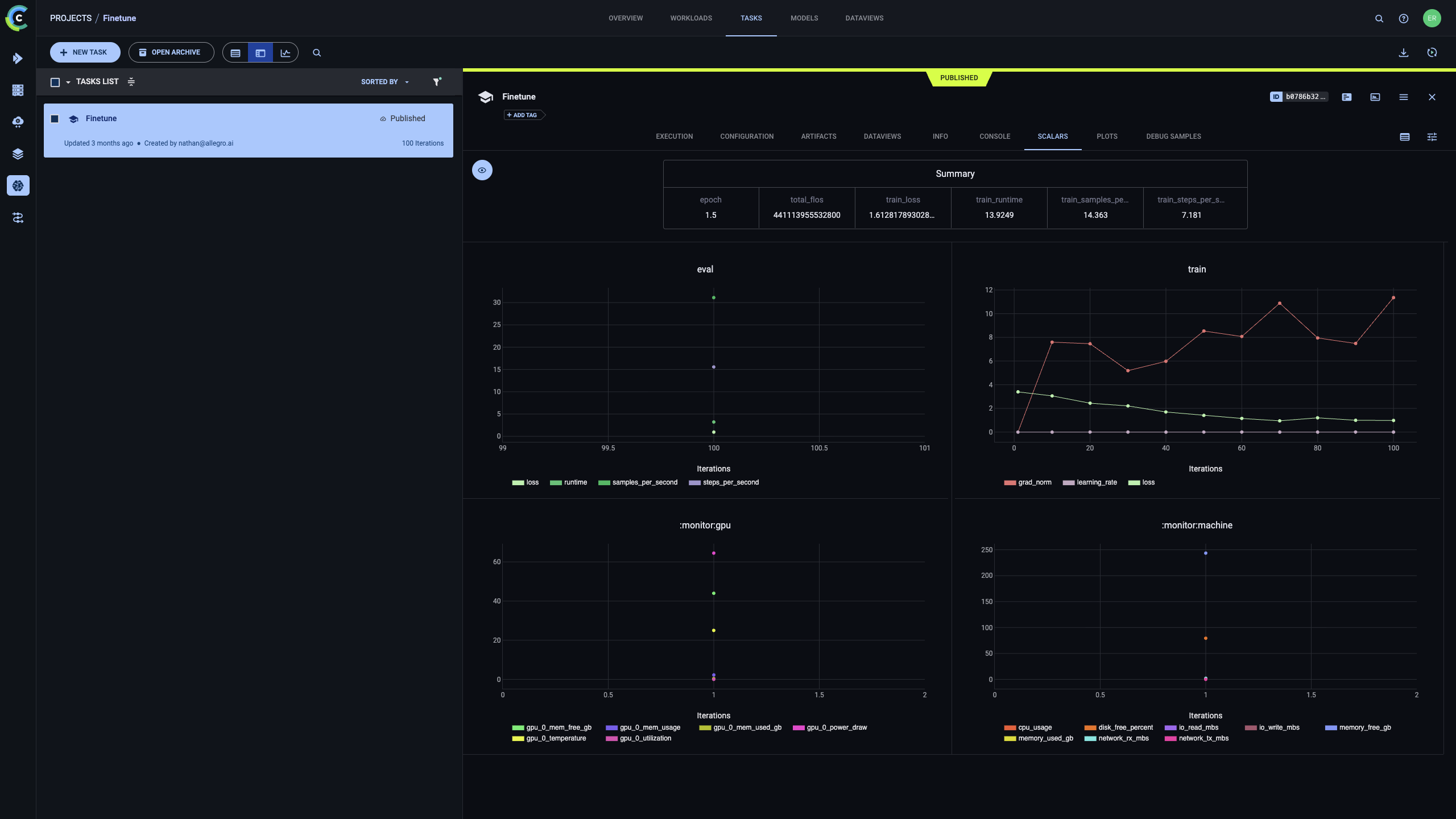
ClearML’s experiment manager is the core of its AI Development Center. To start, either try a simple MNIST classifier example or run this code to perform LLM finetuning. All relevant information is captured and displayed by ClearML.
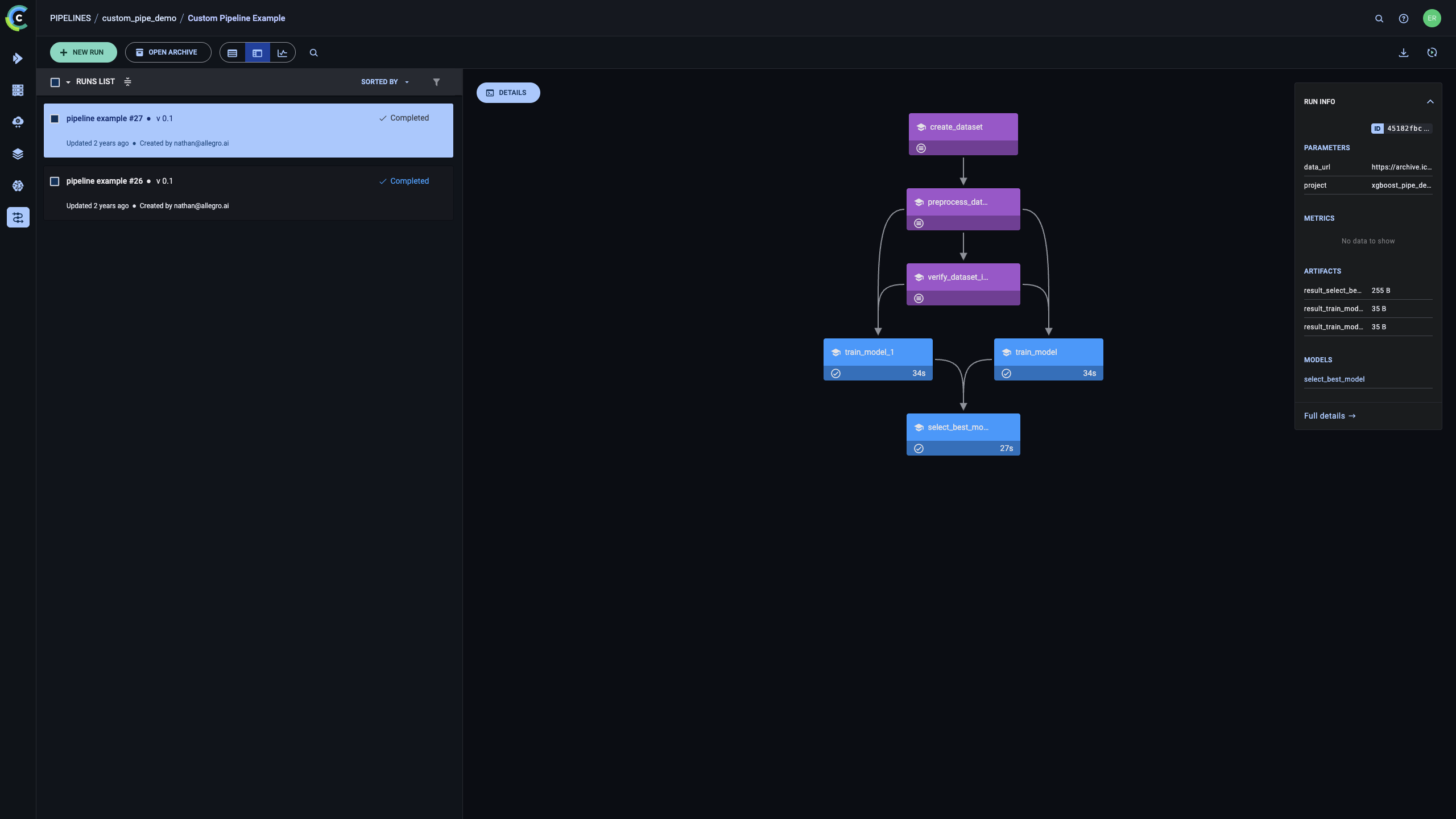
Pipeline Orchestration with ClearML - Based on this github example. Running the linked example on a configured clearml server would result in a similar pipeline visualization in the ClearML user interface. See cml Pipeline Orchestration documentation for more information.
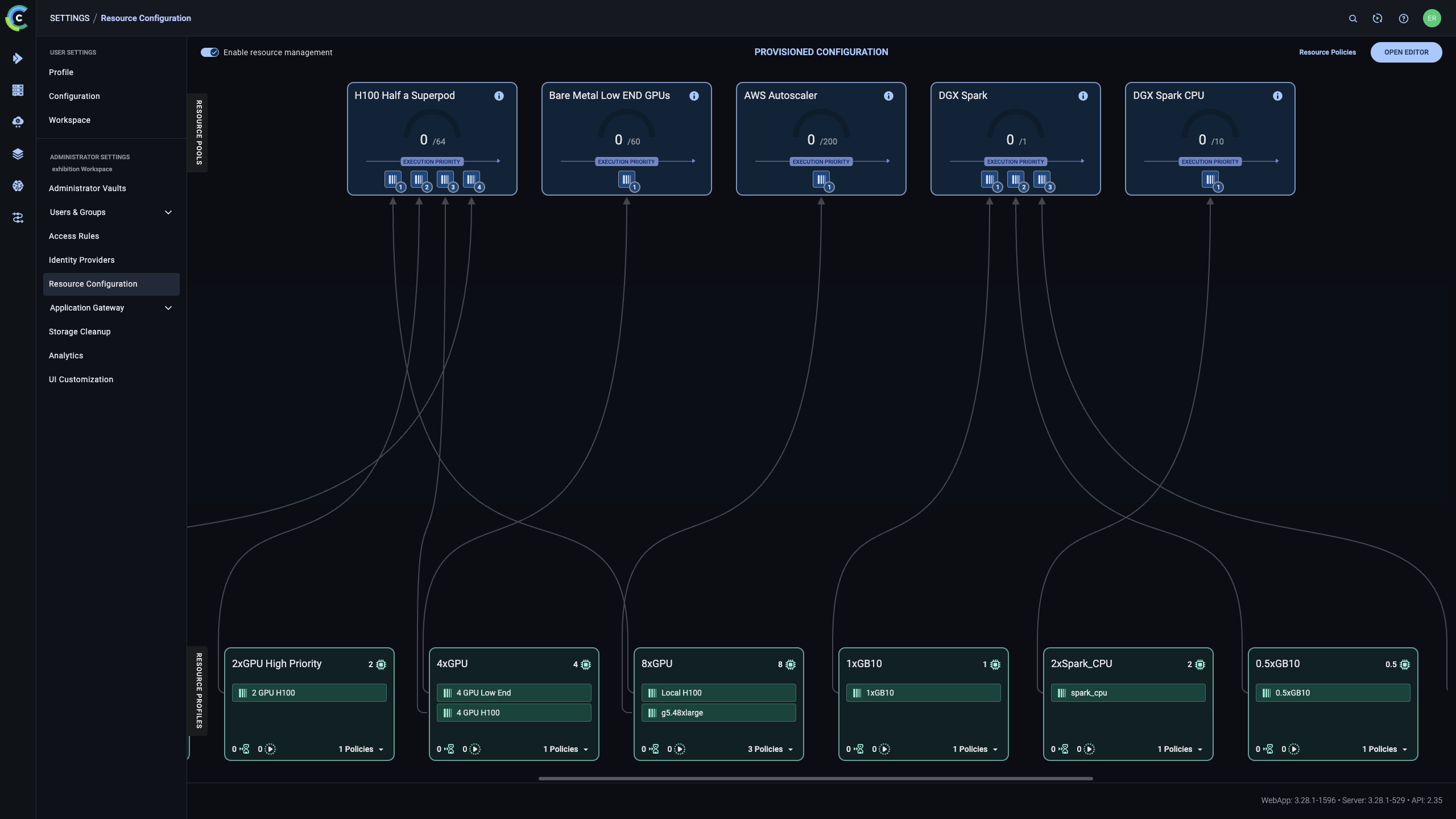
ClearML’s Resource Configuration allows admins to set resource hierarchies, spillovers and quotas. To do that, admins need to configure the ClearML Agent to the topology configured in the ClearML user interface. For more information, see ClearML’s documentation.
7 Summary #
This reference configuration outlines an opinionated yet flexible architecture for delivering an enterprise AI lifecycle management platform using SUSE AI integrated with ClearML. The solution establishes a standardized, Kubernetes-native foundation for running, managing, and governing AI workloads across on-premises, hybrid, and air-gapped environments.
By combining SUSE’s secure and supported infrastructure stack with ClearML’s AI workload orchestration and lifecycle management capabilities, the architecture addresses key enterprise requirements such as scalability, multi-tenancy, security, observability, and operational consistency. The result is a repeatable platform design that enables organizations to operationalize AI workloads reliably while maintaining control over data, infrastructure, and governance.
8 Frequently Asked Questions (FAQs) #
Does the SUSE AI and ClearML solution support different hardware accelerators?
Yes. The joint solution combining SUSE and ClearML is designed to run on heterogeneous infrastructure. The platform is silicon-agnostic and supports accelerators from multiple vendors, including NVIDIA and AMD GPUs, as well as Intel accelerators. It can also run on standard Intel and ARM CPU architectures, allowing organizations to deploy and scale AI/ML workloads across diverse hardware environments supported by SUSE.
Any Examples for Training Models on top of ClearML?
Absolutely! You can find simple examples such as training an MNIST classifier with Pytorch here or fine tune an LLM using managed Q&A dataset here. For all examples check out ClearML examples in ClearML’s github repository
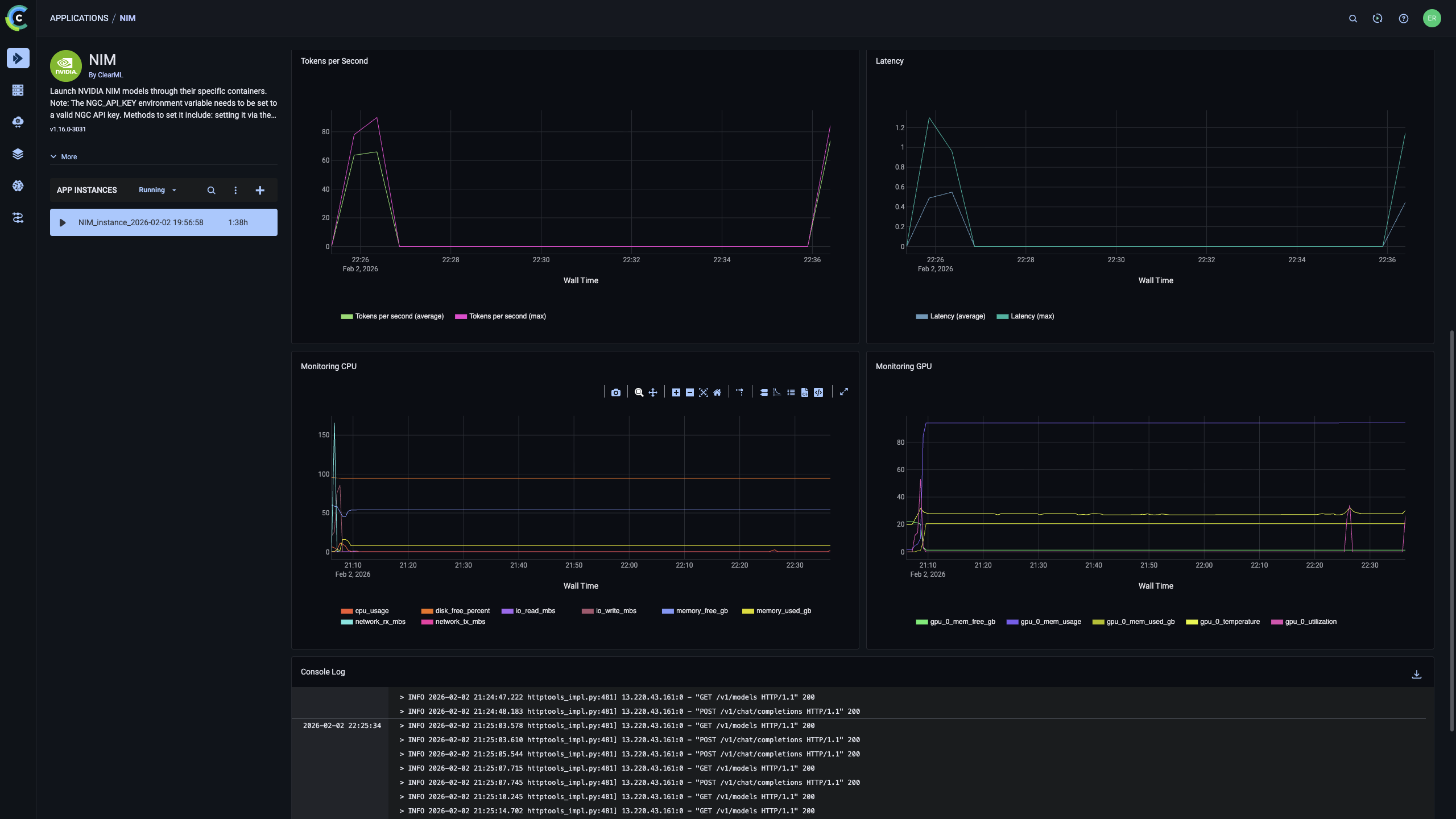
Does ClearML support serving NVIDIA NIMs containers?
Yes, ClearML offers built-in deployment and management capabilities for NVIDIA NIMs containers. It requires the NIMs application to be installed on the server.
Is ClearML installed on-prem?
ClearML supports installing both on-prem and on Cloud instances
Does ClearML support air-gapped deployments?
Yes, ClearML fully supports air-gapped deployments with no connection to the Internet.
9 References #
10 Legal notice #
Copyright © 2006–2026 SUSE LLC and contributors. All rights reserved.
Permission is granted to copy, distribute and/or modify this document under the terms of the GNU Free Documentation License, Version 1.2 or (at your option) version 1.3; with the Invariant Section being this copyright notice and license. A copy of the license version 1.2 is included in the section entitled "GNU Free Documentation License".
SUSE, the SUSE logo and YaST are registered trademarks of SUSE LLC in the United States and other countries. For SUSE trademarks, see https://www.suse.com/company/legal/.
Linux is a registered trademark of Linus Torvalds. All other names or trademarks mentioned in this document may be trademarks or registered trademarks of their respective owners.
Documents published as part of the series SUSE Technical Reference Documentation have been contributed voluntarily by SUSE employees and third parties. They are meant to serve as examples of how particular actions can be performed. They have been compiled with utmost attention to detail. However, this does not guarantee complete accuracy. SUSE cannot verify that actions described in these documents do what is claimed or whether actions described have unintended consequences. SUSE LLC, its affiliates, the authors, and the translators may not be held liable for possible errors or the consequences thereof.
11 GNU Free Documentation License #
Copyright © 2000, 2001, 2002 Free Software Foundation, Inc. 51 Franklin St, Fifth Floor, Boston, MA 02110-1301 USA. Everyone is permitted to copy and distribute verbatim copies of this license document, but changing it is not allowed.
0. PREAMBLE#
The purpose of this License is to make a manual, textbook, or other functional and useful document "free" in the sense of freedom: to assure everyone the effective freedom to copy and redistribute it, with or without modifying it, either commercially or noncommercially. Secondarily, this License preserves for the author and publisher a way to get credit for their work, while not being considered responsible for modifications made by others.
This License is a kind of "copyleft", which means that derivative works of the document must themselves be free in the same sense. It complements the GNU General Public License, which is a copyleft license designed for free software.
We have designed this License in order to use it for manuals for free software, because free software needs free documentation: a free program should come with manuals providing the same freedoms that the software does. But this License is not limited to software manuals; it can be used for any textual work, regardless of subject matter or whether it is published as a printed book. We recommend this License principally for works whose purpose is instruction or reference.
1. APPLICABILITY AND DEFINITIONS#
This License applies to any manual or other work, in any medium, that contains a notice placed by the copyright holder saying it can be distributed under the terms of this License. Such a notice grants a world-wide, royalty-free license, unlimited in duration, to use that work under the conditions stated herein. The "Document", below, refers to any such manual or work. Any member of the public is a licensee, and is addressed as "you". You accept the license if you copy, modify or distribute the work in a way requiring permission under copyright law.
A "Modified Version" of the Document means any work containing the Document or a portion of it, either copied verbatim, or with modifications and/or translated into another language.
A "Secondary Section" is a named appendix or a front-matter section of the Document that deals exclusively with the relationship of the publishers or authors of the Document to the Document’s overall subject (or to related matters) and contains nothing that could fall directly within that overall subject. (Thus, if the Document is in part a textbook of mathematics, a Secondary Section may not explain any mathematics.) The relationship could be a matter of historical connection with the subject or with related matters, or of legal, commercial, philosophical, ethical or political position regarding them.
The "Invariant Sections" are certain Secondary Sections whose titles are designated, as being those of Invariant Sections, in the notice that says that the Document is released under this License. If a section does not fit the above definition of Secondary then it is not allowed to be designated as Invariant. The Document may contain zero Invariant Sections. If the Document does not identify any Invariant Sections then there are none.
The "Cover Texts" are certain short passages of text that are listed, as Front-Cover Texts or Back-Cover Texts, in the notice that says that the Document is released under this License. A Front-Cover Text may be at most 5 words, and a Back-Cover Text may be at most 25 words.
A "Transparent" copy of the Document means a machine-readable copy, represented in a format whose specification is available to the general public, that is suitable for revising the document straightforwardly with generic text editors or (for images composed of pixels) generic paint programs or (for drawings) some widely available drawing editor, and that is suitable for input to text formatters or for automatic translation to a variety of formats suitable for input to text formatters. A copy made in an otherwise Transparent file format whose markup, or absence of markup, has been arranged to thwart or discourage subsequent modification by readers is not Transparent. An image format is not Transparent if used for any substantial amount of text. A copy that is not "Transparent" is called "Opaque".
Examples of suitable formats for Transparent copies include plain ASCII without markup, Texinfo input format, LaTeX input format, SGML or XML using a publicly available DTD, and standard-conforming simple HTML, PostScript or PDF designed for human modification. Examples of transparent image formats include PNG, XCF and JPG. Opaque formats include proprietary formats that can be read and edited only by proprietary word processors, SGML or XML for which the DTD and/or processing tools are not generally available, and the machine-generated HTML, PostScript or PDF produced by some word processors for output purposes only.
The "Title Page" means, for a printed book, the title page itself, plus such following pages as are needed to hold, legibly, the material this License requires to appear in the title page. For works in formats which do not have any title page as such, "Title Page" means the text near the most prominent appearance of the work’s title, preceding the beginning of the body of the text.
A section "Entitled XYZ" means a named subunit of the Document whose title either is precisely XYZ or contains XYZ in parentheses following text that translates XYZ in another language. (Here XYZ stands for a specific section name mentioned below, such as "Acknowledgements", "Dedications", "Endorsements", or "History".) To "Preserve the Title" of such a section when you modify the Document means that it remains a section "Entitled XYZ" according to this definition.
The Document may include Warranty Disclaimers next to the notice which states that this License applies to the Document. These Warranty Disclaimers are considered to be included by reference in this License, but only as regards disclaiming warranties: any other implication that these Warranty Disclaimers may have is void and has no effect on the meaning of this License.
2. VERBATIM COPYING#
You may copy and distribute the Document in any medium, either commercially or noncommercially, provided that this License, the copyright notices, and the license notice saying this License applies to the Document are reproduced in all copies, and that you add no other conditions whatsoever to those of this License. You may not use technical measures to obstruct or control the reading or further copying of the copies you make or distribute. However, you may accept compensation in exchange for copies. If you distribute a large enough number of copies you must also follow the conditions in section 3.
You may also lend copies, under the same conditions stated above, and you may publicly display copies.
3. COPYING IN QUANTITY#
If you publish printed copies (or copies in media that commonly have printed covers) of the Document, numbering more than 100, and the Document’s license notice requires Cover Texts, you must enclose the copies in covers that carry, clearly and legibly, all these Cover Texts: Front-Cover Texts on the front cover, and Back-Cover Texts on the back cover. Both covers must also clearly and legibly identify you as the publisher of these copies. The front cover must present the full title with all words of the title equally prominent and visible. You may add other material on the covers in addition. Copying with changes limited to the covers, as long as they preserve the title of the Document and satisfy these conditions, can be treated as verbatim copying in other respects.
If the required texts for either cover are too voluminous to fit legibly, you should put the first ones listed (as many as fit reasonably) on the actual cover, and continue the rest onto adjacent pages.
If you publish or distribute Opaque copies of the Document numbering more than 100, you must either include a machine-readable Transparent copy along with each Opaque copy, or state in or with each Opaque copy a computer-network location from which the general network-using public has access to download using public-standard network protocols a complete Transparent copy of the Document, free of added material. If you use the latter option, you must take reasonably prudent steps, when you begin distribution of Opaque copies in quantity, to ensure that this Transparent copy will remain thus accessible at the stated location until at least one year after the last time you distribute an Opaque copy (directly or through your agents or retailers) of that edition to the public.
It is requested, but not required, that you contact the authors of the Document well before redistributing any large number of copies, to give them a chance to provide you with an updated version of the Document.
4. MODIFICATIONS#
You may copy and distribute a Modified Version of the Document under the conditions of sections 2 and 3 above, provided that you release the Modified Version under precisely this License, with the Modified Version filling the role of the Document, thus licensing distribution and modification of the Modified Version to whoever possesses a copy of it. In addition, you must do these things in the Modified Version:
Use in the Title Page (and on the covers, if any) a title distinct from that of the Document, and from those of previous versions (which should, if there were any, be listed in the History section of the Document). You may use the same title as a previous version if the original publisher of that version gives permission.
List on the Title Page, as authors, one or more persons or entities responsible for authorship of the modifications in the Modified Version, together with at least five of the principal authors of the Document (all of its principal authors, if it has fewer than five), unless they release you from this requirement.
State on the Title page the name of the publisher of the Modified Version, as the publisher.
Preserve all the copyright notices of the Document.
Add an appropriate copyright notice for your modifications adjacent to the other copyright notices.
Include, immediately after the copyright notices, a license notice giving the public permission to use the Modified Version under the terms of this License, in the form shown in the Addendum below.
Preserve in that license notice the full lists of Invariant Sections and required Cover Texts given in the Document’s license notice.
Include an unaltered copy of this License.
Preserve the section Entitled "History", Preserve its Title, and add to it an item stating at least the title, year, new authors, and publisher of the Modified Version as given on the Title Page. If there is no section Entitled "History" in the Document, create one stating the title, year, authors, and publisher of the Document as given on its Title Page, then add an item describing the Modified Version as stated in the previous sentence.
Preserve the network location, if any, given in the Document for public access to a Transparent copy of the Document, and likewise the network locations given in the Document for previous versions it was based on. These may be placed in the "History" section. You may omit a network location for a work that was published at least four years before the Document itself, or if the original publisher of the version it refers to gives permission.
For any section Entitled "Acknowledgements" or "Dedications", Preserve the Title of the section, and preserve in the section all the substance and tone of each of the contributor acknowledgements and/or dedications given therein.
Preserve all the Invariant Sections of the Document, unaltered in their text and in their titles. Section numbers or the equivalent are not considered part of the section titles.
Delete any section Entitled "Endorsements". Such a section may not be included in the Modified Version.
Do not retitle any existing section to be Entitled "Endorsements" or to conflict in title with any Invariant Section.
Preserve any Warranty Disclaimers.
If the Modified Version includes new front-matter sections or appendices that qualify as Secondary Sections and contain no material copied from the Document, you may at your option designate some or all of these sections as invariant. To do this, add their titles to the list of Invariant Sections in the Modified Version’s license notice. These titles must be distinct from any other section titles.
You may add a section Entitled "Endorsements", provided it contains nothing but endorsements of your Modified Version by various parties—for example, statements of peer review or that the text has been approved by an organization as the authoritative definition of a standard.
You may add a passage of up to five words as a Front-Cover Text, and a passage of up to 25 words as a Back-Cover Text, to the end of the list of Cover Texts in the Modified Version. Only one passage of Front-Cover Text and one of Back-Cover Text may be added by (or through arrangements made by) any one entity. If the Document already includes a cover text for the same cover, previously added by you or by arrangement made by the same entity you are acting on behalf of, you may not add another; but you may replace the old one, on explicit permission from the previous publisher that added the old one.
The author(s) and publisher(s) of the Document do not by this License give permission to use their names for publicity for or to assert or imply endorsement of any Modified Version.
5. COMBINING DOCUMENTS#
You may combine the Document with other documents released under this License, under the terms defined in section 4 above for modified versions, provided that you include in the combination all of the Invariant Sections of all of the original documents, unmodified, and list them all as Invariant Sections of your combined work in its license notice, and that you preserve all their Warranty Disclaimers.
The combined work need only contain one copy of this License, and multiple identical Invariant Sections may be replaced with a single copy. If there are multiple Invariant Sections with the same name but different contents, make the title of each such section unique by adding at the end of it, in parentheses, the name of the original author or publisher of that section if known, or else a unique number. Make the same adjustment to the section titles in the list of Invariant Sections in the license notice of the combined work.
In the combination, you must combine any sections Entitled "History" in the various original documents, forming one section Entitled "History"; likewise combine any sections Entitled "Acknowledgements", and any sections Entitled "Dedications". You must delete all sections Entitled "Endorsements".
6. COLLECTIONS OF DOCUMENTS#
You may make a collection consisting of the Document and other documents released under this License, and replace the individual copies of this License in the various documents with a single copy that is included in the collection, provided that you follow the rules of this License for verbatim copying of each of the documents in all other respects.
You may extract a single document from such a collection, and distribute it individually under this License, provided you insert a copy of this License into the extracted document, and follow this License in all other respects regarding verbatim copying of that document.
7. AGGREGATION WITH INDEPENDENT WORKS#
A compilation of the Document or its derivatives with other separate and independent documents or works, in or on a volume of a storage or distribution medium, is called an "aggregate" if the copyright resulting from the compilation is not used to limit the legal rights of the compilation’s users beyond what the individual works permit. When the Document is included in an aggregate, this License does not apply to the other works in the aggregate which are not themselves derivative works of the Document.
If the Cover Text requirement of section 3 is applicable to these copies of the Document, then if the Document is less than one half of the entire aggregate, the Document’s Cover Texts may be placed on covers that bracket the Document within the aggregate, or the electronic equivalent of covers if the Document is in electronic form. Otherwise they must appear on printed covers that bracket the whole aggregate.
8. TRANSLATION#
Translation is considered a kind of modification, so you may distribute translations of the Document under the terms of section 4. Replacing Invariant Sections with translations requires special permission from their copyright holders, but you may include translations of some or all Invariant Sections in addition to the original versions of these Invariant Sections. You may include a translation of this License, and all the license notices in the Document, and any Warranty Disclaimers, provided that you also include the original English version of this License and the original versions of those notices and disclaimers. In case of a disagreement between the translation and the original version of this License or a notice or disclaimer, the original version will prevail.
If a section in the Document is Entitled "Acknowledgements", "Dedications", or "History", the requirement (section 4) to Preserve its Title (section 1) will typically require changing the actual title.
9. TERMINATION#
You may not copy, modify, sublicense, or distribute the Document except as expressly provided for under this License. Any other attempt to copy, modify, sublicense or distribute the Document is void, and will automatically terminate your rights under this License. However, parties who have received copies, or rights, from you under this License will not have their licenses terminated so long as such parties remain in full compliance.
10. FUTURE REVISIONS OF THIS LICENSE#
The Free Software Foundation may publish new, revised versions of the GNU Free Documentation License from time to time. Such new versions will be similar in spirit to the present version, but may differ in detail to address new problems or concerns. See http://www.gnu.org/copyleft/.
Each version of the License is given a distinguishing version number. If the Document specifies that a particular numbered version of this License "or any later version" applies to it, you have the option of following the terms and conditions either of that specified version or of any later version that has been published (not as a draft) by the Free Software Foundation. If the Document does not specify a version number of this License, you may choose any version ever published (not as a draft) by the Free Software Foundation.
ADDENDUM: How to use this License for your documents#
Copyright (c) YEAR YOUR NAME.
   Permission is granted to copy, distribute and/or modify this document
   under the terms of the GNU Free Documentation License, Version 1.2
   or any later version published by the Free Software Foundation;
   with no Invariant Sections, no Front-Cover Texts, and no Back-Cover Texts.
   A copy of the license is included in the section entitled “GNU
   Free Documentation License”.
If you have Invariant Sections, Front-Cover Texts and Back-Cover Texts, replace the “ with…Texts.” line with this:
with the Invariant Sections being LIST THEIR TITLES, with the
   Front-Cover Texts being LIST, and with the Back-Cover Texts being LIST.
If you have Invariant Sections without Cover Texts, or some other combination of the three, merge those two alternatives to suit the situation.
If your document contains nontrivial examples of program code, we recommend releasing these examples in parallel under your choice of free software license, such as the GNU General Public License, to permit their use in free software.