SUSE Virtualization with Portworx Enterprise by Everpure on Bare Metal #
A reference design for a modern virtualization platform

This reference configuration provides guidance for deploying SUSE® Virtualization with Portworx® Enterprise by Everpure™ and Everpure™ FlashArray™ on bare metal infrastructure. It outlines architecture, storage, and networking best practices to deliver a scalable, resilient platform for running virtual machines and containerized workloads with enterprise-grade performance and data protection.
Documents published as part of the series SUSE Technical Reference Documentation have been contributed voluntarily by SUSE employees and third parties. They are meant to serve as examples of how particular actions can be performed. They have been compiled with utmost attention to detail. However, this does not guarantee complete accuracy. SUSE cannot verify that actions described in these documents do what is claimed or whether actions described have unintended consequences. SUSE LLC, its affiliates, the authors, and the translators may not be held liable for possible errors or the consequences thereof.
1 Introduction #
This document is intended as a supplement to Modern Virtualization with SUSE Virtualization and Everpure: Integrating Portworx Enterprise by Everpure and Everpure FlashArray Storage with SUSE Virtualization. It provides additional design and deployment considerations for running SUSE Virtualization with Portworx Enterprise by Everpure in bare metal environments.
The objective is to help organizations seamlessly integrate SUSE Virtualization with Portworx Enterprise by Everpure, ensuring deployments that deliver optimized performance, scalability, and reliability for virtualized workloads.
1.1 Scope #
This document provides
architectural guidance for deploying SUSE Virtualization with Portworx Enterprise by Everpure on bare metal.
best practices for installation, scaling, monitoring, and lifecycle management.
recommendations for running stateful, virtualized workloads backed by Everpure FlashArray storage.
1.2 Audience #
This guide is intended for platform engineers, system administrators, DevOps engineers, and IT professionals responsible for designing, deploying, managing, and maintaining IT infrastructure solutions to support cloud native and virtual machine workloads.
Familiarity with Kubernetes, virtualization, and storage concepts is assumed.
2 Business aspect #
Enterprises are under pressure to modernize IT infrastructure while maintaining high levels of performance, resilience, and cost efficiency. Deploying SUSE Virtualization with Portworx Enterprise by Everpure and Everpure FlashArray on bare metal helps address these challenges by providing a scalable and reliable foundation for virtualized workloads. This integrated solution reduces operational complexity, protects critical data, accelerates workload deployment, and maximizes infrastructure investments, enabling organizations to support digital transformation with confidence.
2.1 Business problem #
Enterprises are facing increasing challenges in managing modern, data-intensive applications while supporting diverse infrastructure needs across data centers, edge sites, and hybrid environments. Traditional virtualization and storage approaches often lack the agility, scalability, and resilience required for today’s workloads, creating bottlenecks that affect multiple stakeholders.
Developers struggle with slow provisioning and lack of persistent storage for stateful applications.
IT operators and platform engineers face complexity in managing storage, ensuring high availability, and handling disaster recovery across distributed environments.
Line of business managers are impacted by delays in application delivery, leading to missed opportunities and reduced competitiveness.
C-suite executives must balance modernization with cost efficiency, risk reduction, and alignment to digital transformation goals.
These challenges highlight the need for an integrated solution that simplifies operations, enhances resilience, and delivers enterprise-grade scalability for virtualized and cloud-native workloads.
2.2 Business value #
By addressing the complexity, scalability, and resiliency limitations of traditional virtualization and storage, SUSE Virtualization with Portworx Enterprise and Everpure FlashArray on bare metal empowers organizations to streamline operations while preparing for future growth. Developers gain faster access to persistent storage, enabling rapid innovation and accelerated application delivery. IT operators and platform engineers benefit from simplified management, automated scaling, and built-in data protection, all of which significantly reduce operational overhead.
SUSE Virtualization enhances infrastructure efficiency by supporting both container and virtual machine workloads on the same platform. This unified approach minimizes infrastructure sprawl, optimizes resource utilization, and simplifies operations across diverse environments.
For business leaders, these capabilities translate into improved agility, faster time-to-market, and stronger returns on infrastructure investments, while also reducing overall business risk. Together, SUSE Virtualization and Portworx by Everpure provide a robust foundation not only for current enterprise workloads but also for forward-looking initiatives such as hybrid cloud expansion, edge computing, and digital transformation.
3 Architecture #
This section provides a planning and architecture overview for deploying SUSE Virtualization with Portworx on bare metal. The focus is to describe a high-level design that ensures scalability, reliability, security, and performance by identifying key architectural components and their interactions. Additionally, it highlights how this integrated solution effectively supports your production workloads.
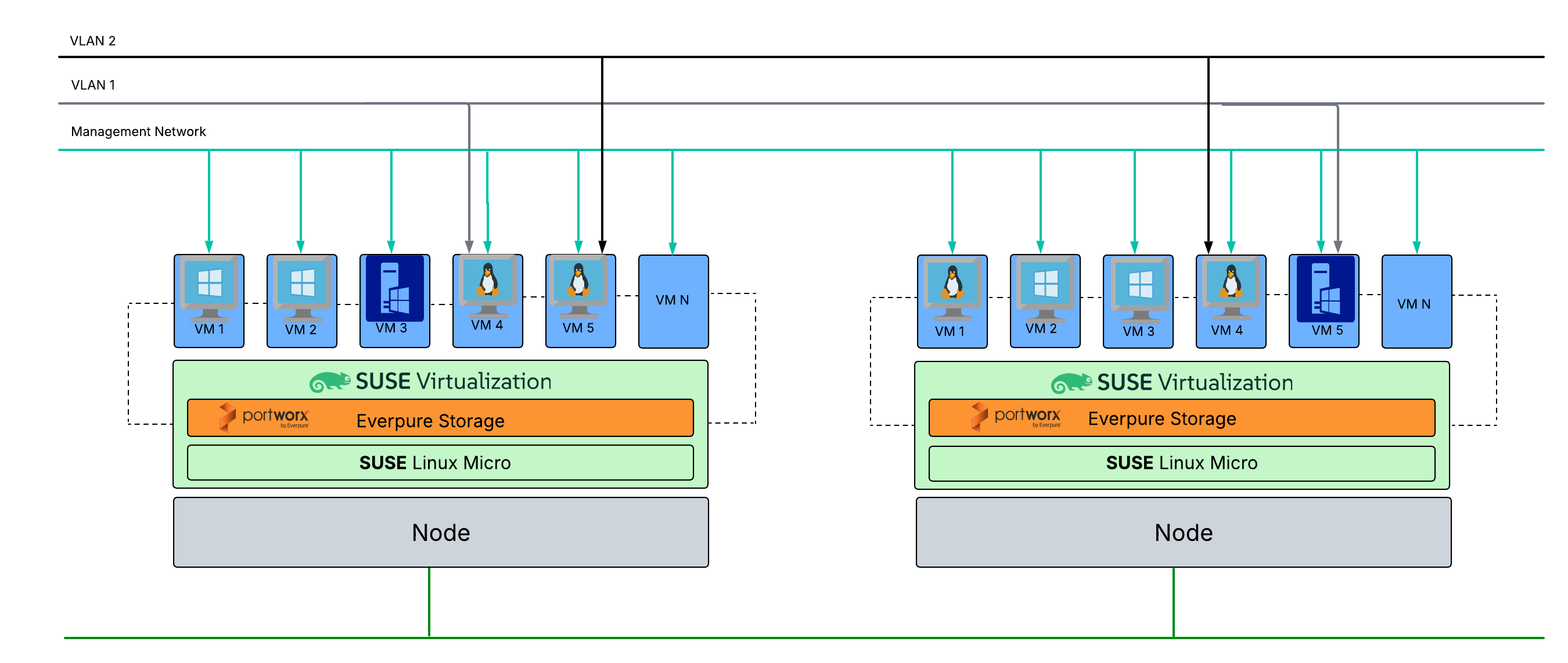
The integration brings together SUSE Virtualization and Portworx Enterprise by Everpure to deliver compute, storage, and orchestration layers for a modern, adaptable, and scalable, enterprise virtualization solution. Rather than focusing on low-level hypervisor internals, the architecture highlights how SUSE Virtualization and Portworx Enterprise work together to provide a flexible, scalable, and enterprise-grade platform.
3.1 SUSE Virtualization #
SUSE Virtualization is a lightweight, hyperconverged infrastructure solution,enabling the management of virtual machines and containers side-by-side on a unified, cloud-native platform. To ensure a secure and optimized base, SUSE Virtualization is deployed on SUSE Linux Micro, an immutable, enterprise-grade operating system purpose-built for containerized and virtual workloads. Furthermore, the platform integrates natively with SUSE Rancher Prime. This integration equips the architecture with centralized authentication, access control, observability, and built-in security, empowering operators to manage diverse workloads across data center and edge environments using a consistent operational model.
3.2 Portworx® Enterprise by Everpure™ #
Portworx Enterprise serves as the enterprise-grade storage layer for both VM and container workloads. It ensures consistent storage reliability across on-premises, hybrid, and edge deployments by delivering persistent volumes, high availability, automated failover, backup and disaster recovery, performance optimization, and encryption. A critical component to this deployment is the Portworx Operator. Deployed natively into the cluster, the Portworx Operator is designed to efficiently automate and manage the installation, configuration, and ongoing upgrade workflows of all Portworx components.
3.3 Compute platform #
The entire solution is deployed on bare-metal physical infrastructure. This includes the host and worker nodes, networking components (switches, NICs, load balancers), and enterprise storage devices such as an Everpure FlashArray. These physical components provide the raw performance, connectivity, and resiliency required to support large-scale virtualized and containerized workloads.
4 Design considerations #
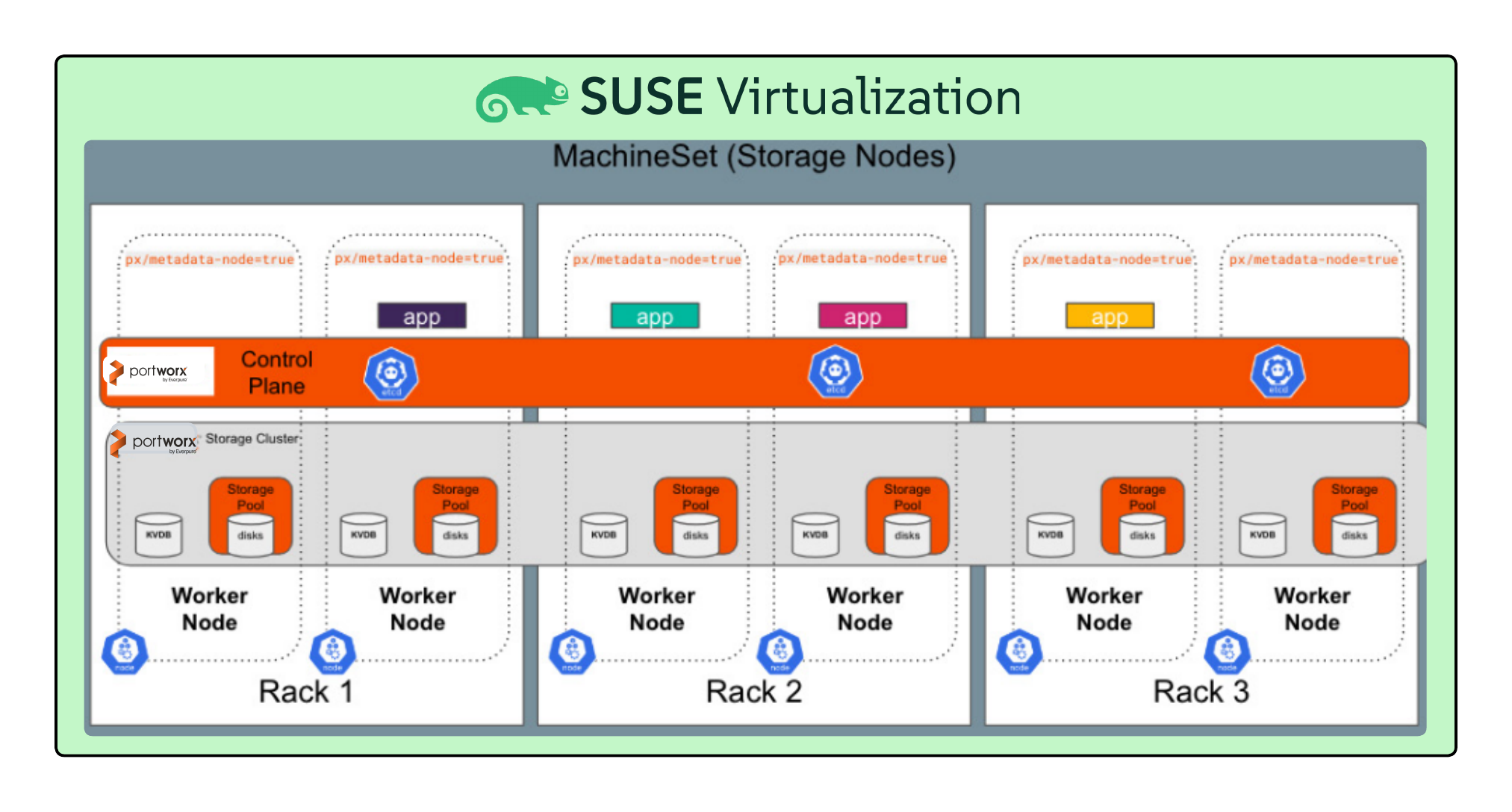
The diagram below shows a high-level, reference design for SUSE Virtualization integrated with Portworx Enterprise deployed on bare-metal nodes along with an Everpure FlashArray. By implementing this design, a platform engineering team can automate the provisioning of a well-defined architecture following best practices that includes high availability, operations management, observability, business continuity, performance, and security.

The foundation of the deployment is the bare metal compute nodes that will host both the SUSE Virtualization hypervisor and the Portworx storage layer.
4.1 Preparing the SUSE Virtualization environment #
Before deploying Portworx, you must prepare the SUSE Virtualization platform and underlying nodes to ensure they meet the specific storage requirements. Review the following configurations to ensure a stable and performant integration.
Node Count: While three storage nodes establish quorum, six nodes are recommended for production environments. In a six-node cluster, losing one node affects only one-sixth of its capacity, allowing the remaining nodes to distribute the load effectively.
Fault Domains: Distribute nodes evenly across multiple availability zones or racks to ensure a single physical failure does not take down the entire storage cluster. If running SUSE Virtualization nested on top of other hypervisors, apply anti-affinity rules to prevent storage nodes from residing on the same physical host.
Resource Requirements: Each bare metal node requires a minimum of 8 vCPUs and 32 GB of RAM. Verify that all nodes run the same kernel version and SUSE Linux Enterprise Server release to prevent compatibility issues.
OS Prerequisites: Configure NTP for strict time synchronization, ensure proper DNS resolution, and disable swap on all storage nodes. Update firewall, SELinux, and AppArmor policies to permit Portworx communication ports.
Node Labeling: Apply the label
portworx.io/node-type=storageto all nodes contributing storage so the operator can automatically discover devices.
4.2 Storage and networking infrastructure #
Designing a robust and efficient network is essential for achieving optimal performance and reliability when deploying Portworx with SUSE Virtualization. A well-planned network architecture ensures seamless communication between nodes, maintains data consistency, and supports high availability across the storage cluster. This section outlines the key networking considerations and best practices specific to Portworx running on SUSE Virtualization.
By carefully structuring the network layout particularly around management and data interfaces you can enhance both the stability and performance of your Portworx deployment. Additionally, properly configured firewall rules and VLAN segmentation can provide improved security and traffic isolation within your virtualized environment.
4.2.1 Management and data interfaces #
When planning network configurations for Portworx on SUSE Virtualization, several best practices should be observed to ensure efficient data flow and scalability. Some considerations are noted below.
Dedicated network interfaces: Assign separate virtual or physical NICs for management and data traffic. Management traffic (cluster operations, control plane) should be isolated from data plane traffic (replication, volume access) to prevent congestion and performance degradation.
Use of bridge or macvtap interfaces: In KVM-based SUSE Virtualization environments, configure Linux bridges or MacvTap interfaces to provide direct network access to Portworx nodes. This reduces latency and improves throughput for data replication and I/O operations.
Consistent network configuration across hosts: Ensure that all SUSE Virtualization hosts maintain identical interface names, IP schemes, and VLAN configurations. Consistency helps avoid issues when migrating or scaling Portworx nodes.
Jumbo frames and MTU settings: For high-throughput storage workloads, enable jumbo frames (MTU 9000) on the data interfaces to improve performance, provided that the entire network path supports it.
Bandwidth and QoS: Reserve sufficient bandwidth for Portworx data traffic. Implement Quality of Service (QoS) policies if the network is shared with other workloads, ensuring predictable latency and throughput.
Redundancy and bonding: Use NIC bonding or teaming (for example, mode 4 LACP) for redundancy and load balancing across both management and data networks, ensuring high availability and fault tolerance.
Firewall and security rules: Configure firewalls to allow required Portworx communication ports (control, data, and API) between nodes. Limit external access to management interfaces to secure administrative operations.
DNS and time synchronization: Verify that all nodes have consistent DNS resolution and NTP synchronization, as Portworx relies on stable name resolution and accurate timekeeping for cluster operations.
NIC usage: By default, Portworx uses the same network interface cards used by the Kubernetes cluster for both management traffic and data replication. This configuration simplifies the initial setup of the Portworx storage cluster but may lead to potential network congestion as both types of traffic share the same physical network resources. The default NIC for Portworx can be used for labs or development environments to simplify setup, but it should be avoided for production environments where storage performance is critical.
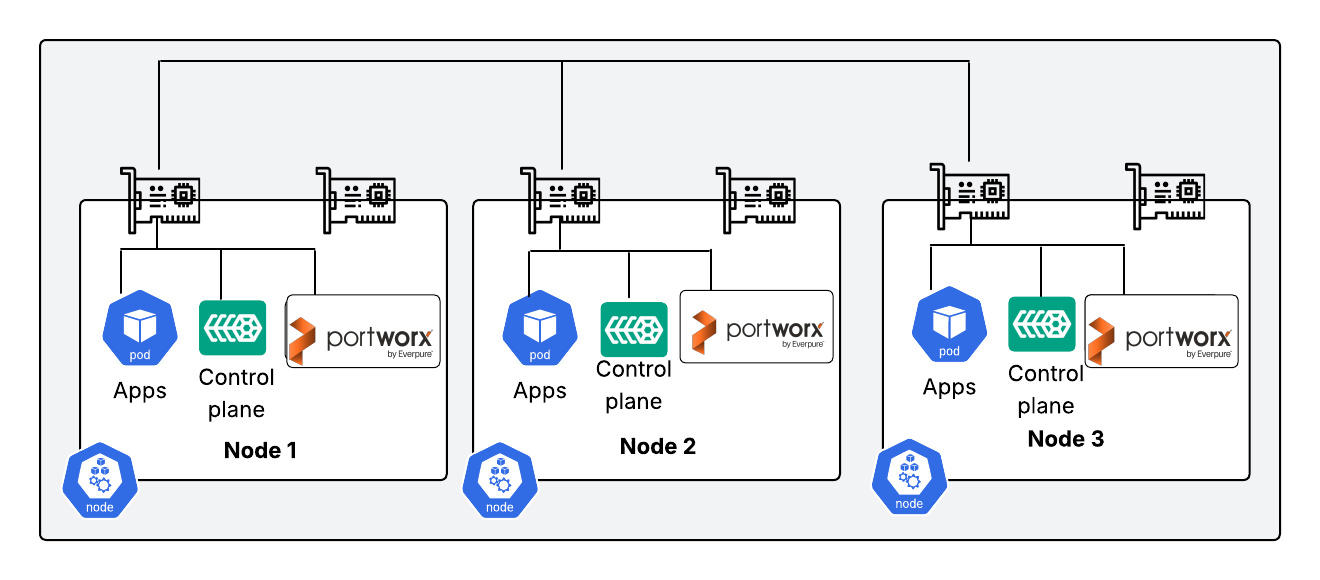
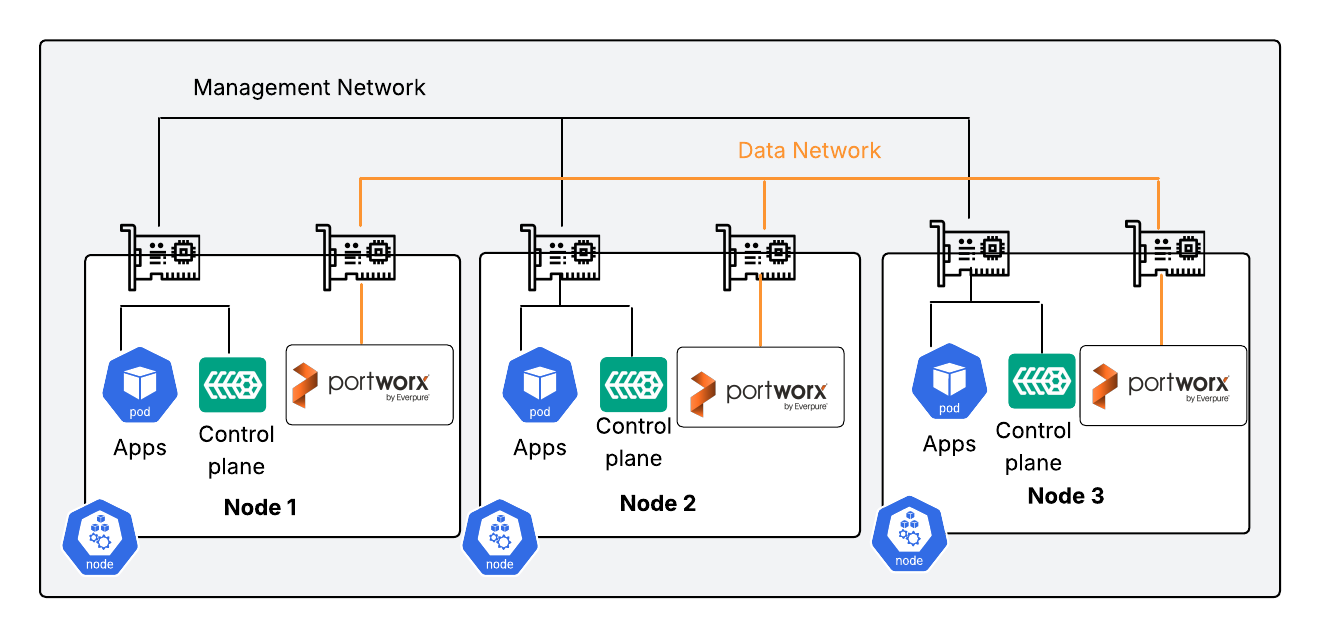
Dedicated data networks: To optimize network performance and reduce congestion, Portworx can be configured to use a dedicated NIC specifically for handling data replication between nodes. This approach segregates data replication traffic from the management and application traffic, ensuring that the NICs used by SUSE Virtualization for managing VMs and containerized workloads, remain uncongested and perform efficiently. Implementing a dedicated data network can enhance the overall throughput and reliability of the storage cluster, especially with high data replication demands.
4.2.2 Bandwidth and latency #
The physical network infrastructure significantly impacts how efficiently data can be written and replicated across nodes in a SUSE Virtualization cluster using Portworx storage. Because Portworx must replicate data to a secondary node before confirming a write operation, both network bandwidth and latency directly affect application write performance and overall storage throughput. Some considerations are noted below.
Consistency: Ensure that all storage nodes use network interfaces (NICs) of the same speed and configuration to maintain consistent and predictable performance.
Bandwidth: 10 Gbps or higher is recommended for production environments. Data-intensive or latency-sensitive workloads may require 25 Gbps or greater. 1 Gbps may be sufficient for some non-production scenarios, such as configuration testing.
Latency: 10 ms between storage nodes is required for synchronous replication.
4.2.3 Backing disks and storage arrays #
When configuring a Portworx storage cluster on SUSE Virtualization, the choice and configuration of backing disks are critical for achieving optimal performance, reliability, and scalability. Below are key considerations to guide you in selecting and configuring backing disks for your Portworx storage cluster:
Block devices: Portworx requires block storage devices as the backing storage for the Portworx storage cluster. Each storage node must be provisioned with raw block devices rather than pre-formatted file systems or logical volumes. These block devices can be sourced from local disks within the bare metal worker nodes. Alternatively, they can be sourced from a hardware storage array, such as an Everpure FlashArray or other SAN systems, that can present block devices to the servers. Ensure that the block devices to be used by Portworx are recognized by the host operating system of the worker nodes.
Disk type and performance: The block devices used by Portworx determine the overall capacity, I/O performance, and throughput of the storage cluster. When selecting disks, consider the type, size, and performance capabilities. Faster devices, such as NVMe SSDs, provide better performance for Kubernetes applications using Portworx for persistent volumes (PVs) compared to slower devices like traditional hard disks.
Disk redundancy and fault tolerance: Portworx allows application owners to specify the level of redundancy for their stateful data through replication factors. This ensures that replicas are stored on multiple nodes in the cluster. Additionally, implementing a RAID configuration (such as RAID1) at the hardware controller level can provide per-node disk redundancy. This setup allows a node to tolerate single disk failures without triggering a replica re-sync across the cluster. However, this extra layer of protection does incur higher hardware costs.
Capacity planning: The size and configuration of the backing disks determines the total capacity of the Portworx storage cluster. While Portworx requires a small amount of overhead for metadata and journal writes, most of the capacity is used for persistent volumes and replicas. When planning capacity, consider the expected number of replicas per application to ensure sufficient storage. Disks can be resized, or additional devices can be added to expand the total storage cluster capacity for future needs.
Storage pool configuration: Portworx requires at least one storage pool to operate, but multiple pools can be configured to segregate different types of workloads or create storage tiers for performance optimization. Each storage pool should consist of drives with identical specifications to ensure consistent storage performance across the nodes in the cluster. This configuration helps maintain uniformity in storage performance for all replicas.
By carefully considering these factors, you can ensure that your Portworx storage cluster on SUSE Virtualization is well-equipped to handle the demands of your applications, providing high performance, reliability, and scalability.
4.2.4 Storage pools and single-volume strategy #
By following these guidelines, organizations can deploy a robust and scalable Portworx architecture on SUSE Virtualization, ensuring high availability and optimal performance for their applications.
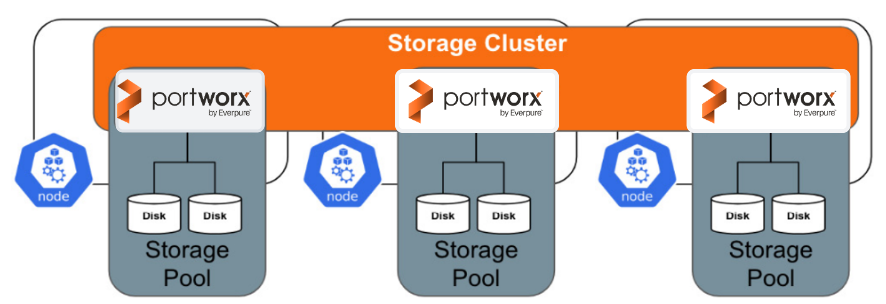
A storage pool in Portworx is a logical grouping of a node’s physical drives. Portworx uses the space in these storage pools to dynamically create virtual volumes for containers. Storage pools consist of a collection of drives with the same capacity and type. When you create a pool, Portworx categorizes it based on its latency and performance in random and sequential IOPS.
To set up a storage pool, you need a minimum of one disk per node. Portworx evaluates each disk through a benchmark process, categorizing it based on its throughput into one of three I/O priorities: low, medium, or high. Disks that share the same I/O priority and size within a node are grouped into a pool. This categorization allows you to align various applications with the appropriate tier of storage based on their performance requirements. For example, database applications can be placed on flash devices for high performance, while applications managing logging data can utilize less performant options.
For future scalability, consider the methods available to increase storage capacity in the cluster. This can be either by expanding an existing disk (vertical scaling) or by adding additional disks to the storage pool (horizontal scaling). While both methods increase capacity, horizontal scaling necessitates an intensive and time-consuming rebalancing process Vertical scaling is preferred, as it does not require rebalancing. In an enterprise setting, the "disk" in the storage pool is often provided by a logical unit in a storage array, simplifying capacity expansion and providing other enterprise features like centralized management.
4.2.5 Journal devices #
A journal device is dedicated storage used to improve the performance and reliability of write operations by logging these operations before they are finalized in main storage volumes. Configuring a journal device is recommended. Some additional recommendations are provided below.
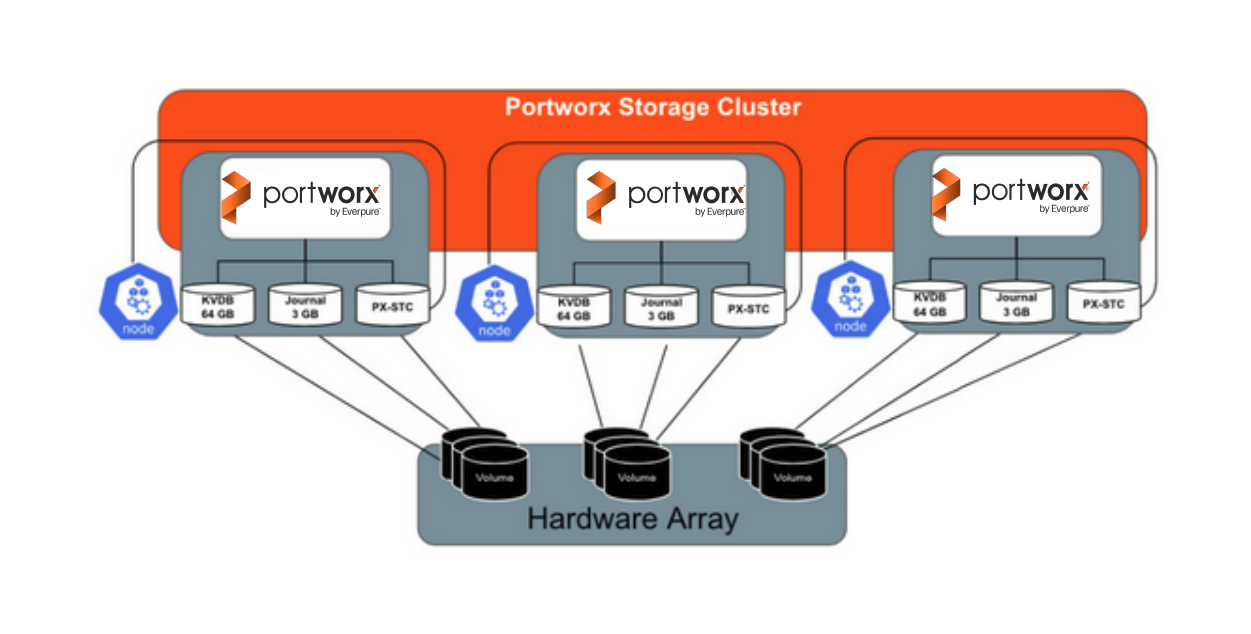
Since journal writes are small and frequent, fast storage, like a solid-state drive (SSD) or NVMe device is strongly recommended. The journal device must be at least as fast as the fastest storage device on the node participating in the Portworx storage cluster. If the journal device performs slower, the overall cluster write performance will be limited to the speed of the journal device.
The journal device should have a capacity of 3 GB, as Portworx uses only this amount of space for journaling. Allocating a larger device does not improve performance unless the increased capacity also provides additional IOPS, such as in many cloud environments.
For nodes using local drives as backing disks, configure the journal device to be automatically created from existing disks rather than dedicating a separate physical disk for the 3 GB requirement. This reduces hardware cost and complexity.
For environments using storage arrays that can easily provision and present multiple volumes or LUNs to worker nodes, create a dedicated 3 GB volume specifically for the journal device. This separation is done to achieve better metadata write performance.

Using a high-performance SSD or NVMe device for journaling can significantly improve metadata throughput and overall I/O responsiveness in Portworx storage clusters.
4.2.6 Portworx KVDB #
Portworx relies on a key-value database (KVDB) to store critical operational data such as cluster state, configuration, and volume metadata. Because this information is essential to cluster operation, it must be highly available, resilient, and protected from node or device failures. When deploying Portworx on SUSE Virtualization, you can configure the KVDB using one of the following options:
Internal KVDB
The internal KVDB is integrated directly into the Portworx deployment and is the recommended configuration for most environments.
This approach simplifies deployment by removing the need for an external database cluster, reducing management overhead and potential points of failure. The internal KVDB provides a stable and efficient mechanism for maintaining cluster metadata and configuration state.
External etcd cluster
Alternatively, Portworx can utilize an external etcd cluster as its KVDB.
This option is suitable for organizations that already maintain a production etcd infrastructure or require advanced features, such as SyncDR (Synchronous Disaster Recovery).

SyncDR depends on an external etcd cluster to maintain data consistency and high availability across geographically distributed sites. However, using an external etcd cluster introduces additional setup and management complexity. When using this option, ensure the etcd cluster is deployed across multiple fault domains to maintain quorum during node or site outages.
4.2.7 Third-Party Storage Considerations #
A hardware storage array can be used to provide the block devices as backing disks for the Portworx storage cluster. A storage array is a centralized storage system that consists of multiple storage devices (HDDs, SSDs, NVMe devices) to provide expanded storage capacity for servers and applications, often with high performance, redundancy, scalability features. A storage array may offer other benefits, such as deduplication and compression, that can lower total cost of ownership when hosting replicas for a Portworx storage cluster.
When providing backing disks to Portworx storage nodes from a hardware array, special considerations should be taken. This section outlines design considerations when using an external storage array for Portworx backing disks.
Consider the following guidance when using a storage array to provide backing for your Portworx storage cluster:
Block devices are typically presented to physical hosts (SUSE Virtualization worker nodes) via Fibre-Channel or iSCSI connections.
Interface redundancy: Portworx recommends using a minimum of two iSCSI or Fibre-Channel interfaces per node to present storage to the cluster. A pair of interfaces provides high availability in the case of hardware failure, and with multi-pathing, can deliver additional bandwidth to the backing storage array.
Fibre-Channel configuration: Ensure proper zoning in the Storage Array Network Fabric for the nodes.
iSCSI configuration: Dedicate Ethernet interfaces solely for storage traffic, rather than sharing them with SUSE Virtualization traffic. Configure jumbo frames on these interfaces and any in-line network devices, including physical switches and the storage array, to enhance performance.
For storage cluster disks, Portworx recommends presenting a single volume per storage node based on your sizing decisions. Using a single volume reduces performance impact if resizing operations are required later. If your storage array supports volume resizing, these volumes can be expanded to increase the total storage of the Portworx storage cluster This expansion avoids triggering a rebalancing task, which is a costly storage operation involving data copying.
Creating additional volumes of a desired size is straightforward with an external hardware array. In scenarios using an external hardware array, Portworx recommends creating 3 GB volumes from the array and presenting them to the worker nodes to be used as the journal device.
5 Deployment #
This section outlines the high-level deployment workflow. For complete step-by-step instructions, exact commands, and configuration files, refer to Modern Virtualization with SUSE and Everpure: Integrating Portworx Enterprise and Everpure FlashArray Storage with SUSE Virtualization.
5.1 Preparatory configurations #
Multipath setup: Deploy a Harvester CloudInit resource to configure node-level
udevrules and multipath settings tailored for the Everpure FlashArray, then restart the cluster nodes to apply the changes.Array credentials: Configure user access within the Everpure FlashArray and create a corresponding Kubernetes secret in the Portworx namespace to securely store these credentials.
5.2 Generate the Portworx installation specifications #
Portworx Central configuration: Access the Portworx Central Web portal to generate a customized installation spec for the Everpure FlashArray platform.
Basic and storage settings: Define your Kubernetes environment details, select the built-in
etcdoption, and configure your storage parameters (such as enabling PX-StoreV2, selecting Fibre Channel, and defining capacity mapping and maximum node distribution).Network and customization: Ensure the Portworx services starting port is correctly assigned, select the Rancher Kubernetes Engine (RKE) environment, and generate the installation specifications.
5.3 Install the Portworx Operator and StorageCluster #
Deploy the Portworx Operator: Execute the first generated installation spec on the SUSE Virtualization management node.
Configure the Stork snapshot (Optional): If you are running a compatible version of SUSE Virtualization (
v1.6.0or higher), configure and apply a Stork SnapshotStorageClass.Deploy the Portworx
StorageCluster: Execute the second generated spec to initiate the deployment of the actual PortworxStorageCluster.
5.4 StorageClass and CSI driver configuration #
Add the
StorageClass: Create and apply a new default KubernetesStorageClassconfigured to use the Portworx provisioner. Ensure any pre-existing default storage classes (such as Longhorn) are unset to prevent conflicts.Update SUSE Virtualization UI settings: Navigate to the advanced settings within the SUSE Virtualization UI (under
csi-driver-config) to map the new CSI driver provisioner and define the appropriate volume snapshot class name.
6 Validation #
This section outlines the high-level validation workflow. For detailed validation steps and troubleshooting guidance, refer to the complete deployment documentation.
Environment readiness: Verify that the Portworx Operator and
StorageClusterare in a healthy state and that the Portworx CSI driver is registered. Confirm that the PortworxStorageClassis available and set as the default.Provision a test VM: From the SUSE Virtualization UI, create a virtual machine and assign its primary writable root disk to the Portworx
StorageClass.Verify provisioning: Confirm that the
PersistentVolumeClaimis successfully created and bound to a Portworx-provisioned volume using the correct CSI driver.Validate operation: Start the virtual machine and verify that it reaches a running state with the root disk attached and accessible.
Optional checks: * If snapshot functionality is enabled, validate snapshot creation. * Optionally, restart the VM to confirm storage persistence.
7 Conclusion #
As organizations accelerate the modernization of their applications and infrastructure, they increasingly transition from traditional virtual machine deployments to cloud-native technologies like containers and Kubernetes. SUSE Virtualization meets this demand by providing a flexible, unified platform where containerized and virtualized workloads coexist seamlessly side-by-side. By integrating Portworx Enterprise by Everpure, this architecture gains resilient, scalable, and highly efficient storage services tailored for mission-critical operations—fully supporting enterprise availability, data mobility, and robust protection needs. Together, SUSE Virtualization and Portworx equip enterprises with a dependable, future-proof infrastructure foundation capable of driving their most demanding workloads.
This guide has detailed the core architectural concepts, configuration steps, and validation methods required to successfully implement this integration using an Everpure FlashArray. By bridging these technologies, organizations can confidently eliminate infrastructure silos and streamline operations.
To continue your learning journey, explore the following technical resources:
8 Frequently Asked Questions (FAQs) #
What problem does SUSE Virtualization with Portworx on bare metal solve?
This solution addresses the challenges of running modern, stateful virtualized workloads with high availability, performance, and operational consistency. It provides a unified platform to run virtual machines and containers together while ensuring enterprise-grade persistent storage, resiliency, and simplified lifecycle management.
Why deploy SUSE Virtualization on bare metal instead of a traditional hypervisor stack?
Deploying on bare metal removes unnecessary abstraction layers, improves performance, and provides greater control over hardware resources. It also enables tighter integration with Kubernetes, allowing organizations to manage virtual machines and containers using the same cloud-native operational model.
How does Portworx integrate with SUSE Virtualization?
Portworx integrates as the persistent storage layer for SUSE Virtualization by providing block storage volumes to both virtual machines and container workloads. It runs as a Kubernetes-native service and manages replication, failover, backup, and storage lifecycle operations transparently.
Is Everpure FlashArray required for this architecture?
Everpure FlashArray is recommended and validated in this reference configuration because of its performance, reliability, and enterprise features. However, Portworx can also work with other supported hardware storage arrays or local disks, provided they can present raw block devices to the SUSE Virtualization nodes.
What is the minimum cluster size for production deployments?
Portworx requires a minimum of three storage nodes to establish quorum. For production environments, six storage nodes are recommended to improve fault tolerance, capacity distribution, and I/O performance during node failures or maintenance operations.
Can this architecture support both virtual machines and containers?
Yes. SUSE Virtualization is designed to run virtual machines and Kubernetes workloads side by side on the same cluster. Portworx provides persistent storage services for both workload types, enabling consistent data management across VMs and containers.
Is a dedicated storage network required?
A dedicated storage network is strongly recommended for production environments. Separating management and data traffic reduces contention and improves storage replication performance. For high-performance workloads, 25 Gbps or higher network bandwidth is preferred.
What are the recommended storage pool and backing disk configurations?
Portworx recommends using a single backing disk per node to create the storage pool. This approach simplifies capacity expansion, especially when using external storage arrays that support volume resizing, and avoids costly data rebalancing operations.
How does this architecture support future scalability and growth?
The solution supports horizontal scaling by adding nodes and vertical scaling by expanding backing disks. It also provides a foundation for hybrid cloud, edge deployments, and mixed VM/container workloads without requiring architectural changes.
Does this reference configuration support disaster recovery?
Yes. Portworx provides built-in backup and disaster recovery capabilities. Advanced DR features, including synchronous replication across sites, are supported when integrated with an external etcd cluster and appropriate network connectivity.
Is this solution suitable for edge or remote deployments?
Yes. SUSE Virtualization and Portworx are well-suited for edge environments because of their lightweight footprint, Kubernetes-native management, and ability to operate consistently across centralized data centers and remote locations.
9 Legal notice #
Copyright © 2006–2026 SUSE LLC and contributors. All rights reserved.
Permission is granted to copy, distribute and/or modify this document under the terms of the GNU Free Documentation License, Version 1.2 or (at your option) version 1.3; with the Invariant Section being this copyright notice and license. A copy of the license version 1.2 is included in the section entitled "GNU Free Documentation License".
SUSE, the SUSE logo and YaST are registered trademarks of SUSE LLC in the United States and other countries. For SUSE trademarks, see https://www.suse.com/company/legal/.
Linux is a registered trademark of Linus Torvalds. All other names or trademarks mentioned in this document may be trademarks or registered trademarks of their respective owners.
Documents published as part of the series SUSE Technical Reference Documentation have been contributed voluntarily by SUSE employees and third parties. They are meant to serve as examples of how particular actions can be performed. They have been compiled with utmost attention to detail. However, this does not guarantee complete accuracy. SUSE cannot verify that actions described in these documents do what is claimed or whether actions described have unintended consequences. SUSE LLC, its affiliates, the authors, and the translators may not be held liable for possible errors or the consequences thereof.
10 GNU Free Documentation License #
Copyright © 2000, 2001, 2002 Free Software Foundation, Inc. 51 Franklin St, Fifth Floor, Boston, MA 02110-1301 USA. Everyone is permitted to copy and distribute verbatim copies of this license document, but changing it is not allowed.
0. PREAMBLE#
The purpose of this License is to make a manual, textbook, or other functional and useful document "free" in the sense of freedom: to assure everyone the effective freedom to copy and redistribute it, with or without modifying it, either commercially or noncommercially. Secondarily, this License preserves for the author and publisher a way to get credit for their work, while not being considered responsible for modifications made by others.
This License is a kind of "copyleft", which means that derivative works of the document must themselves be free in the same sense. It complements the GNU General Public License, which is a copyleft license designed for free software.
We have designed this License in order to use it for manuals for free software, because free software needs free documentation: a free program should come with manuals providing the same freedoms that the software does. But this License is not limited to software manuals; it can be used for any textual work, regardless of subject matter or whether it is published as a printed book. We recommend this License principally for works whose purpose is instruction or reference.
1. APPLICABILITY AND DEFINITIONS#
This License applies to any manual or other work, in any medium, that contains a notice placed by the copyright holder saying it can be distributed under the terms of this License. Such a notice grants a world-wide, royalty-free license, unlimited in duration, to use that work under the conditions stated herein. The "Document", below, refers to any such manual or work. Any member of the public is a licensee, and is addressed as "you". You accept the license if you copy, modify or distribute the work in a way requiring permission under copyright law.
A "Modified Version" of the Document means any work containing the Document or a portion of it, either copied verbatim, or with modifications and/or translated into another language.
A "Secondary Section" is a named appendix or a front-matter section of the Document that deals exclusively with the relationship of the publishers or authors of the Document to the Document’s overall subject (or to related matters) and contains nothing that could fall directly within that overall subject. (Thus, if the Document is in part a textbook of mathematics, a Secondary Section may not explain any mathematics.) The relationship could be a matter of historical connection with the subject or with related matters, or of legal, commercial, philosophical, ethical or political position regarding them.
The "Invariant Sections" are certain Secondary Sections whose titles are designated, as being those of Invariant Sections, in the notice that says that the Document is released under this License. If a section does not fit the above definition of Secondary then it is not allowed to be designated as Invariant. The Document may contain zero Invariant Sections. If the Document does not identify any Invariant Sections then there are none.
The "Cover Texts" are certain short passages of text that are listed, as Front-Cover Texts or Back-Cover Texts, in the notice that says that the Document is released under this License. A Front-Cover Text may be at most 5 words, and a Back-Cover Text may be at most 25 words.
A "Transparent" copy of the Document means a machine-readable copy, represented in a format whose specification is available to the general public, that is suitable for revising the document straightforwardly with generic text editors or (for images composed of pixels) generic paint programs or (for drawings) some widely available drawing editor, and that is suitable for input to text formatters or for automatic translation to a variety of formats suitable for input to text formatters. A copy made in an otherwise Transparent file format whose markup, or absence of markup, has been arranged to thwart or discourage subsequent modification by readers is not Transparent. An image format is not Transparent if used for any substantial amount of text. A copy that is not "Transparent" is called "Opaque".
Examples of suitable formats for Transparent copies include plain ASCII without markup, Texinfo input format, LaTeX input format, SGML or XML using a publicly available DTD, and standard-conforming simple HTML, PostScript or PDF designed for human modification. Examples of transparent image formats include PNG, XCF and JPG. Opaque formats include proprietary formats that can be read and edited only by proprietary word processors, SGML or XML for which the DTD and/or processing tools are not generally available, and the machine-generated HTML, PostScript or PDF produced by some word processors for output purposes only.
The "Title Page" means, for a printed book, the title page itself, plus such following pages as are needed to hold, legibly, the material this License requires to appear in the title page. For works in formats which do not have any title page as such, "Title Page" means the text near the most prominent appearance of the work’s title, preceding the beginning of the body of the text.
A section "Entitled XYZ" means a named subunit of the Document whose title either is precisely XYZ or contains XYZ in parentheses following text that translates XYZ in another language. (Here XYZ stands for a specific section name mentioned below, such as "Acknowledgements", "Dedications", "Endorsements", or "History".) To "Preserve the Title" of such a section when you modify the Document means that it remains a section "Entitled XYZ" according to this definition.
The Document may include Warranty Disclaimers next to the notice which states that this License applies to the Document. These Warranty Disclaimers are considered to be included by reference in this License, but only as regards disclaiming warranties: any other implication that these Warranty Disclaimers may have is void and has no effect on the meaning of this License.
2. VERBATIM COPYING#
You may copy and distribute the Document in any medium, either commercially or noncommercially, provided that this License, the copyright notices, and the license notice saying this License applies to the Document are reproduced in all copies, and that you add no other conditions whatsoever to those of this License. You may not use technical measures to obstruct or control the reading or further copying of the copies you make or distribute. However, you may accept compensation in exchange for copies. If you distribute a large enough number of copies you must also follow the conditions in section 3.
You may also lend copies, under the same conditions stated above, and you may publicly display copies.
3. COPYING IN QUANTITY#
If you publish printed copies (or copies in media that commonly have printed covers) of the Document, numbering more than 100, and the Document’s license notice requires Cover Texts, you must enclose the copies in covers that carry, clearly and legibly, all these Cover Texts: Front-Cover Texts on the front cover, and Back-Cover Texts on the back cover. Both covers must also clearly and legibly identify you as the publisher of these copies. The front cover must present the full title with all words of the title equally prominent and visible. You may add other material on the covers in addition. Copying with changes limited to the covers, as long as they preserve the title of the Document and satisfy these conditions, can be treated as verbatim copying in other respects.
If the required texts for either cover are too voluminous to fit legibly, you should put the first ones listed (as many as fit reasonably) on the actual cover, and continue the rest onto adjacent pages.
If you publish or distribute Opaque copies of the Document numbering more than 100, you must either include a machine-readable Transparent copy along with each Opaque copy, or state in or with each Opaque copy a computer-network location from which the general network-using public has access to download using public-standard network protocols a complete Transparent copy of the Document, free of added material. If you use the latter option, you must take reasonably prudent steps, when you begin distribution of Opaque copies in quantity, to ensure that this Transparent copy will remain thus accessible at the stated location until at least one year after the last time you distribute an Opaque copy (directly or through your agents or retailers) of that edition to the public.
It is requested, but not required, that you contact the authors of the Document well before redistributing any large number of copies, to give them a chance to provide you with an updated version of the Document.
4. MODIFICATIONS#
You may copy and distribute a Modified Version of the Document under the conditions of sections 2 and 3 above, provided that you release the Modified Version under precisely this License, with the Modified Version filling the role of the Document, thus licensing distribution and modification of the Modified Version to whoever possesses a copy of it. In addition, you must do these things in the Modified Version:
Use in the Title Page (and on the covers, if any) a title distinct from that of the Document, and from those of previous versions (which should, if there were any, be listed in the History section of the Document). You may use the same title as a previous version if the original publisher of that version gives permission.
List on the Title Page, as authors, one or more persons or entities responsible for authorship of the modifications in the Modified Version, together with at least five of the principal authors of the Document (all of its principal authors, if it has fewer than five), unless they release you from this requirement.
State on the Title page the name of the publisher of the Modified Version, as the publisher.
Preserve all the copyright notices of the Document.
Add an appropriate copyright notice for your modifications adjacent to the other copyright notices.
Include, immediately after the copyright notices, a license notice giving the public permission to use the Modified Version under the terms of this License, in the form shown in the Addendum below.
Preserve in that license notice the full lists of Invariant Sections and required Cover Texts given in the Document’s license notice.
Include an unaltered copy of this License.
Preserve the section Entitled "History", Preserve its Title, and add to it an item stating at least the title, year, new authors, and publisher of the Modified Version as given on the Title Page. If there is no section Entitled "History" in the Document, create one stating the title, year, authors, and publisher of the Document as given on its Title Page, then add an item describing the Modified Version as stated in the previous sentence.
Preserve the network location, if any, given in the Document for public access to a Transparent copy of the Document, and likewise the network locations given in the Document for previous versions it was based on. These may be placed in the "History" section. You may omit a network location for a work that was published at least four years before the Document itself, or if the original publisher of the version it refers to gives permission.
For any section Entitled "Acknowledgements" or "Dedications", Preserve the Title of the section, and preserve in the section all the substance and tone of each of the contributor acknowledgements and/or dedications given therein.
Preserve all the Invariant Sections of the Document, unaltered in their text and in their titles. Section numbers or the equivalent are not considered part of the section titles.
Delete any section Entitled "Endorsements". Such a section may not be included in the Modified Version.
Do not retitle any existing section to be Entitled "Endorsements" or to conflict in title with any Invariant Section.
Preserve any Warranty Disclaimers.
If the Modified Version includes new front-matter sections or appendices that qualify as Secondary Sections and contain no material copied from the Document, you may at your option designate some or all of these sections as invariant. To do this, add their titles to the list of Invariant Sections in the Modified Version’s license notice. These titles must be distinct from any other section titles.
You may add a section Entitled "Endorsements", provided it contains nothing but endorsements of your Modified Version by various parties—for example, statements of peer review or that the text has been approved by an organization as the authoritative definition of a standard.
You may add a passage of up to five words as a Front-Cover Text, and a passage of up to 25 words as a Back-Cover Text, to the end of the list of Cover Texts in the Modified Version. Only one passage of Front-Cover Text and one of Back-Cover Text may be added by (or through arrangements made by) any one entity. If the Document already includes a cover text for the same cover, previously added by you or by arrangement made by the same entity you are acting on behalf of, you may not add another; but you may replace the old one, on explicit permission from the previous publisher that added the old one.
The author(s) and publisher(s) of the Document do not by this License give permission to use their names for publicity for or to assert or imply endorsement of any Modified Version.
5. COMBINING DOCUMENTS#
You may combine the Document with other documents released under this License, under the terms defined in section 4 above for modified versions, provided that you include in the combination all of the Invariant Sections of all of the original documents, unmodified, and list them all as Invariant Sections of your combined work in its license notice, and that you preserve all their Warranty Disclaimers.
The combined work need only contain one copy of this License, and multiple identical Invariant Sections may be replaced with a single copy. If there are multiple Invariant Sections with the same name but different contents, make the title of each such section unique by adding at the end of it, in parentheses, the name of the original author or publisher of that section if known, or else a unique number. Make the same adjustment to the section titles in the list of Invariant Sections in the license notice of the combined work.
In the combination, you must combine any sections Entitled "History" in the various original documents, forming one section Entitled "History"; likewise combine any sections Entitled "Acknowledgements", and any sections Entitled "Dedications". You must delete all sections Entitled "Endorsements".
6. COLLECTIONS OF DOCUMENTS#
You may make a collection consisting of the Document and other documents released under this License, and replace the individual copies of this License in the various documents with a single copy that is included in the collection, provided that you follow the rules of this License for verbatim copying of each of the documents in all other respects.
You may extract a single document from such a collection, and distribute it individually under this License, provided you insert a copy of this License into the extracted document, and follow this License in all other respects regarding verbatim copying of that document.
7. AGGREGATION WITH INDEPENDENT WORKS#
A compilation of the Document or its derivatives with other separate and independent documents or works, in or on a volume of a storage or distribution medium, is called an "aggregate" if the copyright resulting from the compilation is not used to limit the legal rights of the compilation’s users beyond what the individual works permit. When the Document is included in an aggregate, this License does not apply to the other works in the aggregate which are not themselves derivative works of the Document.
If the Cover Text requirement of section 3 is applicable to these copies of the Document, then if the Document is less than one half of the entire aggregate, the Document’s Cover Texts may be placed on covers that bracket the Document within the aggregate, or the electronic equivalent of covers if the Document is in electronic form. Otherwise they must appear on printed covers that bracket the whole aggregate.
8. TRANSLATION#
Translation is considered a kind of modification, so you may distribute translations of the Document under the terms of section 4. Replacing Invariant Sections with translations requires special permission from their copyright holders, but you may include translations of some or all Invariant Sections in addition to the original versions of these Invariant Sections. You may include a translation of this License, and all the license notices in the Document, and any Warranty Disclaimers, provided that you also include the original English version of this License and the original versions of those notices and disclaimers. In case of a disagreement between the translation and the original version of this License or a notice or disclaimer, the original version will prevail.
If a section in the Document is Entitled "Acknowledgements", "Dedications", or "History", the requirement (section 4) to Preserve its Title (section 1) will typically require changing the actual title.
9. TERMINATION#
You may not copy, modify, sublicense, or distribute the Document except as expressly provided for under this License. Any other attempt to copy, modify, sublicense or distribute the Document is void, and will automatically terminate your rights under this License. However, parties who have received copies, or rights, from you under this License will not have their licenses terminated so long as such parties remain in full compliance.
10. FUTURE REVISIONS OF THIS LICENSE#
The Free Software Foundation may publish new, revised versions of the GNU Free Documentation License from time to time. Such new versions will be similar in spirit to the present version, but may differ in detail to address new problems or concerns. See http://www.gnu.org/copyleft/.
Each version of the License is given a distinguishing version number. If the Document specifies that a particular numbered version of this License "or any later version" applies to it, you have the option of following the terms and conditions either of that specified version or of any later version that has been published (not as a draft) by the Free Software Foundation. If the Document does not specify a version number of this License, you may choose any version ever published (not as a draft) by the Free Software Foundation.
ADDENDUM: How to use this License for your documents#
Copyright (c) YEAR YOUR NAME.
   Permission is granted to copy, distribute and/or modify this document
   under the terms of the GNU Free Documentation License, Version 1.2
   or any later version published by the Free Software Foundation;
   with no Invariant Sections, no Front-Cover Texts, and no Back-Cover Texts.
   A copy of the license is included in the section entitled “GNU
   Free Documentation License”.
If you have Invariant Sections, Front-Cover Texts and Back-Cover Texts, replace the “ with…Texts.” line with this:
with the Invariant Sections being LIST THEIR TITLES, with the
   Front-Cover Texts being LIST, and with the Back-Cover Texts being LIST.
If you have Invariant Sections without Cover Texts, or some other combination of the three, merge those two alternatives to suit the situation.
If your document contains nontrivial examples of program code, we recommend releasing these examples in parallel under your choice of free software license, such as the GNU General Public License, to permit their use in free software.