39 Concept & Architecture #
SUSE Telco Cloud is a platform designed for hosting modern, cloud native, Telco applications at scale from core to edge.
This page explains the architecture and components used in SUSE Telco Cloud.
39.1 SUSE Telco Cloud Architecture #
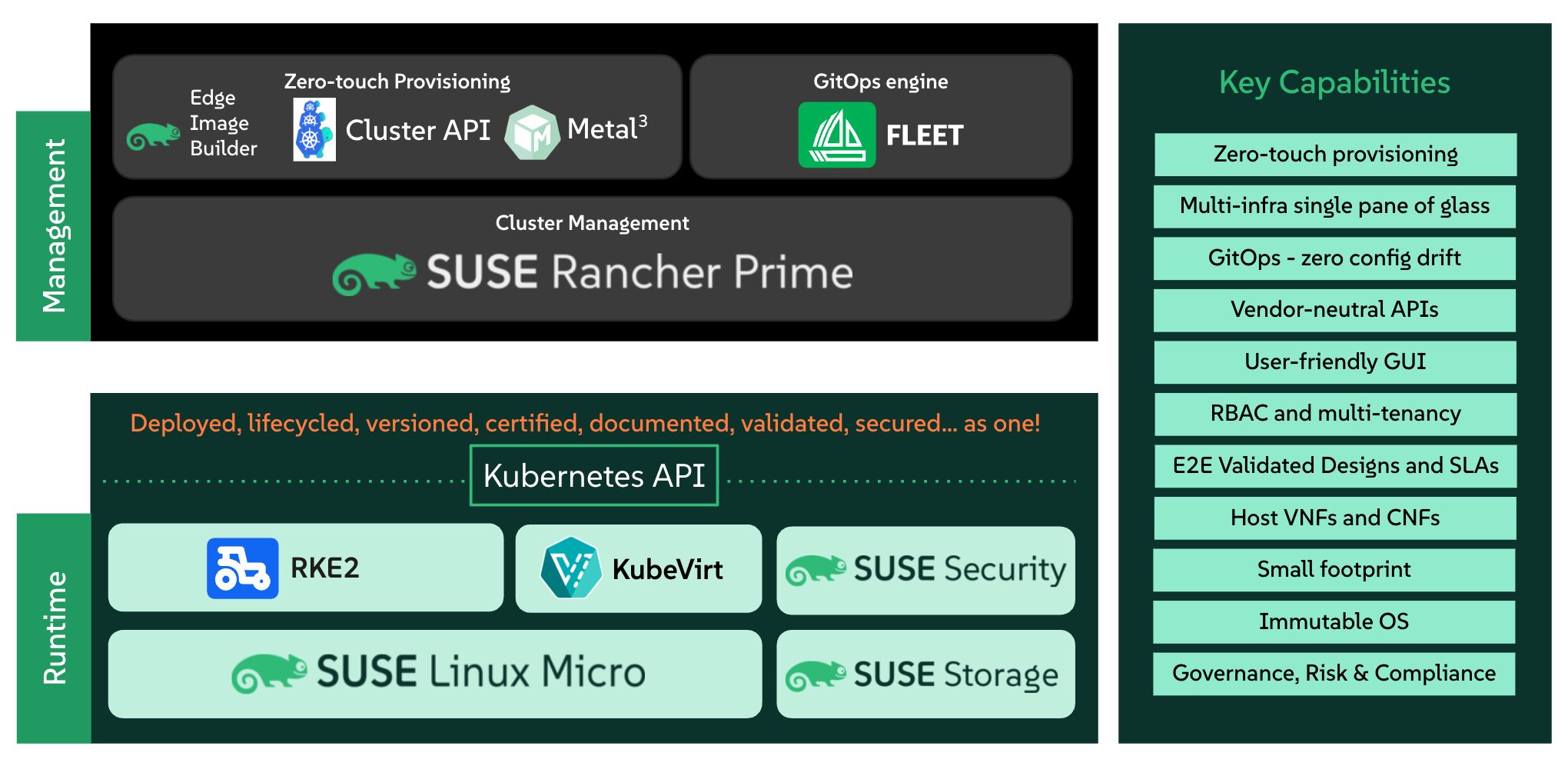
The following diagram shows the high-level architecture of SUSE Telco Cloud:
39.2 Components #
There are two different blocks, the management stack and the runtime stack:
Management stack: This is the part of SUSE Telco Cloud that is used to manage the provision and lifecycle of the runtime stacks. It includes the following components:
Multi-cluster management in public and private cloud environments with Rancher (Chapter 5, Rancher)
Bare-metal support with Metal3 (Chapter 10, Metal3), MetalLB (Chapter 18, MetalLB) and
CAPI(Cluster API) infrastructure providersComprehensive tenant isolation and
IDP(Identity Provider) integrationsLarge marketplace of third-party integrations and extensions
Vendor-neutral API and rich ecosystem of providers
Control the SUSE Linux Micro transactional updates
GitOps Engine for managing the lifecycle of the clusters using Git repositories with Fleet (Chapter 8, Fleet)
Runtime stack: This is the part of SUSE Telco Cloud that is used to run the workloads.
RKE2 (Chapter 15, RKE2) serves as the security-hardened, lightweight Kubernetes distribution, optimized for edge and compliance-focused telecom environments.
(Optional) SUSE Security (Chapter 17, SUSE Security) to enable security features like image vulnerability scanning, deep packet inspection and automatic intra-cluster traffic control.
(Optional) Block Storage with SUSE Storage (Chapter 16, SUSE Storage) to enable a simple and easy way to use a cloud native storage solution.
Optimized Operating System with SUSE Linux Micro (Chapter 9, SUSE Linux Micro) to enable a secure, lightweight and immutable (transactional file system) OS for running containers. SUSE Linux Micro is available on AArch64 and AMD64/Intel 64 architectures, and it also supports
Real-Time Kernelfor Telco and edge use cases.
39.3 Deployment Model #
SUSE Telco Cloud follows a two-stage deployment model: the management cluster is deployed using an image generated by Edge Image Builder (Chapter 11, Edge Image Builder), and downstream clusters are provisioned via Directed Network Provisioning. This chapter gives an overview of this deployment model, as it is the recommended and supported approach for SUSE Telco Cloud environments.
39.3.1 Why This Deployment Model? #
The management cluster is a one-time, single-site deployment. Image-based Provisioning bundles all the components into a single bootable image. This way, the management cluster will bootstrap itself, requiring minimal operational complexity. It is the simplest and most straightforward way to get it up and running.
Downstream clusters, however, are a different story. In telco environments, they are deployed at scale across many data centers and edge sites, often with no on-site technical expertise available. Directed Network Provisioning is designed for this: it requires that target servers support an out-of-band management interface such as Redfish, through which the management cluster remotely powers on, inspects, and provisions bare-metal nodes without any on-site intervention.
Baking all cluster-specific configuration into a boot image, as Image-based Provisioning would require, means every site variation demands a different image, and any configuration change requires rebuilding and redistributing images across all sites. Directed Network Provisioning solves this by keeping the OS image generic and driving all cluster-specific configuration, including networking, Kubernetes, and Telco profiles, from the management cluster at provisioning time. Operators simply rack, power, and connect the hardware and the management cluster handles the rest.
This separation also unlocks full GitOps integration. Since the entire downstream cluster definition is expressed as Cluster API manifests, it can be stored in Git and reconciled by Fleet across all sites, making provisioning, configuration, and lifecycle operations fully auditable and repeatable without manual intervention.
39.3.2 Deployment of Management Cluster #
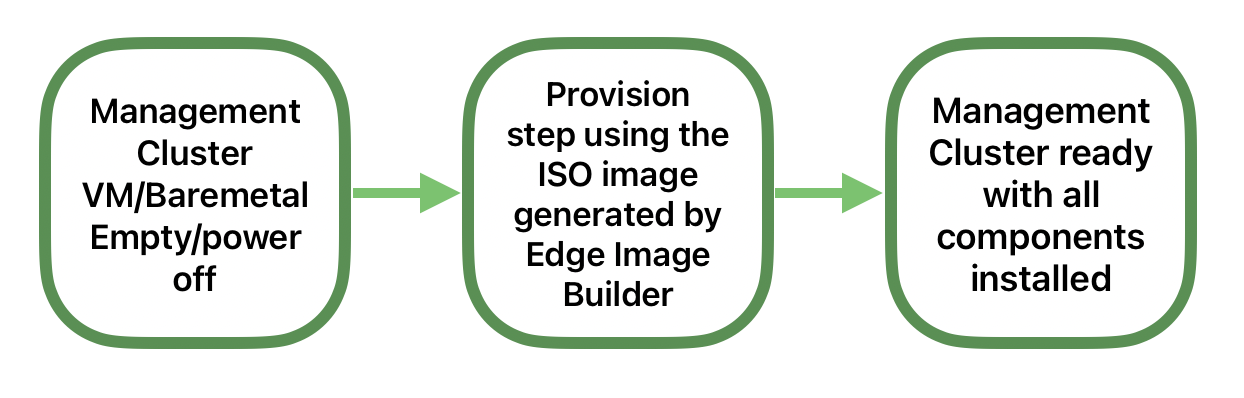
Using the Edge Image Builder (Chapter 11, Edge Image Builder) to create a new ISO image with the management stack included. You can then use this ISO image to install a new management cluster on VMs or bare-metal.

For more information about how to deploy a new management cluster, see the SUSE Telco Cloud Management Cluster guide (Chapter 41, Setting up the management cluster).
For more information about how to use the Edge Image Builder, see the Edge Image Builder guide (Chapter 3, Standalone clusters with Edge Image Builder).
39.3.3 Deployment of a Single-Node Downstream Cluster with Telco Profiles #
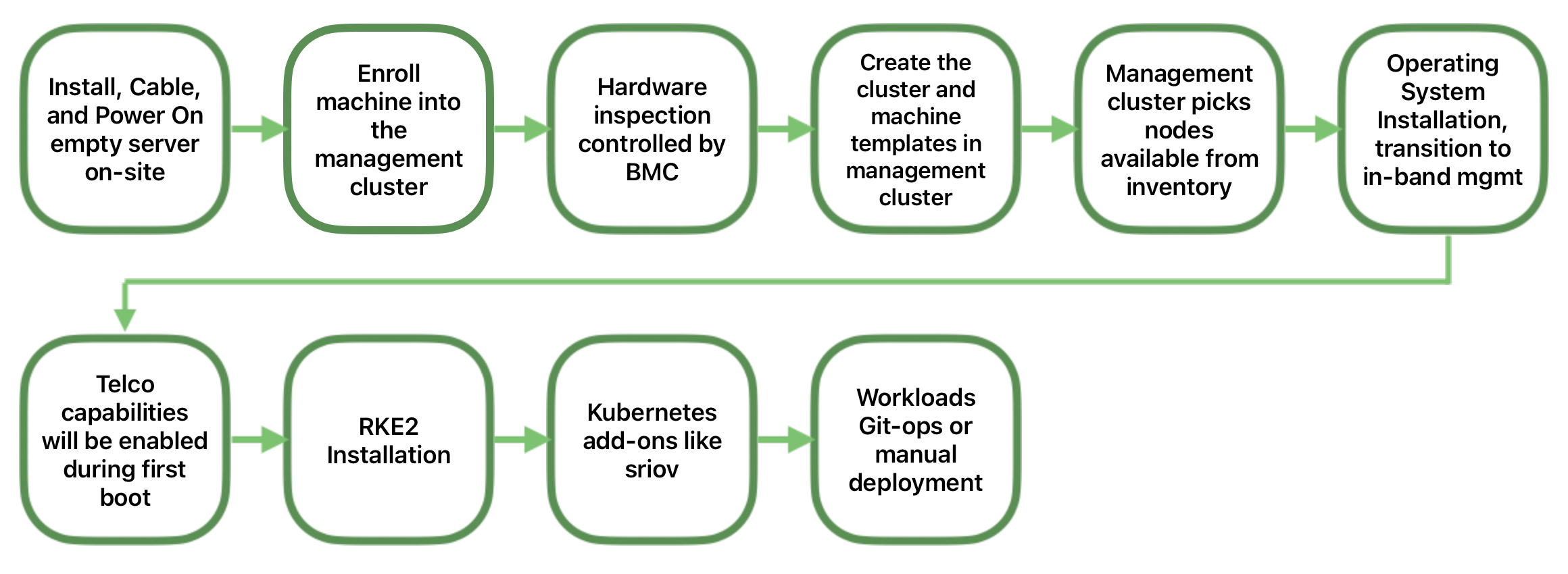
Once we have the management cluster up and running, we can use it to deploy a single-node downstream cluster with all Telco capabilities enabled and configured using the directed network provisioning workflow.
The following diagram shows the high-level workflow to deploy it:
For more information about how to deploy a downstream cluster, see the SUSE Telco Cloud Automated Provisioning guide. (Chapter 43, Fully automated directed network provisioning)
For more information about Telco features, see the SUSE Telco Cloud Telco Features guide. (Chapter 42, Telco features configuration)
39.3.4 Deployment of a Highly-Available Downstream Cluster #
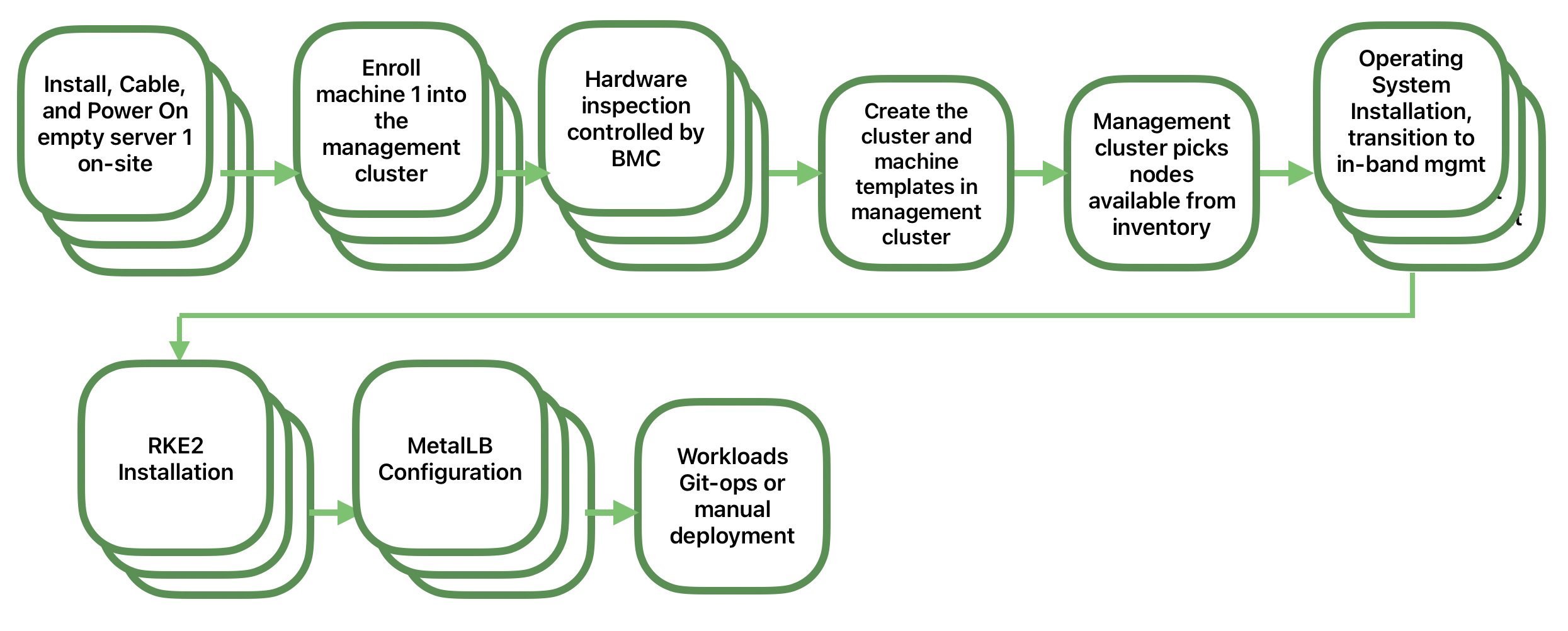
Once we have the management cluster up and running, we can use it to deploy a high availability downstream cluster with MetalLB as a load balancer using the directed network provisioning workflow.
The following diagram shows the high-level workflow to deploy it:
For more information about how to deploy a downstream cluster, see the SUSE Telco Cloud Automated Provisioning guide. (Chapter 43, Fully automated directed network provisioning)