Rancher Turtles 故障排除
本指南提供了 Rancher Turtles 和集群 API (CAPI) 集群的故障排除步骤。它涵盖了常见问题及其解决方案,以帮助您维护一个稳定和功能正常的环境。
在阅读本指南之前,您可以先查看 CAPI 项目的官方 troubleshooting 文档。
理解 Rancher Turtles 和 CAPI 的复杂性对于有效的故障排除至关重要。本指南旨在为您提供诊断和解决 Rancher Turtles 和 CAPI 中基本问题的知识。
先决条件
要有效地故障排除 Rancher Turtles 和 CAPI 集群,您需要:
-
访问一个配置了 kubectl 的终端,以访问 Rancher 管理集群。
-
安装 Krew 插件管理器以用于 kubectl。
-
安装 Helm CLI 工具。
您可以按照 Krew 安装指南 中的说明安装 Krew。
如何检查日志
您可以查看以下 pod 并检查以下命名空间中的日志:
| 名称空间 | 部署 | 说明 |
|---|---|---|
cattle-turtles-system |
rancher-turtles-controller-manager |
处理 Rancher Turtles 集成并管理其自定义资源。 |
fleet-addon-system |
caapf-controller-manager |
控制自定义基础设施提供者的集群 API 提供程序框架 |
cattle-capi-system |
capi-controller-manager |
核心集群 API 控制器,协调主要集群资源 |
rke2-bootstrap-system |
rke2-bootstrap-controller-manager |
管理 RKE2 节点的启动配置。 |
rke2-control-plane-system |
rke2-control-plane-controller-manager |
处理 RKE2 控制平面组件的初始化和管理 |
*-system |
*-controller-manager |
处理基础设施提供者组件的初始化和管理 |
$-启动系统 |
$-启动控制器管理器 |
管理自定义提供者的启动配置。 |
$-control-plane-system |
$-control-plane-controller-manager |
处理自定义提供者控制平面组件的初始化和管理 |
'*' - 取决于所使用的基础设施提供者 '$' - 取决于控制平面/启动提供者,例如 kubeadm 或 rke2
监控集群 API 控制平面 Pod 日志的一种方法是使用 kubectl logs 和标签选择器。
kubectl logs -l control-plane=controller-manager -n cattle-turtles-system -f
kubectl logs -l control-plane=controller-manager -n cattle-capi-system -f
kubectl logs -l control-plane=controller-manager -n rke2-bootstrap-system -f
kubectl logs -l control-plane=controller-manager -n rke2-control-plane-system -f|
使用 |
监控不同 Pod 日志的最佳方法是使用以下方法。
kubectl krew install stern然后您可以实时跟踪所有 Pod 的日志。
kubectl stern . -n cattle-turtles-system -n rke2-bootstrap-system -n rke2-control-plane-system -n cattle-capi-system或
kubectl stern -A -l control-plane=controller-manager如何管理 Rancher Turtles 和 CAPI 资源
列出 Rancher 和 Cluster API 资源
用户经常询问如何处理由 CAPI 和 Rancher 创建的长列表不同的 CRD,这里有一些处理方法的建议。
-
列出所有与 CAPI 和 Rancher 相关的凭据。
kubectl api-resources | grep 'cattle.io\|cluster.x-k8s.io' -
了解该资源。您可以获得关于它的功能或配置选项的完整解释。
kubectl api-resources | grep clusterclass kubectl explain clusterclass.cluster.x-k8s.io -
然后您将获得关于每个字段和配置部分的描述。
kubectl explain clusterclass.spec
kubectl explain clusterclass.spec.controlPlane
kubectl explain clusterclasses.spec.controlPlane.machineInfrastructure
列出现有的 Rancher 和 Cluster API 对象资源
最常见的错误是在 Kubernetes 中使用 default 命名空间进行工作。这会使您的配置变得非常混乱,难以管理和排除故障。我们强烈建议为部署和创建 CAPI 下游集群使用单独的命名空间,并避免使用 Kubernetes 系统命名空间,例如 default 和 kube-*。
在使用`kubectl`应用模板时,请始终指定`-n <NAMESPACE>`以在已知位置配置资源。您可以使用以下命令在*KUBECONFIG*中切换命名空间:
kubectl config view
kubectl config set-context --current --namespace <NAMESPACE>
使用单独的命名空间,您可以通过这种方法轻松管理资源。
|
使用 |
-
使用
get-all为lineage安装krew和kubectl插件kubectl krew install lineage kubectl krew install get-all -
然后列出该命名空间中所有现有资源,例如
capi-clusters,您的下游集群配置已部署在其中。kubectl get-all -n capi-clusters示例输出:
NAME NAMESPACE AGE configmap/kube-root-ca.crt capi-clusters 23h secret/cluster1-shim capi-clusters 32s serviceaccount/default capi-clusters 23h rke2config.bootstrap.cluster.x-k8s.io/cluster1-mp-0-dm59p capi-clusters 32s rke2config.bootstrap.cluster.x-k8s.io/cluster1-mp-1-gv6kh capi-clusters 32s rke2configtemplate.bootstrap.cluster.x-k8s.io/cluster1-pool0 capi-clusters 33s rke2configtemplate.bootstrap.cluster.x-k8s.io/cluster1-pool1 capi-clusters 33s clusterclass.cluster.x-k8s.io/clusterclass1 capi-clusters 33s cluster.cluster.x-k8s.io/cluster1 capi-clusters 32s machinepool.cluster.x-k8s.io/cluster1-mp-0-d4fdv capi-clusters 32s machinepool.cluster.x-k8s.io/cluster1-mp-1-l86kv capi-clusters 32s clustergroup.fleet.cattle.io/clusterclass1 capi-clusters 33s azureclusteridentity.infrastructure.cluster.x-k8s.io/cluster-identity capi-clusters 33s azuremanagedcluster.infrastructure.cluster.x-k8s.io/cluster1-l2cs6 capi-clusters 32s azuremanagedclustertemplate.infrastructure.cluster.x-k8s.io/cluster capi-clusters 33s azuremanagedcontrolplane.infrastructure.cluster.x-k8s.io/cluster1-rv8v4 capi-clusters 32s azuremanagedcontrolplanetemplate.infrastructure.cluster.x-k8s.io/cluster1-control-plane capi-clusters 33s azuremanagedmachinepool.infrastructure.cluster.x-k8s.io/cluster1-mp-0-78tck capi-clusters 32s azuremanagedmachinepool.infrastructure.cluster.x-k8s.io/cluster1-mp-1-zdscw capi-clusters 32s azuremanagedmachinepooltemplate.infrastructure.cluster.x-k8s.io/cluster1-pool0 capi-clusters 33s azuremanagedmachinepooltemplate.infrastructure.cluster.x-k8s.io/cluster1-pool1 capi-clusters 33s -
然后您可以检查所有对象资源之间的关系。
kubectl lineage -n capi-clusters cluster.cluster.x-k8s.io/cluster1输出:
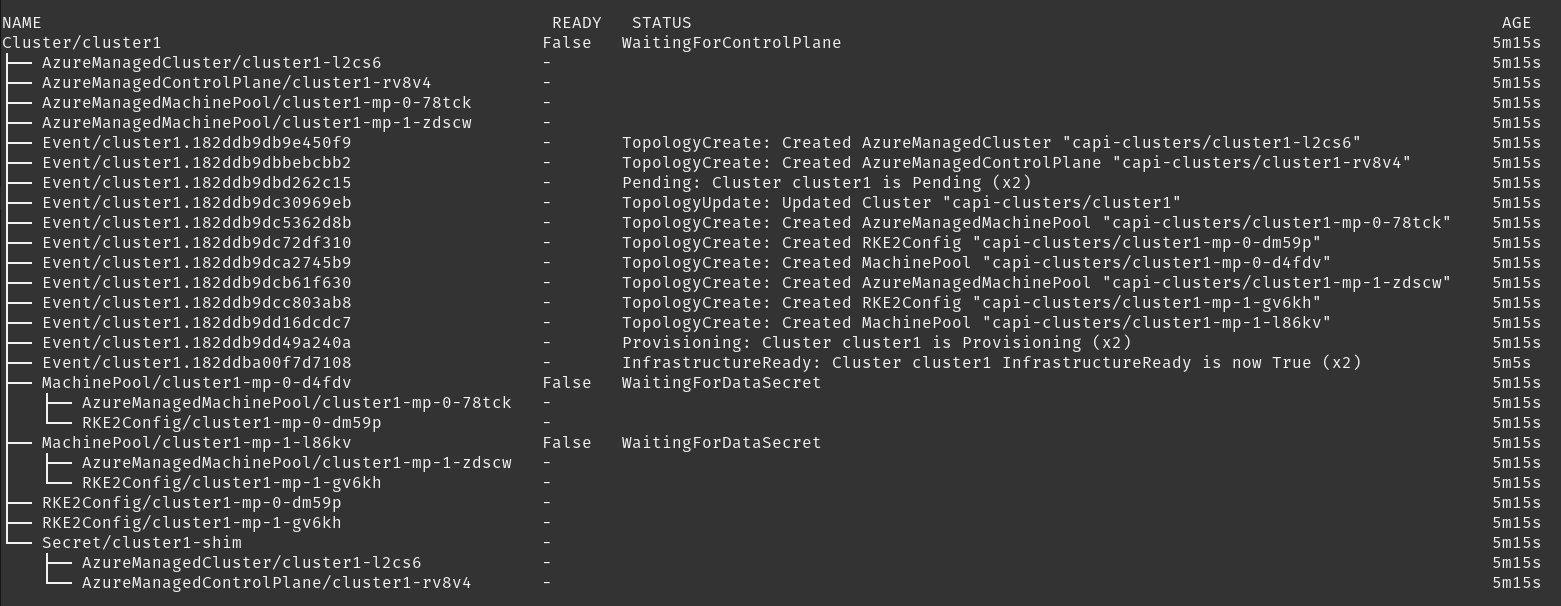
如何为 SUSE® Rancher Prime Cluster API 和 CAPI 提供者启用调试模式
-
SUSE® Rancher Prime Cluster API - 要为 SUSE® Rancher Prime Cluster API 启用调试模式,您需要对
cattle-system/rancher-config配置映射应用补丁,如下:kubectl patch configmap -n cattle-system rancher-config --type merge --patch '{"data":{"rancher-turtles": "managerArguments:\n - --v=5\n"}}'(5等效于DEBUG)
这导致Turtles pod被重新启动,以使用新配置。
-
集群 API 提供者 - 编辑需要提高日志级别的 CAPIProvider 资源。更改为您所需的级别:
CAPIProvider.Spec.Manager.Verbosity=5(5等效于DEBUG)
如何从 Rancher Turtles 和 CAPI 收集信息
crust-gather 是由集群 API 开发者专门为从 CAPI 环境中收集日志和资源状态而创建的项目。这是一个安全且官方的工具,可以在任何类型的环境(生产、测试或开发)中使用,以收集全面的诊断信息以进行故障排除。
您可以通过以下说明进行安装:
kubectl krew install crust-gather

kubectl crust-gather --help
或者,可以通过 install.sh 脚本独立安装:
curl -sSfL https://github.com/crust-gather/crust-gather/raw/main/install.sh | sh

crust-gather --help
您可以指定一个过滤器列表以收集数据。默认情况下,它会获取整个集群的快照。数据默认存储在 crust-gather 目录中。 Crust-gather 接受 Rancher 或子集群的预定义过滤器配置。请参见下面的示例配置。
child-crust-gather.yaml 文件的示例 YAML 过滤器配置:
filters:
  - include_kind:
    - Node
    - Namespace
    - CustomResourceDefinition
  - include_group:
    - management.cattle.io/.*
    - provisioning.cattle.io/.*
  - include_namespace:
    - cattle.*
    - fleet.*
    - kube-system
settings:
  insecure_skip_tls_verify: true
  secrets_file: secrets.txt
rancher-crust-gather.yaml 文件的示例 YAML 过滤器配置:
filters:
  - include_group:
    - .*cluster.x-k8s.io/.*
    - turtles-capi.cattle.io/.*
  - include_kind:
    - CustomResourceDefinition
    - Node
    - Namespace
  - include_group:
    - management.cattle.io/.*
    - provisioning.cattle.io/.*
  - include_namespace:
    - cattle-turtles-system
    - capi-.*
    - cattle.*
    - fleet.*
    - c-.*
    - rke2.*
    - cert-manager
    - kube-system
settings:
  insecure_skip_tls_verify: true
  secrets_file: secrets.txt
确保 kubeconfig 指向正确的集群,然后运行以下命令:
kubectl crust-gather collect-from-config -c config.yaml通过常规标志使用:
kubectl crust-gather collect --include-namespace cattle-turtles-system --include-namespace capi-* --include-namespace cattle* --include-namespace c-* --include-namespace=<any-capi-cluster-namespace> --kubeconfig=<KUBECONFIG>您可以指定一个包含秘密或环境变量的文件,以排除秘密字符串。
例如:
kubectl crust-gather collect -s ENV_WITH_SECRET --secrets-file=secrets.txt或者排除所有秘密资源的收集:
kubectl crust-gather collect --exclude-kind Secret如何清理 Rancher Turtles 和 CAPI 资源
有时,基础设施的清理可能会失败,可能导致待处理资源。在这种情况下,您必须手动删除资源。
请注意,手动移除最终处理程序 requires 需要手动清理由基础设施提供者配置的资源。
export NAMESPACE=capi-clusters

for RESOURCE in `kubectl get-all -n $NAMESPACE -o name | grep 'cattle.io\|cluster.x-k8s.io'`;
do
        echo "Patching $RESOURCE in namespace $NAMESPACE";
        kubectl patch $RESOURCE -n $NAMESPACE -p '{"metadata":{"finalizers":[]}}' --type=merge;
        kubectl delete $RESOURCE -n $NAMESPACE;
done
如何卸载 Rancher Turtles 和 CAPI 项目
要从管理集群中卸载 Rancher Turtles 和 CAPI 组件,请按以下步骤操作:
-
首先,删除所有使用 CAPI 创建的下游集群。对于每个集群:
kubectl delete -n capi-clusters cluster.cluster.x-k8s.io cluster1将
capi-clusters替换为您集群部署的命名空间,将cluster1替换为您的集群名称。在继续下一步之前,请等待每个集群完全删除。 -
卸载 Rancher Turtles Helm 图表:
helm uninstall -n cattle-turtles-system rancher-turtles -
删除可能由 CAPI 提供者创建的任何 webhook 配置:
# List all webhook configurations kubectl get validatingwebhookconfigurations.admissionregistration.k8s.io # Delete provider-specific webhooks (examples) kubectl delete validatingwebhookconfigurations.admissionregistration.k8s.io azureserviceoperator-validating-webhook-configuration kubectl delete validatingwebhookconfigurations.admissionregistration.k8s.io capz-validating-webhook-configuration kubectl delete validatingwebhookconfigurations.admissionregistration.k8s.io capi-validating-webhook-configuration kubectl delete validatingwebhookconfigurations.admissionregistration.k8s.io rke2-webhook-configuration # Also check and delete mutating webhooks if present kubectl get mutatingwebhookconfigurations kubectl delete mutatingwebhookconfigurations [webhook-name] -
清理任何剩余的命名空间和资源。卸载后,以下命名空间可能仍然存在:
-
cattle-turtles-system
-
rke2-bootstrap-system
-
rke2-control-plane-system
-
capi-system
-
capz-system(或其他特定于提供者的命名空间,如 capv-system、capa-system 等)
-
capi-clusters(或您部署集群的其他命名空间)
要去除这些命名空间:
# First remove any finalizers that might be blocking deletion
for NS in cattle-turtles-system rke2-bootstrap-system rke2-control-plane-system capi-system capz-system capi-clusters; do
  kubectl get namespace $NS -o json | jq '.spec.finalizers = []' | kubectl replace --raw "/api/v1/namespaces/$NS/finalize" -f -
done

# Then delete the namespaces
kubectl delete namespace cattle-turtles-system rke2-bootstrap-system rke2-control-plane-system capi-system capz-system capi-clusters
-
-
最后,去除与 Cluster API 和 Rancher Turtles 相关的 CRD:
# Delete all Cluster API and Rancher Turtles CRDs
kubectl get crds | grep 'cluster.x-k8s.io\|turtles-capi.cattle.io' | awk '{print $1}' | xargs kubectl delete crd

# Or manually delete them one by one
kubectl delete crd clusters.cluster.x-k8s.io
kubectl delete crd clusterclasses.cluster.x-k8s.io
kubectl delete crd machines.cluster.x-k8s.io
kubectl delete crd machinepools.cluster.x-k8s.io
kubectl delete crd providers.turtles-capi.cattle.io
kubectl delete crd clusterconfigs.turtles-capi.cattle.io
# ... and other related CRDs
在删除这些 CRD 之前,请确保所有集群已完全删除,否则您可能会留下孤立的云资源。