SUSE Rancher Prime Issues
Guest cluster log collection
You can collect guest cluster logs and configuration files. Perform the following steps on each guest cluster node:
-
Log in to the node.
-
Download the Rancher v2.x Linux log collector script and generate a log bundle using the following commands:
curl -OLs https://raw.githubusercontent.com/rancherlabs/support-tools/master/collection/rancher/v2.x/logs-collector/rancher2_logs_collector.sh
sudo bash rancher2_logs_collector.sh
The output of the script indicates the location of the generated tarball.
For more information, see The Rancher v2.x Linux log collector script.
Importing of SUSE Virtualization clusters into Rancher
After the cluster-registration-url is set on SUSE Virtualization, a deployment named cattle-system/cattle-cluster-agent is created for importing of the SUSE Virtualization cluster into Rancher.
Import pending due to unable to read CA file error
The following error messages in the cattle-cluster-agent-* pod logs indicate that the SUSE Virtualization cluster cannot be imported into Rancher.
2025-02-13T17:25:22.520593546Z time="2025-02-13T17:25:22Z" level=info msg="Rancher agent version v2.10.2 is starting"
2025-02-13T17:25:22.529886868Z time="2025-02-13T17:25:22Z" level=error msg="unable to read CA file from /etc/kubernetes/ssl/certs/serverca: open /etc/kubernetes/ssl/certs/serverca: no such file or directory"
2025-02-13T17:25:22.529924542Z time="2025-02-13T17:25:22Z" level=error msg="Strict CA verification is enabled but encountered error finding root CA"
The root cause is ineffective configuration of Rancher’s agent-tls-mode setting, which controls how Rancher’s agents (cluster-agent, fleet-agent, and system-agent) validate Rancher’s certificate when establishing a connection. The default value of this setting depends on the Rancher version and installation type.
| Type | Versions | Default Value |
|---|---|---|
New installation |
v2.8 |
|
New installation |
v2.9 and later |
|
Upgrade |
v2.8 to v2.9 |
|
You can configure this setting to match your requirements by performing the following steps:
-
Log in to the Rancher UI.
-
Go to Global Settings → Settings.
-
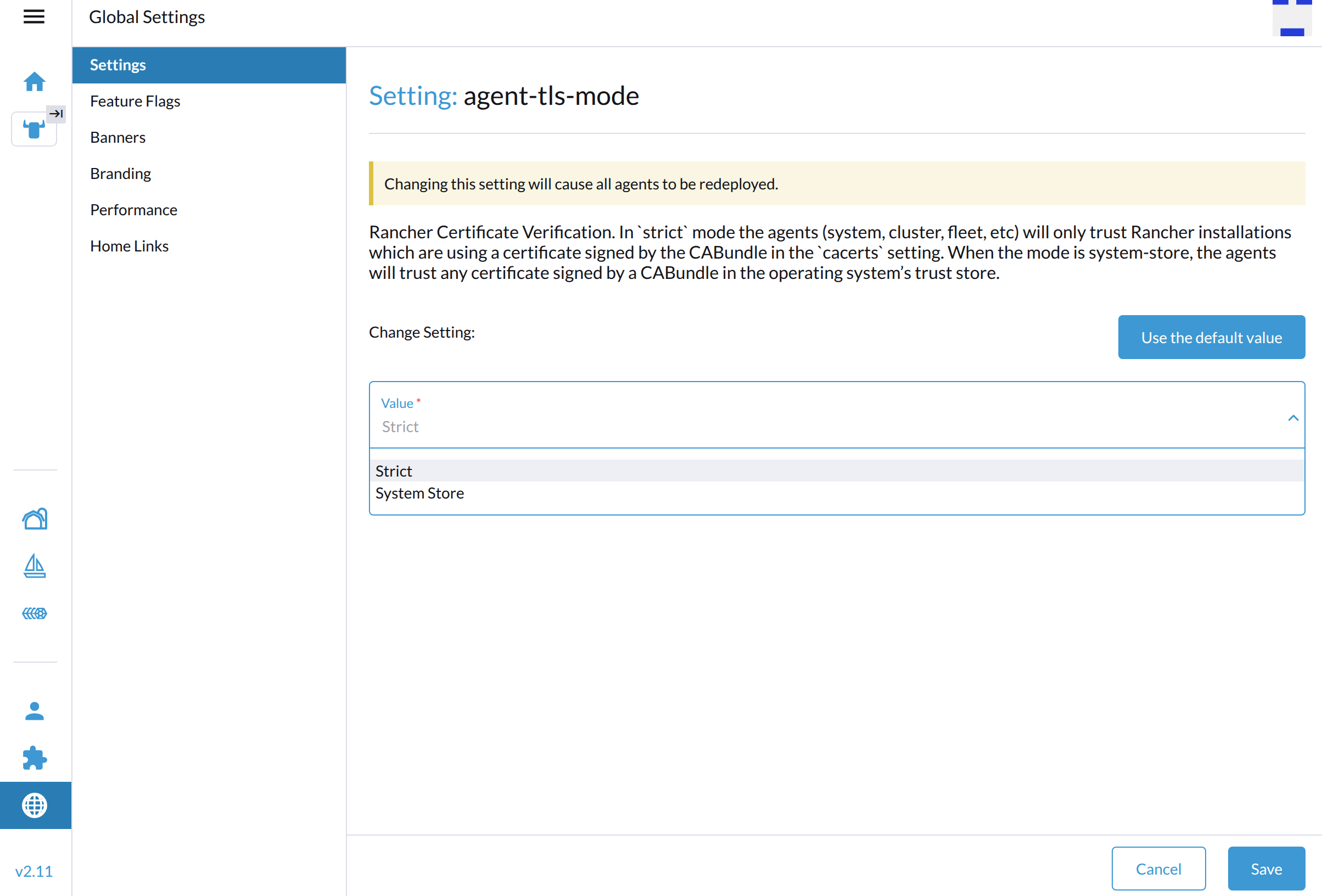
Select agent-tls-mode, and then select ⋮ → Edit Setting to access the configuration options.
-
Select one of the following values:
-
Strict: Rancher’s agents only trust certificates generated by the Certificate Authority (CA) specified in the
cacertssetting. This is the recommended default TLS setting.The Strict option enables a higher level of security by requiring Rancher to have access to the CA that generated the certificate visible to the agents. In the case of certain certificate configurations (notably, external certificates), this is not automatic, and extra configuration is required. For more information about scenarios that require extra configuration, see Choose your SSL Configuration in the Rancher documentation.
-
System Store: Rancher’s agents trust any certificate generated by a public CA specified in the operating system’s trust store. Use this setting if your setup uses an external trust authority and you don’t have ownership over the Certificate Authority.
Using the System Store setting implies that the agent trusts all external authorities found in the operating system’s trust store including those outside of the user’s control.
-
-
Click Save.
Related issues:
-
Rancher: #45628 (See this comment.)
Guest cluster load balancer IP is not reachable
Issue description
The load balancer service successfully obtains an IP address from the DHCP server or IP pool but remains inaccessible.

To check if the issue exists in your environment, perform the following steps:
-
Create a new guest cluster with the following settings:
-
Container Network: "Calico"
-
Cloud Provider: "Harvester"
-
-
Deploy NGINX on the new guest cluster.
kubectl apply -f https://k8s.io/examples/application/deployment.yaml -
Create a load balancer that uses NGINX.
Root cause
In the following example, a guest cluster node uses the IP address 10.115.1.46 and a new load balancer is assigned the IP address 10.115.6.200. When this load balancer’s IP address is later added to a new interface, such as vip-fd8c28ce (attached to @enp1s0), the Calico controller takes over the load balancer IP address. This conflict causes the load balancer IP address to become unreachable from outside the cluster.
To verify the cause, run the following command on the affected guest cluster node:
ip -d link show dev vxlan.calico
44: vxlan.calico: <BROADCAST,MULTICAST,UP,LOWER_UP> mtu 1450 qdisc noqueue state UNKNOWN mode DEFAULT group default qlen 1000
    link/ether 66:a7:41:00:1d:ba brd ff:ff:ff:ff:ff:ff promiscuity 0  allmulti 0 minmtu 68 maxmtu 65535
info: Using default fan map value (33)
    vxlan id 4096 local 10.115.6.200 dev vip-8a928fa0 srcport 0 0 dstport 4789 nolearning ttl auto ageing 300 udpcsum noudp6zerocsumtx noudp6zerocsumrx addrgenmode eui64 numtxqueues 1 numrxqueues 1 gso_max_size 65536 gso_max_segs 65535 tso_max_size 65536 tso_max_segs 65535 gro_max_size 65536

The IP 10.115.6.200 is from the vip-* interface.
Affected Versions
The IP auto-detection feature is available in Calico v3.22 and other versions, with first-found as the default value.
Consequently, most RKE2 clusters using Calico as the default CNI alongside the Harvester Cloud Provider to deliver load balancer services are susceptible to this issue.
Workaround
Newly created clusters
When creating a new cluster in Rancher, select Add-on: Calico to open the YAML configuration window. Add nodeAddressAutodetectionV4 and skipInterface: vip.* to the spec.installation.calicoNetwork field.
installation:
  backend: VXLAN
  calicoNetwork:
    bgp: Disabled
    nodeAddressAutodetectionV4: (1)
skipInterface: vip.* (2)| 1 | Configures IPv4 address auto-detection filtering. |
| 2 | Instructs the Calico controller to skip any interfaces matching the vip.* naming pattern. |
These additional lines ensure that the Calico controller does not inadvertently intercept the assigned load balancer IP addresses.
Existing clusters
-
Run the command
kubectl edit installation. -
Go to the
spec.calicoNetwork.nodeAddressAutodetectionV4block and apply the following changes:-
Remove the
firstFound: trueentry if it is present. -
Add the
skipInterface: vip.*parameter.
-
-
Save the changes.
-
Monitor the cluster for approximately two minutes while the
calico-system/calico-nodeDaemonSet undergoes a rolling update.The newly initialized pods automatically use the node IP for the VXLAN.
-
Check if the
vxlan.calicointerface uses the node IP (such as10.115.1.46) instead of the VIP.ip -d link show dev vxlan.calico 45: vxlan.calico: <BROADCAST,MULTICAST,UP,LOWER_UP> mtu 1450 qdisc noqueue state UNKNOWN mode DEFAULT group default qlen 1000 link/ether 66:a7:41:00:1d:ba brd ff:ff:ff:ff:ff:ff promiscuity 0 allmulti 0 minmtu 68 maxmtu 65535 info: Using default fan map value (33) vxlan id 4096 local 10.115.1.46 dev enp1s0 srcport 0 0 dstport 4789 nolearning ttl auto ageing 300 udpcsum noudp6zerocsumtx noudp6zerocsumrx addrgenmode eui64 numtxqueues 1 numrxqueues 1 gso_max_size 65536 gso_max_segs 65535 tso_max_size 65536 tso_max_segs 65535 gro_max_size 65536 -
If the
vxlan.calicointerface still uses the VIP, check thetigera-operatorpod logs for the key phrasefailed calling webhook.kubectl -n tigera-operator logs tigera-operator-8566d6db5c-wfjkt ... {"level":"error","ts":"2025-12-18T09:06:37Z","msg":"Reconciler error","controller":"tigera-installation-controller","object":{"name":"periodic-5m0s-reconcile-event"},"namespace":"","name":"periodic-5m0s-reconcile-event","reconcileID":"bae9d2da-a4bf-4d8b-89b8-c8a23a96f351","error":"Internal error occurred: failed calling webhook \"rancher.cattle.io.namespaces\": failed to call webhook: Post \"https://rancher-webhook.cattle-system.svc:443/v1/webhook/validation/namespaces?timeout=10s\": context deadline exceeded"...}If this error occurs, add the following container parameters directly to the
calico-system/calico-nodeDaemonSet.- name: IP_AUTODETECTION_METHOD value: skip-interface=vip.* -
Check the
vxlan.calicointerface again after a few minutes.Once the interface stops using the VIP, the VIP will become reachable.
Guest cluster load balancer allocates IP from global pool
When a load balancer operating in IP pool mode targets a specific network, it unexpectedly allocates an IP address from the global IP pool if no dedicated pool matches the target network.
In the following example, if an IP-pool-mode load balancer targets default/vlan-200, it selects an IP address from pool-100 because no dedicated pool exists for default/vlan-200.
Type |
Name |
Details |
VM network |
|
- |
VM network |
|
- |
VM network |
|
- |
IP pool (global) |
|
Intended for |
IP pool (dedicated) |
|
Bound to |
Root Cause
In the current implementation, a global IP pool can have an empty network field, causing the controller to skip network matching during IP allocation.
-
Design rationale: This behavior simplifies cluster setup in single-pool deployments, allowing a primary global IP pool to serve guest clusters without being tied to specific VM networks.
-
Selection behavior: During automatic IP pool selection, the controller does not verify whether the global IP pool matches the target network requested by the load balancer. As a result, the controller selects the global pool whenever no dedicated pool matches the target network.
-
Backward compatibility constraints: Strictly enforcing network matching on global IP pool would break backward compatibility for existing cluster deployments. Furthermore, because a global IP pool’s
networkfield can be left empty, requiring a strict network match would prevent the creation of new load balancers targeting global IP pool.
Workaround
Select one of the following options to prevent unexpected global IP allocations:
-
Option 1: Avoid creating global IP pool
Do not set all three Scope fields (
Project,Namespace, andGuest Kubernetes Cluster) toALL(*)when creating an IP pool. In multi-tenant environments, avoid global IP pool because they prevent proper resource isolation and tenant access control. -
Option 2: Create dedicated IP pools for guest cluster networks
If you cannot modify or delete existing global IP pool, create a dedicated IP pool (or a placeholder pool) for every VM network used by guest clusters (for example,
pool-200). Binding a dedicated pool to each network ensures the controller selects the intended pool instead of selecting an unassigned global pool.
Expected result: The guest cluster load balancer will either allocate an IP address from the matching dedicated pool or fail explicitly with an error message such as no matching pool or no IP.