VPC NAT Gateway
|
All features that use Kube-OVN are considered experimental. For more information about experimental features, see Feature Labels. |
Kube-OVN supports network address translation (NAT) via Kubernetes custom resource definitions (CRDs), not just IP tables directly. For example, resources such as OvnEip, OvnSnatRule, and OvnDnatRule (or their iptables-based equivalents) are used to define NAT behavior declaratively.
In SUSE Virtualization, virtual machine orchestration (compute, storage, virtual machine lifecycle, L2 VLAN-based networking, and underlay networking) is handled by SUSE Virtualization. Overlay networking (including routing, NAT, subnets, and VPC) is handled by Kube-OVN. This separation allows for more scalable, flexible, and clean networking.
NAT provides the following benefits:
-
External connectivity or inbound access
-
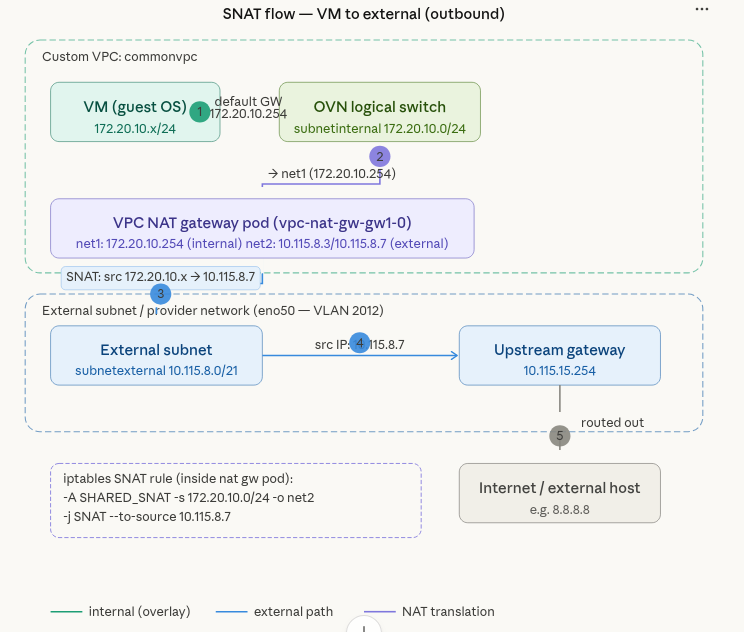
Source NAT (SNAT) allows virtual machines and pods in a private overlay network or VPC to access external networks (for example, the internet) by translating their internal source IP to a public (or external network-shared) IP.
-
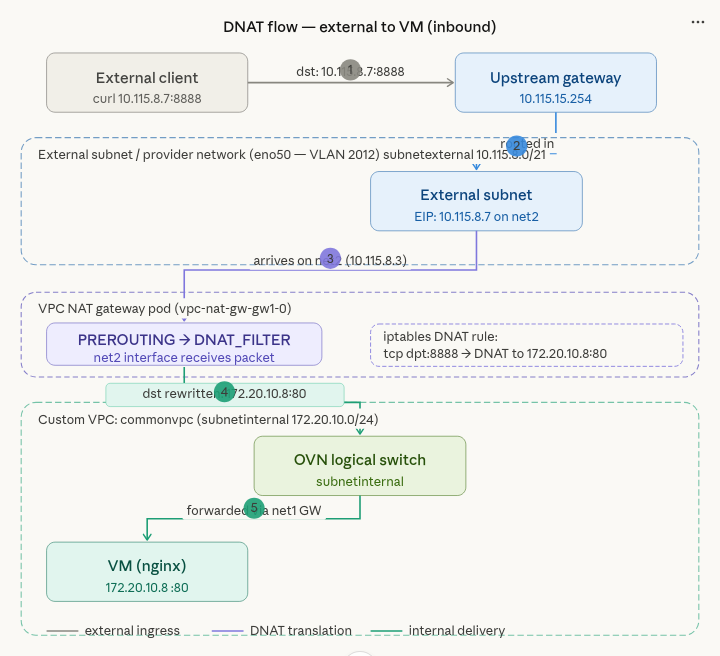
Destination NAT (DNAT) allows external hosts to access internal virtual machines and pods by mapping a public IP or port to an internal private IP or port. This is useful when you want to access an internal virtual machine via SSH.
-
-
Flexible networking for VPCs and overlay networks
When using SNAT or DNAT with Kube-OVN, you can build isolated private subnets and VPCs while still allowing controlled egress (outbound) or ingress (inbound) traffic. This is especially relevant for virtual machine workloads managed by SUSE Virtualization, which may require virtual machines to access the internet or to expose services externally.
Kube-OVN as secondary CNI
In SUSE Virtualization v1.6.x and v1.7.x, outbound and inbound connectivity for virtual machines works only when they are attached to subnets created on a default VPC (ovn-cluster) with the natOutgoing setting set to true.
With the introduction of Kube-OVN as the secondary CNI in SUSE Virtualization v1.8.0, outbound and inbound connectivity for virtual machines also works on subnets created on custom VPCs using the VPC NAT gateway functionality.
Sample configuration
Creating a network attachment definition (tenant or internal network)
apiVersion: k8s.cni.cncf.io/v1
kind: NetworkAttachmentDefinition
metadata:
  labels:
    network.harvesterhci.io/ready: "true"
    network.harvesterhci.io/type: OverlayNetwork
  name: vswitchinternal
  namespace: default
spec:
  config: '{"cniVersion":"0.3.1","name":"vswitchinternal","type":"kube-ovn","server_socket":
    "/run/openvswitch/kube-ovn-daemon.sock", "provider": "vswitchinternal.default.ovn"}'
Creating a network attachment definition (external network)
kubectl get net-attach-def vswitchexternal1 -o yaml
apiVersion: k8s.cni.cncf.io/v1
kind: NetworkAttachmentDefinition
metadata:
  labels:
    network.harvesterhci.io/ready: "true"
    network.harvesterhci.io/type: OverlayNetwork
  name: vswitchexternal
  namespace: kube-system
spec:
  config: '{"cniVersion":"0.3.1","name":"vswitchexternal","master": "eno50","type":"kube-ovn","server_socket":
    "/run/openvswitch/kube-ovn-daemon.sock", "provider": "vswitchexternal.kube-system.ovn"}'
Creating a subnet using the internal or tenant network in custom-vpc
apiVersion: kubeovn.io/v1
kind: Subnet
metadata:
  name: subnetinternal
spec:
  cidrBlock: 172.20.10.0/24
  default: false
  enableLb: true
  excludeIps:
  - 172.20.10.1
  gateway: 172.20.10.1
  gatewayNode: ""
  natOutgoing: true
  private: false
  protocol: IPv4
  provider: vswitchinternal.default.ovn
  vpc: custom-vpc
Creating a subnet using the external network
apiVersion: kubeovn.io/v1
kind: Subnet
metadata:
  name: subnetexternal
spec:
  cidrBlock: 10.115.48.0/21
  default: false
  enableLb: true
  excludeIps:
  - 10.115.55.254
  gateway: 10.115.55.254
  gatewayNode: ""
  natOutgoing: true
  private: false
  protocol: IPv4
  provider: vswitchexternal.kube-system.ovn
  vpc: custom-vpc
Creating the VPC NAT gateway configuration
kind: VpcNatGateway
apiVersion: kubeovn.io/v1
metadata:
  annotations:
    k8s.v1.cni.cncf.io/networks: default/vswitchinternal
  name: gw1
spec:
  vpc: custom-vpc
  subnet: subnetinternal
  lanIp: 172.20.10.254
  externalSubnets:
    - subnetexternal
Verifying if a new VPC NAT gateway StatefulSet was created
kubectl get statefulset -n kube-system vpc-nat-gw-gw1 -o yaml
apiVersion: apps/v1
kind: StatefulSet
metadata:
  creationTimestamp: "2026-03-06T22:33:47Z"
  generation: 1
  labels:
    app: vpc-nat-gw-gw1
    ovn.kubernetes.io/vpc-nat-gw: "true"
  name: vpc-nat-gw-gw1
  namespace: kube-system
  resourceVersion: "12139577"
  uid: cb48e680-95e8-408d-be47-23499ad0ac5c
spec:
  persistentVolumeClaimRetentionPolicy:
    whenDeleted: Retain
    whenScaled: Retain
  podManagementPolicy: OrderedReady
  replicas: 1
  revisionHistoryLimit: 10
  selector:
    matchLabels:
      app: vpc-nat-gw-gw1
      ovn.kubernetes.io/vpc-nat-gw: "true"
  serviceName: ""
  template:
    metadata:
      annotations:
        externalvswitch.kube-system.ovn.kubernetes.io/routes: '[{"dst":"0.0.0.0/0","gw":"10.115.55.254"}]'
        internalvswitch.default.ovn.kubernetes.io/ip_address: 172.20.10.254
        internalvswitch.default.ovn.kubernetes.io/logical_switch: internalsubnet
        internalvswitch.default.ovn.kubernetes.io/routes: '[{"dst":"10.55.0.0/16","gw":"172.20.10.1"},{"dst":"10.115.48.0/21","gw":"172.20.10.1"}]'
        internalvswitch.default.ovn.kubernetes.io/vpc_nat_gw: gw1
        k8s.v1.cni.cncf.io/networks: default/internalvswitch, kube-system/externalvswitch
        ovn.kubernetes.io/ip_address: 172.20.10.254
        ovn.kubernetes.io/logical_switch: internalsubnet
        ovn.kubernetes.io/vpc_nat_gw: gw1
      labels:
        app: vpc-nat-gw-gw1
        ovn.kubernetes.io/vpc-nat-gw: "true"
    spec:
      affinity: {}
      containers:
      - command:
        - sleep
        - infinity
        env:
        - name: GATEWAY_V4
          value: 10.115.55.254
        - name: GATEWAY_V6
        image: docker.io/kubeovn/vpc-nat-gateway:v1.15.0
        imagePullPolicy: IfNotPresent
        lifecycle:
          postStart:
            exec:
              command:
              - sh
              - -c
              - sysctl -w net.ipv4.ip_forward=1
        name: vpc-nat-gw
        resources: {}
        securityContext:
          allowPrivilegeEscalation: true
          privileged: true
        terminationMessagePath: /dev/termination-log
        terminationMessagePolicy: File
      dnsPolicy: ClusterFirst
      restartPolicy: Always
      schedulerName: default-scheduler
      securityContext: {}
      terminationGracePeriodSeconds: 0
  updateStrategy:
    type: RollingUpdate
status:
  availableReplicas: 1
  collisionCount: 0
  currentReplicas: 1
  currentRevision: vpc-nat-gw-gw1-98ff96d76
  observedGeneration: 1
  readyReplicas: 1
  replicas: 1
  updateRevision: vpc-nat-gw-gw1-98ff96d76
  updatedReplicas: 1
Verifying if a new VPC NAT gateway pod was created
kubectl describe pod vpc-nat-gw-gw1-0 -n kube-system
Name:             vpc-nat-gw-gw1-0
Namespace:        kube-system
Priority:         0
Service Account:  default
Node:             hp-46/10.115.14.70
Start Time:       Fri, 06 Mar 2026 22:33:47 +0000
Labels:           app=vpc-nat-gw-gw1
                  apps.kubernetes.io/pod-index=0
                  controller-revision-hash=vpc-nat-gw-gw1-98ff96d76
                  ovn.kubernetes.io/vpc-nat-gw=true
                  statefulset.kubernetes.io/pod-name=vpc-nat-gw-gw1-0
Annotations:      cni.projectcalico.org/containerID: 3cf564b6124aae048a097bd9777dd3ac583b293357cb819a85146515e2ba1e52
                  cni.projectcalico.org/podIP: 10.52.1.66/32
                  cni.projectcalico.org/podIPs: 10.52.1.66/32
                  externalvswitch.kube-system.ovn.kubernetes.io/allocated: true
                  externalvswitch.kube-system.ovn.kubernetes.io/cidr: 10.115.48.0/21
                  externalvswitch.kube-system.ovn.kubernetes.io/gateway: 10.115.55.254
                  externalvswitch.kube-system.ovn.kubernetes.io/ip_address: 10.115.48.1
                  externalvswitch.kube-system.ovn.kubernetes.io/logical_router: commonvpc
                  externalvswitch.kube-system.ovn.kubernetes.io/logical_switch: externalsubnet
                  externalvswitch.kube-system.ovn.kubernetes.io/mac_address: fe:01:4a:61:43:6e
                  externalvswitch.kube-system.ovn.kubernetes.io/pod_nic_type: veth-pair
                  externalvswitch.kube-system.ovn.kubernetes.io/routed: true
                  externalvswitch.kube-system.ovn.kubernetes.io/routes: [{"dst":"0.0.0.0/0","gw":"10.115.55.254"}]
                  internalvswitch.default.ovn.kubernetes.io/allocated: true
                  internalvswitch.default.ovn.kubernetes.io/cidr: 172.20.10.0/24
                  internalvswitch.default.ovn.kubernetes.io/gateway: 172.20.10.1
                  internalvswitch.default.ovn.kubernetes.io/ip_address: 172.20.10.254
                  internalvswitch.default.ovn.kubernetes.io/logical_router: commonvpc
                  internalvswitch.default.ovn.kubernetes.io/logical_switch: internalsubnet
                  internalvswitch.default.ovn.kubernetes.io/mac_address: d6:2d:c1:95:45:15
                  internalvswitch.default.ovn.kubernetes.io/pod_nic_type: veth-pair
                  internalvswitch.default.ovn.kubernetes.io/routed: true
                  internalvswitch.default.ovn.kubernetes.io/routes: [{"dst":"10.55.0.0/16","gw":"172.20.10.1"},{"dst":"10.115.48.0/21","gw":"172.20.10.1"}]
                  internalvswitch.default.ovn.kubernetes.io/vpc_cidrs: ["172.20.10.0/24"]
                  internalvswitch.default.ovn.kubernetes.io/vpc_nat_gw: gw1
                  k8s.v1.cni.cncf.io/network-status:
                    [{
                        "name": "k8s-pod-network",
                        "interface": "eth0",
                        "ips": [
                            "10.52.1.66"
                        ],
                        "mac": "be:86:12:cc:e3:30",
                        "default": true,
                        "dns": {}
                    },{
                        "name": "default/internalvswitch",
                        "interface": "net1",
                        "ips": [
                            "172.20.10.254"
                        ],
                        "mac": "d6:2d:c1:95:45:15",
                        "dns": {}
                    },{
                        "name": "kube-system/externalvswitch",
                        "interface": "net2",
                        "ips": [
                            "10.115.48.1"
                        ],
                        "mac": "fe:01:4a:61:43:6e",
                        "dns": {},
                        "gateway": [
                            "10.115.55.254"
                        ]
                    }]
                  k8s.v1.cni.cncf.io/networks: default/internalvswitch, kube-system/externalvswitch
                  ovn.kubernetes.io/ip_address: 172.20.10.254
                  ovn.kubernetes.io/logical_switch: internalsubnet
                  ovn.kubernetes.io/vpc_nat_gw: gw1
                  ovn.kubernetes.io/vpc_nat_gw_init: true
Status:           Running
IP:               10.52.1.66
IPs:
  IP:           10.52.1.66
Controlled By:  StatefulSet/vpc-nat-gw-gw1
Containers:
  vpc-nat-gw:
    Container ID:  containerd://efcab898c60ad94ee5d79a598f96d5b0becf65c2ae917d6f02246b227be40eca
    Image:         docker.io/kubeovn/vpc-nat-gateway:v1.15.0
    Image ID:      docker.io/kubeovn/vpc-nat-gateway@sha256:4c090dffaaf5c44593883bfa15a4524e860ac4d7c32555d98284aa8fa042ba6a
    Port:          <none>
    Host Port:     <none>
    Command:
      sleep
      infinity
    State:          Running
      Started:      Fri, 06 Mar 2026 22:34:01 +0000
    Ready:          True
    Restart Count:  0
    Environment:
      GATEWAY_V4:  10.115.55.254
      GATEWAY_V6:
    Mounts:
      /var/run/secrets/kubernetes.io/serviceaccount from kube-api-access-qgb7d (ro)
Conditions:
  Type                        Status
  PodReadyToStartContainers   True
  Initialized                 True
  Ready                       True
  ContainersReady             True
  PodScheduled                True
Volumes:
  kube-api-access-qgb7d:
    Type:                    Projected (a volume that contains injected data from multiple sources)
    TokenExpirationSeconds:  3607
    ConfigMapName:           kube-root-ca.crt
    Optional:                false
    DownwardAPI:             true
QoS Class:                   BestEffort
Node-Selectors:              <none>
Tolerations:                 node.kubernetes.io/not-ready:NoExecute op=Exists for 300s
                             node.kubernetes.io/unreachable:NoExecute op=Exists for 300s
Events:                      <none>
Checking the VPC NAT gateway pod for interfaces
In this example, net1 is attached to the internal network, while net2 is attached to the external network.
kubectl exec -it vpc-nat-gw-gw1-0 -n kube-system -- /bin/bash
vpc-nat-gw-gw1-0:/kube-ovn# ip addr show
1: lo: <LOOPBACK,UP,LOWER_UP> mtu 65536 qdisc noqueue state UNKNOWN group default qlen 1000
    link/loopback 00:00:00:00:00:00 brd 00:00:00:00:00:00
    inet 127.0.0.1/8 scope host lo
       valid_lft forever preferred_lft forever
    inet6 ::1/128 scope host proto kernel_lo
       valid_lft forever preferred_lft forever
2: eth0@if4949: <BROADCAST,MULTICAST,UP,LOWER_UP> mtu 1450 qdisc noqueue state UP group default qlen 1000
    link/ether be:86:12:cc:e3:30 brd ff:ff:ff:ff:ff:ff link-netnsid 0
    inet 10.52.1.66/32 scope global eth0
       valid_lft forever preferred_lft forever
    inet6 fe80::bc86:12ff:fecc:e330/64 scope link proto kernel_ll
       valid_lft forever preferred_lft forever
4950: net1@if4951: <BROADCAST,MULTICAST,UP,LOWER_UP> mtu 1450 qdisc noqueue state UP group default
    link/ether d6:2d:c1:95:45:15 brd ff:ff:ff:ff:ff:ff link-netnsid 0
    inet 172.20.10.254/24 brd 172.20.10.255 scope global net1
       valid_lft forever preferred_lft forever
    inet6 fe80::d42d:c1ff:fe95:4515/64 scope link proto kernel_ll
       valid_lft forever preferred_lft forever
4952: net2@if4953: <BROADCAST,MULTICAST,UP,LOWER_UP> mtu 1450 qdisc noqueue state UP group default
    link/ether fe:01:4a:61:43:6e brd ff:ff:ff:ff:ff:ff link-netnsid 0
    inet 10.115.48.1/21 brd 10.115.55.255 scope global net2
       valid_lft forever preferred_lft forever
    inet 10.115.55.200/21 scope global secondary net2
       valid_lft forever preferred_lft forever
    inet6 fe80::fc01:4aff:fe61:436e/64 scope link proto kernel_ll
       valid_lft forever preferred_lft forever
vpc-nat-gw-gw1-0:/kube-ovn# ip route show
default via 10.115.55.254 dev net2
10.55.0.0/16 via 172.20.10.1 dev net1
10.115.48.0/21 dev net2 proto kernel scope link src 10.115.48.1
169.254.1.1 dev eth0 scope link
172.20.10.0/24 dev net1 proto kernel scope link src 172.20.10.254
Creating a provider network and physical interface
apiVersion: kubeovn.io/v1
kind: ProviderNetwork
metadata:
  name: pn1
spec:
  defaultInterface: eno50
Creating a VLAN network attached to a provider network
apiVersion: kubeovn.io/v1
kind: Vlan
metadata:
  name: vlan2017
spec:
  id: 2017
  provider: pn1
Editing a subnet to use a specific VLAN
This attaches the subnet to the provider network underlay.
apiVersion: kubeovn.io/v1
kind: Subnet
metadata:
  name: subnetexternal
spec:
  cidrBlock: 10.115.48.0/21
  default: false
  enableLb: true
  excludeIps:
  - 10.115.55.254
  gateway: 10.115.55.254
  gatewayNode: ""
  natOutgoing: true
  private: false
  protocol: IPv4
  provider: vswitchexternal.kube-system.ovn
  vlan: vlan2017
  vpc: custom-vpc
Verifying the provider network bridge and external subnet attached to the OVS
In this example, the provider network bridge is br-pn1 and the external subnet attached on the OVS is patch-localnet.externalsubnet-to-br-int.
kubectl exec -it ovs-ovn-q92zk -n kube-system -- /bin/bash
Defaulted container "openvswitch" out of: openvswitch, hostpath-init (init)
nobody@hp-65:/kube-ovn$ ovs-vsctl show
54ef5649-9fe6-4944-865b-30a591c95121
    Bridge br-pn1
        Port br-pn1
            Interface br-pn1
                type: internal
        Port patch-localnet.externalsubnet-to-br-int
            Interface patch-localnet.externalsubnet-to-br-int
                type: patch
                options: {peer=patch-br-int-to-localnet.externalsubnet}
        Port eno50
            trunks: [0, 2017]
            Interface eno50
    Bridge br-int
        fail_mode: secure
        datapath_type: system
        Port br-int
            Interface br-int
                type: internal
        Port "6159403e_net1_h"
            Interface "6159403e_net1_h"
        Port mirror0
            Interface mirror0
                type: internal
        Port ovn0
            Interface ovn0
                type: internal
        Port patch-br-int-to-localnet.externalsubnet
            Interface patch-br-int-to-localnet.externalsubnet
                type: patch
                options: {peer=patch-localnet.externalsubnet-to-br-int}
        Port "7e8b0_37a8eec_h"
            Interface "7e8b0_37a8eec_h"
        Port "6159403e_net2_h"
            Interface "6159403e_net2_h"
    ovs_version: "3.5.3"
SNAT for external connectivity from overlay virtual machines
Creating an elastic IP (EIP) resource
apiVersion: kubeovn.io/v1
kind: IptablesEIP
metadata:
  name: my-eip
spec:
  natGwDp: gw1 # Name of your VpcNatGateway
  externalSubnet: subnetexternal
  v4ip: 10.115.55.200 #random public ip from external subnet
Creating a SNAT resource
apiVersion: kubeovn.io/v1
kind: IptablesSnatRule
metadata:
  name: my-snat
spec:
  eip: my-eip
  internalCIDR: 172.20.10.0/24 #internal subnet CIDR
Verifying the EIP status
kubectl get eip
NAME     IP              MAC                 NAT         NATGWDP   READY
my-eip   10.115.55.200   52:1b:4f:1d:14:ce   dnat,snat   gw1       true
Verifying the SNAT filter iptable rule
This rule is created inside the VPC NAT gateway pod.
vpc-nat-gw-gw1-0:/kube-ovn# iptables-legacy-save -t nat
# Generated by iptables-save v1.8.11 on Sat Mar  7 00:28:34 2026
*nat
:PREROUTING ACCEPT [2949:373475]
:INPUT ACCEPT [107:31097]
:OUTPUT ACCEPT [0:0]
:POSTROUTING ACCEPT [1:60]
:DNAT_FILTER - [0:0]
:EXCLUSIVE_DNAT - [0:0]
:EXCLUSIVE_SNAT - [0:0]
:SHARED_DNAT - [0:0]
:SHARED_SNAT - [0:0]
:SNAT_FILTER - [0:0]
-A PREROUTING -j DNAT_FILTER
-A POSTROUTING -j SNAT_FILTER
-A SHARED_SNAT -s 172.20.10.0/24 -o net2 -j SNAT --to-source 10.115.55.200 --random-fully
-A SNAT_FILTER -j EXCLUSIVE_SNAT
-A SNAT_FILTER -j SHARED_SNAT
COMMIT
Attaching a virtual machine to the overlay network and adding a default route
The virtual machine is created and attached to the vswitchinternal overlay network, and a default route is added in the guest operating system. In this example, 172.20.10.254 is the IP address of the net1 interface on the VPC NAT gateway pod.
ip route add default via 172.20.10.254 dev enp1s0The virtual machine running on the guest operating system must be able to successfully ping 8.8.8.8.
Traffic from the virtual machine enters the NAT gateway pod via the net1 interface. Based on the configured routing, it is directed to the net2 interface, where an iptables SNAT rule translates the subnet’s private IP 172.20.10.0/24 to 10.115.55.200 for external connectivity.
DNAT for inbound access (external to overlay VMs)
Creating a DNAT resource with the same EIP as the SNAT resource
kind: IptablesDnatRule
apiVersion: kubeovn.io/v1
metadata:
  name: dnat01
spec:
  eip: my-eip
  externalPort: '8888'
  internalIp: 172.20.10.2 #IP of the overlay VM
  internalPort: '80'
  protocol: tcp
Checking the DNAT filter in the VPC NAT gateway pod
vpc-nat-gw-gw1-0:/kube-ovn# iptables-legacy -t nat -L -n -v 2>/dev/null | grep -E "DNAT"
 3051  392K DNAT_FILTER  all  --  *      *       0.0.0.0/0            0.0.0.0/0
Chain DNAT_FILTER (1 references)
 3051  392K EXCLUSIVE_DNAT  all  --  *      *       0.0.0.0/0            0.0.0.0/0
 3051  392K SHARED_DNAT  all  --  *      *       0.0.0.0/0            0.0.0.0/0
Chain EXCLUSIVE_DNAT (1 references)
Chain SHARED_DNAT (1 references)
    1    60 DNAT       tcp  --  *      *       0.0.0.0/0            10.115.55.200        tcp dpt:8888 to:172.20.10.2:80
Installing NGINX on a virtual machine attached to the overlay network
The virtual machine is created and attached to the overlay network in the subnetinternal subnet, and NGINX is installed on the virtual machine for checking of inbound access.
sudo apt update
sudo apt install nginx -y
sudo systemctl status nginx

test nginx locally on the VM
curl http://127.0.0.1
To validate the DNAT configuration, run the following command from an external host.
curl -k http://10.115.55.200:8888The request should return a valid response from the internal service.