Installation Issues
The following sections contain tips to troubleshoot or get assistance with failed installations.
Logging into the Installer (a live OS)
Users can press the key combination CTRL + ALT + F2 to switch to another TTY and log in with the following credentials:
-
User:
rancher -
Password:
rancher
Meeting hardware requirements
-
Check that your hardware meets the minimum requirements to complete installation.
Stuck in Loading images. This may take a few minutes...
Because the system doesn’t have a default route, your installer may become "stuck" in this state. You can check your route status by executing the following command:
$ ip route
default via 10.10.0.10 dev mgmt-br proto dhcp        <-- Does a default route exist?
10.10.0.0/24 dev mgmt-br proto kernel scope link src 10.10.0.15
Check that your DHCP server offers a default route option. Attaching content from /run/cos/target/rke2.log is helpful too.
For more information, see DHCP Server Configuration.
Modifying cluster token on agent nodes
When an agent node fails to join the cluster, it can be related to the cluster token not being identical to the server node token.
In order to confirm the issue, connect to your agent node (i.e. with SSH) and check the rancherd service log with the following command:
sudo journalctl -b -u rancherdIf the cluster token setup in the agent node is not matching the server node token, you will find several entries of the following message:
msg="Bootstrapping Rancher (v2.7.5/v1.25.9+rke2r1)"
msg="failed to bootstrap system, will retry: generating plan: response 502: 502  Bad Gateway getting cacerts: <html>\r\n<head><title>502 Bad Gateway</title></head>\r\n<body>\r\n<center><h1>502 Bad Gateway</h1></center>\r\n<hr><center>nginx</center>\r\n</body>\r\n</html>\r\n"
Note that the Rancher version and IP address depend on your environment and might differ from the message above.
To fix the issue, you need to update the token value in the rancherd configuration file /etc/rancher/rancherd/config.yaml.
For example, if the cluster token setup in the server node is ThisIsTheCorrectOne, you will update the token value as follow:
token: 'ThisIsTheCorrectOne'To ensure the change is persistent across reboots, update the token value of the OS configuration file /oem/90_custom.yaml:
name: Harvester Configuration
stages:
  ...
  initramfs:
  - commands:
    - ...
    files:
    - path: /etc/rancher/rancherd/config.yaml
      permissions: 384
      owner: 0
      group: 0
      content: |
        server: https://$cluster-vip:443
        role: agent
        token: "ThisIsTheCorrectOne"
        kubernetesVersion: v1.25.9+rke2r1
        rancherVersion: v2.7.5
        rancherInstallerImage: rancher/system-agent-installer-rancher:v2.7.5
        labels:
         - harvesterhci.io/managed=true
        extraConfig:
          disable:
          - rke2-snapshot-controller
          - rke2-snapshot-controller-crd
          - rke2-snapshot-validation-webhook
      encoding: ""
ownerstring: ""|
To see what is the current cluster token value, log in your server node (i.e. with SSH)
and look in the file |
Checking the status of components
Before checking the status of SUSE Virtualization components, obtain a copy of the cluster’s kubeconfig file using either of the following methods:
-
On the SUSE Virtualization UI, go to the Support screen and then click Download KubeConfig.
-
Run the following commands on any of the management nodes:
$ sudo su
$ cat /etc/rancher/rke2/rke2.yaml
After you obtain a copy of the kubeconfig file, run the following script against the cluster to check the readiness of each component.
-
SUSE Virtualization components
#!/bin/bash cluster_ready() { namespaces=("cattle-system" "kube-system" "harvester-system" "longhorn-system") for ns in "${namespaces[@]}"; do pod_statuses=($(kubectl -n "${ns}" get pods \ --field-selector=status.phase!=Succeeded \ -ojsonpath='{range .items[*]}{.metadata.namespace}/{.metadata.name},{.status.conditions[?(@.type=="Ready")].status}{"\n"}{end}')) for status in "${pod_statuses[@]}"; do name=$(echo "${status}" | cut -d ',' -f1) ready=$(echo "${status}" | cut -d ',' -f2) if [ "${ready}" != "True" ]; then echo "pod ${name} is not ready" false return fi done done } if cluster_ready; then echo "cluster is ready" else echo "cluster is not ready" fi -
API
$ curl -fk https://<VIP>/versionYou must replace
<VIP>with the actual VIP, which is the value ofkube-vip.io/requestedIP.
Collecting troubleshooting information
Please include the following information in a bug report when reporting a failed installation:
-
A failed installation screenshot.
-
System information and logs.
Please follow the guide in Logging into the Installer (a live OS) to log in. And run the command to generate a tarball that contains troubleshooting information:
supportconfig -k -cThe command output messages contain the generated tarball path. For example the path is
/var/loq/scc_aaa_220520_1021 804d65d-c9ba-4c54-b12d-859631f892c5.txzin the following example: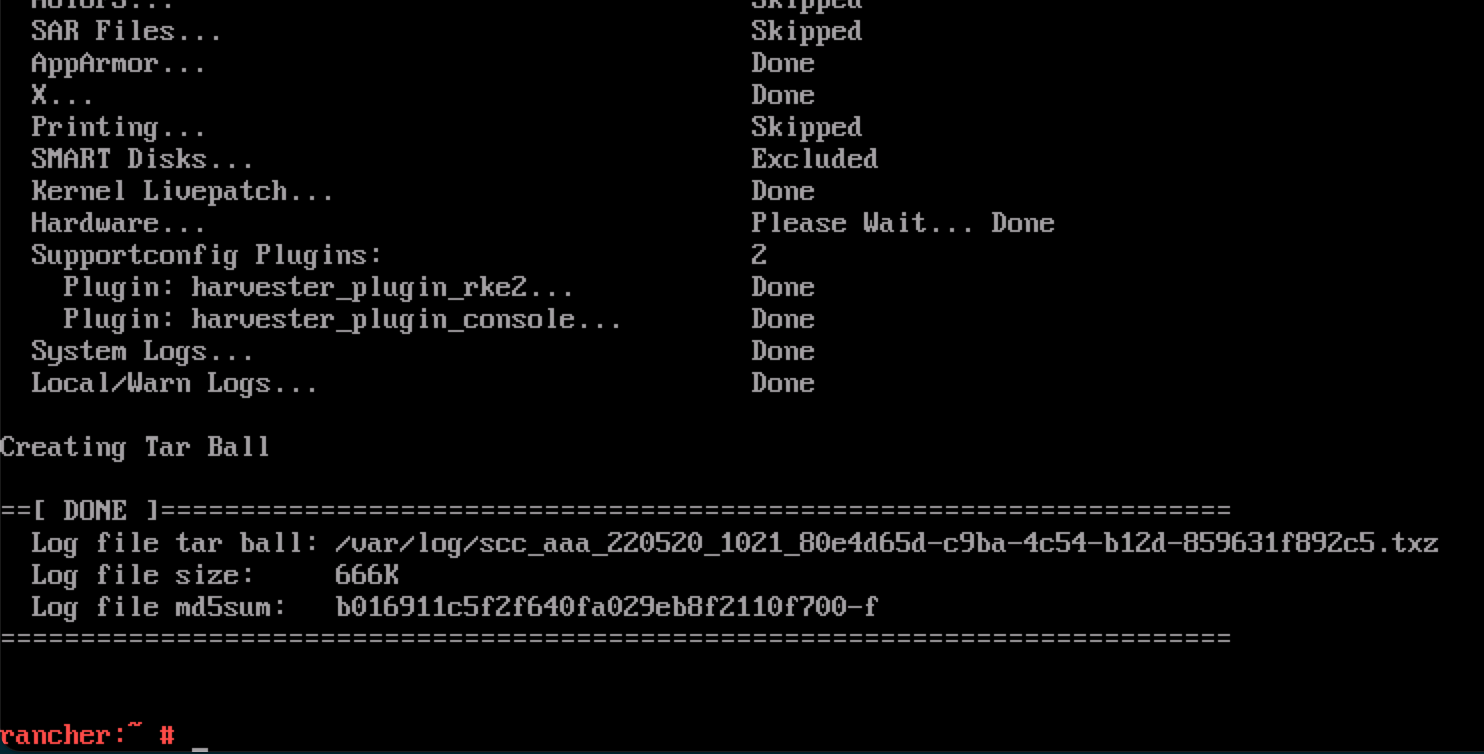
A failure PXE Boot installation automatically generates a tarball if the
install.debugfield is set totruein the configuration file.
Checking chart status
SUSE Virtualization uses the following chart CRDs:
-
HelmChart: Maintains RKE2 charts.-
rke2-runtimeclasses -
rke2-multus -
rke2-metrics-server -
rke2-ingress-nginx -
rke2-coredns -
rke2-cannal
-
-
ManagedChart: Manages Rancher and SUSE Virtualization charts.-
rancher-monitoring-crd -
rancher-logging-crd -
kubeovn-operator-crd -
harvester-crd -
harvester
-
You can use the helm list -A command to retrieve a list of installed charts.
Example of output:
NAME                                       	NAMESPACE                      	REVISION	UPDATED                                	STATUS  	CHART                                                                                   	APP VERSION
fleet                                      	cattle-fleet-system            	4       	2025-09-24 09:07:10.801764068 +0000 UTC	deployed	fleet-107.0.0+up0.13.0                                                                  	0.13.0
fleet-agent-local                          	cattle-fleet-local-system      	1       	2025-09-24 08:59:28.686781982 +0000 UTC	deployed	fleet-agent-local-v0.0.0+s-d4f65a6f642cca930c78e6e2f0d3f9bbb7d3ba47cf1cce34ac3d6b8770ce5
fleet-crd                                  	cattle-fleet-system            	1       	2025-09-24 08:58:28.396419747 +0000 UTC	deployed	fleet-crd-107.0.0+up0.13.0                                                              	0.13.0
harvester                                  	harvester-system               	1       	2025-09-24 08:59:37.718646669 +0000 UTC	deployed	harvester-0.0.0-master-ac070598                                                         	master-ac070598
harvester-crd                              	harvester-system               	1       	2025-09-24 08:59:35.341316526 +0000 UTC	deployed	harvester-crd-0.0.0-master-ac070598                                                     	master-ac070598
kubeovn-operator-crd                       	kube-system                    	1       	2025-09-24 08:59:34.783356576 +0000 UTC	deployed	kubeovn-operator-crd-1.13.13                                                            	v1.13.13
mcc-local-managed-system-upgrade-controller	cattle-system                  	1       	2025-09-24 08:59:10.656784284 +0000 UTC	deployed	system-upgrade-controller-107.0.0                                                       	v0.16.0
rancher                                    	cattle-system                  	1       	2025-09-24 08:57:20.690330683 +0000 UTC	deployed	rancher-2.12.0                                                                          	8815e66-dirty
rancher-logging-crd                        	cattle-logging-system          	1       	2025-09-24 08:59:36.262080367 +0000 UTC	deployed	rancher-logging-crd-107.0.1+up4.10.0-rancher.10
rancher-monitoring-crd                     	cattle-monitoring-system       	1       	2025-09-24 08:59:35.287099045 +0000 UTC	deployed	rancher-monitoring-crd-107.1.0+up69.8.2-rancher.15
rancher-provisioning-capi                  	cattle-provisioning-capi-system	1       	2025-09-24 08:59:00.561162307 +0000 UTC	deployed	rancher-provisioning-capi-107.0.0+up0.8.0                                               	1.10.2
rancher-webhook                            	cattle-system                  	2       	2025-09-24 09:02:38.774660489 +0000 UTC	deployed	rancher-webhook-107.0.0+up0.8.0                                                         	0.8.0
rke2-canal                                 	kube-system                    	1       	2025-09-24 08:57:25.248839867 +0000 UTC	deployed	rke2-canal-v3.30.2-build2025071100                                                      	v3.30.2
rke2-coredns                               	kube-system                    	1       	2025-09-24 08:57:25.341016864 +0000 UTC	deployed	rke2-coredns-1.42.302                                                                   	1.12.2
rke2-ingress-nginx                         	kube-system                    	3       	2025-09-24 09:01:31.331647555 +0000 UTC	deployed	rke2-ingress-nginx-4.12.401                                                             	1.12.4
rke2-metrics-server                        	kube-system                    	1       	2025-09-24 08:57:42.162046899 +0000 UTC	deployed	rke2-metrics-server-3.12.203                                                            	0.7.2
rke2-multus                                	kube-system                    	1       	2025-09-24 08:57:25.341560394 +0000 UTC	deployed	rke2-multus-v4.2.106                                                                    	4.2.1
rke2-runtimeclasses                        	kube-system                    	1       	2025-09-24 08:57:40.137168056 +0000 UTC	deployed	rke2-runtimeclasses-0.1.000                                                             	0.1.0
HelmChart CRD
HelmChart items are installed by jobs. You can determine the name and status of each job by running the following command on the SUSE Virtualization node:
$ kubectl get helmcharts -A -o jsonpath='{range .items[*]}{"Namespace: "}{.metadata.namespace}{"\nName: "}{.metadata.name}{"\nStatus:\n"}{range .status.conditions[*]}{" - Type: "}{.type}{"\n Status: "}{.status}{"\n Reason: "}{.reason}{"\n Message: "}{.message}{"\n"}{end}{"JobName: "}{.status.jobName}{"\n\n"}{end}'Example of output:
Namespace: kube-system
Name: rke2-canal
Status:
  - Type: JobCreated
    Status: True
    Reason: Job created
    Message: Applying HelmChart using Job kube-system/helm-install-rke2-canal
  - Type: Failed
    Status: False
    Reason:
    Message:
JobName: helm-install-rke2-canal
Namespace: kube-system
Name: rke2-coredns
Status:
  - Type: JobCreated
    Status: True
    Reason: Job created
    Message: Applying HelmChart using Job kube-system/helm-install-rke2-coredns
  - Type: Failed
    Status: False
    Reason:
    Message:
JobName: helm-install-rke2-coredns
Namespace: kube-system
Name: rke2-ingress-nginx
Status:
  - Type: JobCreated
    Status: True
    Reason: Job created
    Message: Applying HelmChart using Job kube-system/helm-install-rke2-ingress-nginx
  - Type: Failed
    Status: False
    Reason:
    Message:
JobName: helm-install-rke2-ingress-nginx
Namespace: kube-system
Name: rke2-metrics-server
Status:
  - Type: JobCreated
    Status: True
    Reason: Job created
    Message: Applying HelmChart using Job kube-system/helm-install-rke2-metrics-server
  - Type: Failed
    Status: False
    Reason:
    Message:
JobName: helm-install-rke2-metrics-server
Namespace: kube-system
Name: rke2-multus
Status:
  - Type: JobCreated
    Status: True
    Reason: Job created
    Message: Applying HelmChart using Job kube-system/helm-install-rke2-multus
  - Type: Failed
    Status: False
    Reason:
    Message:
JobName: helm-install-rke2-multus
Namespace: kube-system
Name: rke2-runtimeclasses
Status:
  - Type: JobCreated
    Status: True
    Reason: Job created
    Message: Applying HelmChart using Job kube-system/helm-install-rke2-runtimeclasses
  - Type: Failed
    Status: False
    Reason:
    Message:
JobName: helm-install-rke2-runtimeclasses
You can use the information in the following ways:
-
Determine the cause of a failed job: Check the
ReasonandMessagevalues of theFailedcondition. -
Rerun a job: Remove the
Statusfield for that specific job from theHelmChartCRD. The controller deploys a new job.
ManagedChart CRD
Rancher uses SUSE® Rancher Prime: Continuous Delivery to install charts on target clusters. SUSE Virtualization has only one target cluster (fleet-local/local).
SUSE® Rancher Prime: Continuous Delivery deploys an agent on each target cluster via helm install, so you can find the fleet-agent-local chart using the helm list -A command. The cluster.fleet.cattle.io CRD contains the agent’s status.
apiVersion: fleet.cattle.io/v1alpha1
kind: Cluster
metadata:
  name: local
  namespace: fleet-local
spec:
  agentAffinity:
    nodeAffinity:
      preferredDuringSchedulingIgnoredDuringExecution:
      - preference:
          matchExpressions:
          - key: fleet.cattle.io/agent
            operator: In
            values:
            - "true"
        weight: 1
  agentNamespace: cattle-fleet-local-system
  clientID: xd8cgpm2gq5w25qf46r8ml6qxvhsg858g64s5k7wj5h947vs5sxbwd
  kubeConfigSecret: local-kubeconfig
  kubeConfigSecretNamespace: fleet-local
  redeployAgentGeneration: 1
status:
  agent:
    lastSeen: "2025-09-01T07:09:28Z"
    namespace: cattle-fleet-local-system
  agentAffinityHash: f50425c0999a8e18c2d104cdb8cb063762763f232f538b5a7c8bdb61
  agentDeployedGeneration: 1
  agentMigrated: true
  agentNamespaceMigrated: true
  agentTLSMode: system-store
  apiServerCAHash: 158866807fdf372a1f1946bb72d0fbcdd66e0e63c4799f9d4df0e18b
  apiServerURL: https://10.53.0.1:443
  cattleNamespaceMigrated: true
  conditions:
  - lastUpdateTime: "2025-08-28T04:43:02Z"
    status: "True"
    type: Processed
  - lastUpdateTime: "2025-08-28T10:08:31Z"
    status: "True"
    type: Imported
  - lastUpdateTime: "2025-08-28T10:08:30Z"
    status: "True"
    type: Reconciled
  - lastUpdateTime: "2025-08-28T10:09:30Z"
    status: "True"
    type: Ready
Rancher converts the ManagedChart CRD into a Bundle resource with an mcc- prefix. The SUSE® Rancher Prime: Continuous Delivery agent watches for Bundle resources and deploys them to the target cluster. The BundleDeployment resource contains the deployment status.
The SUSE® Rancher Prime: Continuous Delivery controller does not push data to the agent. Instead, the agent polls Bundle resource data from the cluster on which the SUSE® Rancher Prime: Continuous Delivery controller is installed. In SUSE Virtualization, the SUSE® Rancher Prime: Continuous Delivery controller and agent are on the same cluster, so network issues are not a concern.
$ kubectl get bundledeployments -A -o jsonpath='{range .items[*]}{"Namespace: "}{.metadata.namespace}{"\nName: "}{.metadata.name}{"\nStatus:\n"}{range .status.conditions[*]}{"  - Type: "}{.type}{"\n    Status: "}{.status}{"\n    Reason: "}{.reason}{"\n    Message: "}{.message}{"\n"}{end}{"\n"}{end}'
Namespace: cluster-fleet-local-local-1a3d67d0a899
Name: fleet-agent-local
Status:
  - Type: Installed
    Status: True
    Reason:
    Message:
  - Type: Deployed
    Status: True
    Reason:
    Message:
  - Type: Ready
    Status: True
    Reason:
    Message:
  - Type: Monitored
    Status: True
    Reason:
    Message:
Namespace: cluster-fleet-local-local-1a3d67d0a899
Name: mcc-harvester
Status:
  - Type: Installed
    Status: True
    Reason:
    Message:
  - Type: Deployed
    Status: True
    Reason:
    Message:
  - Type: Ready
    Status: True
    Reason:
    Message:
  - Type: Monitored
    Status: True
    Reason:
    Message:
Namespace: cluster-fleet-local-local-1a3d67d0a899
Name: mcc-harvester-crd
Status:
  - Type: Installed
    Status: True
    Reason:
    Message:
  - Type: Deployed
    Status: True
    Reason:
    Message:
  - Type: Ready
    Status: True
    Reason:
    Message:
  - Type: Monitored
    Status: True
    Reason:
    Message:
Namespace: cluster-fleet-local-local-1a3d67d0a899
Name: mcc-kubeovn-operator-crd
Status:
  - Type: Installed
    Status: True
    Reason:
    Message:
  - Type: Deployed
    Status: True
    Reason:
    Message:
  - Type: Ready
    Status: True
    Reason:
    Message:
  - Type: Monitored
    Status: True
    Reason:
    Message:
Namespace: cluster-fleet-local-local-1a3d67d0a899
Name: mcc-rancher-logging-crd
Status:
  - Type: Installed
    Status: True
    Reason:
    Message:
  - Type: Deployed
    Status: True
    Reason:
    Message:
  - Type: Ready
    Status: True
    Reason:
    Message:
  - Type: Monitored
    Status: True
    Reason:
    Message:
Namespace: cluster-fleet-local-local-1a3d67d0a899
Name: mcc-rancher-monitoring-crd
Status:
  - Type: Installed
    Status: True
    Reason:
    Message:
  - Type: Deployed
    Status: True
    Reason:
    Message:
  - Type: Ready
    Status: True
    Reason:
    Message:
  - Type: Monitored
    Status: True
    Reason:
    Message:
If you change the harvester-system/harvester deployment image, the SUSE® Rancher Prime: Continuous Delivery agent detects the change and updates the corresponding status in the BundleDeployment resource.
Example:
status:
  appliedDeploymentID: s-89f9ce3f33c069befb4ebdceaa103af7b71db0e70a39760cb6653366964e5:1cd9188211e318033f89b77acf7b996
e5bb3d9a25319528c47dc052528056f78
  conditions:
  - lastUpdateTime: "2025-08-28T04:44:18Z"
    status: "True"
    type: Installed
  - lastUpdateTime: "2025-08-28T04:44:18Z"
    status: "True"
    type: Deployed
  - lastUpdateTime: "2025-09-01T07:40:28Z"
    message: deployment.apps harvester-system/harvester modified {"spec":{"template":{"spec":{"containers":[{"env":[{"
name":"HARVESTER_SERVER_HTTPS_PORT","value":"8443"},{"name":"HARVESTER_DEBUG","value":"false"},{"name":"HARVESTER_SERV
ER_HTTP_PORT","value":"0"},{"name":"HCI_MODE","value":"true"},{"name":"RANCHER_EMBEDDED","value":"true"},{"name":"HARV
ESTER_SUPPORT_BUNDLE_IMAGE_DEFAULT_VALUE","value":"{\"repository\":\"rancher/support-bundle-kit\",\"tag\":\"master-hea
d\",\"imagePullPolicy\":\"IfNotPresent\"}"},{"name":"NAMESPACE","valueFrom":{"fieldRef":{"apiVersion":"v1","fieldPath"
:"metadata.namespace"}}}],"image":"frankyang/harvester:fix-renovate-head","imagePullPolicy":"IfNotPresent","name":"api
server","ports":[{"containerPort":8443,"name":"https","protocol":"TCP"},{"containerPort":6060,"name":"profile","protoc
ol":"TCP"}],"resources":{"requests":{"cpu":"250m","memory":"256Mi"}},"securityContext":{"appArmorProfile":{"type":"Unc
onfined"},"capabilities":{"add":["SYS_ADMIN"]}},"terminationMessagePath":"/dev/termination-log","terminationMessagePol
icy":"File"}]}}}}
Console shows Setting up Harvester after day 0 installation
Issue description
After a successful installation, the console persistently shows Setting up Harvester. While most UI and CLI operations remain unaffected, attempts to start an upgrade are blocked.
The following information is displayed after you run the command kubectl get managedchart -n fleet-local harvester -oyaml:
...
status:
  conditions:
  - lastUpdateTime: "2025-10-22T08:01:18Z"
    message: 'NotReady(1) [Cluster fleet-local/local]; daemonset.apps harvester-system/harvester-network-controller
      modified {"spec":{"template":{"spec":{"containers":[{"args":["agent"],"command":["harvester-network-controller"],
      "env":[{"name":"NODENAME","valueFrom":{"fieldRef":{"apiVersion":"v1","fieldPath":"spec.nodeName"}}},
      {"name":"NAMESPACE","valueFrom":{"fieldRef":{"apiVersion":"v1","fieldPath":"metadata.namespace"}}}],
      "image":"rancher/harvester-network-controller:master-head","imagePullPolicy":"IfNotPresent","name":"harvester-network",
      "resources":{"limits":{"cpu":"100m","memory":"128Mi"},"requests":{"cpu":"10m","memory":"64Mi"}},
      "securityContext":{"privileged":true},"terminationMessagePath":"/dev/termination-log","terminationMessagePolicy":"File",
      "volumeMounts":[{"mountPath":"/dev","name":"dev"},{"mountPath":"/lib/modules","name":"modules"}]}]}}}};'
    status: "False"
    type: Ready
Root cause
The console runs the following command to determine if the status of the harvester ManagedChart (in the fleet-local namespace) is Ready.
cmd := exec.Command("/bin/sh", "-c", kubectl -n fleet-local get ManagedChart harvester -o jsonpath='{.status.conditions}' |
jq 'map(select(.type == "Ready" and .status == "True")) | length')
The ManagedChart CRD is used by SUSE® Rancher Prime: Continuous Delivery to manage resources via GitOps. If any of those resources are directly modified, ManagedChart records and flags the deviations. In the above example, the error occurred because a custom image tag was directly applied to the harvester-system/harvester-network-controller DaemonSet.
To retrieve the full list of ManagedChart resources, run the command kubectl get bundle -n fleet-local mcc-harvester -oyaml.
apiVersion: fleet.cattle.io/v1alpha1
kind: Bundle
metadata:
  name: mcc-harvester
  namespace: fleet-local
spec:
  resources:
  - content: H4s...===
    encoding: base64+gz
    charts/harvester-network-controller/templates/daemonset.yaml
  - content: ...
Workaround
You can perform either of the following actions:
-
Revert the direct changes made to the affected resources.
-
Update the
ManagedChartCRD with the desired custom configuration usingkubectl edit managedchart -n fleet-local harvester.