REST API 和自动化
SUSE® Security 自动化
在 SUSE® Security 中有许多自动化功能,以支持整个 CI/CD 工作流,包括:
-
用于在构建期间自动扫描的 Jenkins 插件
-
注册表扫描以自动化储存库监控
-
入场控制策略以允许/拒绝未经授权的部署
-
CIS 基准在主机上自动运行
-
GitHub 上的 Helm 图表用于在 Kubernetes 上进行自动部署
-
响应规则以自动响应安全事件
-
用于构建任何 SUSE® Security 功能自动化的 REST API
REST API
可以使用 REST API 管理 SUSE® Security 解决方案。以下是使用 REST API 的常见自动化示例。REST API yaml 文档最好在 Swagger 2.0 查看器中查看。REST API 文档在下面的 yaml 文件中,最好在 swagger.io 等阅读器中查看。
最新更新可以在 这里 找到。在 SUSE® Security GitHub 源代码中也可以找到 储存库。 主干中的 apis.yaml 可能包含未发布的功能。 建议下载适当的已发布版本源代码,并从 controller/api 文件夹中提取 apis.yaml。
|
如果您使用用户名/密码进行 REST API 调用,请确保在完成后对 /v1/auth 进行 DELETE 调用。每个用户最多可以有 32 个并发会话。如果超过此限制,将会发生身份验证失败。 |
SUSE® Security 还支持响应规则,以自动化对检测到的安全事件或漏洞的常见响应。有关更多详细信息,请参见安全策略 → 响应规则部分。
在 Kubernetes 中暴露 REST API
要从 Kubernetes 集群外部访问 REST API,请启用 10443 端口。
apiVersion: v1
kind: Service
metadata:
  name: neuvector-svc-controller-api
  namespace: neuvector
spec:
  ports:
    - port: 10443
      name: controller-api
      protocol: TCP
  type: LoadBalancer
  selector:
app: neuvector-controller-pod|
|
|
如果使用 LoadBalancer 类型,请在下面的示例中将 controllerIP 设置为负载均衡器的外部 IP 或 URL。 |
REST API 的身份验证
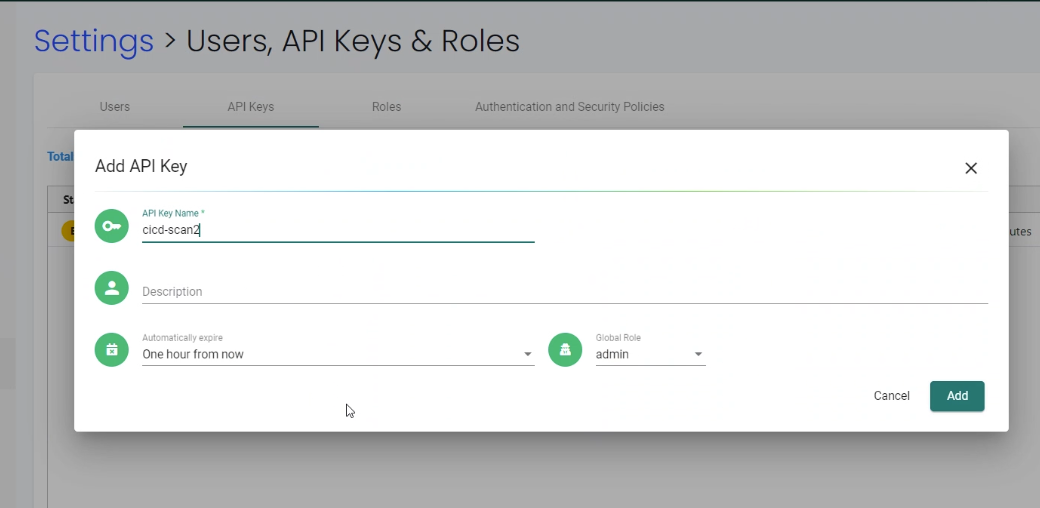
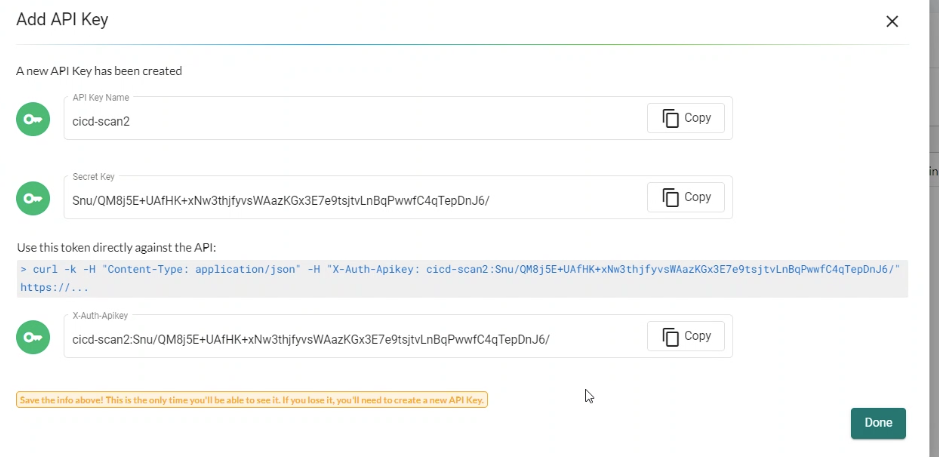
REST API 支持两种类型的身份验证:用户名/密码和词元两者都可以在设置 → 用户、API 密钥和角色中配置,并与默认或自定义角色关联,以限制访问特权下面的示例显示了基于用户名/密码的身份验证,其中首先创建词元,然后在后续的 REST API 调用中使用。如果使用词元,可以直接在每个 REST API 调用中使用。注意:基于用户名的连接有有限的并发会话数量,因此在完成后,重要的是按照下面所示删除用户名词元。基于词元的身份验证没有限制,但会根据创建时选择的时间限制而过期。
有关基于词元的身份验证,请参见以下屏幕截图和示例调用。创建后,请务必复制密钥和词元,因为在屏幕关闭后无法检索。

从脚本触发漏洞扫描
SUSE® Security 可以自动触发以扫描图像中的漏洞。这可以通过配置要监控的注册表/储存库、使用 SUSE® Security Jenkins 插件或使用 REST API 来完成。请参阅扫描与合规性部分以获取更多详细信息。
下面的示例脚本演示了如何远程拉取容器、运行它并进行扫描。可以从 Jenkins 任务(远程外壳)或任何 CI/CD 工具触发还使用了JSON解析工具(jq)。
请确保在脚本中输入控制器IP地址,并将容器镜像名称更改为您希望扫描的名称。此外,请更新用户名/密码字段。
点击这里查看详细信息
_curCase_=`echo $0 | awk -F"." '{print $(NF-1)}' | awk -F"/" '{print $NF}'`
_DESC_="able to scan ubuntu:16.04 image"
_ERRCODE_=0
_ERRTYPE_=1
_RESULT_="pass"

# please remember to specify the controller ip address here
_controllerIP_="<your_controller_ip>"
_controllerRESTAPIPort_="10443"
_neuvectorUsername_="admin"
_neuvectorPassword_="admin"
_registryURL_=""
_registryUsername_=""
_registryPassword_=""
_repository_="alpine"
_tag_="latest"

curl -k -H "Content-Type: application/json" -d '{"password": {"username": "'$_neuvectorUsername_'", "password": "'$_neuvectorPassword_'"}}' "https://$_controllerIP_:$_controllerRESTAPIPort_/v1/auth" > /dev/null 2>&1 > token.json
_TOKEN_=`cat token.json | jq -r '.token.token'`
echo `date +%Y%m%d_%H%M%S` scanning an image ...
curl -k -H "Content-Type: application/json" -H "X-Auth-Token: $_TOKEN_" -d '{"request": {"registry": "'$_registryURL_'", "username": "'$_registryUsername_'", "password": "'$_registryPassword_'", "repository": "'$_repository_'", "tag": "'$_tag_'"}}' "https://$_controllerIP_:$_controllerRESTAPIPort_/v1/scan/repository" > /dev/null 2>&1 > scan_repository.json

while [ `wc -c < scan_repository.json` = "0" ]; do
    echo `date +%Y%m%d_%H%M%S` scanning is still in progress ...
    sleep 5
    curl -k -H "Content-Type: application/json" -H "X-Auth-Token: $_TOKEN_" -d '{"request": {"registry": "'$_registryURL_'", "username": "'$_registryUsername_'", "password": "'$_registryPassword_'", "repository": "'$_repository_'", "tag": "'$_tag_'"}}' "https://$_controllerIP_:$_controllerRESTAPIPort_/v1/scan/repository" > /dev/null 2>&1 > scan_repository.json
done

echo `date +%Y%m%d_%H%M%S` log out
curl -k -X 'DELETE' -H "Content-Type: application/json" -H "X-Auth-Token: $_TOKEN_" "https://$_controllerIP_:$_controllerRESTAPIPort_/v1/auth" > /dev/null 2>&1
cat scan_repository.json | jq .

rm *.json
echo `date +%Y%m%d_%H%M%S` [$_curCase_] $_DESC_: $_RESULT_-$_ERRCODE_|
您可能需要安装jq。 |
对于基于Kubernetes的部署,您可以按如下方式设置控制器IP:
_podNAME_=`kubectl get pod -n neuvector -o wide | grep "allinone\|controller" | head -n 1 | awk '{print $1}'`
_controllerIP_=`kubectl exec $_podNAME_ -n neuvector -- consul info | grep leader_addr | awk -F":| " '{print $3}'`|
在多个控制器部署中,请求必须发送到单个控制器IP,以便多个对长时间运行的镜像扫描的状态请求发送到执行扫描的控制器。 |
要在本地扫描而不是在注册表中:
curl -k -H "Content-Type: application/json" -H "X-Auth-Token: $_TOKEN_" -d '{"request": {"tag": "3.4", "repository": "nvlab/alpine", "scan_layers": true}}' "https://$_controllerIP_:443/v1/scan/repository"示例输出:
点击这里查看详细信息
{
  "report": {
    "image_id": "c7fc7faf8c28d48044763609508ebeebd912ad6141a722386b89d044b62e4d45",
    "registry": "",
    "repository": "nvlab/alpine",
    "tag": "3.4",
    "digest": "sha256:2441496fb9f0d938e5f8b27aba5cc367b24078225ceed82a9a5e67f0d6738c80",
    "base_os": "alpine:3.4.6",
    "cvedb_version": "1.568",
    "vulnerabilities": [
      {
        "name": "CVE-2018-0732",
        "score": 5,
        "severity": "Medium",
        "vectors": "AV:N/AC:L/Au:N/C:N/I:N/A:P",
        "description": "During key agreement in a TLS handshake using a DH(E) based ciphersuite a malicious server can send a very large prime value to the client. This will cause the client to spend an unreasonably long period of time generating a key for this prime resulting in a hang until the client has finished. This could be exploited in a Denial Of Service attack. Fixed in OpenSSL 1.1.0i-dev (Affected 1.1.0-1.1.0h). Fixed in OpenSSL 1.0.2p-dev (Affected 1.0.2-1.0.2o).",
        "package_name": "openssl",
        "package_version": "1.0.2n-r0",
        "fixed_version": "1.0.2o-r1",
        "link": "https://cve.mitre.org/cgi-bin/cvename.cgi?name=CVE-2018-0732",
        "score_v3": 7.5,
        "vectors_v3": "CVSS:3.0/AV:N/AC:L/PR:N/UI:N/S:U/C:N/I:N/A:H"
      },
                  ...
    ],
    "layers": [
      {
        "digest": "c68318b6ae6a2234d575c4b6b33844e3e937cf608c988a0263345c1abc236c14",
        "cmds": "/bin/sh",
        "vulnerabilities": [
          {
            "name": "CVE-2018-0732",
            "score": 5,
            "severity": "Medium",
            "vectors": "AV:N/AC:L/Au:N/C:N/I:N/A:P",
            "description": "During key agreement in a TLS handshake using a DH(E) based ciphersuite a malicious server can send a very large prime value to the client. This will cause the client to spend an unreasonably long period of time generating a key for this prime resulting in a hang until the client has finished. This could be exploited in a Denial Of Service attack. Fixed in OpenSSL 1.1.0i-dev (Affected 1.1.0-1.1.0h). Fixed in OpenSSL 1.0.2p-dev (Affected 1.0.2-1.0.2o).",
            "package_name": "openssl",
            "package_version": "1.0.2n-r0",
            "fixed_version": "1.0.2o-r1",
            "link": "https://cve.mitre.org/cgi-bin/cvename.cgi?name=CVE-2018-0732",
            "score_v3": 7.5,
            "vectors_v3": "CVSS:3.0/AV:N/AC:L/PR:N/UI:N/S:U/C:N/I:N/A:H"
          },
                                  ...
        ],
        "size": 5060096
      }
    ]
  }
}
自动创建策略规则
要在SUSE® Security策略控制器中创建新规则,FROM和TO字段的组必须先存在。以下示例基于容器标签nv-service-type=data创建一个新组,并为标签nv-service-type=website创建另一个组。然后创建一条规则,允许wordpress容器到mysql容器的流量,仅使用mysql协议。
请确保更新访问控制器的用户名和密码。
#!/bin/sh
TOKEN_JSON=$(curl -k -H "Content-Type: application/json" -d '{"password": {"username": "admin", "password": "admin"}}' "https://`docker inspect neuvector.allinone | jq -r '.[0].NetworkSettings.IPAddress'`:10443/v1/auth")
_TOKEN_=`echo $TOKEN_JSON | jq -r '.token.token'`
curl -k -H "Content-Type: application/json" -H "X-Auth-Token: $_TOKEN_" -d '{"config": {"name": "mydb", "criteria": [{"value": "data", "key": "nv.service.type", "op": "="}]}}' "https://`docker inspect neuvector.allinone | jq -r '.[0].NetworkSettings.IPAddress'`:10443/v1/group"
curl -k -H "Content-Type: application/json" -H "X-Auth-Token: $_TOKEN_" -d '{"config": {"name": "mywp", "criteria": [{"value": "website", "key": "nv.service.type", "op": "="}]}}' "https://`docker inspect neuvector.allinone | jq -r '.[0].NetworkSettings.IPAddress'`:10443/v1/group"
curl -k -X "PATCH" -H "Content-Type: application/json" -H "X-Auth-Token: $_TOKEN_" -d '{"insert": {"rules": [{"comment": "Custom WP Rule", "from": "mywp", "applications": ["MYSQL"], "ports": "any", "to": "mydb", "action": "allow", "id": 0}], "after": 0}}' "https://`docker inspect neuvector.allinone | jq -r '.[0].NetworkSettings.IPAddress'`:10443/v1/policy/rule"
curl -k -X "DELETE" -H "Content-Type: application/json" -H "X-Auth-Token: $_TOKEN_" "https://`docker inspect neuvector.allinone | jq -r '.[0].NetworkSettings.IPAddress'`:10443/v1/auth"
如果SUSE® Security中已经存在这些组,则可以创建新规则,跳过组创建步骤。此示例还在最后移除了身份验证令牌。请注意,可以指定规则ID号,SUSE® Security按从低到高的顺序执行规则。
导出/导入配置文件
这里是自动备份SUSE® Security配置文件的示例。您可以选择导出所有配置设置(策略、用户、设置等),或仅导出策略。
|
这些示例仅作为参考,除非已签订特定的企业支持协议,否则不提供官方支持。 |
要导出所有配置:
./config.py export -u admin -w admin -s $_controllerIP_ -p $_controllerPort_ -f $_FILENAME_ # exporting the configuration with all settings仅导出策略:
./config.py export -u admin -w admin -s $_controllerIP_ -p $_controllerPort_ -f $_FILENAME_ --section policy # exporting the configuration with policy only要导入文件:
./config.py import -u admin -w admin -s $_controllerIP_ -p $_controllerPort_ -f $_FILENAME_ # importing the configuration示例Python文件 包含config.py、client.py和multipart.py。下载示例文件:导入导出。请将所有三个文件放在一个文件夹中以运行上述命令。您可能需要安装一些Python模块才能运行该脚本。
sudo pip install requests six设置或更改用户密码
使用REST API调用进行用户管理。
curl -s -k -H 'Content-Type: application/json' -H 'X-Auth-Token: c64125decb31e6d3125da45cba0f5025' https://127.0.0.1:10443/v1/user/admin -X PATCH -d '{"config":{"fullname":"admin","password":"admin","new_password":"NEWPASS"}}'在容器上启动数据包捕获
当容器表现出可疑行为时,启动数据包捕获。
#!/bin/sh
TOKEN_JSON=$(curl _k _H "Content_Type: application/json" _d '{"password": {"username": "admin", "password": "admin"}}' "https://`docker inspect neuvector.allinone | jq _r '.[0].NetworkSettings.IPAddress'`:10443/v1/auth")
_TOKEN_=`echo $TOKEN_JSON | jq -r '.token.token'`
curl -k -H "Content-Type: application/json" -H "X-Auth-Token: $_TOKEN_" -d '{"sniffer":{"file_number":1,"filter":"port 1381"}}' "https://`docker inspect neuvector.allinone | jq -r '.[0].NetworkSettings.IPAddress'`:10443/v1/sniffer?f_workload=`docker inspect neuvector.allinone | jq -r .[0].Id`"
请记得在一段时间后停止嗅探会话,以免其无限运行。轮换的文件数量最大值为50。
检查并接受 EULA(新部署)
如上所述获取身份验证令牌。还请根据需要替换控制器IP地址。
curl -s -k -H 'Content-Type: application/json' -H 'X-Auth-Token: $_TOKEN_' https://127.0.0.1:10443/v1/eula | jq .
{
  "eula": {
    "accepted":false
  }
}
接受 EULA
curl -s -k -H 'Content-Type: application/json' -H 'X-Auth-Token: $_TOKEN_' -d '{"eula":{"accepted":true}}' https://127.0.0.1:10443/v1/eula然后再次检查 EULA。
配置注册表扫描
curl -k -H "Content-Type: application/json" -H "X-Auth-Token: $_TOKEN_" -d '{"request": {"registry": "https://registry.connect.redhat.com", "username": "username", "password": "password", "tag": "latest", "repository": "neuvector/enforcer"}}' "https://controller:port/v1/scan/repository"在名称空间中启用所有 Pod 的数据包捕获
点击这里查看详细信息
#!/bin/bash
#set -x

hash curl 2>/dev/null || { echo >&2 "Required curl but it's not installed.  Aborting."; exit 1; }
hash jq 2>/dev/null || { echo >&2 "Required jq but it's not installed.  Aborting."; exit 1;}

script="$0"
usage() {
    echo "Usage: $script -n [namespace] -d [pcap duration (seconds)] -l [https://nvserver:10443]" 1>&2;
    exit 1;
}

while getopts ":n:d:l:h" opt; do
    case $opt in
        n)
            NAMESPACE=$OPTARG
            ;;
        d)
            DURATION=$OPTARG
            ;;
        l)  URL="$OPTARG/v1"
            ;;
        h)
            usage
            ;;
        \?)
            echo "Invalid option, $OPTARG.  Try -h for help." 1>&2
            ;;
        :)
            echo "Invalid option: $OPTARG requires an argument" 1>&2
    esac
done

if [ ! "$NAMESPACE" ] || [ ! "$DURATION" ] || [ ! "$URL" ]
then
    usage
    exit 1
fi

count=0
for i in `kubectl -n $NAMESPACE get pods -o wide 2> /dev/null | tail -n +2 | awk '{print $1}' | sed 's|\(.*\)-.*|\1|' | uniq`;
do
    CHOICE1[count]=$i
    count=$count+1
done

if [ -z ${CHOICE1[0]} ]; then
    echo "No pods found in $NAMESPACE."
    exit 1
else
    for i in "${!CHOICE1[@]}"
    do
        echo "$i : ${CHOICE1[$i]}"
    done
    read -p "Packet capture on which pod group? " -r
    if [ -n $REPLY ]; then
        POD_STRING=${CHOICE1[$REPLY]}
        echo $POD_STRING " selected."
    else
        exit 1
    fi
fi

sniffer_start() {
    URI="/sniffer?f_workload=$1"
    sniff_id=$(curl -ks --location --request POST ${URL}${URI} "${curlHeaders[@]}" --data-raw '{ "sniffer": { "file_number": 1, "filter": "" }}' | jq .result.id)
    echo $sniff_id
}

sniffer_stop() {
    URI="/sniffer/stop/${1}"
    status_code=`curl -ks -w "%{http_code}" --location --request PATCH ${URL}${URI} "${curlHeaders[@]}"`
    echo $status_code
}

sniffer_pcap_get() {
    URI="/sniffer/${1}/pcap"
    status_code=`curl -ks -w "%{http_code}" --location --request GET ${URL}${URI} "${curlHeaders[@]}" -o $1.pcap`
    echo $status_code
}

sniffer_pcap_delete() {
    URI="/sniffer/${1}"
    status_code=`curl -ks -w "%{http_code}" --location --request DELETE ${URL}${URI} "${curlHeaders[@]}"`
    echo $status_code
}

show_menu() {
    count=0
    for i in "Exit script" "Start packet capture for $DURATION seconds" "Download packet capture from pods" "Delete packet capture from pods";
    do
        CHOICE2[count]=$i
        count=$count+1
    done
        echo
        echo "Selections:"
    for i in "${!CHOICE2[@]}"
    do
        echo "$i : ${CHOICE2[$i]}"
    done
}

get_token() {
read -p "Enter {product-name} Username: " USER
if [ -z $USER ]; then
    echo "Blank username, exiting..."
    exit 1
fi
read -s -p "Enter password: " PASS
if [ -z $PASS ]; then
    echo
    echo "Blank password, exiting..."
    exit 1
fi

TOKEN=`curl -ks --location --request POST ${URL}/auth \
--header "accept: application/json" \
--header "Content-Type: application/json" \
--data-raw '{"password": {"username": "'$USER'", "password": "'$PASS'"}}'|jq .token.token`
echo $TOKEN
}

TOKEN=$(get_token)
while [ "$TOKEN" = "null" ]; do
    echo
    echo "Authenticating failed, retry."
    TOKEN=$(get_token)
done

TOKEN=${TOKEN:1:${#TOKEN}-2}
echo
declare -a curlHeaders=('-H' "Content-Type: application/json" '-H' "X-Auth-Token: $TOKEN")
echo "Pulling worklods from $URL"
declare -a workloads="($(
    curl -ks --location --request GET ${URL}/workload "${curlHeaders[@]}" \
    | jq '.workloads[] | select(.display_name | startswith("'${POD_STRING}'"))| select(.domain=="'$NAMESPACE'" and .cap_sniff==true) | .display_name + "::" +.id' -r
))"

if [ ${#workloads[@]} -eq 0 ]; then
    echo
    echo "No pods is capable of packet capture.  Only ethernet IP part of Kubernetes CIDR can packet capture."
    exit 1
else
    echo
    echo "List of Pods to perform capture on."
    echo "Pod Name : ID"
    for pods in "${workloads[@]}" ; do
        POD_NAME="${pods%%::*}"
        POD_ID="${pods##*::}"
        echo "$POD_NAME : $POD_ID"
    done
fi

while :; do
    show_menu
    read -p "Choice? " -r
    if [ -n $REPLY ]; then
        case "$REPLY" in
            0)
                exit 0;
                ;;
            1)
                counter=0
                declare -a sniffs;
                for pods in "${workloads[@]}"; do
                    POD_ID="${pods##*::}"
                    sniff_id="$(sniffer_start $POD_ID)";
                    sniffs[$counter]=$sniff_id
                    counter=$((counter+1))
                done
                echo "Running pcap for ~$DURATION seconds.";
                sleep $DURATION;
                for sniff_id in "${sniffs[@]}"; do
                    sniff_id=${sniff_id:1:${#sniff_id}-2}
                    status="$(sniffer_stop $sniff_id)";
                done
                ;;
            2)
                for sniff_id in "${sniffs[@]}"; do
                    sniff_id=${sniff_id:1:${#sniff_id}-2}
                    status="$(sniffer_pcap_get $sniff_id)";
                done
                ;;
            3)
                for sniff_id in "${sniffs[@]}"; do
                    sniff_id=${sniff_id:1:${#sniff_id}-2}
                    status="$(sniffer_pcap_delete $sniff_id)";
                done
                ;;
        esac
    else
        exit 1
    fi
done
启用或禁用容器隔离
隔离的 API 调用是通过 PATCH 到 /v1/workload/:id,带有以下主体。工作负载 ID 是容器/Pod ID。
--data-raw '{
    "config": {
        "quarantine": true,
        "wire": "default",
        "quarantine_reason": "violation"
    }
}'
为 SUSE® Security 支持启用调试模式
使用您的 IP、用户名和密码设置访问令牌:
_controllerIP_="<your_controller_ip>"
_controllerRESTAPIPort_="10443"
_neuvectorUsername_="admin"
_neuvectorPassword_="admin"
获取身份验证令牌
curl -k -H "Content-Type: application/json" -d '{"password": {"username": "'$_neuvectorUsername_'", "password": "'$_neuvectorPassword_'"}}' "https://$_controllerIP_:$_controllerRESTAPIPort_/v1/auth" > /dev/null 2>&1 > token.json
_TOKEN_=`cat token.json | jq -r '.token.token'`
启用调试模式
curl -X PATCH -k -H "Content-Type: application/json" -H "X-Auth-Token: $_TOKEN_" -d '{"config": {"controller_debug": ["cpath", "conn"]}}' "https://$_controllerIP_:$_controllerRESTAPIPort_/v1/system/config"  > /dev/null 2>&1   > set_debug.json
#debug options - cpath, conn, mutex, scan, cluster , all
在集群中禁用所有控制器的调试
curl -X PATCH -k -H "Content-Type: application/json" -H "X-Auth-Token: $_TOKEN_" -d '{"config": {"controller_debug": []}}' "https://$_controllerIP_:$_controllerRESTAPIPort_/v1/system/config" > /dev/null 2>&1 > set_debug.json检查集群中控制器的调试状态
curl  -k -H "Content-Type: application/json" -H "X-Auth-Token: $_TOKEN_"  "https://$_controllerIP_:$_controllerRESTAPIPort_/v1/system/config"  > /dev/null 2>&1   > system_setting.json

cat system_setting.json | jq .config.controller_debug
注销
echo `date +%Y%m%d_%H%M%S` log out
curl -k -X 'DELETE' -H "Content-Type: application/json" -H "X-Auth-Token: $_TOKEN_" "https://$_controllerIP_:$_controllerRESTAPIPort_/v1/auth" > /dev/null 2>&1
报告基础镜像层中是否存在漏洞
在使用 REST API 扫描镜像时,要识别基础镜像中的 CVE,必须在 API 调用中识别基础镜像,如下例所示。
curl -k -H "Content-Type: application/json" -H "X-Auth-Token: $_TOKEN_" -d '{"request": {"registry": "https://registry.hub.docker.com/", "repository": "garricktam/debian", "tag": "latest", "scan_layers": false, "base_image": "2244...../nodejs:3.2......"}}' "https://$RESTURL/v1/scan/repository"
{noformat}
局限性
如果要扫描的镜像是远程镜像,并指定了 "registry",则基础镜像也必须是远程镜像,名称必须以 http 或 https 开头。 如果要扫描的镜像是本地镜像,则基础镜像也必须是本地镜像。
例如,
{"request": {"repository": "neuvector/manager", "tag": "4.0.2", "scan_layers": true, "base_image": "alpine:3.12.0"}}
{"request": {"registry": "https://10.1.127.12:5000/", "repository": "neuvector/manager", "tag": "4.0.0", "scan_layers": true, "base_image": "https://registry.hub.docker.com/alpine:3.12.0"}}
{"request": {"repository": "neuvector/manager", "tag": "4.0.2", "scan_layers": true, "base_image": "10.1.127.12:5000/neuvector/manager:4.0.2”}}
获取 CVE 数据库版本和日期
curl -k -H "Content-Type: application/json" -H "X-Auth-Token: $_TOKEN_" "https://127.0.0.1:10443/v1/scan/scanner"输出:
{
    "scanners": [
        {
            "cvedb_create_time": "2020-07-07T10:34:04Z",
            "cvedb_version": "1.950",
            "id": "0f043705948557828ac1831ee596588a0d050950113117ddd19ecd604982f4d9",
            "port": 18402,
            "server": "127.0.0.1"
        },
        {
            "cvedb_create_time": "2020-07-07T10:34:04Z",
            "cvedb_version": "1.950",
            "id": "9fa02c644d603f59331c95735158d137002d32a75ed1014326f5039f38d4d717",
            "port": 18402,
            "server": "192.168.9.95"
        }
    ]
}
管理主集群和远程(工作)集群的联合
通常,列出联合成员可以使用 GET 请求以下端点(请参见示例以获取特定语法):
https://neuvector-svc-controller.neuvector:10443/v1/fed/member
有关通过 ConfigMap 进行联邦自动化的信息,请查看 联邦 ConfigMap 示例 文档。
选定的联邦管理 API:
点击这里查看详细信息
_masterClusterIP_=$1
_workerClusterIP_=$2
# this is used if one of clusters is going to be kicked by master cluster
_CLUSTER_name_=$3

echo `date +%Y%m%d_%H%M%S` [$_curCase_] login as default admin user
curl -k -H "Content-Type: application/json" -d '{"password": {"username": "admin", "password": "admin"}}' "https://$_masterClusterIP_:10443/v1/auth" > /dev/null 2>&1 > ./$_LOGFOLDER_/token.json
_TOKEN_M_=`cat ./$_LOGFOLDER_/token.json | jq -r '.token.token'`

echo `date +%Y%m%d_%H%M%S` [$_curCase_] promote to master cluster
curl -k -H "Content-Type: application/json" -H "X-Auth-Token: $_TOKEN_M_" -d '{"master_rest_info": {"port": 11443, "server": "'$_masterClusterIP_'"}, "name": "master"}' "https://$_masterClusterIP_:10443/v1/fed/promote" > /dev/null 2>&1
echo `date +%Y%m%d_%H%M%S` [$_curCase_] idle 6 seconds for logon session timeout
sleep 6

echo `date +%Y%m%d_%H%M%S` [$_curCase_] login as default admin user on master cluster
curl -k -H "Content-Type: application/json" -d '{"password": {"username": "admin", "password": "admin"}}' "https://$_masterClusterIP_:10443/v1/auth" > /dev/null 2>&1 > ./token.json
_TOKEN_M_=`cat ./token.json | jq -r '.token.token'`

echo `date +%Y%m%d_%H%M%S` [$_curCase_] checking fed join_token on master cluster
curl -k -H "Content-Type: application/json" -H "X-Auth-Token: $_TOKEN_M_" "https://$_masterClusterIP_:10443/v1/fed/join_token" > /dev/null 2>&1 > ./join_token.json
cat ./join_token.json | jq -c .
_JOIN_TOKEN_=`cat ./join_token.json | jq -r '.join_token'`

echo `date +%Y%m%d_%H%M%S` [$_curCase_] login as default admin user on worker cluster
curl -k -H "Content-Type: application/json" -d '{"password": {"username": "admin", "password": "admin"}}' "https://$_workerClusterIP_:10443/v1/auth" > /dev/null 2>&1 > ./token.json
_TOKEN_W_=`cat ./token.json | jq -r '.token.token'`

echo `date +%Y%m%d_%H%M%S` [$_curCase_] joining the cluster
curl -k -H "Content-Type: application/json" -H "X-Auth-Token: $_TOKEN_W_" -d '{"join_token": "'$_JOIN_TOKEN_'", "name": "worker", "joint_rest_info": {"port": 10443, "server": "'$_workerClusterIP_'"}}' "https://$_workerClusterIP_:10443/v1/fed/join" > /dev/null 2>&1
echo `date +%Y%m%d_%H%M%S` [$_curCase_] idle 9 seconds for events
sleep 9

########## whenever there is a change on cluster such as a cluster is kicked/left/joined, run this to check the status ############
echo `date +%Y%m%d_%H%M%S` [$_curCase_] checking fed member on master cluster
curl -k -H "Content-Type: application/json" -H "X-Auth-Token: $_TOKEN_M_" "https://$_masterClusterIP_:10443/v1/fed/member" > /dev/null 2>&1 > ./fedMember.json
cat ./fedMember.json | jq -c .

echo `date +%Y%m%d_%H%M%S` [$_curCase_] checking fed member on worker cluster
curl -k -H "Content-Type: application/json" -H "X-Auth-Token: $_TOKEN_W_" "https://$_workerClusterIP_:10443/v1/fed/member" > /dev/null 2>&1 > ./fedMember.json
cat ./fedMember.json | jq -c .
_CLUSTER_id_=`cat ./fedMember.json | jq -r --arg _CLUSTER_name_ "$_CLUSTER_name_" '.joint_clusters[] | select(.name == $_CLUSTER_name_).id'`
###################################################################################################################################

########## for ur information to leave or kick the cluster ############
echo `date +%Y%m%d_%H%M%S` [$_curCase_] requesting to leave on worker cluster
curl -k -H "Content-Type: application/json" -H "X-Auth-Token: $_TOKEN_W_" -d '{"force": false}' "https://$_workerClusterIP_:10443/v1/fed/leave" > /dev/null 2>&1
echo `date +%Y%m%d_%H%M%S` [$_curCase_] idle 9 seconds for events
sleep 9

echo `date +%Y%m%d_%H%M%S` [$_curCase_] requesting to kick on master cluster, $_CLUSTER_id_
curl -k -X "DELETE" -H "Content-Type: application/json" -H "X-Auth-Token: $_TOKEN_M_" "https://$_masterClusterIP_:10443/v1/fed/cluster/$_CLUSTER_id_" > /dev/null 2>&1
echo `date +%Y%m%d_%H%M%S` [$_curCase_] idle 9 seconds for events
sleep 9
#######################################################################