CRD - 自定义资源定义
SUSE® Security 用于策略即代码的 CRD
SUSE® Security 自定义资源定义 (CRD) 可被各个团队用于自动定义 SUSE® Security 容器安全平台中的安全策略。开发人员、DevOps、DevSecOps 和安全团队可以协同合作,为部署到生产环境中的新应用或更新后的应用自动化安全策略。CRD 还可以用于在多个 Kubernetes 集群中强制执行全局安全策略。
|
CRD 在 Kubernetes 1.11 及更高版本中受支持。在早期版本中部署 SUSE® Security 安全规则 CRD 可能不会导致错误,但该 CRD 将不会被处理。 |
CRD 可用于支持许多用例和工作流程:
-
在应用开发期间定义安全策略,以便推送到生产环境。
-
使用 SUSE® Security 学习行为,并在推送到生产环境之前导出 CRD 进行审查。
-
将安全策略从暂存环境迁移到生产集群。
-
在混合或多云环境中跨多个复制集群复制规则。
-
强制执行全局安全策略(请参见底部的示例)。
CRD 带来了许多好处,包括:
-
定义/声明安全策略,作为代码。
-
与应用部署清单一样版本化和跟踪安全策略。
-
定义任何应用的允许行为,包括网络、文件和进程行为。
支持的资源类型
SUSE® Security 支持以下自定义资源定义:
-
NvAdmissionControlSecurityRule
-
NvClusterSecurityRule
-
NvGroupDefinition
-
NvSecurityRule
NvGroupDefinition
NvGroupDefinition 自定义资源表示一个组的定义,包括其描述和标准。它本身并不代表一个主动或强制的组。相反,它在NeuVector系统中作为参考定义。
NeuVector仅在`NvGroupDefinition`在`NvSecurityRule`或`NvClusterSecurityRule`中被引用时创建和应用主动组。在此之前,`NvGroupDefinition`在Kubernetes集群中存在,但没有任何强制或运行时效果。这种行为是故意的,是NeuVector设计的一部分。
摘要:
-
`NvGroupDefinition`定义了组的元数据和选择标准。
-
`NvSecurityRule`和`NvClusterSecurityRule`应用并激活该组。
-
存在`NvGroupDefinition`意味着定义存在,但只有在被安全规则引用时才会变为主动。
所有`NvGroupDefinition`资源都在`neuvector`名称空间下创建。
架构属性: name_referral
从v5.4.3开始,NeuVector在NvSecurityRule/NvClusterSecurityRule CRD架构的组选择器(target.selector, ingress.items[].selector, egress.items[].selector)中使用属性`name_referral`(布尔值)作为设置。您可以通过在组导出对话框中勾选“使用名称引用”来在UI中启用此设置。
如果`name_referral`属性设置为`true`,则NeuVector会忽略NvSecurityRule/NvClusterSecurityRule中组选择器的`criteria/comment`字段。这意味着NeuVector将尝试通过引用来确定组的`criteria/comment`。这在NvSecurityRule/NvClusterSecurityRule CRD中引入了“组引用”,以协助在编辑组时进行修改。如果未设置,则用户需要在各自的YAML文件中每个定义的位置更新组,如需修改。
NvClusterSecurityRule和NvSecurityRule
NvSecurityRule和NvClusterSecurityRule之间的区别在于由范围定义设定的边界。NvSecurityRule资源的范围在名称空间级别,而NvClusterSecurityRule的范围在集群级别。资源类型可以在yaml文件中配置,并可在部署期间创建,如NeuVector的部署说明和示例所示。
NvSecurityRule资源类型在名称空间范围内的重要性在于强制执行目标组的配置域,必须与NeuVector的CRD安全策略中配置的名称空间匹配。这提供了强制措施,以防止影响目标组策略规则的不必要的跨名称空间策略创建。
对于NvClusterSecurityRule自定义资源定义,它具有集群级别的范围,因此不会对定义的目标强制任何名称空间边界。然而,用于导入CRD-yaml文件的用户上下文必须具有必要的权限,以访问或位于与CRD-yaml文件中配置的相同名称空间,否则导入将被拒绝。
启用CRD支持
如Kubernetes和OpenShift部署部分所述(部署SUSE® Security),应首先添加自定义资源和NvSecurityRules的适当集群角色和集群角色绑定。
然后应使用这些部分中的示例yaml创建NvSecurityRule和NvClusterSecurityRule。SUSE® Security CRD现在可以部署。
生成示例SUSE® Security CRD
查看SUSE® Security CRD的yaml文件格式的最简单方法是从SUSE® Security控制台导出。在您测试应用程序时,SUSE® Security处于发现模式以学习网络、文件和进程行为后,您可以导出学习到的策略。
转到策略→组菜单,然后点击右上角的导出组策略。
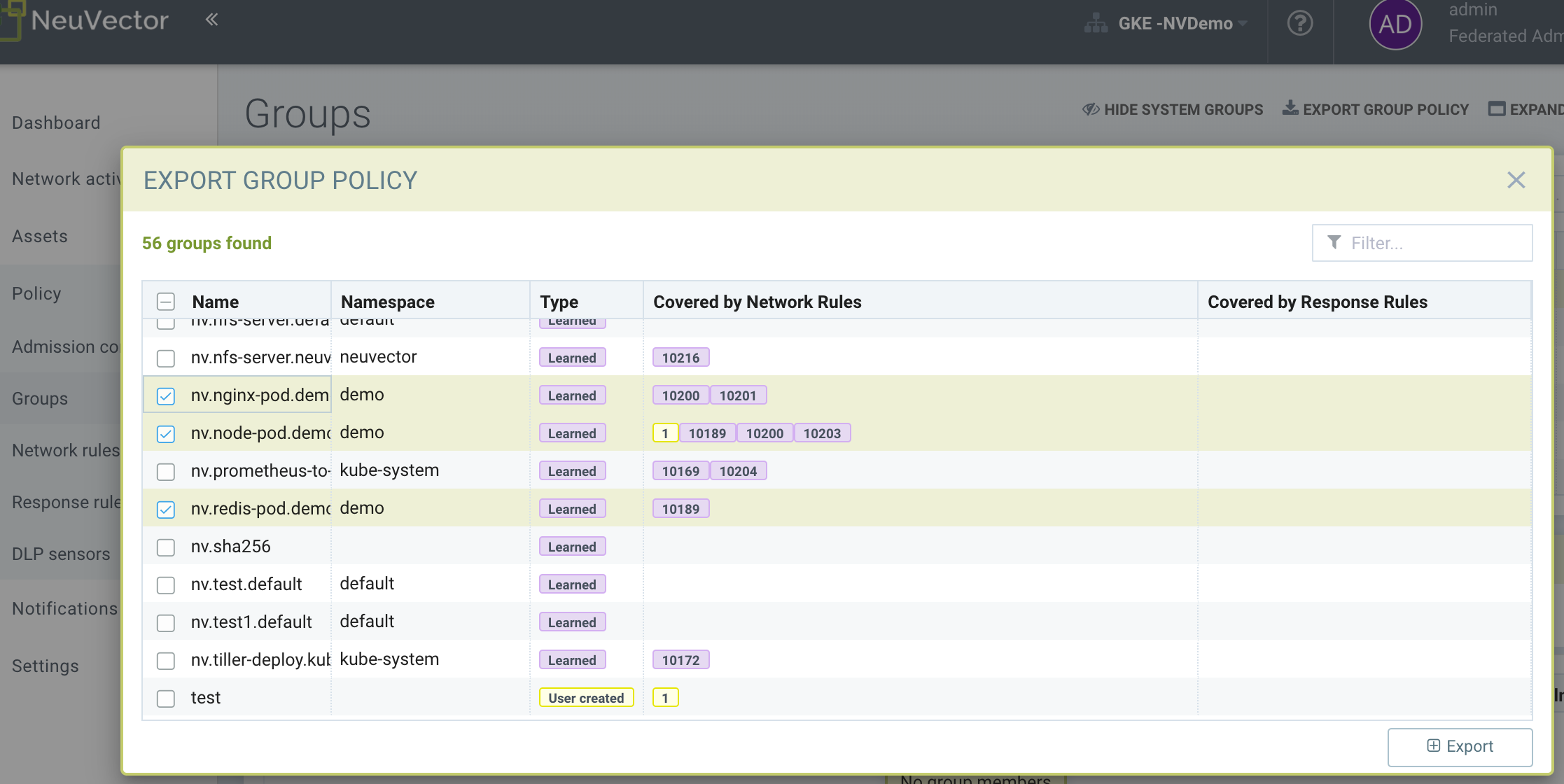
然后选择您希望导出的组,例如上面演示名称空间中的三个组。检查下面保存的CRD yaml,以查看SUSE® Security网络、进程和文件规则是如何表达的。
|
除了所选组,所有“链接”的组也将被导出。链接组指的是根据网络规则允许连接到或从中连接的任意其他组。 |
示例导出的CRD
点击这里查看详细信息
apiVersion: v1
items:
- apiVersion: neuvector.com/v1
  kind: NvSecurityRule
  metadata:
    name: nv.nginx-pod.demo
    namespace: demo
  spec:
    egress:
    - selector:
        criteria:
        - key: service
          op: =
          value: node-pod.demo
        - key: domain
          op: =
          value: demo
        name: nv.node-pod.demo
      action: allow
      applications:
      - HTTP
      name: nv.node-pod.demo-egress-0
      ports: any
    file: []
    ingress:
    - selector:
        criteria:
        - key: service
          op: =
          value: exploit.demo
        - key: domain
          op: =
          value: demo
        name: nv.exploit.demo
      action: allow
      applications:
      - HTTP
      name: nv.nginx-pod.demo-ingress-0
      ports: any
    process:
    - action: allow
      name: nginx
      path: /usr/sbin/nginx
    - action: allow
      name: pause
      path: /pause
    - action: allow
      name: ps
      path: /bin/ps
    target:
      selector:
        criteria:
        - key: service
          op: =
          value: nginx-pod.demo
        - key: domain
          op: =
          value: demo
        name: nv.nginx-pod.demo
      policymode: Monitor
- apiVersion: neuvector.com/v1
  kind: NvSecurityRule
  metadata:
    name: nv.node-pod.demo
    namespace: demo
  spec:
    egress:
    - selector:
        criteria:
        - key: address
          op: =
          value: google.com
        name: test
      action: allow
      applications:
      - SSL
      name: test-egress-1
      ports: any
    - selector:
        criteria:
        - key: service
          op: =
          value: redis-pod.demo
        - key: domain
          op: =
          value: demo
        name: nv.redis-pod.demo
      action: allow
      applications:
      - Redis
      name: nv.redis-pod.demo-egress-2
      ports: any
    - selector:
        criteria:
        - key: service
          op: =
          value: kube-dns.kube-system
        - key: domain
          op: =
          value: kube-system
        name: nv.kube-dns.kube-system
      action: allow
      applications:
      - DNS
      name: nv.kube-dns.kube-system-egress-3
      ports: any
    file: []
    ingress: []
    process:
    - action: allow
      name: curl
      path: ""
    - action: allow
      name: node
      path: /usr/bin/nodejs
    - action: allow
      name: pause
      path: /pause
    - action: allow
      name: ps
      path: /bin/ps
    - action: allow
      name: sh
      path: /bin/dash
    - action: allow
      name: whoami
      path: /usr/bin/whoami
    target:
      selector:
        criteria:
        - key: service
          op: =
          value: node-pod.demo
        - key: domain
          op: =
          value: demo
        name: nv.node-pod.demo
      policymode: Protect
- apiVersion: neuvector.com/v1
  kind: NvSecurityRule
  metadata:
    name: nv.redis-pod.demo
    namespace: demo
  spec:
    egress: []
    file: []
    ingress: []
    process:
    - action: allow
      name: pause
      path: /pause
    - action: allow
      name: redis-server
      path: /usr/local/bin/redis-server
    target:
      selector:
        criteria:
        - key: service
          op: =
          value: redis-pod.demo
        - key: domain
          op: =
          value: demo
        name: nv.redis-pod.demo
      policymode: Monitor
- apiVersion: neuvector.com/v1
  kind: NvSecurityRule
  metadata:
    name: nv.kube-dns.kube-system
    namespace: kube-system
  spec:
    egress: null
    file: null
    ingress: null
    process: null
    target:
      selector:
        criteria:
        - key: service
          op: =
          value: kube-dns.kube-system
        - key: domain
          op: =
          value: kube-system
        name: nv.kube-dns.kube-system
      policymode: Monitor
- apiVersion: neuvector.com/v1
  kind: NvSecurityRule
  metadata:
    name: nv.exploit.demo
    namespace: demo
  spec:
    egress: null
    file: null
    ingress: null
    process: null
    target:
      selector:
        criteria:
        - key: service
          op: =
          value: exploit.demo
        - key: domain
          op: =
          value: demo
        name: nv.exploit.demo
      policymode: Monitor
kind: List
metadata: null
例如:
-
这是一个名称空间 CRD,属于NvSecurityRule。
-
nginx-pod.demo 可以通过 HTTP 与 node-pod.demo 通信,允许的进程已列出。
-
node-pod.demo 可以使用 Redis 协议与 redis-pod.demo 通信。
-
服务的策略模式设置为 Monitor 模式。
-
node-pod.demo 被允许通过 SSL 访问 google.com。
-
像 nv.node-pod.demo 这样的组名被引用但未在 CRD 中定义,因此在部署时预期它们已经存在。请参见下面的组定义。
示例 NeuVector CRD - NvAdmissionControlSecurityRule
生成 CRD 清单的另一种方法是从 策略 > 访问控制 视图中,通过点击 更多操作 下拉列表并选择 导出。以下是示例 NvAdmissionControlSecurityRule CRD 清单:
|
NvAdmissionControlSecurityRule |
点击这里查看示例 CRD
apiVersion: neuvector.com/v1
kind: NvAdmissionControlSecurityRule
metadata:
  creationTimestamp: null
  name: local
spec:
  config:
    client_mode: service
    enable: true
    mode: monitor
  rules:
  - action: deny
    containers:
    - containers
    criteria:
    - name: namespace
      op: containsAny
      path: namespace
      value: n2,ns1
    disabled: false
    rule_mode: ""
您可以参考 CRD 的完整架构 对上述生成的清单进行修改,以满足您的要求。
完成修改后,您可以将清单应用到您的 Kubernetes 集群。
策略模式配置和组定义
策略模式配置和组定义在 CRD 配置 yaml 文件中得到支持。在 yaml 配置文件中配置策略模式后,导入该文件将为 CRD 导入设置目标组为此值。
|
从 SUSE® Security 控制台(策略 → 组)不允许修改导入的目标策略模式。例如,一旦模式设置为 Monitor,它只能通过 CRD 修改进行更改,而不能通过控制台进行更改。 |
|
CRD 导入行为忽略任何 '链接' 组的策略模式,如果链接组已经存在,则保持策略模式不变。如果链接组不存在,它将被自动创建并在设置 → 配置中设置为默认的新服务模式。 |
策略模式配置要求
-
模式仅适用于配置的目标组
-
目标组配置必须具有格式 nv.SERVICE_NAME.DOMAIN。
-
示例: nv.xxx.yyy
-
xxx.yyy=SERVICE
-
yyy=DOMAIN
-
-
支持的值为 Discover、Monitor 和 Protect
-
目标组必须包含键值对 key: service
-
配置的键:domain 必须与配置的服务键值对的服务域后缀匹配
策略模式配置 Yaml 文件示例
  target:
      policymode: Protect
      selector:
          name: nv.xxx.yyy
          criteria:
          - key: service            #1 of 2 Criteria must exist
            value: xxx.yyy
            op: "="
          - key: domain             #2 of 2 Criteria must exist
            value: yyy
            op: "="
CRD 策略规则语法和语义
组名
-
避免使用以 fed.、nv.ip.、host: 或 workload: 开头的名称,这些名称保留给联邦组或基于 IP 的服务。
-
您可以使用 node、external 或 containers 作为组名。然而,这将与保留的默认组名相同,因此不会创建新组。CRD 中的任何组定义标准将被忽略,但组的规则将被处理。新规则将在组名下显示。
-
符合标准: ^[a-zA-Z0-9]+[.:a-zA-Z0-9_-]*$
-
不得以 fed、workload 或 nv.ip 开头
-
如果名称的格式为 nv.xxx.yyy,则必须存在匹配的服务和域定义,否则导入验证将失败。 有关详细信息,请参阅上述策略模式配置。
-
如果要导入的组名在目标系统中已存在,则导入的 CRD 和目标系统中的 CRD 之间的标准必须匹配。 如果存在差异,CRD 导入将被拒绝。
准则
-
除非名称是 nodes、external 或 containers,否则不能为空。
-
名称 - 如果名称具有服务格式 nv.xxx.yyy,则请参阅上述策略模式配置部分的详细信息。
-
键 - 该键符合正则表达式模式 ^[a-zA-Z0-9]+[.:a-zA-Z0-9_-]*$
-
操作(op)
-
字符串 = "="
-
字符串 = "!="
-
string = "contains"
-
字符串 = "前缀"
-
string = "regex"
-
字符串 = "!正则表达式"
-
-
值 - 一个没有限制的字符串
-
键 - 不能为空
-
操作符 - 运算符
-
如果操作符是等于 (=) 或不等于 (!=),则其’值不能为空。
-
如果操作符是等于 (=) 或不等于 (!=) 并且有一个值(例如 * 或 ?),则该值不能具有任何正则表达式格式,如 ^$。
-
示例:
-
键:服务
-
操作: =
-
值:ab?c*e^$ (这是不正确的)
-
-
-
操作 - 允许或拒绝
-
应用程序(支持的值)
-
ActiveMQ
-
Apache
-
Cassandra
-
Consul
-
Couchbase
-
CouchDB
-
DHCP
-
DNS
-
回应
-
ElasticSearch
-
etcd
-
GRPC
-
HTTP
-
Jetty
-
Kafka
-
Memcached
-
MongoDB
-
MSSQL
-
MySQL
-
nginx
-
NTP
-
Oracle
-
PostgreSQL
-
RabbitMQ
-
Radius
-
Redis
-
RTSP
-
SIP
-
Spark
-
SSH
-
SSL
-
Syslog
-
TFTP
-
VoltDB
-
Wordpress
-
ZooKeeper
-
-
端口 - 指定的格式为xxx/yyy。其中xxx=协议(tcp,udp),yyy=端口号(0-65535)。
-
TCP/123或TCP/any
-
UDP/123或UDP/123
-
ICMP
-
123 = TCP/123
-
-
进程 - 每个进程的操作、名称、路径列表
-
操作:允许/拒绝 #此操作优先于文件访问规则。 如果意图是允许文件访问规则生效,则应设置为允许。
-
名称:进程名称
-
路径:进程路径(可选)
-
-
文件 - 文件访问规则列表;这些仅适用于定义的目标容器组
-
应用程序:应用程序列表
-
行为:阻止访问 / 监控更改 #这会阻止对下面定义的过滤器的访问。 如果选择监控更改,则将从SUSE® Security的Web控制台通知 > 安全事件页面生成安全事件。
-
过滤器:路径/文件名
-
递归:true/false
-
RBAC支持与CRD
利用 Kubernetes 现有的 RBAC 模型,SUSE® Security 扩展了 CRD(自定义资源定义),通过利用 Kubernetes 的角色绑定,并在 SUSE® Security 配置的 CRD 规则中与配置的名称空间关联,以支持 RBAC,适用于使用 NvSecurityRule 资源类型的场景。然后使用此配置的名称空间来强制执行配置的目标,该目标必须位于SUSE® Security安全策略中配置的此名称空间内。在角色绑定定义的集群角色时,可以将其绑定到Kubernetes用户或组。SUSE® Security支持的两种集群角色资源类型是NvSecurityRule和NvClusterSecurityRule。
角色绑定和集群角色绑定,两个用户在不同名称空间中绑定到集群角色(NvSecurityRules和NvClusterSecurityRules资源)
以下示例说明了创建一个包含两个资源(NvSecurityRules和NvClusterSecurityRules)的集群角色的场景,以绑定到两个不同的用户。
一个用户(user1)属于名称空间(ns1),而另一个用户(user2)属于名称空间(ns2)。 User1将角色绑定到此创建的集群角色(nvsecnvclustrole),而User2则集群角色绑定到同一集群角色(nvsecnvclustrole)。
这里的关键要点是说明使用角色绑定时,这将具有名称空间级别的范围,而使用集群角色绑定时将具有集群级别的范围。 用户1将进行角色绑定(名称空间级别),用户2将进行集群角色绑定(集群级别)。 这在基于作用域级别的RBAC执行中最为重要,这决定了创建的用户访问权限。
示例使用两种不同类型的定义yaml文件,以及使用每个用户的效果。
-
创建一个包含NvSecurityRules和NvClusterSecurityRules资源的集群角色。
请注意,这个集群角色配置了两个资源,nvsecurityrules和nvclustersecurityrules。示例(nvsecnvclustroles.yaml):
apiVersion: rbac.authorization.k8s.io/v1 kind: ClusterRole metadata: name: nvsecnvclustrole rules: - apiGroups: - neuvector.com resources: - nvsecurityrules - nvclustersecurityrules verbs: - list - delete - create - get - update - apiGroups: - apiextensions.k8s.io resources: - customresourcedefinitions verbs: - get - list -
创建两个测试yaml文件。一个用于NvSecurityRules,另一个用于NvClusterSecurityRules资源。
示例
NvSecurityRulesnvsecurity.yaml 文件:apiVersion: neuvector.com/v1 kind: NvSecurityRule metadata: name: ns1crd namespace: ns1 spec: target: selector: name: nv.nginx-pod.ns1 criteria: - key: service value: nginx-pod.ns1 op: "=" - key: domain value: ns1 op: "=" ingress: - selector: name: ingress criteria: - key: domain value: demo op: "=" ports: "tcp/65535" applications: - SSL action: allow name: ingress示例
NvClusterSecurityRulesnvclustersecurity.yaml 文件:apiVersion: neuvector.com/v1 kind: NvClusterSecurityRule metadata: name: rbacnvclustmatchnamespacengtargserving namespace: nvclusterspace spec: target: policymode: Protect selector: name: nv.nginx-pod.eng criteria: - key: service value: nginx-pod.eng op: "=" - key: domain value: eng op: "=" ingress: - selector: name: ingress criteria: - key: service value: nginx-pod.demo op: "=" ports: "tcp/65535" applications: - SSL action: allow name: ingress -
将用户上下文切换到用户1(属于ns1名称空间),该用户对NvSecurityRules资源有角色绑定,该资源绑定到名称空间ns1。 因此,导入测试yaml文件(kubectl create --f nvsecurity.yaml)应该被允许,因为该yaml文件配置了NvSecurityRules资源和该用户绑定的名称空间。
然而,如果尝试导入测试yaml文件(nvclustersecurity.yaml),则会被拒绝,因为导入的CRD yaml文件定义了具有集群作用域的资源NvClusterSecurityRules,但用户1的角色绑定是名称空间作用域。 名称空间作用域的权限低于集群作用域。 因此,Kubernetes RBAC将拒绝此类请求。
示例错误信息:
Error from server (Forbidden): error when creating "rbacnvclustnamespacengtargnvclustingress.yamltmp": nvclustersecurityrules.neuvector.com is forbidden: User "user1" cannot create resource "nvclustersecurityrules" in API group "neuvector.com" at the cluster scope接下来,我们可以将用户上下文切换到用户2,具有更广泛的权限,集群级别。 用户2具有不绑定名称空间的集群角色绑定,但具有集群级别的权限,并与NvClusterSecurityRules资源关联。
因此,使用用户2导入任一yaml文件(nvsecurity.yaml或nvclustersecurity.yaml)将被允许,因为该用户的集群角色绑定不受限于资源NvSecurityRules(名称空间作用域)或NvClusterSecurityRules(集群作用域)。
在 CRD 中表达网络规则(Ingress、Egress 对象)
在 CRD 中表达的网络规则具有 Ingress 和/或 Egress 对象,这些对象定义了允许的进出连接(协议、端口等)到/从工作负载(组)。在 SUSE® Security 中,每个网络规则必须在 CRD 中具有唯一名称。请注意,在控制台中,网络规则仅具有唯一的 ID 号码。
如果规则的 'To'(目标)是一个学习到的、发现的组,则在导出时 SUSE® Security 会在名称前加上 'nv.' 标识符。例如 "nv.redis-master.demo-ingress-0"。对于发现的和自定义的组,SUSE® Security 还会在规则名称 'nv.redis-master.demo-ingress-0' 中附加一个唯一名称标识符,例如 '-ingress-0'。对于 CRD 规则名称,'nv.' 标识符不是必需的,并且为了清晰起见,会添加到导出的规则中。例如:
    ingress:
    - action: allow
      applications:
      - Redis
      name: nv.redis-master.demo-ingress-0
不允许自定义的用户创建的组具有 'nv.' 前缀。只有具有域和服务对象的发现/学习组应具有该前缀。例如:
    - action: allow
      applications:
      - HTTP
      name: nv.node-pod.demo-egress-1
      ports: any
      priority: 0
      selector:
        comment: ""
        criteria:
        - key: service
          op: =
          value: node-pod.demo
        - key: domain
          op: =
          value: demo
        name: nv.node-pod.demo
已部署应用程序的自定义配置
通过使用自定义的 CRD yaml 文件,这使您能够自定义网络安全规则、文件访问规则和进程安全规则,所有这些都打包到一个配置文件中。 允许这些自定义配置有多个好处。
-
首先,这允许在多个 Kubernetes 环境中应用相同的规则,从而实现集群之间的同步。
-
其次,这允许在应用程序上线之前预先部署规则,从而提供主动和有效的安全规则部署工作流程。
-
第三,这允许政策模式从评估模式(如发现或监控)更改为保护最终阶段环境的模式。
这些 CRD 规则可以通过使用 Kubernetes CLI 命令(如 'kubectl create --f crd.yaml')导入到 SUSE® Security 安全平台中。 这使安全团队能够根据 Kubernetes 环境中各种容器的需求量身定制要应用的安全规则。
例如,可以配置特定的 yaml 文件以启用政策模式来发现或监控名为 nv.alpine.ns1 的特定容器,在一个暂存集群环境中。 此外,您可以限制配置的目标容器 nv.alpine.ns1 的 SSH 访问到另一个容器 nv.redhat.ns2。
一旦所有必要的安全规则测试和评估被认为是正确的,您就可以通过使用 SUSE® Security 策略迁移功能,将其迁移到生产集群环境,同时进行应用程序部署,后续将在本节中讨论。
执行这些功能的CRD配置示例
以下是此类配置的示例代码片段
apiVersion: neuvector.com/v1
kind:     NvSecurityRule
metadata:
  name:    ns1global
  namespace: ns1              #The target's native namespace
spec:
  target:
      selector:
          name: nv.alpine.ns1
          criteria:
          - key: service
            value: alpine.ns1   #The source target's running container
            op: "="
          - key: domain
            value: ns1
            op: "="
  egress:
      -
        selector:
            name: egress
            criteria:
            - key: service
              value: nv.redhat.ns2      #The destination's running container
              op: "="
        ports:   tcp/22                     #Denies ssh to the destination container nv.redhat.ns2
        applications:
            - SSH
        action:  deny
        name:    egress
  file:                                       #Applies only to the defined target container group
  - app:
    - chmod                              #The application chmod is the only application allowed to access, while all other apps are denied.
    behavior: block_access      #Supported values are block_access and monitor_change.  This blocks access to the defined filter below.
    filter: /tmp/passwd.txt
    recursive: false
  process:
  - action: allow                  #This action has precedence over the file access rule.  This should be allowed if the intent is to allow the file access rule to take effect.
    name: chmod                # This configured should match the application defined under the file section.
    path: /bin/chmod
上述代码片段配置为强制从目标组容器 nv.alpine.ns1 访问出口组 nv.redhat.ns2 的 SSH。 此外,文件访问和处理规则的强制执行已定义并应用于配置的目标容器nv.alpine.ns1。 通过此捆绑配置,我们允许定义的网络、文件和处理安全规则作用于配置的目标组。
策略组和规则迁移支持
SUSE® Security支持将某些SUSE® Security组类型从Kubernetes集群导出为yaml文件,并通过使用原生kubectl命令导入到另一个Kubernetes集群。
迁移用例
-
将被视为"`production ready`"的经过测试的CRD组和安全规则从临时k8s集群环境导出到生产k8s集群环境。
-
导出在临时 k8s 环境中已学习到的、待迁移到生产 k8s 环境的安全规则。
-
允许修改配置的目标组的策略模式,例如,在临时环境中为发现或监控模式,在生产环境中为保护模式。
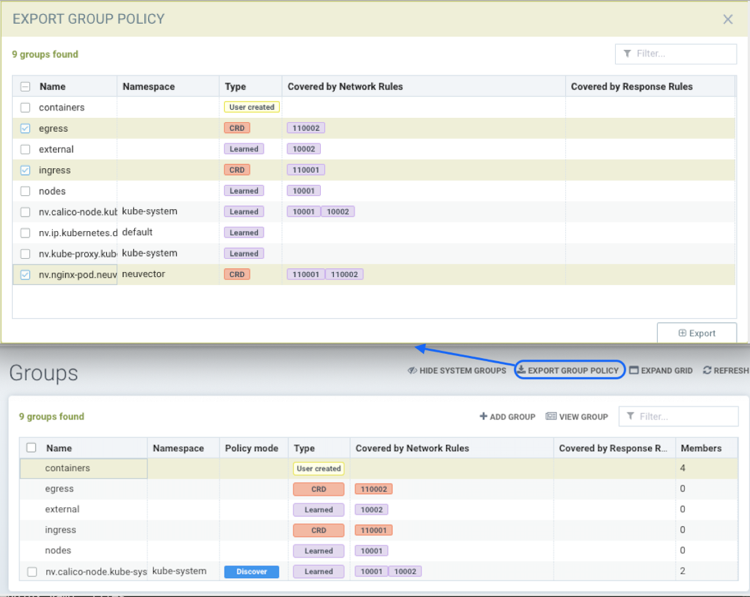
带有NvsecurityRule资源类型的导出组yaml文件示例
  kind: NvSecurityRule
  metadata:
    name: nv.nginx-pod.neuvector
    namespace: neuvector
  spec:
    egress: []
    file: []
    ingress: []
    process: []
    target:
      selector:
        criteria:
        - key: service
          op: =
          value: nginx-pod.neuvector
        - key: domain
          op: =
          value: neuvector
        name: nv.nginx-pod.neuvector
policymode: Discover-
未定义标准为domain=xx(名称空间)的导出组与资源类型NvClusterSecurityRule和默认名称空间一起导出。 没有名称空间的导出组示例包括外部、容器等。
带有NvClusterSecurityRule资源类型的导出组yaml文件示例
  kind: NvClusterSecurityRule
  metadata:
    name: egress
    namespace: default
  spec:
    egress: []
    file:             #File path profile applicable to the Target group only, and only applies to self-learned and user create groups
    - app:
      - vi
      - cat
      behavior: block_access
      filter: /etc/mysecret              #Only vi and cat can access this file with “block_access”.
      recursive: false
    ingress:
    - selector:
        criteria:
        - key: service
          op: =
          value: nginx-pod.neuvector
        - key: domain
          op: =
          value: neuvector
        name: nv.nginx-pod.neuvector     #Group Name
      action: allow
      applications:
      - Apache
      - ElasticSearch
      name: egress-ingress-0             #Policy Name
      ports: tcp/9400
    process:      #Process profile applicable to the Target group only, and only applies to self-learned and user create groups.
       - action: deny     #Possible values are deny and allow
          name: ls
          path: /bin/ls        #This example shows it denies the ls command for this target.
    target:
      selector:
        criteria:
        - key: service
          op: =
          value: nginx-pod.demo
        name: egress                     #Group Name
      policymode: null
- apiVersion: neuvector.com/v1
  kind: NvSecurityRule
  metadata:
    name: ingress
    namespace: demo
spec:|
CRD 导入行为忽略任何 '链接' 组的策略模式,如果链接组已经存在,则保持策略模式不变。如果链接组不存在,它将被自动创建并在设置 → 配置中设置为默认的新服务模式。 |
全局规则的CRD示例
下面的示例CRD分为两个部分:
-
第一部分是名为containers的NvClusterSecurityRule: 此NvClusterSecurityRule的目标是所有容器。它具有一个入站策略,不允许任何外部连接(在您的集群外部)通过SSH连接到您的容器。它还拒绝所有容器使用SSH处理。 此定义的全局行为适用于所有容器。
-
第二部分是针对alpine服务的NvSecurityRule: 目标是名为nv.alpine.default的服务,位于’default’名称空间中。因为它属于所有容器,所以它将继承上述网络策略和处理规则。它还添加了不允许通过80端口向外部网络发送HTTP流量的规则。同时,它不允许运行scp处理。
请注意,对于服务nv.alpine.default(定义为nv.xxx.yyy,其中xxx是服务名称如alpine,yyy是名称空间如default),我们可以定义其设置的策略模式。在这里,它被定义为保护模式(阻止所有异常活动)。
由于nv.alpine.default处于保护模式,它将拒绝容器运行SSH处理和scp处理,并且也会拒绝来自外部或http到外部的SSH连接。
如果您将nv.alpine.default的策略模式更改为监控,那么SUSE® Security在调用scp/SSH处理时只会记录日志,或者在有来自外部或http到外部的SSH连接时。
apiVersion: v1
items:
- apiVersion: neuvector.com/v1
  kind: NvClusterSecurityRule
  metadata:
    name: containers
    namespace: default
  spec:
    egress: []
    file: []
    ingress:
    - selector:
        criteria: []
        name: external
      action: deny
      applications:
      - SSH
      name: containers-ingress-0
      ports: tcp/22
    process:
    - action: deny
      name: ssh
      path: /bin/ssh
    target:
      selector:
        criteria:
        - key: container
          op: =
          value: '*'
        name: containers
      policymode: null
- apiVersion: neuvector.com/v1
  kind: NvSecurityRule
  metadata:
    name: nv.alpine.default
    namespace: default
  spec:
    egress:
    - selector:
        criteria: []
        name: external
      action: deny
      applications:
      - HTTP
      name: external-egress-0
      ports: tcp/80
    file: []
    ingress: []
    process:
    - action: deny
      name: scp
      path: /bin/scp
    target:
      selector:
        criteria:
        - key: service
          op: =
          value: alpine.default
        - key: domain
          op: =
          value: default
        name: nv.alpine.default
      policymode: Protect
kind: List
metadata: null
要允许或将某个处理(例如监控处理)列入白名单,只需添加一个处理规则,操作为:允许,处理名称和路径。 允许规则必须指定路径,但拒绝规则是可选的。