Installing SUSE Observability
SUSE® Observability server
Prerequisites
Before installing the SUSE® Observability server, a default storage class must be set up in the cluster where the SUSE® Observability server is to be installed.
-
For k3s: The local-path storage class of type rancher.io/local-path is created by default.
-
For EKS, AKS, GKE a storage class is set by default
-
For RKE2 Node Drivers: No storage class is created, by default. You need to create one before installing SUSE® Observability.
Where to install SUSE® Observability server
|
A service token must be used instead of API key as they are synonymous. Any environment variable that continues to refer to |
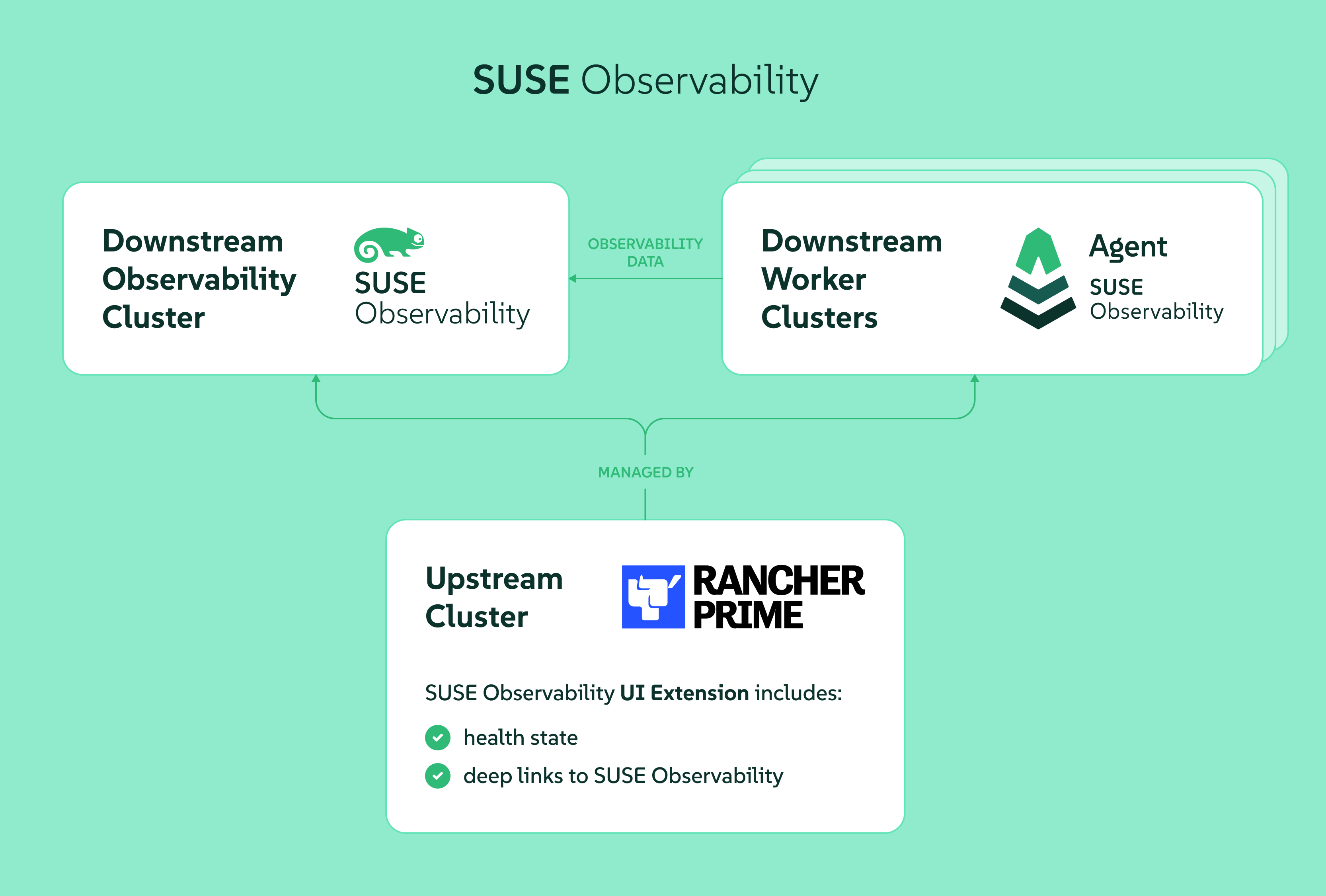
SUSE® Observability server should be installed in its own downstream cluster intended for Observability. See the below picture for reference.
For SUSE® Observability to be able to work properly it needs:
-
Kubernetes Persistent Storage to be available in the observability cluster to store metrics, events, etc.
-
the observability cluster to support a way to expose SUSE® Observability on an HTTPS URL to Rancher, SUSE® Observability users and the SUSE® Observability agent. This can be done via an Ingress configuration using an ingress controller, alternatively a (cloud) loadbalancer for the SUSE® Observability services could do this too, for more information see the Rancher docs.
|
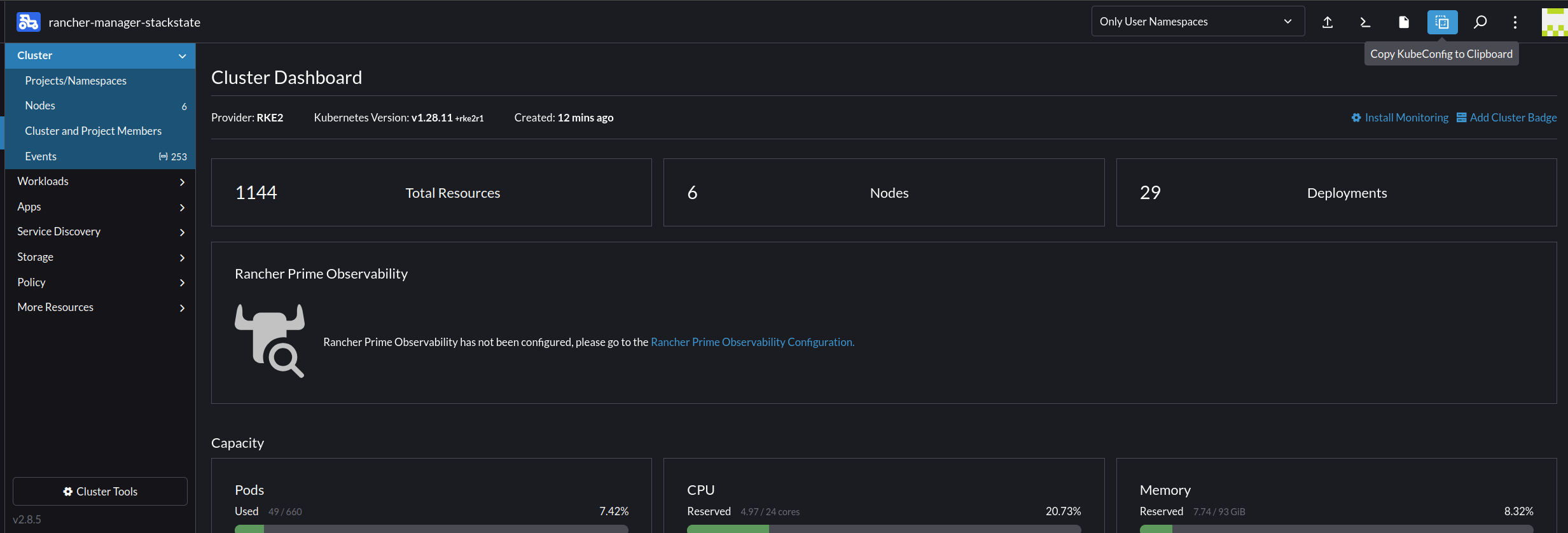
If you created the cluster using Rancher Manager and would like to run the provisioning commands below from a local terminal instead of in the web terminal, just copy or download the kubeconfig from the cluster dashboard, see image below, and paste it (or place the downloaded file) into a file that you can easily find e.g. ~/.kube/config-rancher and set the environment variable KUBECONFIG=$HOME/.kube/config-rancher |
After meeting the prerequisites, you can proceed with the installation. The installation is NOT YET AVAILABLE from the app store. Instead, you can install SUSE® Observability via the kubectl shell of the cluster.
You can now follow the instruction below for a HA or NON-HA setup.
|
Be aware upgrading or downgrading from HA to NON-HA and vice-versa is not yet supported. |
Installing SUSE® Observability
-
Get the helm chart
helm_repo.shhelm repo add suse-observability https://charts.rancher.com/server-charts/prime/suse-observability helm repo update -
Create configuration and deploy
-
Recommended method
-
Legacy method (Deprecated)
The
global.suseObservabilityconfiguration method is available starting from version2.8.0. For earlier versions, use the legacy method.Create a
values.yamlfile with your configuration:global: # Optional: Override image registry (defaults to registry.rancher.com) # Only needed for air-gapped environments or custom registries # imageRegistry: "your-private-registry.example.com" suseObservability: # Required: Your {stackstate-product-name} license key license: "YOUR-LICENSE-KEY" # Required: Base URL for {stackstate-product-name} baseUrl: "https://observability.example.com" # Required: Sizing profile # Available: trial, 10-nonha, 20-nonha, 50-nonha, 100-nonha, # 150-ha, 250-ha, 500-ha, 4000-ha sizing: profile: "150-ha" # Required: Plain text Admin password adminPassword: "your-password" # Instead of adminPassword you can provide a bcrypt hashed password with adminPasswordBcrypt # Generate with: htpasswd -bnBC 10 "" "your-password" | tr -d ':\n' # adminPasswordBcrypt: "$2a$10$..." # Optional: Receiver API key (auto-generated if not provided) # receiverApiKey: "your-receiver-api-key" # Optional: Affinity for pod scheduling (see affinity documentation) # affinity: # nodeAffinity: ... # podAntiAffinity: # requiredDuringSchedulingIgnoredDuringExecution: trueThe
baseUrlmust be the URL via which SUSE® Observability is be accessible to Rancher, users and the SUSE® Observability agent. The URL must include the scheme. For example,https://observability.internal.mycompany.com. See also Accessing SUSE Observability.If you override
imageRegistryto pull through a private mirror or air-gapped registry, you can still confirm that images have not been tampered with. See Verify container image signatures.The
sizing.profileshould be one of trial, 10-nonha, 20-nonha, 50-nonha, 100-nonha, 150-ha, 250-ha, 500-ha, 4000-ha. Based on this profile, resources and configuration are automatically applied for HA or non-HA mode. Currently moving from a non-HA to an HA environment is not possible, so if you expect your environment requires observing around 150 nodes, select an HA profile immediately.Deploy with a single command:
helm_deploy.shhelm upgrade --install \ --namespace suse-observability \ --create-namespace \ --values values.yaml \ suse-observability \ suse-observability/suse-observabilityAlternatively, deploy directly using
--setflags without a values file:helm upgrade --install \ --namespace suse-observability \ --create-namespace \ --set global.suseObservability.license="YOUR-LICENSE-KEY" \ --set global.suseObservability.baseUrl="https://observability.example.com" \ --set global.suseObservability.sizing.profile="150-ha" \ --set global.suseObservability.adminPassword='$2a$10$...' \ suse-observability \ suse-observability/suse-observabilityUsing a single default password is great to get started with SUSE® Observability, but for a production setup more secure authentication options are available.
For affinity configuration options, refer to Configure Kubernetes Affinities.
This method is deprecated. For new installations, use the recommended method above. For existing installations using this method, see the migration guide to transition to the new configuration format.
Generate helm chart values files:
helm_template.shexport VALUES_DIR=. helm template \ --set license='<your license>' \ --set baseUrl='<suse-observability-base-url>' \ --set rancherUrl='<rancher-prime-base-url>' \ --set sizing.profile='<sizing.profile>' \ suse-observability-values \ suse-observability/suse-observability-values --output-dir $VALUES_DIRThe
baseUrlmust be the URL via which SUSE® Observability will be accessible to Rancher, users, and the SUSE® Observability agent. The URL must include the scheme, for examplehttps://observability.internal.mycompany.com. See also Accessing SUSE Observability.To see health information in Rancher using the UI extension, set the
rancherUrlvalue to the URL of Rancher (to be precise, its Origin).This command generates the files
$VALUES_DIR/suse-observability-values/templates/baseConfig_values.yaml,$VALUES_DIR/suse-observability-values/templates/sizing_values.yaml, and$VALUES_DIR/suse-observability-values/templates/affinity_values.yamlcontaining the necessary configuration to install the SUSE® Observability Helm Chart.The SUSE® Observability administrator password will be autogenerated by the above command and are output as comments in the generated
basicConfig.yamlfile. For more info, see single password. The actual values contain thebcrypthashes of those passwords so that they’re securely stored in the Helm release in the cluster.Using a single default password is great to get started with SUSE® Observability, but for a production setup more secure authentication options are available.
Store the generated
basicConfig.yaml,sizing_values.yamlandaffinity_values.yamlfiles safely. You can reuse these files for upgrades, which saves time and ensures that SUSE® Observability continues to use the same API key. This is desirable as it means Agents and other data providers for SUSE® Observability won’t need to be updated. The files can be regenerated independently using the switchesbasicConfig.generate=falseandsizing.generate=falseto disable any of them while keeping the previously generated version of the file in theoutput-dir.The SUSE® Observability Values chart generates affinity configurations you can use with the main SUSE® Observability chart to control pod scheduling behavior. Refer to Configure Kubernetes Affinities for more information.
-
Configure SUSE® Observability to use Rancher as an OIDC provider.
Generate the `oidc_values.yaml`. This guide assumes that you save it in the `$VALUES_DIR`
$VALUES_DIR/oidc_values.yamlstackstate: authentication: rancher: clientId: "<oidc-client-id>" secret: "<oidc-secret>" baseUrl: "<rancher-url>"This step is required if you are planning to use the Rancher RBAC to scope visibility into the downstream clusters. For a more detailed explanation on how to configure SUSE® Observability to use Rancher as an OIDC provider, see Configure SUSE® Observability for using Rancher as an OIDC provider.
-
Deploy the SUSE® Observability helm chart with the generated values:
helm_deploy.shhelm upgrade --install \ --namespace suse-observability \ --create-namespace \ --values $VALUES_DIR/suse-observability-values/templates/baseConfig_values.yaml \ --values $VALUES_DIR/suse-observability-values/templates/sizing_values.yaml \ --values $VALUES_DIR/suse-observability-values/templates/affinity_values.yaml \ --values $VALUES_DIR/oidc_values.yaml \ suse-observability \ suse-observability/suse-observability -