Upgrade Manager
|
harvester-upgrade-manager is an experimental add-on. Its add-on manifest, Helm chart, and container image are not included in the published SUSE VirtualizationISO image, but you can download them from the |
The Upgrade Manager provides a declarative, Kubernetes-native way to orchestrate SUSE Virtualization cluster upgrades. In contrast to the legacy upgrade mechanics, using this tool only requires you to create an UpgradePlan custom resource. The Upgrade Manager then handles the entire lifecycle: downloading the ISO, preloading container images, upgrading cluster components, sequencing node upgrades, and cleaning up afterward.
Limitations
Mutual exclusion with the built-in upgrade path
Do not use the Upgrade Manager simultaneously with the built-in upgrade mechanism. Running both concurrently can cause conflicting state changes, leaving the cluster inconsistent. Before creating an UpgradePlan, verify that no other upgrade process is active, and do not trigger an upgrade using the built-in mechanism while an UpgradePlan is in progress.
Air-gapped environments
The Upgrade Manager does not currently support air-gapped environments. For more information, see issue #10471.
As a workaround, preload the Upgrade Manager’s container image on each node (or host it in a private registry), and serve its Helm chart from an internal HTTP server.
Installing and enabling the add-on
-
Apply the add-on manifest from the
experimental-addonsrepository.kubectl apply -f \ https://raw.githubusercontent.com/harvester/experimental-addons/v1.8/harvester-upgrade-manager/harvester-upgrade-manager.yaml -
Enable the add-on by patching its resource.
kubectl -n harvester-system patch addons.harvesterhci harvester-upgrade-manager \ --type=json -p '[{"op":"replace","path":"/spec/enabled","value":true}]' -
Verify that the Upgrade Manager deployment is running and ready.
$ kubectl -n harvester-system get deployments -l app.kubernetes.io/name=harvester-upgrade-manager
NAME                                           READY   UP-TO-DATE   AVAILABLE   AGE
harvester-upgrade-manager-controller-manager   1/1     1            1           36m
Starting an upgrade
The Upgrade Manager supports two ways to specify the target release. Both approaches result in an UpgradePlan resource that the Upgrade Manager reconciles through its upgrade pipeline.
Version-based entrypoint
The Upgrade Manager automatically resolves the ISO URL from the Version resource.
-
Create a
Versionresource containing the ISO download URL and an optional checksum.apiVersion: harvesterhci.io/v1beta1 kind: Version metadata: name: v1.8.0 namespace: harvester-system spec: isoURL: https://releases.rancher.com/harvester/v1.8.0/harvester-v1.8.0-amd64.iso -
Create an
UpgradePlanthat references the version by name.apiVersion: management.harvesterhci.io/v1beta1 kind: UpgradePlan metadata: generateName: hvst-upgrade- spec: version: v1.8.0
VirtualMachineImage-based entrypoint
This approach is useful when the ISO has already been uploaded or when you want more control over the image storage policy.
-
Import the ISO as a
VirtualMachineImage.The annotation
harvesterhci.io/os-upgrade-image: "True"marks the image as eligible for the upgrade.apiVersion: harvesterhci.io/v1beta1 kind: VirtualMachineImage metadata: annotations: harvesterhci.io/os-upgrade-image: "True" name: harvester-v1-8-0-amd64 namespace: harvester-system spec: backend: cdi displayName: harvester-v1.8.0-amd64.iso sourceType: download url: https://releases.rancher.com/harvester/v1.8.0/harvester-v1.8.0-amd64.iso retry: 3 targetStorageClassName: longhorn-static -
Create an
UpgradePlanthat references theVirtualMachineImage.apiVersion: management.harvesterhci.io/v1beta1 kind: UpgradePlan metadata: generateName: hvst-upgrade- spec: image: harvester-v1-8-0-amd64
Upgrade plan phases
The Upgrade Manager drives each UpgradePlan through a fixed pipeline, concluding at one of two terminal phases: Succeeded or Failed.
Each phase records two values in status.currentPhase: a present-progressive value (for example, Initializing) when work begins, and a past-tense value (Initialized) when work completes. Both are appended to status.phaseTransitionTimestamps for a complete history.
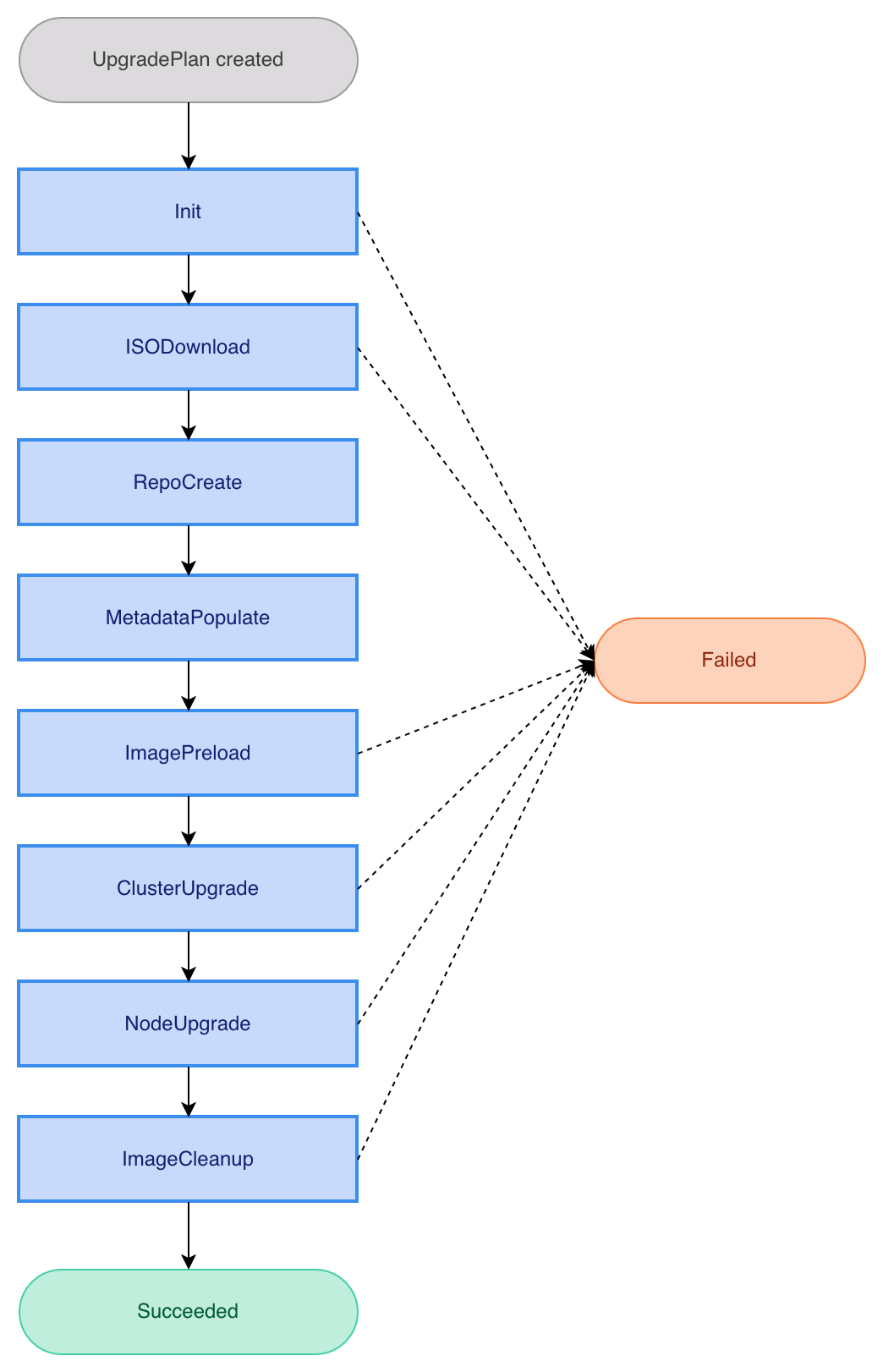
| Phase | Description |
|---|---|
|
Validate the request and prepare the internal state. |
|
Provision the ISO image as a |
|
Build an in-cluster upgrade repository backed by the ISO image. |
|
Read release metadata (SUSE Virtualization, Rancher, Kubernetes, and monitoring chart versions) from the upgrade repository. |
|
Preload container images required by the new release onto every node. |
|
Upgrade cluster-scoped components (for example, Rancher and the SUSE Virtualization chart). |
|
Evacuate virtual machines, upgrade Kubernetes and the operating system, and reboot each node sequentially. |
|
Clean up unnecessary preloaded container images from every node. |
Monitoring the upgrade progress
You can monitor the overall progress by inspecting the UpgradePlan resource.
kubectl get upgradeplans -o yamlThe output shows the full resource status, including the current phase, phase transition timestamps, node upgrade statuses, and release metadata.
$ kubectl get upgradeplans -o yaml
apiVersion: v1
items:
- apiVersion: management.harvesterhci.io/v1beta1
  kind: UpgradePlan
  metadata:
    annotations:
      management.harvesterhci.io/replica-replenishment-wait-interval: "600"
    creationTimestamp: "2026-04-15T05:07:13Z"
    generateName: hvst-upgrade-
    generation: 1
    name: hvst-upgrade-9s9cd
    resourceVersion: "898907"
    uid: 47b0458d-e2ed-43ff-9453-262eec0a8823
  spec:
    image: harvester-v1-8-0-rc5-amd64
  status:
    conditions:
    - lastTransitionTime: "2026-04-15T05:47:54Z"
      message: UpgradePlan has completed
      observedGeneration: 1
      reason: Succeeded
      status: "False"
      type: Progressing
    - lastTransitionTime: "2026-04-15T05:47:54Z"
      message: ""
      observedGeneration: 1
      reason: ReconcileSuccess
      status: "False"
      type: Degraded
    - lastTransitionTime: "2026-04-15T05:47:54Z"
      message: Entered one of the terminal phases
      observedGeneration: 1
      reason: Executed
      status: "False"
      type: Available
    currentPhase: Succeeded
    isoImageID: harvester-v1-8-0-rc5-amd64
    nodeUpgradeStatuses:
      alfa-1-tink-system:
        state: ImageCleaned
    phaseTransitionTimestamps:
    - phase: Initializing
      phaseTransitionTimestamp: "2026-04-15T05:07:13Z"
    - phase: Initialized
      phaseTransitionTimestamp: "2026-04-15T05:07:13Z"
    - phase: ISODownloading
      phaseTransitionTimestamp: "2026-04-15T05:07:13Z"
    - phase: ISODownloaded
      phaseTransitionTimestamp: "2026-04-15T05:11:13Z"
    - phase: RepoCreating
      phaseTransitionTimestamp: "2026-04-15T05:11:13Z"
    - phase: RepoCreated
      phaseTransitionTimestamp: "2026-04-15T05:11:16Z"
    - phase: MetadataPopulating
      phaseTransitionTimestamp: "2026-04-15T05:11:16Z"
    - phase: MetadataPopulated
      phaseTransitionTimestamp: "2026-04-15T05:11:27Z"
    - phase: ImagePreloading
      phaseTransitionTimestamp: "2026-04-15T05:11:27Z"
    - phase: ImagePreloaded
      phaseTransitionTimestamp: "2026-04-15T05:20:11Z"
    - phase: ClusterUpgrading
      phaseTransitionTimestamp: "2026-04-15T05:20:12Z"
    - phase: ClusterUpgraded
      phaseTransitionTimestamp: "2026-04-15T05:32:19Z"
    - phase: NodeUpgrading
      phaseTransitionTimestamp: "2026-04-15T05:32:19Z"
    - phase: NodeUpgraded
      phaseTransitionTimestamp: "2026-04-15T05:45:57Z"
    - phase: CleaningUp
      phaseTransitionTimestamp: "2026-04-15T05:45:57Z"
    - phase: CleanedUp
      phaseTransitionTimestamp: "2026-04-15T05:47:53Z"
    - phase: Succeeded
      phaseTransitionTimestamp: "2026-04-15T05:47:54Z"
    previousVersion: v1.7.1
    releaseMetadata:
      harvester: v1.8.0-rc5
      harvesterChart: 1.8.0-rc5
      kubernetes: v1.35.2+rke2r1
      minUpgradableVersion: v1.7.0
      monitoringChart: 108.0.2+up77.9.1-rancher.11
      os: Harvester v1.8.0-rc5
      rancher: v2.14.0
    singleNode: alfa-1-tink-system
kind: List
metadata:
  resourceVersion: ""
For a more detailed view that includes Kubernetes events emitted during phase transitions, run the following command:
kubectl describe upgradeplansThe output’s Events section is particularly useful for diagnosing transient errors that the Upgrade Manager automatically recovers from.
$ kubectl describe upgradeplans
Name:         hvst-upgrade-9s9cd
Namespace:
Labels:       <none>
Annotations:  management.harvesterhci.io/replica-replenishment-wait-interval: 600
API Version:  management.harvesterhci.io/v1beta1
Kind:         UpgradePlan
Metadata:
  Creation Timestamp:  2026-04-15T05:07:13Z
  Generate Name:       hvst-upgrade-
  Generation:          1
  Resource Version:    898907
  UID:                 47b0458d-e2ed-43ff-9453-262eec0a8823
Spec:
  Image:  harvester-v1-8-0-rc5-amd64
Status:
  Conditions:
    Last Transition Time:  2026-04-15T05:47:54Z
    Message:               UpgradePlan has completed
    Observed Generation:   1
    Reason:                Succeeded
    Status:                False
    Type:                  Progressing
    Last Transition Time:  2026-04-15T05:47:54Z
    Message:
    Observed Generation:   1
    Reason:                ReconcileSuccess
    Status:                False
    Type:                  Degraded
    Last Transition Time:  2026-04-15T05:47:54Z
    Message:               Entered one of the terminal phases
    Observed Generation:   1
    Reason:                Executed
    Status:                False
    Type:                  Available
  Current Phase:           Succeeded
  Iso Image Id:            harvester-v1-8-0-rc5-amd64
  Node Upgrade Statuses:
    alfa-1-tink-system:
      State:  ImageCleaned
  Phase Transition Timestamps:
    Phase:                       Initializing
    Phase Transition Timestamp:  2026-04-15T05:07:13Z
    Phase:                       Initialized
    Phase Transition Timestamp:  2026-04-15T05:07:13Z
    Phase:                       ISODownloading
    Phase Transition Timestamp:  2026-04-15T05:07:13Z
    Phase:                       ISODownloaded
    Phase Transition Timestamp:  2026-04-15T05:11:13Z
    Phase:                       RepoCreating
    Phase Transition Timestamp:  2026-04-15T05:11:13Z
    Phase:                       RepoCreated
    Phase Transition Timestamp:  2026-04-15T05:11:16Z
    Phase:                       MetadataPopulating
    Phase Transition Timestamp:  2026-04-15T05:11:16Z
    Phase:                       MetadataPopulated
    Phase Transition Timestamp:  2026-04-15T05:11:27Z
    Phase:                       ImagePreloading
    Phase Transition Timestamp:  2026-04-15T05:11:27Z
    Phase:                       ImagePreloaded
    Phase Transition Timestamp:  2026-04-15T05:20:11Z
    Phase:                       ClusterUpgrading
    Phase Transition Timestamp:  2026-04-15T05:20:12Z
    Phase:                       ClusterUpgraded
    Phase Transition Timestamp:  2026-04-15T05:32:19Z
    Phase:                       NodeUpgrading
    Phase Transition Timestamp:  2026-04-15T05:32:19Z
    Phase:                       NodeUpgraded
    Phase Transition Timestamp:  2026-04-15T05:45:57Z
    Phase:                       CleaningUp
    Phase Transition Timestamp:  2026-04-15T05:45:57Z
    Phase:                       CleanedUp
    Phase Transition Timestamp:  2026-04-15T05:47:53Z
    Phase:                       Succeeded
    Phase Transition Timestamp:  2026-04-15T05:47:54Z
  Previous Version:              v1.7.1
  Release Metadata:
    Harvester:               v1.8.0-rc5
    Harvester Chart:         1.8.0-rc5
    Kubernetes:              v1.35.2+rke2r1
    Min Upgradable Version:  v1.7.0
    Monitoring Chart:        108.0.2+up77.9.1-rancher.11
    Os:                      Harvester v1.8.0-rc5
    Rancher:                 v2.14.0
  Single Node:               alfa-1-tink-system
Events:
  Type     Reason                     Age                From                      Message
  ----     ------                     ----               ----                      -------
  Normal   PhaseTransition            67m                upgradeplan-controller    Entering phase ISODownload
  Normal   PhaseCompleted             63m                upgradeplan-controller    Completed phase ISODownload
  Normal   PhaseTransition            63m                upgradeplan-controller    Entering phase RepoCreate
  Warning  ReconcileError             63m                upgradeplan-controller    Pipeline error: Deployment.apps "hvst-upgrade-9s9cd-repo" not found
  Normal   PhaseCompleted             63m                upgradeplan-controller    Completed phase RepoCreate
  Normal   PhaseTransition            63m                upgradeplan-controller    Entering phase MetadataPopulate
  Normal   PhaseCompleted             63m                upgradeplan-controller    Completed phase MetadataPopulate
  Normal   PhaseTransition            63m                upgradeplan-controller    Entering phase ImagePreload
  Warning  ReconcileError             63m                upgradeplan-controller    Pipeline error: Plan.upgrade.cattle.io "hvst-upgrade-9s9cd-image-preload" not found
  Normal   PhaseCompleted             54m                upgradeplan-controller    Completed phase ImagePreload
  Normal   PhaseTransition            54m                upgradeplan-controller    Entering phase ClusterUpgrade
  Normal   PhaseCompleted             42m (x2 over 42m)  upgradeplan-controller    Completed phase ClusterUpgrade
  Normal   PhaseTransition            42m (x2 over 42m)  upgradeplan-controller    Entering phase NodeUpgrade
  Normal   RestoreVMConfigMapCreated  41m                vm-live-migrate-detector  ConfigMap harvester-system/hvst-upgrade-9s9cd-restore-vm created
  Normal   VMShutdownCompleted        41m                vm-live-migrate-detector  Shutdown completed for 0 VM(s) on node alfa-1-tink-system, success: 0, failed: 0
  Normal   PhaseCompleted             28m                upgradeplan-controller    Completed phase NodeUpgrade
  Normal   PhaseTransition            28m                upgradeplan-controller    Entering phase ImageCleanup
  Warning  ReconcileError             28m                upgradeplan-controller    Pipeline error: fetch image list from http://hvst-upgrade-9s9cd-repo.harvester-system/harvester-iso/bundle/harvester/images-lists-archive/v1.7.1/image_list_all.txt: Get "http://hvst-upgrade-9s9cd-repo.harvester-system/harvester-iso/bundle/harvester/images-lists-archive/v1.7.1/image_list_all.txt": dial tcp: lookup hvst-upgrade-9s9cd-repo.harvester-system on 10.53.0.10:53: read udp 10.52.0.25:37478->10.53.0.10:53: read: connection refused
  Warning  ReconcileError             28m                upgradeplan-controller    Pipeline error: fetch image list from http://hvst-upgrade-9s9cd-repo.harvester-system/harvester-iso/bundle/harvester/images-lists-archive/v1.7.1/image_list_all.txt: Get "http://hvst-upgrade-9s9cd-repo.harvester-system/harvester-iso/bundle/harvester/images-lists-archive/v1.7.1/image_list_all.txt": dial tcp 10.53.31.29:80: connect: connection refused
  Normal   PhaseCompleted             26m (x2 over 26m)  upgradeplan-controller    Completed phase ImageCleanup
  Normal   UpgradeSucceeded           26m (x2 over 26m)  upgradeplan-controller    Upgrade completed successfully
Aborting an upgrade
A validating webhook guards in-flight UpgradePlan resources against accidental deletion. To abort an upgrade that is still progressing, perform the following steps:
-
Acknowledge the cancellation with the
management.harvesterhci.io/allow-deletionannotation.kubectl annotate upgradeplans <upgradeplan-name> management.harvesterhci.io/allow-deletion=true -
Delete the resource.
kubectl delete upgradeplans <upgradeplan-name>Resource deletion is unconditionally blocked during the
ClusterUpgradeandNodeUpgradephases, regardless of annotations. Interrupting these phases can leave the cluster components or a partially-upgraded node in an inconsistent state. Wait for the current phase to complete before aborting.
UpgradePlan resources in a terminal phase (Succeeded or Failed) can be deleted directly without an annotation.
Recovering from an accidentally deleted UpgradePlan
If an UpgradePlan is deleted during any phase other than ClusterUpgrading or NodeUpgrading, the Upgrade Manager’s finalizer cleans up associated resources: the upgrade repository deployment and service, VirtualMachineImage resources, image preload plans, cluster upgrade jobs, and node annotations. Currently running upgrade jobs continue as orphaned processes with no further coordination.
A partially completed upgrade cannot be resumed after the UpgradePlan is deleted. The cluster may be left with components at mixed versions, requiring manual investigation to assess its state before taking further action.
Disabling the add-on
You can safely uninstall the Upgrade Manager by disabling the add-on.
kubectl -n harvester-system patch addons.harvesterhci harvester-upgrade-manager \
--type=json -p '[{"op":"replace","path":"/spec/enabled","value":false}]'|
Do not disable the harvester-upgrade-manager add-on while an upgrade is in progress. Disabling it uninstalls the Upgrade Manager, halting all reconciliation and leaving the |