|
This is unreleased documentation for SUSE® Virtualization v1.8 (Dev). |
Upgrade from v1.7.x to v1.8.x
General information
An Upgrade button appears on the Dashboard screen whenever a new SUSE Virtualization version that you can upgrade to becomes available. For more information, see Start an upgrade.
Clusters running v1.7.x can upgrade to v1.8.x directly because SUSE Virtualization allows a maximum of one minor version upgrade for underlying components. SUSE Virtualization v1.7.0 and v1.7.1 use the same minor version of RKE2 (v1.34), while SUSE Virtualization v1.8.0 uses the next minor version (v1.35). For more information, see Upgrade paths.
For information about upgrading SUSE Virtualization in air-gapped environments, see Prepare an air-gapped upgrade.
|
Support for legacy BIOS booting is removed in v1.8.0. Existing SUSE Virtualization clusters that use this boot mode will continue to function, but upgrading to later versions may require re-installation in UEFI mode. To avoid issues and disruptions, use UEFI in new installations. |
Update the Harvester UI Extension on SUSE Rancher Prime v2.14
You must use a compatible version (v1.8.x) of the Harvester UI Extension to import SUSE Virtualization v1.8.x clusters on Rancher v2.14.
-
On the Rancher UI, go to local → Apps → Repositories.
-
Locate the repository named harvester, and then select ⋮ → Refresh.
-
Go to the Extensions screen.
-
Locate the extension named Harvester, and then click Update.
-
Select a compatible version, and then click Update.
-
Allow some time for the extension to be updated, and then refresh the screen.
Known issues
Virtual machines fail to migrate with "KubeVirt is not ready" error
After upgrading to v1.8.x, virtual machines may fail to migrate with the error message "KubeVirt is not ready". This issue occurs due to a race condition where a virt-handler pod is created without the annotations KubeVirt needs to determine whether the pod is up-to-date.
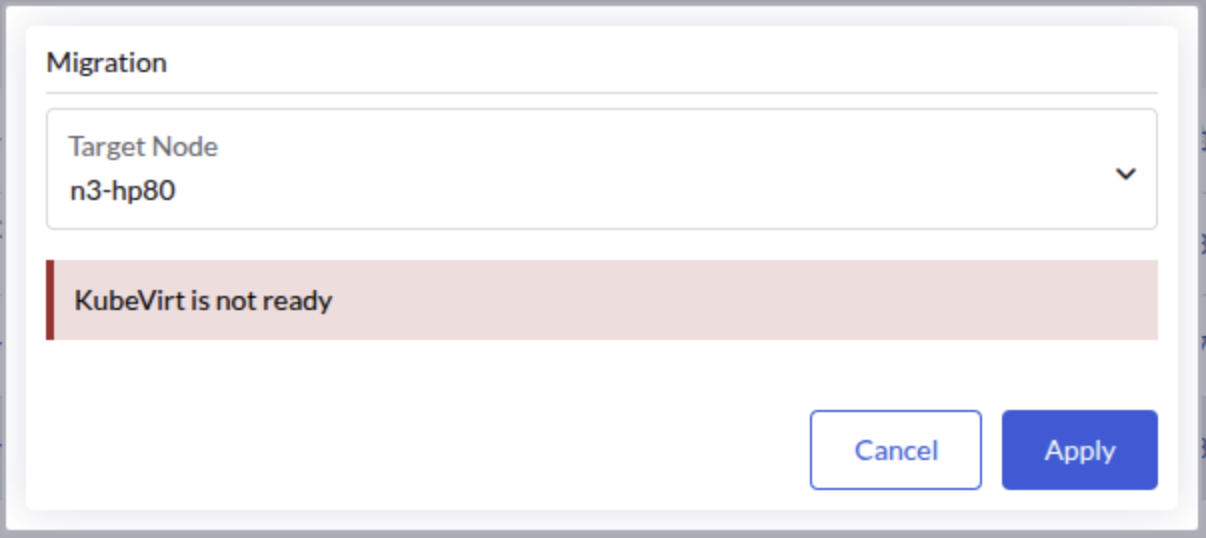
The KubeVirt operator continuously waits for the outdated virt-handler pod to terminate, preventing the KubeVirt custom resource from reaching the "Available" state. This blocks subsequent virtual machine operations, including live migration.
|
This issue has been observed in three-node clusters with one witness node, but it may also occur in other deployment configurations. |
Identifying the issue
-
Check the status of the KubeVirt custom resource.
kubectl get kubevirt/kubevirt -n harvester-system -o yaml | yq '.status.conditions'If your environment is affected, the
Availablecondition will be set toFalsewith the reasonDeploymentInProgress.- lastProbeTime: "2026-04-18T17:42:39Z" lastTransitionTime: "2026-04-18T17:42:39Z" message: Deploying version 1.7.0-150700.3.16.2 with registry registry.suse.com/suse/sles/15.7 reason: DeploymentInProgress status: "False" type: Available -
Check the
virt-operatorlogs.kubectl logs deployment/virt-operator -n harvester-system --tail 10 | grep waitingThe logs will contain messages indicating that the DaemonSet is waiting for outdated pods to terminate.
{"component":"virt-operator","level":"info","msg":"DaemonSet virt-handler waiting for out of date pods to terminate.","pos":"readycheck.go:63","timestamp":"2026-04-20T02:19:14.503468Z"} -
Identify the affected
virt-handlerpod by checking which instance lacks the required KubeVirt annotations.kubectl get pods -n harvester-system -l kubevirt.io=virt-handler -o json | \ jq -r '.items[] | "\(.metadata.name):\n" + ((.metadata.annotations // {}) | to_entries | map(select(.key | startswith("kubevirt.io/install-strategy-"))) | map(" \(.key): \(.value)") | join("\n")) + "\n"'The output displays the KubeVirt
install-strategyannotations for each pod. The affected pod will lack these listed annotations entirely.virt-handler-64r9v: kubevirt.io/install-strategy-identifier: 9890638436fb4150e2046eff9f500bc4f18812f8 kubevirt.io/install-strategy-registry: registry.suse.com/suse/sles/15.7 kubevirt.io/install-strategy-version: 1.7.0-150700.3.16.2 virt-handler-wzmdv:
Workaround
-
Delete the affected
virt-handlerpod (for example,virt-handler-wzmdv).kubectl delete pod virt-handler-wzmdv -n harvester-system -
Wait for the pod to be recreated with the correct annotations, and then verify that the KubeVirt custom resource transitions to the
Availablestate.kubectl get kubevirt/kubevirt -n harvester-system -o yaml | yq '.status.conditions[] | select(.type == "Available")'The
Availablecondition should be set toTrue.- lastProbeTime: "2026-04-18T17:45:00Z" lastTransitionTime: "2026-04-18T17:45:00Z" message: All components ready reason: AllComponentsReady status: "True" type: Available -
Verify that virtual machine operations resume normal functionality.
Related issue: #10447
Upgrade stuck in post-draining when storage network is enabled for RWX volumes
When upgrading to v1.8.x with the storage network enabled for RWX volumes (where the SUSE Storage setting Storage Network For RWX Volume Enabled is set to true), the upgrade may become stuck with one node remaining in the "Post-draining" state.
|
This issue does not affect clusters where a storage network is configured but the SUSE Storage setting "Storage Network for RWX Volume Enabled" is not set to `true`. |
Indicators
-
The post-drain job repeatedly shows the following message:
Upgrade repo deployment is not ready yet, waiting... -
The pod in the
upgrade-repodeployment fails to mount its RWX PVC, showing an error message similar to the following:Warning FailedMount 76s (x55 over 97m) kubelet MountVolume.MountDevice failed for volume "pvc-ea2fbba7-7e5b-4446-a008-b2277892e8c8" : rpc error: code = Internal desc = mount failed: exit status 32 Mounting command: /usr/local/sbin/nsmounter Mounting arguments: mount -t nfs -o vers=4.1,noresvport,timeo=600,retrans=5,softerr None:/pvc-ea2fbba7-7e5b-4446-a008-b2277892e8c8 /var/lib/kubelet/plugins/kubernetes.io/csi/driver.longhorn.io/cf026ab85828c03bfd7fca2bf32f1d9d37752c2d19fd441ec617799827a1612e/globalmount Output: mount.nfs: Failed to resolve server None: Name or service not known
Root cause
During the upgrade, a race condition occurs between SUSE Virtualization’s storage network initialization and SUSE Storage’s migration process. SUSE Virtualization prematurely clears the setting Endpoint Network for RWX Volume before SUSE Storage completes its data migration. This causes existing RWX share-manager services to use an invalid NFS endpoint (nfs://None/pvc-xxx) that cannot be resolved.
Workaround
-
Restore the SUSE Storage setting Endpoint Network for RWX Volume by patching it with your storage network’s network attachment definition (NAD) name.
kubectl -n longhorn-system patch setting endpoint-network-for-rwx-volume \
  --type=merge -p '{"value":"<storage-network-nad-name>"}'
Replace
<storage-network-nad-name>with the actual storage network NAD name (for example,storagenetwork-2g426). -
Identify the
upgrade-repovolume name.kubectl get pvc $(kubectl get deployment -l harvesterhci.io/upgradeComponent=repo -n harvester-system -o jsonpath='{.items[0].spec.template.spec.volumes[0].persistentVolumeClaim.claimName}') -n harvester-system -o jsonpath='{.spec.volumeName}'The volume name appears in the format
pvc-<id>(for example,pvc-ea2fbba7-7e5b-4446-a008-b2277892e8c8). -
Restart the
upgrade-reposhare-manager pod.Use the
upgrade-repovolume name to locate and restart the pod. Replacepvc-ea2fbba7-7e5b-4446-a008-b2277892e8c8in the following example with the actual volume name.kubectl -n longhorn-system delete pod share-manager-pvc-ea2fbba7-7e5b-4446-a008-b2277892e8c8 -
Remove the initialized annotation from the
rwx-networksetting.kubectl annotate settings.harvesterhci.io rwx-network rwx-network.settings.harvesterhci.io/initialized-Removing the annotation ensures that SUSE Virtualization syncs the correct SUSE Storage value and prevents it from being overwritten by an empty value during future reconciliations.
-
Monitor the upgrade and verify that it is completed successfully.
Related issue: #10532