Kube-OVN Operator (Expérimental)
|
kubeovn-operator est un produit complémentaire expérimental. Pour plus d’informations sur les fonctionnalités expérimentales, consultez Étiquettes de Fonctionnalité. |
kubeovn-operator est utilisé pour gérer le cycle de vie de Kube-OVN en tant que CNI secondaire sur les clusters sous-jacents SUSE Virtualization.
Activation de kubeovn-operator
Vous devez activer kubeovn-operator pour déployer Kube-OVN sur un cluster SUSE Virtualization pour des capacités SDN avancées telles que le cloud privé virtuel (VPC) et les sous-réseaux pour les charges de travail des machines virtuelles.
-
Dans l’interface utilisateur SUSE Virtualization, allez à Avancés → produits complémentaires.
-
Sélectionnez kubeovn-operator (Expérimental), puis sélectionnez ⋮ → Activer.
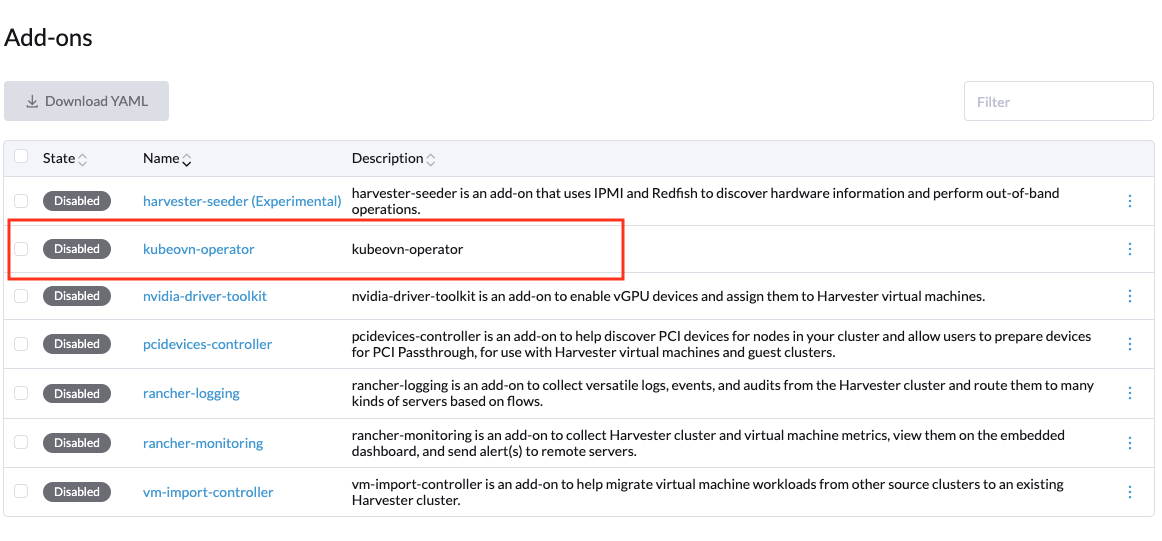
Le produit complémentaire déploie kubeovn-operator et crée l’objet par défaut Configuration nommé configuration.kubeovn.io, qui utilise des valeurs par défaut spécifiques à SUSE Virtualization pour configurer le CNI Kube-OVN.
Voici un exemple d’un objet Configuration :
apiVersion: kubeovn.io/v1
kind: Configuration
metadata:
  name: kubeovn
  namespace: kube-system
spec:
  cniConf:
    cniBinDir: /opt/cni/bin
    cniConfFile: /kube-ovn/01-kube-ovn.conflist
    cniConfigDir: /etc/cni/net.d
    cniConfigPriority: "90"
    localBinDir: /usr/local/bin
  components:
    OVSDBConTimeout: 10
    OVSDBInactivityTimeout: 10
    checkGateway: true
    enableANP: false
    enableBindLocalIP: true
    enableExternalVPC: true
    enableIC: false
    enableKeepVMIP: true
    enableLB: true
    enableLBSVC: false
    enableLiveMigrationOptimize: true
    enableNATGateway:  true
    enableNP: true
    enableOVNIPSec: false
    enableTProxy: false
    hardwareOffload: false
    logicalGateway: false
    lsCtSkipOstLportIPS: true
    lsDnatModDlDst: true
    secureServing: false
    setVLANTxOff:  false
    u2oInterconnection:  false
  debug:
    mirrorInterface: mirror0
  dpdkCPU:  "0"
  dpdkMEMORY: "0"
  dpdkVersion: "19.11"
  dualStack:
    joinCIDR: fd00:100:64::/112
    pingerExternalAddress: 2606:4700:4700::1111
    pingerExternalDomain: google.com.
    podCIDR: fd00:10:16::/112
    podGateway: fd00:10:16::1
    serviceCIDR: fd00:10:96::/112
  global:
    images:
      kubeovn:
        dpdkRepository: kube-ovn-dpdk
        repository: kube-ovn
        supportArm: true
        thirdParty:  true
        vpcRepository: vpc-nat-gateway
    registry:
      address: docker.io/kubeovn
  hugePages: "0"
  hugepageSizeType:  hugepages-2Mi
  imagePullPolicy: IfNotPresent
  ipv4:
    joinCIDR: 100.64.0.0/16
    pingerExternalAddress: 1.1.1.1
    pingerExternalDomain: google.com.
    podCIDR: 10.54.0.0/16
    podGateway: 10.54.0.1
    serviceCIDR: 10.55.0.1
  ipv6:
    joinCIDR: fd00:100:64::/112
    pingerExternalAddress: 2606:4700:4700::1111
    pingerExternalDomain: google.com.
    podCIDR: fd00:10:16::/112
    podGateway: fd00:10:16::1
    serviceCIDR: fd00:10:96::/112
  kubeOvnCNI:
    requests:
      cpu: "100m"
      memory: "100Mi"
    limits:
      cpu: "1"
      memory:  "1Gi"
  kubeOvnController:
    requests:
      cpu: "200m"
      memory: "200Mi"
    limits:
      cpu: "1"
      memory: "1Gi"
  kubeOvnMonitor:
    requests:
      cpu: "200m"
      memory: "200Mi"
    limits:
      cpu: "200m"
      memory: "200Mi"
  kubeOvnPinger:
    requests:
      cpu: "100m"
      memory: "100Mi"
    limits:
      cpu: "200m"
      memory: "400Mi"
  kubeletConfig:
    kubeletDir: /var/lib/kubelet
  logConfig:
    logDir: /var/log
  masterNodesLabel: node-role.kubernetes.io/control-plane=true
  networking:
    defaultSubnet: ovn-default
    defaultVPC: ovn-cluster
    enableECMP: false
    enableEIPSNAT: true
    enableMetrics:  true
    enableSSL: false
    netStack: ipv4
    networkType: geneve
    nodeSubnet: join
    ovnLeaderProbeInterval: 5
    ovnNorthdNThreads: 1
    ovnNorthdProbeInterval: 5000
    ovnRemoteOpenflowInterval: 10
    ovnRemoteProbeInterval: 10000
    podNicType: veth-pair
    probeInterval:  180000
    tunnelType: vxlan
    nodeLocalDNSIPS: ""
    vlan:
      providerName: provider
      vlanId: 1
      vlanName: ovn-vlan
  openVSwitchDir: /var/lib/rancher/origin/openvswitch
  ovnCentral:
    requests:
      cpu: 300m
      memory: 200Mi
    limits:
      cpu: 3
      memory: 4Gi
  ovnDir: /etc/origin/ovn
  ovsOVN:
    limits:
      cpu:  2
      memory: 1000Mi
    requests:
      cpu: 200m
      memory: 200Mi
  performance:
    gcInterval: 360
    inspectInterval: 20
ovsVSCtlConcurrency: 100|
Cet objet Assurez-vous que les blocs CIDR de pod et de service IPv4 de Kube-OVN ne se chevauchent pas avec les blocs CIDR de pod et de service de Harvester. |
Désactivation de kubeovn-operator
|
Assurez-vous qu’aucune machine virtuelle n’utilise des réseaux VM basés sur les composants SDN de Kube-OVN. La désactivation du produit complémentaire kubeovn-operator est un processus perturbateur. |
Vous pouvez désactiver kubeovn-operator en utilisant les commandes suivantes :
kubectl delete configuration kubeovn -n kube-system --wait=false

kubectl delete validatingwebhookconfiguration kube-ovn-webhook --ignore-not-found

kubectl delete ips --all

kubectl delete subnets join ovn-default --ignore-not-found

kubectl delete vpc ovn-cluster --ignore-not-found

# Remove annotations/labels in namespaces and nodes
kubectl annotate node --all ovn.kubernetes.io/cidr-
kubectl annotate node --all ovn.kubernetes.io/gateway-
kubectl annotate node --all ovn.kubernetes.io/ip_address-
kubectl annotate node --all ovn.kubernetes.io/logical_switch-
kubectl annotate node --all ovn.kubernetes.io/mac_address-
kubectl annotate node --all ovn.kubernetes.io/port_name-
kubectl annotate node --all ovn.kubernetes.io/allocated-
kubectl annotate node --all ovn.kubernetes.io/chassis-
kubectl label node --all kube-ovn/role-
kubectl annotate ns --all ovn.kubernetes.io/cidr-
kubectl annotate ns --all ovn.kubernetes.io/exclude_ips-
kubectl annotate ns --all ovn.kubernetes.io/gateway-
kubectl annotate ns --all ovn.kubernetes.io/logical_switch-
kubectl annotate ns --all ovn.kubernetes.io/private-
kubectl annotate ns --all ovn.kubernetes.io/allow-
kubectl annotate ns --all ovn.kubernetes.io/allocated-

# Remove annotations in all pods of all namespaces
for ns in $(kubectl get ns -o name | awk -F/ '{print $2}'); do
  echo "annotating pods in namespace $ns"
  kubectl annotate pod --all -n $ns ovn.kubernetes.io/cidr-
  kubectl annotate pod --all -n $ns ovn.kubernetes.io/gateway-
  kubectl annotate pod --all -n $ns ovn.kubernetes.io/ip_address-
  kubectl annotate pod --all -n $ns ovn.kubernetes.io/logical_switch-
  kubectl annotate pod --all -n $ns ovn.kubernetes.io/mac_address-
  kubectl annotate pod --all -n $ns ovn.kubernetes.io/port_name-
  kubectl annotate pod --all -n $ns ovn.kubernetes.io/allocated-
  kubectl annotate pod --all -n $ns ovn.kubernetes.io/routed-
  kubectl annotate pod --all -n $ns ovn.kubernetes.io/vlan_id-
  kubectl annotate pod --all -n $ns ovn.kubernetes.io/network_type-
  kubectl annotate pod --all -n $ns ovn.kubernetes.io/provider_network-
done
Vous devez redémarrer chaque nœud pour compléter le processus de désinstallation. Une fois les nœuds redémarrés, vous pouvez désactiver le produit complémentaire kubeovn-operator depuis l’interface utilisateur de Harvester.