安装问题
以下各部分提供了在安装失败时进行故障排查或获得帮助的提示。
满足硬件要求
-
检查您的硬件是否满足 最低要求 以完成安装。
卡在 Loading images. This may take a few minutes… 中
由于系统没有默认路由,您的安装程序可能会陷入这种状态。您可以通过执行以下命令检查路由状态:
$ ip route
default via 10.10.0.10 dev mgmt-br proto dhcp        <-- Does a default route exist?
10.10.0.0/24 dev mgmt-br proto kernel scope link src 10.10.0.15
检查您的 DHCP 服务器是否提供默认路由选项。从 /run/cos/target/rke2.log 附加内容也很有帮助。
有关更多信息,请参见 DHCP 服务器配置。
在代理节点上修改集群词元
当代理节点无法加入集群时,可能与集群词元与服务器节点词元不相同有关。
为了确认问题,请连接到您的代理节点(即使用 SSH),并使用以下命令检查 rancherd 服务日志:
sudo journalctl -b -u rancherd如果代理节点中设置的集群词元与服务器节点词元不匹配,您会发现多条以下消息的条目:
msg="Bootstrapping Rancher (v2.7.5/v1.25.9+rke2r1)"
msg="failed to bootstrap system, will retry: generating plan: response 502: 502  Bad Gateway getting cacerts: <html>\r\n<head><title>502 Bad Gateway</title></head>\r\n<body>\r\n<center><h1>502 Bad Gateway</h1></center>\r\n<hr><center>nginx</center>\r\n</body>\r\n</html>\r\n"
请注意,Rancher 版本和 IP 地址取决于您的环境,可能与上述消息不同。
要解决此问题,您需要在 rancherd 配置文件 /etc/rancher/rancherd/config.yaml 中更新词元值。
例如,如果服务器节点中设置的集群词元是 ThisIsTheCorrectOne,您将按如下方式更新词元值:
token: 'ThisIsTheCorrectOne'为了确保更改在重启后仍然生效,请更新操作系统配置文件 token 中的 /oem/90_custom.yaml 值:
name: Harvester Configuration
stages:
  ...
  initramfs:
  - commands:
    - ...
    files:
    - path: /etc/rancher/rancherd/config.yaml
      permissions: 384
      owner: 0
      group: 0
      content: |
        server: https://$cluster-vip:443
        role: agent
        token: "ThisIsTheCorrectOne"
        kubernetesVersion: v1.25.9+rke2r1
        rancherVersion: v2.7.5
        rancherInstallerImage: rancher/system-agent-installer-rancher:v2.7.5
        labels:
         - harvesterhci.io/managed=true
        extraConfig:
          disable:
          - rke2-snapshot-controller
          - rke2-snapshot-controller-crd
          - rke2-snapshot-validation-webhook
      encoding: ""
ownerstring: ""|
要查看当前集群词元值,请登录到您的服务器节点(即使用SSH),并查看文件`/etc/rancher/rancherd/config.yaml`。例如,您可以运行以下命令仅显示词元的值: |
检查组件状态
在检查 SUSE Virtualization 组件的状态之前,请使用以下任一方法获取集群的 kubeconfig 文件副本:
-
在 SUSE Virtualization 用户界面上,转到*支持*页面,然后点击*下载KubeConfig*。
-
在任何管理节点上运行以下命令:
$ sudo su
$ cat /etc/rancher/rke2/rke2.yaml
获取 kubeconfig 文件副本后,运行以下脚本以检查每个组件的就绪状态。
-
SUSE Virtualization 组件
#!/bin/bash cluster_ready() { namespaces=("cattle-system" "kube-system" "harvester-system" "longhorn-system") for ns in "${namespaces[@]}"; do pod_statuses=($(kubectl -n "${ns}" get pods \ --field-selector=status.phase!=Succeeded \ -ojsonpath='{range .items[*]}{.metadata.namespace}/{.metadata.name},{.status.conditions[?(@.type=="Ready")].status}{"\n"}{end}')) for status in "${pod_statuses[@]}"; do name=$(echo "${status}" | cut -d ',' -f1) ready=$(echo "${status}" | cut -d ',' -f2) if [ "${ready}" != "True" ]; then echo "pod ${name} is not ready" false return fi done done } if cluster_ready; then echo "cluster is ready" else echo "cluster is not ready" fi -
API
$ curl -fk https://<VIP>/version您必须将
<VIP>替换为 实际 VIP,即kube-vip.io/requestedIP的值。
收集故障排查信息
在报告安装失败时,请在错误报告中包含以下信息:
-
安装失败的截图。
-
系统信息和日志。
请按照 [Logging into the Installer (a live OS)] 中的指南进行登录。并运行命令生成包含故障排查信息的 tar 包:
supportconfig -k -c命令的输出消息包含生成的 tar 包路径。例如,路径在以下示例中为
/var/loq/scc_aaa_220520_1021 804d65d-c9ba-4c54-b12d-859631f892c5.txz: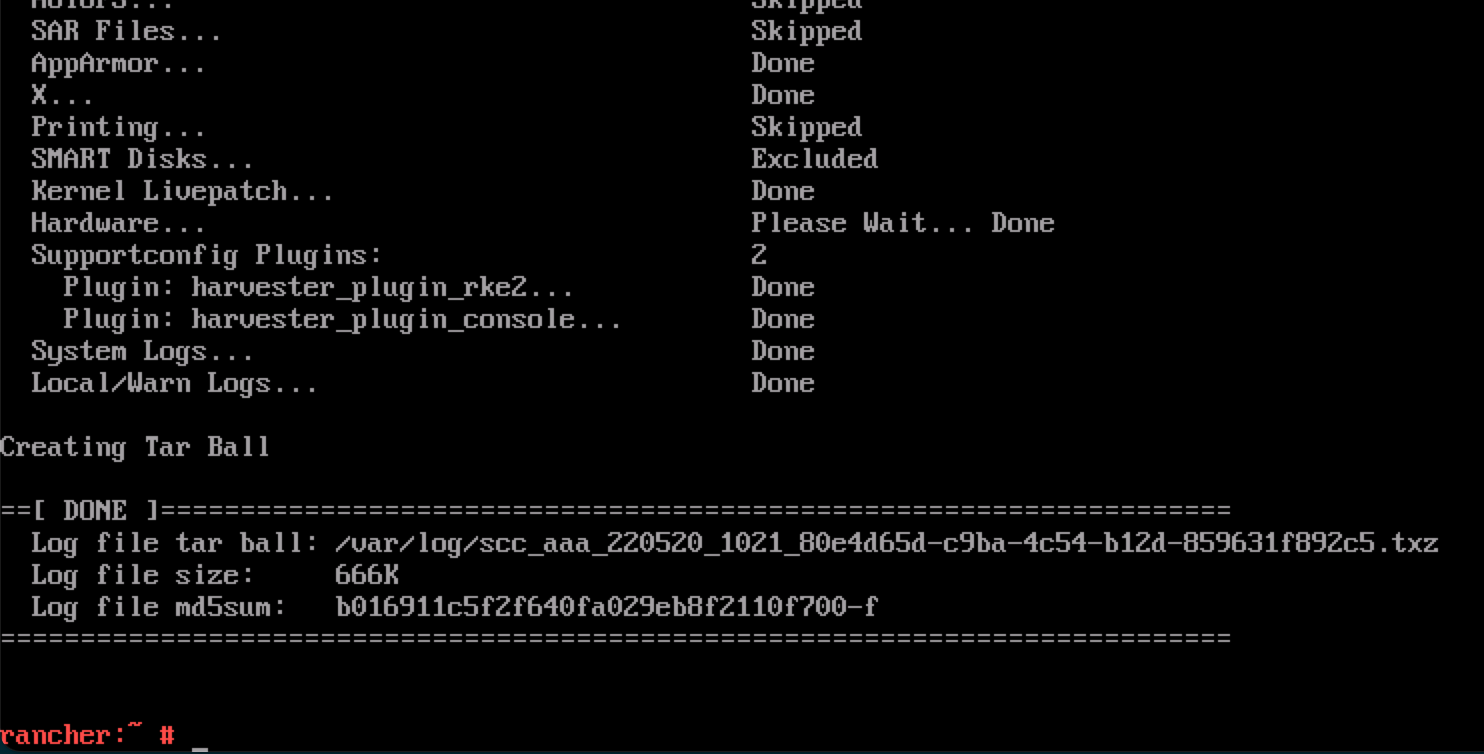
当 PXE 引导安装出现故障时,如果配置文件中的
install.debug字段设置为true,系统会自动生成一个 tar 包。
检查图表状态
SUSE Virtualization 使用以下图表 CRD:
-
HelmChart:维护 RKE2 图表。-
rke2-runtimeclasses -
rke2-multus -
rke2-metrics-server -
rke2-ingress-nginx -
rke2-coredns -
rke2-cannal
-
-
ManagedChart:管理 Rancher 和 SUSE Virtualization 图表。-
rancher-monitoring-crd -
rancher-logging-crd -
kubeovn-operator-crd -
harvester-crd -
harvester
-
您可以使用 helm list -A 命令来检索已安装图表的列表。
输出示例:
NAME                                           NAMESPACE                          REVISION    UPDATED                                    STATUS      CHART                                                                                       APP VERSION
fleet                                          cattle-fleet-system                4           2025-09-24 09:07:10.801764068 +0000 UTC    deployed    fleet-107.0.0+up0.13.0                                                                      0.13.0
fleet-agent-local                              cattle-fleet-local-system          1           2025-09-24 08:59:28.686781982 +0000 UTC    deployed    fleet-agent-local-v0.0.0+s-d4f65a6f642cca930c78e6e2f0d3f9bbb7d3ba47cf1cce34ac3d6b8770ce5
fleet-crd                                      cattle-fleet-system                1           2025-09-24 08:58:28.396419747 +0000 UTC    deployed    fleet-crd-107.0.0+up0.13.0                                                                  0.13.0
harvester                                      harvester-system                   1           2025-09-24 08:59:37.718646669 +0000 UTC    deployed    harvester-0.0.0-master-ac070598                                                             master-ac070598
harvester-crd                                  harvester-system                   1           2025-09-24 08:59:35.341316526 +0000 UTC    deployed    harvester-crd-0.0.0-master-ac070598                                                         master-ac070598
kubeovn-operator-crd                           kube-system                        1           2025-09-24 08:59:34.783356576 +0000 UTC    deployed    kubeovn-operator-crd-1.13.13                                                                v1.13.13
mcc-local-managed-system-upgrade-controller    cattle-system                      1           2025-09-24 08:59:10.656784284 +0000 UTC    deployed    system-upgrade-controller-107.0.0                                                           v0.16.0
rancher                                        cattle-system                      1           2025-09-24 08:57:20.690330683 +0000 UTC    deployed    rancher-2.12.0                                                                              8815e66-dirty
rancher-logging-crd                            cattle-logging-system              1           2025-09-24 08:59:36.262080367 +0000 UTC    deployed    rancher-logging-crd-107.0.1+up4.10.0-rancher.10
rancher-monitoring-crd                         cattle-monitoring-system           1           2025-09-24 08:59:35.287099045 +0000 UTC    deployed    rancher-monitoring-crd-107.1.0+up69.8.2-rancher.15
rancher-provisioning-capi                      cattle-provisioning-capi-system    1           2025-09-24 08:59:00.561162307 +0000 UTC    deployed    rancher-provisioning-capi-107.0.0+up0.8.0                                                   1.10.2
rancher-webhook                                cattle-system                      2           2025-09-24 09:02:38.774660489 +0000 UTC    deployed    rancher-webhook-107.0.0+up0.8.0                                                             0.8.0
rke2-canal                                     kube-system                        1           2025-09-24 08:57:25.248839867 +0000 UTC    deployed    rke2-canal-v3.30.2-build2025071100                                                          v3.30.2
rke2-coredns                                   kube-system                        1           2025-09-24 08:57:25.341016864 +0000 UTC    deployed    rke2-coredns-1.42.302                                                                       1.12.2
rke2-ingress-nginx                             kube-system                        3           2025-09-24 09:01:31.331647555 +0000 UTC    deployed    rke2-ingress-nginx-4.12.401                                                                 1.12.4
rke2-metrics-server                            kube-system                        1           2025-09-24 08:57:42.162046899 +0000 UTC    deployed    rke2-metrics-server-3.12.203                                                                0.7.2
rke2-multus                                    kube-system                        1           2025-09-24 08:57:25.341560394 +0000 UTC    deployed    rke2-multus-v4.2.106                                                                        4.2.1
rke2-runtimeclasses                            kube-system                        1           2025-09-24 08:57:40.137168056 +0000 UTC    deployed    rke2-runtimeclasses-0.1.000                                                                 0.1.0
HelmChart CRD
HelmChart 项目由作业安装。您可以通过在 SUSE Virtualization 节点上运行以下命令来确定每个作业的名称和状态:
$ kubectl get helmcharts -A -o jsonpath='{range .items[*]}{"Namespace: "}{.metadata.namespace}{"\nName: "}{.metadata.name}{"\nStatus:\n"}{range .status.conditions[*]}{" - Type: "}{.type}{"\n Status: "}{.status}{"\n Reason: "}{.reason}{"\n Message: "}{.message}{"\n"}{end}{"JobName: "}{.status.jobName}{"\n\n"}{end}'输出示例:
Namespace: kube-system
Name: rke2-canal
Status:
  - Type: JobCreated
    Status: True
    Reason: Job created
    Message: Applying HelmChart using Job kube-system/helm-install-rke2-canal
  - Type: Failed
    Status: False
    Reason:
    Message:
JobName: helm-install-rke2-canal
Namespace: kube-system
Name: rke2-coredns
Status:
  - Type: JobCreated
    Status: True
    Reason: Job created
    Message: Applying HelmChart using Job kube-system/helm-install-rke2-coredns
  - Type: Failed
    Status: False
    Reason:
    Message:
JobName: helm-install-rke2-coredns
Namespace: kube-system
Name: rke2-ingress-nginx
Status:
  - Type: JobCreated
    Status: True
    Reason: Job created
    Message: Applying HelmChart using Job kube-system/helm-install-rke2-ingress-nginx
  - Type: Failed
    Status: False
    Reason:
    Message:
JobName: helm-install-rke2-ingress-nginx
Namespace: kube-system
Name: rke2-metrics-server
Status:
  - Type: JobCreated
    Status: True
    Reason: Job created
    Message: Applying HelmChart using Job kube-system/helm-install-rke2-metrics-server
  - Type: Failed
    Status: False
    Reason:
    Message:
JobName: helm-install-rke2-metrics-server
Namespace: kube-system
Name: rke2-multus
Status:
  - Type: JobCreated
    Status: True
    Reason: Job created
    Message: Applying HelmChart using Job kube-system/helm-install-rke2-multus
  - Type: Failed
    Status: False
    Reason:
    Message:
JobName: helm-install-rke2-multus
Namespace: kube-system
Name: rke2-runtimeclasses
Status:
  - Type: JobCreated
    Status: True
    Reason: Job created
    Message: Applying HelmChart using Job kube-system/helm-install-rke2-runtimeclasses
  - Type: Failed
    Status: False
    Reason:
    Message:
JobName: helm-install-rke2-runtimeclasses
您可以以以下方式使用这些信息:
-
确定失败作业的原因:检查
Failed条件的Reason和Message值。 -
重新运行作业:从
HelmChartCRD 中删除该特定作业的Status字段。控制器部署一个新作业。
ManagedChart CRD
Rancher 使用 SUSE® Rancher Prime: Continuous Delivery 在目标集群上安装图表,而 SUSE Virtualization 只有一个目标集群 (fleet-local/local)。
SUSE® Rancher Prime: Continuous Delivery 通过 helm install 在每个目标集群上部署一个代理,因此您可以使用 helm list -A 命令查找 fleet-agent-local 图表。cluster.fleet.cattle.io CRD 包含代理的状态。
apiVersion: fleet.cattle.io/v1alpha1
kind: Cluster
metadata:
  name: local
  namespace: fleet-local
spec:
  agentAffinity:
    nodeAffinity:
      preferredDuringSchedulingIgnoredDuringExecution:
      - preference:
          matchExpressions:
          - key: fleet.cattle.io/agent
            operator: In
            values:
            - "true"
        weight: 1
  agentNamespace: cattle-fleet-local-system
  clientID: xd8cgpm2gq5w25qf46r8ml6qxvhsg858g64s5k7wj5h947vs5sxbwd
  kubeConfigSecret: local-kubeconfig
  kubeConfigSecretNamespace: fleet-local
  redeployAgentGeneration: 1
status:
  agent:
    lastSeen: "2025-09-01T07:09:28Z"
    namespace: cattle-fleet-local-system
  agentAffinityHash: f50425c0999a8e18c2d104cdb8cb063762763f232f538b5a7c8bdb61
  agentDeployedGeneration: 1
  agentMigrated: true
  agentNamespaceMigrated: true
  agentTLSMode: system-store
  apiServerCAHash: 158866807fdf372a1f1946bb72d0fbcdd66e0e63c4799f9d4df0e18b
  apiServerURL: https://10.53.0.1:443
  cattleNamespaceMigrated: true
  conditions:
  - lastUpdateTime: "2025-08-28T04:43:02Z"
    status: "True"
    type: Processed
  - lastUpdateTime: "2025-08-28T10:08:31Z"
    status: "True"
    type: Imported
  - lastUpdateTime: "2025-08-28T10:08:30Z"
    status: "True"
    type: Reconciled
  - lastUpdateTime: "2025-08-28T10:09:30Z"
    status: "True"
    type: Ready
Rancher 将 ManagedChart CRD 转换为带有 mcc- 前缀的 Bundle 资源。SUSE® Rancher Prime: Continuous Delivery 代理监视 Bundle 资源并将其部署到目标集群。BundleDeployment 资源包含部署状态。
SUSE® Rancher Prime: Continuous Delivery 控制器未将数据推送到代理。相反,代理从安装了 SUSE® Rancher Prime: Continuous Delivery 控制器的集群中轮询 Bundle 资源数据。在 SUSE Virtualization 中,SUSE® Rancher Prime: Continuous Delivery 控制器和代理位于同一集群,因此无需担心网络问题。
$ kubectl get bundledeployments -A -o jsonpath='{range .items[*]}{"Namespace: "}{.metadata.namespace}{"\nName: "}{.metadata.name}{"\nStatus:\n"}{range .status.conditions[*]}{"  - Type: "}{.type}{"\n    Status: "}{.status}{"\n    Reason: "}{.reason}{"\n    Message: "}{.message}{"\n"}{end}{"\n"}{end}'
Namespace: cluster-fleet-local-local-1a3d67d0a899
Name: fleet-agent-local
Status:
  - Type: Installed
    Status: True
    Reason:
    Message:
  - Type: Deployed
    Status: True
    Reason:
    Message:
  - Type: Ready
    Status: True
    Reason:
    Message:
  - Type: Monitored
    Status: True
    Reason:
    Message:
Namespace: cluster-fleet-local-local-1a3d67d0a899
Name: mcc-harvester
Status:
  - Type: Installed
    Status: True
    Reason:
    Message:
  - Type: Deployed
    Status: True
    Reason:
    Message:
  - Type: Ready
    Status: True
    Reason:
    Message:
  - Type: Monitored
    Status: True
    Reason:
    Message:
Namespace: cluster-fleet-local-local-1a3d67d0a899
Name: mcc-harvester-crd
Status:
  - Type: Installed
    Status: True
    Reason:
    Message:
  - Type: Deployed
    Status: True
    Reason:
    Message:
  - Type: Ready
    Status: True
    Reason:
    Message:
  - Type: Monitored
    Status: True
    Reason:
    Message:
Namespace: cluster-fleet-local-local-1a3d67d0a899
Name: mcc-kubeovn-operator-crd
Status:
  - Type: Installed
    Status: True
    Reason:
    Message:
  - Type: Deployed
    Status: True
    Reason:
    Message:
  - Type: Ready
    Status: True
    Reason:
    Message:
  - Type: Monitored
    Status: True
    Reason:
    Message:
Namespace: cluster-fleet-local-local-1a3d67d0a899
Name: mcc-rancher-logging-crd
Status:
  - Type: Installed
    Status: True
    Reason:
    Message:
  - Type: Deployed
    Status: True
    Reason:
    Message:
  - Type: Ready
    Status: True
    Reason:
    Message:
  - Type: Monitored
    Status: True
    Reason:
    Message:
Namespace: cluster-fleet-local-local-1a3d67d0a899
Name: mcc-rancher-monitoring-crd
Status:
  - Type: Installed
    Status: True
    Reason:
    Message:
  - Type: Deployed
    Status: True
    Reason:
    Message:
  - Type: Ready
    Status: True
    Reason:
    Message:
  - Type: Monitored
    Status: True
    Reason:
    Message:
如果您更改 harvester-system/harvester 部署镜像,SUSE® Rancher Prime: Continuous Delivery 代理会检测到更改并更新 BundleDeployment 资源中的相应状态。
示例:
status:
  appliedDeploymentID: s-89f9ce3f33c069befb4ebdceaa103af7b71db0e70a39760cb6653366964e5:1cd9188211e318033f89b77acf7b996
e5bb3d9a25319528c47dc052528056f78
  conditions:
  - lastUpdateTime: "2025-08-28T04:44:18Z"
    status: "True"
    type: Installed
  - lastUpdateTime: "2025-08-28T04:44:18Z"
    status: "True"
    type: Deployed
  - lastUpdateTime: "2025-09-01T07:40:28Z"
    message: deployment.apps harvester-system/harvester modified {"spec":{"template":{"spec":{"containers":[{"env":[{"
name":"HARVESTER_SERVER_HTTPS_PORT","value":"8443"},{"name":"HARVESTER_DEBUG","value":"false"},{"name":"HARVESTER_SERV
ER_HTTP_PORT","value":"0"},{"name":"HCI_MODE","value":"true"},{"name":"RANCHER_EMBEDDED","value":"true"},{"name":"HARV
ESTER_SUPPORT_BUNDLE_IMAGE_DEFAULT_VALUE","value":"{\"repository\":\"rancher/support-bundle-kit\",\"tag\":\"master-hea
d\",\"imagePullPolicy\":\"IfNotPresent\"}"},{"name":"NAMESPACE","valueFrom":{"fieldRef":{"apiVersion":"v1","fieldPath"
:"metadata.namespace"}}}],"image":"frankyang/harvester:fix-renovate-head","imagePullPolicy":"IfNotPresent","name":"api
server","ports":[{"containerPort":8443,"name":"https","protocol":"TCP"},{"containerPort":6060,"name":"profile","protoc
ol":"TCP"}],"resources":{"requests":{"cpu":"250m","memory":"256Mi"}},"securityContext":{"appArmorProfile":{"type":"Unc
onfined"},"capabilities":{"add":["SYS_ADMIN"]}},"terminationMessagePath":"/dev/termination-log","terminationMessagePol
icy":"File"}]}}}}
安装完成后的第 0 天,控制台显示 Setting up Harvester。
问题描述
安装成功后,控制台持续显示 Setting up Harvester。虽然大多数 UI 和 CLI 操作不受影响,但尝试 启动升级 的操作被阻止。
运行命令 kubectl get managedchart -n fleet-local harvester -oyaml 后,显示以下信息:
...
status:
  conditions:
  - lastUpdateTime: "2025-10-22T08:01:18Z"
    message: 'NotReady(1) [Cluster fleet-local/local]; daemonset.apps harvester-system/harvester-network-controller
      modified {"spec":{"template":{"spec":{"containers":[{"args":["agent"],"command":["harvester-network-controller"],
      "env":[{"name":"NODENAME","valueFrom":{"fieldRef":{"apiVersion":"v1","fieldPath":"spec.nodeName"}}},
      {"name":"NAMESPACE","valueFrom":{"fieldRef":{"apiVersion":"v1","fieldPath":"metadata.namespace"}}}],
      "image":"rancher/harvester-network-controller:master-head","imagePullPolicy":"IfNotPresent","name":"harvester-network",
      "resources":{"limits":{"cpu":"100m","memory":"128Mi"},"requests":{"cpu":"10m","memory":"64Mi"}},
      "securityContext":{"privileged":true},"terminationMessagePath":"/dev/termination-log","terminationMessagePolicy":"File",
      "volumeMounts":[{"mountPath":"/dev","name":"dev"},{"mountPath":"/lib/modules","name":"modules"}]}]}}}};'
    status: "False"
    type: Ready
根本原因
控制台运行以下命令以确定 harvester ManagedChart(在 fleet-local 名称空间)是否处于 Ready 状态。
cmd := exec.Command("/bin/sh", "-c", kubectl -n fleet-local get ManagedChart harvester -o jsonpath='{.status.conditions}' |
jq 'map(select(.type == "Ready" and .status == "True")) | length')
ManagedChart CRD 被 SUSE® Rancher Prime: Continuous Delivery 用于通过 GitOps 管理资源。如果这些资源中的任何一个被直接修改,ManagedChart 会记录并标记这些偏差。在上述示例中,错误发生是因为自定义镜像标签被直接应用于 harvester-system/harvester-network-controller DaemonSet。
要检索 ManagedChart 资源的完整列表,请运行命令 kubectl get bundle -n fleet-local mcc-harvester -oyaml。
apiVersion: fleet.cattle.io/v1alpha1
kind: Bundle
metadata:
  name: mcc-harvester
  namespace: fleet-local
spec:
  resources:
  - content: H4s...===
    encoding: base64+gz
    charts/harvester-network-controller/templates/daemonset.yaml
  - content: ...
解决方法
您可以执行以下任一操作:
-
还原对受影响资源所做的直接更改。
-
使用
kubectl edit managedchart -n fleet-local harvester更新ManagedChartCRD,并应用所需的自定义配置。