|
本文档采用自动化机器翻译技术翻译。 尽管我们力求提供准确的译文,但不对翻译内容的完整性、准确性或可靠性作出任何保证。 若出现任何内容不一致情况,请以原始 英文 版本为准,且原始英文版本为权威文本。 |
从 v1.4.2 或 v1.4.3 升级到 v1.5.0
一般信息
每当有新的 SUSE Virtualization 版本可供升级时,升级 按钮会出现在 仪表板 屏幕上。有关更多信息,请参见 开始升级。
您可以直接从 v1.4.2 升级到 v1.5.0,因为 SUSE Virtualization 允许对底层组件进行最多一次小版本升级。SUSE Virtualization v1.4.2 和 v1.4.3 使用相同的小版本 SUSE® Rancher Prime: RKE2 (v1.31),而 SUSE Virtualization v1.5.0 使用下一个小版本 (v1.32)。
有关在隔离的环境中升级 SUSE Virtualization 的信息,请参见 准备隔离升级。
已知问题
1.在升级期间,管理 URL 状态为 "未准备好"
在某些节点上,SUSE Virtualization 控制台可能会在升级进行时显示 Status: NotReady。
升级到 v1.5.0 完成后,将显示正确的状态。
相关问题: #7963
2.在 Fluentd 和 Fluent Bit Pod 中,隔离的升级卡在了 ImagePullBackOff 错误。
升级可能在过程的最开始就卡住,表现为0%的进度和在SUSE Virtualization用户界面的*升级*对话框中标记为*待处理*的项目。
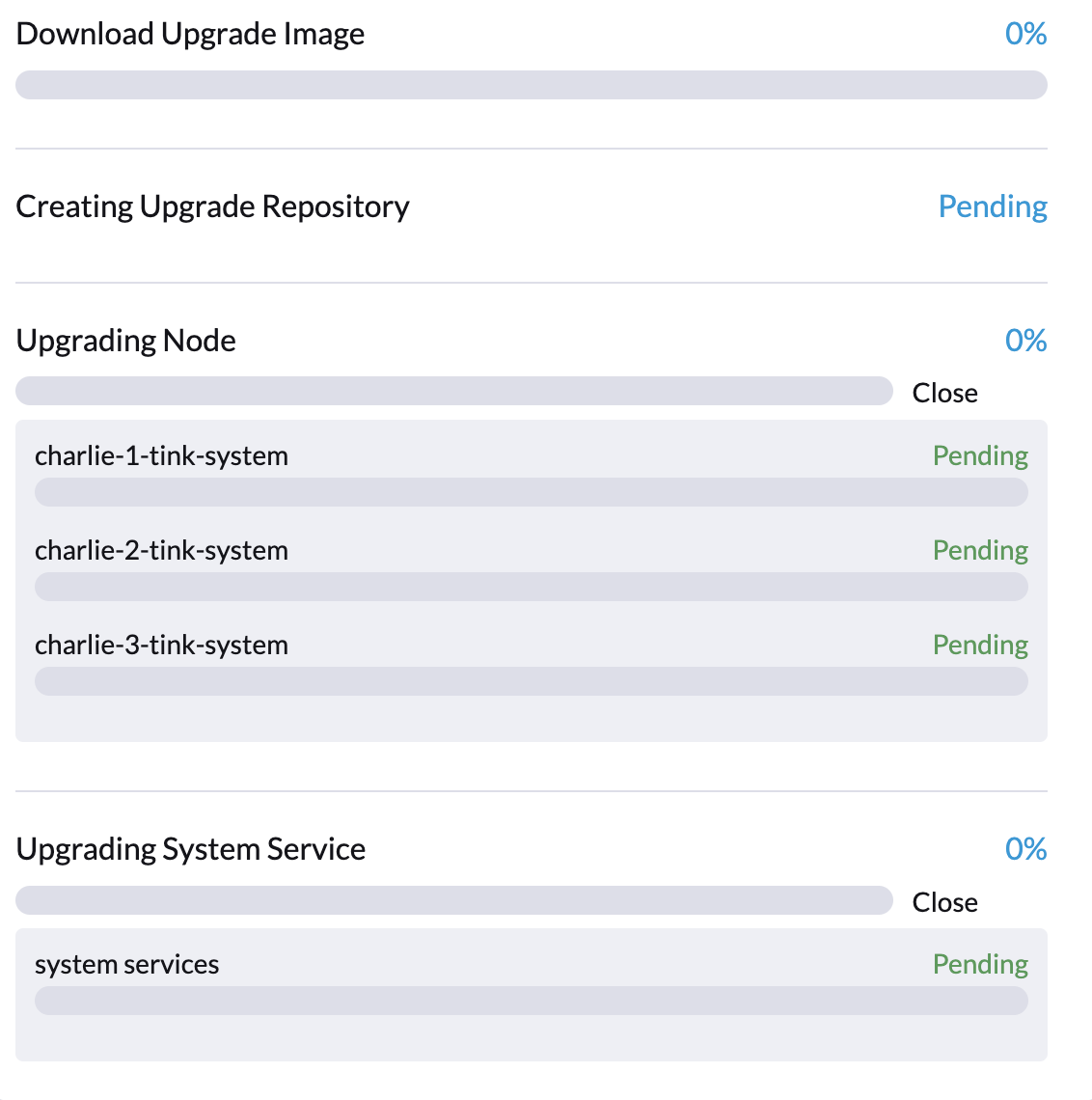
具体来说,Fluentd和Fluent Bit Pod可能会卡在`ImagePullBackOff`状态。要检查Pod的状态,请运行以下命令:
$ kubectl -n harvester-system get upgrades -l harvesterhci.io/latestUpgrade=true
NAME                 AGE
hvst-upgrade-x2hz8   7m14s

$ kubectl -n harvester-system get upgradelogs -l harvesterhci.io/upgrade=hvst-upgrade-x2hz8
NAME                            UPGRADE
hvst-upgrade-x2hz8-upgradelog   hvst-upgrade-x2hz8

$ kubectl -n harvester-system get pods -l harvesterhci.io/upgradeLog=hvst-upgrade-x2hz8-upgradelog
NAME                                                        READY   STATUS             RESTARTS   AGE
hvst-upgrade-x2hz8-upgradelog-downloader-6cdb864dd9-6bw98   1/1     Running            0          7m7s
hvst-upgrade-x2hz8-upgradelog-infra-fluentbit-2nq7q         0/1     ImagePullBackOff   0          7m42s
hvst-upgrade-x2hz8-upgradelog-infra-fluentbit-697wf         0/1     ImagePullBackOff   0          7m42s
hvst-upgrade-x2hz8-upgradelog-infra-fluentbit-kd8kl         0/1     ImagePullBackOff   0          7m42s
hvst-upgrade-x2hz8-upgradelog-infra-fluentd-0               0/2     ImagePullBackOff   0          7m42s
这是因为以下容器镜像既没有在集群节点中预加载,也没有从互联网拉取:
-
ghcr.io/kube-logging/fluentd:v1.15-ruby3 -
ghcr.io/kube-logging/config-reloader:v0.0.5 -
fluent/fluent-bit:2.1.8
要解决此问题,请执行以下任一操作:
-
更新 Logging CR 以使用已经在集群节点中预加载的镜像。为此,请对集群运行以下命令:
# Get the Logging CR names
OPERATOR_LOGGING_NAME=$(kubectl get loggings -l app.kubernetes.io/name=rancher-logging -o jsonpath="{.items[0].metadata.name}")
INFRA_LOGGING_NAME=$(kubectl get loggings -l harvesterhci.io/upgradeLogComponent=infra -o jsonpath="{.items[0].metadata.name}")

# Gather image info from operator's Logging CR
FLUENTD_IMAGE_REPO=$(kubectl get loggings $OPERATOR_LOGGING_NAME -o jsonpath="{.spec.fluentd.image.repository}")
FLUENTD_IMAGE_TAG=$(kubectl get loggings $OPERATOR_LOGGING_NAME -o jsonpath="{.spec.fluentd.image.tag}")

FLUENTBIT_IMAGE_REPO=$(kubectl get loggings $OPERATOR_LOGGING_NAME -o jsonpath="{.spec.fluentbit.image.repository}")
FLUENTBIT_IMAGE_TAG=$(kubectl get loggings $OPERATOR_LOGGING_NAME -o jsonpath="{.spec.fluentbit.image.tag}")

CONFIG_RELOADER_IMAGE_REPO=$(kubectl get loggings $OPERATOR_LOGGING_NAME -o jsonpath="{.spec.fluentd.configReloaderImage.repository}")
CONFIG_RELOADER_IMAGE_TAG=$(kubectl get loggings $OPERATOR_LOGGING_NAME -o jsonpath="{.spec.fluentd.configReloaderImage.tag}")

# Patch the Logging CR
kubectl patch logging $INFRA_LOGGING_NAME --type=json -p="[{\"op\":\"replace\",\"path\":\"/spec/fluentbit/image\",\"value\":{\"repository\":\"$FLUENTBIT_IMAGE_REPO\",\"tag\":\"$FLUENTBIT_IMAGE_TAG\"}}]"
kubectl patch logging $INFRA_LOGGING_NAME --type=json -p="[{\"op\":\"replace\",\"path\":\"/spec/fluentd/image\",\"value\":{\"repository\":\"$FLUENTD_IMAGE_REPO\",\"tag\":\"$FLUENTD_IMAGE_TAG\"}}]"
kubectl patch logging $INFRA_LOGGING_NAME --type=json -p="[{\"op\":\"replace\",\"path\":\"/spec/fluentd/configReloaderImage\",\"value\":{\"repository\":\"$CONFIG_RELOADER_IMAGE_REPO\",\"tag\":\"$CONFIG_RELOADER_IMAGE_TAG\"}}]"
Fluentd 和 Fluent Bit Pod 的状态应在片刻内更改为
Running,并且在更新 Logging CR 后,升级过程应继续。如果Fluentd Pod的状态仍为`ImagePullBackOff`,您可以删除该Pod以强制其重启。UPGRADE_NAME=$(kubectl -n harvester-system get upgrades -l harvesterhci.io/latestUpgrade=true -o jsonpath='{.items[0].metadata.name}') UPGRADELOG_NAME=$(kubectl -n harvester-system get upgradelogs -l harvesterhci.io/upgrade=$UPGRADE_NAME -o jsonpath='{.items[0].metadata.name}') kubectl -n harvester-system delete pods -l harvesterhci.io/upgradeLog=$UPGRADELOG_NAME,harvesterhci.io/upgradeLogComponent=aggregator -
在可以访问互联网的计算机上,拉取所需的容器镜像,然后将其导出为TAR文件。接下来,将TAR文件传输到集群节点,然后在每个节点上运行以下命令以导入镜像:
# Pull down the three container images
docker pull ghcr.io/kube-logging/fluentd:v1.15-ruby3
docker pull ghcr.io/kube-logging/config-reloader:v0.0.5
docker pull fluent/fluent-bit:2.1.8

# Export the images to a tar file
docker save \
  ghcr.io/kube-logging/fluentd:v1.15-ruby3 \
  ghcr.io/kube-logging/config-reloader:v0.0.5 \
  fluent/fluent-bit:2.1.8 > upgradelog-images.tar

# After transferring the tar file to the cluster nodes, import the images (need to be run on each node)
ctr -n k8s.io images import upgradelog-images.tar
在镜像预加载后,升级过程应继续。
-
(不推荐)在禁用日志记录的情况下重新启动升级过程。确保在*升级*对话框中未选中*启用日志记录*复选框。
-
相关问题: #7955
3.升级卡在等待 mcc-harvester bundle CR。
当您从旧的 SUSE Virtualization 版本(如 v1.0.x、v1.1.x 和 v1.2.x)升级时,升级过程可能会卡在等待 mcc-harvester bundle CR 准备就绪。
> kubectl get bundles -n fleet-local
NAME                                          BUNDLEDEPLOYMENTS-READY   STATUS
mcc-harvester                                 0/1                       Modified(1) [Cluster fleet-local/local]; kubevirt.kubevirt.io harvester-system/kubevirt modified {"spec":{"configuration":{"vmStateStorageClass":"vmstate-persistence"}}}
根本原因是最新的`dependency_charts` CRD未被应用,这发生是因为Helm不管理SUSE Virtualization的CRD。要允许升级继续,请运行以下脚本:
kubectl apply -f https://raw.githubusercontent.com/harvester/harvester/refs/tags/v1.5.0/deploy/charts/harvester/dependency_charts/kubevirt-operator/crds/crd-kubevirt.yaml

kubectl apply -f https://raw.githubusercontent.com/harvester/harvester/refs/tags/v1.5.0/deploy/charts/harvester/dependency_charts/csi-snapshotter/crds/volumesnapshotclasses.yaml
kubectl apply -f https://raw.githubusercontent.com/harvester/harvester/refs/tags/v1.5.0/deploy/charts/harvester/dependency_charts/csi-snapshotter/crds/volumesnapshotcontents.yaml
kubectl apply -f https://raw.githubusercontent.com/harvester/harvester/refs/tags/v1.5.0/deploy/charts/harvester/dependency_charts/csi-snapshotter/crds/volumesnapshots.yaml

kubectl apply -f https://raw.githubusercontent.com/harvester/harvester/refs/tags/v1.5.0/deploy/charts/harvester/dependency_charts/whereabouts/crds/whereabouts.cni.cncf.io_ippools.yaml
kubectl apply -f https://raw.githubusercontent.com/harvester/harvester/refs/tags/v1.5.0/deploy/charts/harvester/dependency_charts/whereabouts/crds/whereabouts.cni.cncf.io_overlappingrangeipreservations.yaml
五分钟后,请检查位于 bundle.fleet.cattle.io/v1alpha1 的 mcc-harvester bundle CR 状态。如果仍然显示相同的错误,您必须使用以下脚本重新同步 bundle CR:
#!/bin/bash

patch_fleet_bundle() {
  local bundleName=$1
  local generation=$(kubectl get -n fleet-local bundle ${bundleName} -o jsonpath='{.spec.forceSyncGeneration}')
  local new_generation=$((generation+1))
  patch_manifest="$(mktemp)"
  cat > "$patch_manifest" <<EOF
{
  "spec": {
    "forceSyncGeneration": $new_generation
  }
}
EOF
  echo "patch bundle to new generation: $new_generation"
  kubectl patch -n fleet-local bundle ${bundleName}  --type=merge --patch-file $patch_manifest
  rm -f $patch_manifest
}

for bundle in mcc-harvester
do
  patch_fleet_bundle ${bundle}
done
您还必须确保`cdi` CRD存在。
> kubectl get bundle -n fleet-local
NAMESPACE     NAME                                          BUNDLEDEPLOYMENTS-READY   STATUS
fleet-local   mcc-harvester                                 0/1                       Modified(1) [Cluster fleet-local/local]; cdi.cdi.kubevirt.io cdi missing
如果 cdi CRD 存在,请运行 patch_fleet_bundle 脚本以重新同步 mcc-harvester bundle CR。否则,请运行以下脚本以创建`cdi` CRD:
kubectl apply -f https://raw.githubusercontent.com/harvester/harvester/refs/tags/v1.5.0/deploy/charts/harvester/dependency_charts/cdi/crds/cdi.yaml相关问题: #8163
4.使用可迁移RWX卷的虚拟机意外重启。
当CSI插件Pod被重启时,使用可迁移RWX卷的虚拟机会意外重启。此问题影响SUSE Virtualization v1.4.x、v1.5.0和v1.5.1。
解决方法是在升级开始之前,在SUSE Storage UI上禁用设置 意外分离卷时自动删除工作负载Pod。升级完成后,您必须再次启用该设置。
该问题将在SUSE Storage v1.8.3、v1.9.1及更高版本中修复。SUSE Virtualization v1.6.0将包含SUSE Storage v1.9.1。