
SSH Push接続メソッド
SSH Push(ssh-push)は、SaltクライアントがSUSE Multi-Linux Managerサーバに直接到達できない環境で使用されます。
この環境では、クライアントはDMZと呼ばれるファイアウォール保護ゾーンに位置しています。
DMZ内のシステムは、SUSE Multi-Linux Managerサーバがある内部ネットワークへの接続を開くことは許可されていません。
SSH PushはSUSE Multi-Linux Managerからクライアントへのトンネルのみを開きますが、逆チャネルは直接接続されます。 このようなシナリオは、どこでも機能するわけではありません。 したがって、SSH Push(トンネル付き)も連絡手段として利用可能です。 これにより逆トンネルも開かれ、クライアントからサーバへの接続をブロックする可能性のあるすべてのファイアウォールを通じて通信できます。
SSH Pushは、デーモンエージェントをクライアントにインストールできない場合にも使用されます。
|
SSH Pushメソッドには深刻な制限があります。
スケーラビリティが悪く、プレーンSaltメソッド( |
サーバは、SSH Pushを使用して、定期的にクライアントに接続し、チェックインし、スケジュールされたアクションおよびイベントを実行します。
|
プロビジョニングモデルを使用したシステムの再インストールは、SSH Pushで管理されているクライアントでは現在サポートされていません。 |
この画像はSSH Push処理のパスを示しています。 `Taskomatic`ブロックの左側にあるすべての項目は、SUSE Multi-Linux Managerクライアント上で実行されているプロセスを表しています。
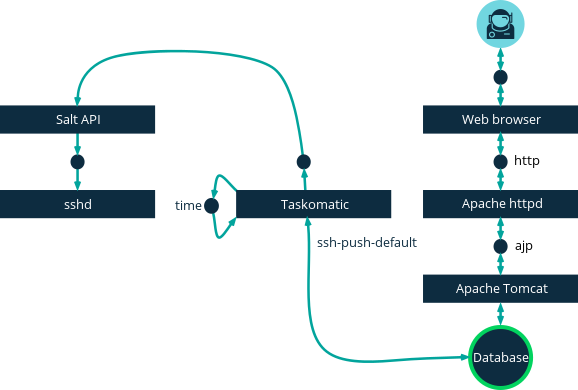
SSH Pushを使用するには、クライアント上でSSHデーモンが実行されており、SUSE Multi-Linux Managerサーバ上で実行されている`salt-api`デーモンから到達可能である必要があります。 さらに、必要なPythonバージョンは、クライアントシステム上のSaltバンドルと共に展開されます。
次の登録手順を開始する前に、SSH Push連絡手段が構成されたアクティベーションキーを定義してください。 このメソッドは、サーバへのHTTPSによる直接接続があることを期待しています。
これらのクライアントをSUSE Multi-Linux Managerサーバに登録するには、Web UIまたはAPIを使用する必要があります。 次の手順または例を参照してください。
-
SUSE Multi-Linux Manager Web UIで、に移動し、適切なフィールドを入力します。
-
SSH Push連絡手段が設定されたアクティベーションキーを選択します。 アクティベーションキーに関する詳細は、アクティベーションキーを参照してください。
-
`Manage system completely via SSH`チェックボックスをオンにします。
-
起動をクリックして、登録を開始します。
-
に移動して、システムが正しく登録されたことを確認します。
APIを使用して、使用する連絡手段を管理できます。 この例のPythonコードは、連絡手段を`ssh-push`に設定します。
有効な値は次のとおりです。
-
default(pull) -
ssh-push -
ssh-push-tunnel
client = xmlrpclib.Server(MLM_HOST + "/rpc/api", verbose=0)
key = client.auth.login(MLM_LOGIN, MLM_PASSWORD)
client.system.setDetails(key, 1000012345, {'contact_method' : 'ssh-push'})
1. 使用可能なパラメータ
SSH Pushを設定する際、システムが登録される際に使用されるホスト、アクティベーションキー、パスワードなどのパラメータを変更できます。 パスワードはブートストラッピングのみに使用され、どこにも保存されません。 今後のすべてのSSHセッションは、キー/証明書ペアを介して認証されます。 これらのパラメータは、で設定されます。
rootとしてではなく非特権ユーザとしてシステムにアクセスするためのsudoユーザなど、システム全体で使用される永続パラメータを設定することもできます。
|
サーバコンテナ内でステップを実行する前に、`mgrctl term`を使用してください。 |
-
SUSE Multi-Linux Managerサーバに最新の`spacewalk-taskomatic`および`spacewalk-certs-tools`パッケージがインストールされていることを確認してください。
-
それぞれのクライアントシステムで、適切な非特権ユーザを作成します。
-
各クライアントシステムで、`sudoers`ファイルを編集します。
sudo visudo
-
`sudoers`ファイルの最後にこの行を追加して、ユーザに`sudo`アクセスを付与します。 `<user>`を、Web UIでクライアントを起動しているユーザの名前に置き換えてください。
<user> ALL=NOPASSWD: /usr/bin/python3, /var/tmp/venv-salt-minion/bin/python
この手順では、クライアントを登録するために必要なパスワードなしでルートアクセスを付与します。 クライアントが正常にインストールされると、ルート権限で実行されるため、アクセスはもはや必要ありません。 クライアントが正常にインストールされた後、`sudoers`ファイルからその行を削除することをお勧めします。
-
SUSE Multi-Linux Managerサーバコンテナ内で、`/etc/rhn/rhn.conf`設定ファイルを編集し、次の行を追加または修正して、非特権ユーザ名を含めます。
ssh_push_sudo_user = <user>
-
この設定パラメータを変更した後、
salt-secrets-config.service、tomcat.service、`taskomatic.service`などのサービスを再起動する必要があります。 必要なすべてのサービスをカバーするためには、SUSE Multi-Linux Managerサーバをルートとして再起動するのが最善です。 コンテナの外部から、コンテナホストで次のコマンドを入力します:mgradm restart
2. アクションの実行
SSH Push機能は、`salt-ssh`を使用してスケジュールされたアクションを実行するためにTaskomaticを使用します。 Taskomaticジョブは、定期的にスケジュールされたアクションをチェックし、それを実行します。 SSH Push機能は、スケジュールされたアクションに基づいて完全な`salt-ssh`呼び出しを実行します。
デフォルトでは、一度に20のSalt SSHアクションを実行できます。 並行して実行できるアクションの数を増やすには、これらの行を設定ファイルに追加し、`parallel_threads`の値を上方に調整します。 問題を避けるために、並行アクションの数を少なく保つことをお勧めします:
taskomatic.sshminion_action_executor.parallel_threads = <number>
org.quartz.threadPool.threadCount = <value of parallel_threads + 20>
これは、任意のクライアントで並行して実行できるアクションの数と、Taskomaticによって使用されるワーカースレッドの総数を調整します。 アクションを複数のクライアントで実行する必要がある場合、アクションは常に各クライアントで順次実行されます。
クライアントがプロキシを介して接続されている場合、プロキシの`MaxSessions`設定を調整する必要があります。 この場合、並行接続の数をクライアントの総数の3倍に設定します。
3. 今後の機能
SSH Pushでまだサポートされていない機能があります。 これらの機能はSalt SSHクライアントでは動作しません。
-
OpenSCAPの監査
-
ビーコン。次の結果になります。
-
`zypper`を使用してシステムにパッケージをインストールしても、パッケージの更新は呼び出されません。
-
仮想ホストシステムがSalt SSHベースの場合、仮想ホスト関数(たとえば、ゲストへのホスト)が動作しません。
-
詳細情報:
-
Salt SSHに関する一般的な情報については、Salt SSHおよび https://docs.saltproject.io/en/latest/topics/ssh/.をご覧ください。
-
SSHキーのローテーションについては、specialized-guides:salt/salt-ssh.adoc#salt.ssh.key_rotationをご覧ください。