
SSH Push 연락 방법
SSH Push (ssh-push)는 Salt 클라이언트가 SUSE Multi-Linux Manager 서버에 직접 접근할 수 없는 환경에서 사용됩니다.
이 환경에서 클라이언트는 DMZ라고 불리는 방화벽 보호 구역에 위치해 있습니다.
DMZ 내의 어떤 시스템도 SUSE Multi-Linux Manager 서버가 위치한 내부 네트워크에 연결을 열 수 있는 권한이 없습니다.
SSH Push는 SUSE Multi-Linux Manager에서 클라이언트로만 터널을 열지만, 역 채널은 직접 연결됩니다. 이러한 시나리오는 어디에서나 작동하지 않을 수 있습니다. 따라서 SSH Push(터널 사용)도 연락 방법으로 사용할 수 있습니다. 이 방법은 역 터널도 열어주므로, 클라이언트에서 서버로의 연결을 차단할 수 있는 모든 방화벽을 통해 통신할 수 있습니다.
SSH 푸시는 클라이언트에 데몬 에이전트를 설치할 수 없는 경우에도 사용할 수 있습니다.
|
SSH Push 방법에는 심각한 제한이 있습니다.
잘 확장되지 않으며, 일반 Salt 방법( |
서버는 SSH Push를 사용하여 정기적으로 클라이언트에 연락해 체크인하고 예약된 작업과 이벤트를 수행합니다.
|
프로비저닝 모델을 사용하여 시스템을 다시 설치하는 것은 현재 SSH Push로 관리되는 클라이언트에서는 지원되지 않습니다. |
이 이미지는 SSH Push 프로세스 경로를 보여줍니다.
Taskomatic 블록의 왼쪽에 있는 모든 항목은 SUSE Multi-Linux Manager 클라이언트에서 실행 중인 프로세스를 나타냅니다.
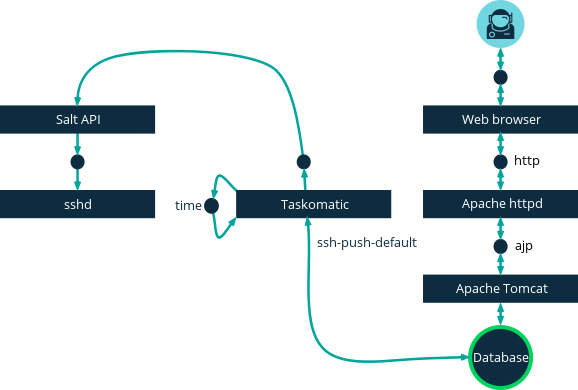
SSH Push를 사용하려면 클라이언트에서 SSH 데몬이 실행 중이어야 하며, SUSE Multi-Linux Manager 서버에서 실행 중인 salt-api 데몬에 의해 접근 가능해야 합니다.
추가로, 필요한 Python 버전은 클라이언트 시스템의 Salt 번들에 배포됩니다.
다음 등록 절차를 시작하기 전에 SSH Push 연락 방법이 구성된 활성화 키를 정의하십시오. 이 방법은 서버와 HTTPS로 직접 연결이 되어 있어야 합니다.
이러한 클라이언트를 Web UI 서버에 등록하려면 SUSE Multi-Linux Manager 또는 API를 사용해야 합니다. 다음 절차나 예제를 참조하십시오.
-
SUSE Multi-Linux Manager Web UI에서 으로 이동하여 적절한 필드를 작성하십시오.
-
SSH Push 연락 방법이 구성된 활성화 키를 선택하십시오. 활성화 키에 대한 자세한 내용은 활성화 키을 참조하십시오.
-
Manage system completely via SSH확인란을 선택하십시오. -
부팅을 클릭하여 등록을 시작합니다.
-
로 이동하여 시스템이 올바르게 등록되었는지 확인합니다.
API를 사용하여 사용할 연락 방법을 관리할 수 있습니다.
이 예제 Python 코드는 연락 방법을 ssh-push(으)로 설정합니다.
유효한 값은 다음과 같습니다.
-
default(풀) -
ssh-push -
ssh-push-tunnel
client = xmlrpclib.Server(MLM_HOST + "/rpc/api", verbose=0)
key = client.auth.login(MLM_LOGIN, MLM_PASSWORD)
client.system.setDetails(key, 1000012345, {'contact_method' : 'ssh-push'})
1. 사용 가능한 파라미터
SSH Push를 구성할 때 시스템이 등록될 때 사용되는 매개변수(호스트, 활성화 키 및 비밀번호 포함)를 수정할 수 있습니다. 비밀번호는 부팅에만 사용되며, 어디에도 저장되지 않습니다. 모든 향후 SSH 세션은 키/인증서 쌍을 통해 인증됩니다. 이 매개변수는 에서 구성됩니다.
또한 시스템 전체에 사용되는 영구 파라미터를 구성할 수 있으며, sudo 사용자가 루트 대신 권한 없는 사용자로 시스템에 액세스하도록 설정할 수도 있습니다.
|
서버 컨테이너 내에서 단계를 실행하기 전에 `mgrctl term`을(를) 사용하십시오. |
-
SUSE Multi-Linux Manager 서버에 최신
spacewalk-taskomatic및spacewalk-certs-tools패키지가 설치되어 있는지 확인하십시오. -
각 클라이언트 시스템에서 적절한 권한 없는 사용자를 생성합니다.
-
각 클라이언트 시스템에서
sudoers파일을 편집합니다:sudo visudo
-
이 줄을
sudo파일의 끝에 추가하여 사용자에게sudoers액세스를 부여하십시오. `<user>`을(를) Web UI에서 클라이언트를 부팅하는 사용자의 이름으로 교체하십시오:<user> ALL=NOPASSWD: /usr/bin/python3, /var/tmp/venv-salt-minion/bin/python
이 절차는 클라이언트를 등록하는 데 필요한 비밀번호 없이 루트 액세스를 부여합니다. 클라이언트가 성공적으로 설치되면 루트 권한으로 실행되므로 더 이상 액세스가 필요하지 않습니다. 클라이언트가 성공적으로 설치된 후
sudoers파일에서 이 줄을 제거하는 것이 좋습니다. -
SUSE Multi-Linux Manager 서버 컨테이너 내에서
/etc/rhn/rhn.conf구성 파일을 편집하고 이 줄에 권한 없는 사용자 이름을 포함하도록 추가하거나 수정합니다:ssh_push_sudo_user = <user>
-
이 구성 매개변수를 변경한 후에는
salt-secrets-config.service,tomcat.service, `taskomatic.service`과(와) 같은 서비스를 다시 시작해야 합니다. 모든 필요한 서비스를 포함하기 위해서는 루트 사용자로 SUSE Multi-Linux Manager 서버를 재시작하는 것이 가장 좋습니다. 컨테이너 외부에서, 컨테이너 호스트에서 입력하십시오:mgradm restart
2. 작업 실행
SSH Push 기능은 taskomatic을 사용하여 salt-ssh`를 사용한 예약된 작업을 실행합니다.
taskomatic 작업은 주기적으로 예약된 작업을 확인하고 실행합니다.
SSH Push 기능은 예약된 작업에 따라 전체 `salt-ssh 호출을 실행합니다.
기본적으로 한 번에 20개의 Salt SSH 작업을 실행할 수 있습니다. 구성 파일에 이러한 줄을 추가하고 `parallel_threads`의 값을 높여서 병렬로 실행할 수 있는 작업 수를 늘릴 수 있습니다. 문제를 피하기 위해 병렬 작업 수를 낮게 유지하는 것이 좋습니다:
taskomatic.sshminion_action_executor.parallel_threads = <number>
org.quartz.threadPool.threadCount = <value of parallel_threads + 20>
이 설정은 하나의 클라이언트에서 병렬로 실행할 수 있는 작업 수와 taskomatic이 사용하는 총 작업자 스레드 수를 조정합니다. 여러 클라이언트에서 작업을 실행해야 하는 경우, 작업은 항상 각 클라이언트에서 순차적으로 실행됩니다.
클라이언트가 프록시를 통해 연결된 경우, 프록시에서 MaxSessions 설정을 조정해야 합니다.
이 경우, 병렬 연결 수를 총 클라이언트 수의 세 배로 설정합니다.
3. 향후 출시될 기능
SSH Push에서 아직 지원되지 않는 기능이 있습니다. 이 기능들은 Salt SSH 클라이언트에서 작동하지 않습니다:
-
OpenSCAP 감사
-
Beacons로 인해 다음 결과가 발생합니다.
-
`zypper`를 사용해 시스템에 패키지를 설치해도 패키지 새로 고침이 호출되지 않습니다.
-
가상 호스트 기능(예: 게스트에 대한 호스트)은 가상 호스트 시스템이 Salt SSH 기반인 경우 작동하지 않습니다.
-
자세한 내용은 다음을 참조하십시오.
-
Salt SSH에 대한 일반적인 내용은 Salt SSH 및 https://docs.saltproject.io/en/latest/topics/ssh/.를 참조하십시오.
-
SSH 키 회전에 대한 내용은 specialized-guides:salt/salt-ssh.adoc#salt.ssh.key_rotation을 참조하십시오.