
SSH 推送联系方法
SSH Push (ssh-push) 用于 Salt 客户端无法直接访问 SUSE Multi-Linux Manager 服务器的环境。
在此环境中,客户端位于称为 DMZ 的防火墙保护区。
DMZ 内的任何系统都无权打开与内部网络的连接,内部网络中有 SUSE Multi-Linux Manager 服务器。
SSH Push 仅从 SUSE Multi-Linux Manager 到客户端打开隧道,但反向通道是直接的。 这种场景可能并不适用于所有地方。 因此,SSH Push(带隧道)也可作为联系方法。 这也打开了一个反向隧道,因此您可以通过所有防火墙进行通信,否则可能会阻止客户端与服务器之间的连接。
如果无法在客户端上安装守护程序代理,也可以使用 SSH 推送。
|
SSH Push 方法有严重的限制。
它的扩展性较差,消耗的服务器资源和网络带宽比普通 Salt 方法 ( |
服务器使用 SSH 推送来定期联系客户端,以签入和执行安排的操作和事件。
|
在使用 SSH 推送方法管理的客户端上,目前不支持使用置备模式重新安装系统。 |
此图演示了 SSH Push 过程路径。
Taskomatic 块左侧的所有项目表示在 SUSE Multi-Linux Manager 客户端上运行的进程。
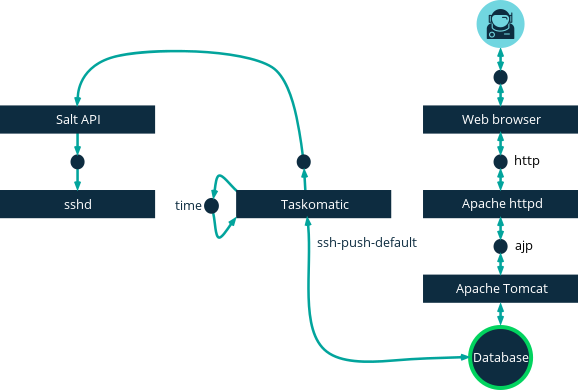
要使用 SSH Push,您必须在客户端上运行 SSH 守护程序,并且该守护程序可以被在 SUSE Multi-Linux Manager 服务器上运行的 salt-api 守护程序访问。
此外,所需的 Python 版本将与 Salt 包一起部署到客户端系统。
在开始以下注册程序之前,请定义一个配置了 SSH Push 联系方法的激活密钥。 此方法期望与服务器之间有直接的 HTTPS 连接。
您需要使用 Web UI 或 API 将这些客户端注册到 SUSE Multi-Linux Manager 服务器。 请参见以下程序或示例。
-
在 SUSE Multi-Linux Manager Web UI 中,导航到 并填写相应字段。
-
选择配置了 SSH Push 联系方法的激活密钥。 有关激活密钥的更多信息,请参见 激活密钥。
-
选中
Manage system completely via SSH复选框。 -
单击 启动 开始注册。
-
导航到 ,确认系统已正确注册。
您可以使用 API 管理要使用的联系方法。
此示例 Python 代码将联系方法设置为 ssh-push。
有效值为:
-
default(拉取) -
ssh-push -
ssh-push-tunnel
client = xmlrpclib.Server(MLM_HOST + "/rpc/api", verbose=0)
key = client.auth.login(MLM_LOGIN, MLM_PASSWORD)
client.system.setDetails(key, 1000012345, {'contact_method' : 'ssh-push'})
1. 可用参数
在配置 SSH Push 时,您可以修改在系统注册时使用的参数,包括主机、激活密钥和密码。 密码仅用于启动,不会被保存。 所有未来的 SSH 会话都通过密钥/证书对进行授权。 这些参数在 中配置。
您也可以配置在系统范围使用的持久性参数,包括配置 sudo 用户来以非特权用户而不是 root 身份访问系统。
|
在服务器容器内运行步骤之前,请使用 |
-
确保您在 SUSE Multi-Linux Manager 服务器上安装了最新的
spacewalk-taskomatic和spacewalk-certs-tools软件包。 -
在每个客户端系统上,创建相应的非特权用户。
-
在每个客户端系统上,编辑
sudoers文件:sudo visudo
-
通过在
sudo文件末尾添加这一行,授予用户sudoers访问权限。 将<user>替换为在 Web UI 中启动客户端的用户的名称:<user> ALL=NOPASSWD: /usr/bin/python3, /var/tmp/venv-salt-minion/bin/python
此过程授予 root 访问权限,无需密码,这对于注册客户端是必需的。 当客户端成功安装后,它以 root 权限运行,因此不再需要访问权限。 我们建议在客户端成功安装后,从
sudoers文件中去除该行。 -
在 SUSE Multi-Linux Manager 服务器容器内,编辑
/etc/rhn/rhn.conf配置文件,并添加或修改下面一行以包含非特权用户名:ssh_push_sudo_user = <user>
-
更改此配置参数后,您必须重启
salt-secrets-config.service、tomcat.service和taskomatic.service等服务。 为了覆盖所有所需的服务,最好以根用户身份重启 SUSE Multi-Linux Manager 服务器。 在容器外,从容器主机输入:mgradm restart
2. 操作的执行
SSH Push 功能使用 Taskomatic 通过 salt-ssh 执行计划操作。
taskomatic 作业定期检查计划操作并执行它们。
SSH Push 功能根据计划操作执行完整的 salt-ssh 调用。
默认情况下,可以同时执行二十个 Salt SSH 操作。
您可以通过将这些行添加到配置文件中,并将 parallel_threads 的值向上调整,来增加可以并行执行的操作数量。
我们建议您保持并行操作的数量较低,以避免问题:
taskomatic.sshminion_action_executor.parallel_threads = <number>
org.quartz.threadPool.threadCount = <value of parallel_threads + 20>
这会调整在任何一个客户端上可以并行运行的操作数量以及 taskomatic 使用的工作线程总数。 如果需要在多个客户端上运行操作,则操作始终在每个客户端上按顺序执行。
如果客户端通过代理连接,则需要调整代理上的 MaxSessions 设置。
在这种情况下,将并行连接的数量设置为客户端总数的三倍。
3. 未来的功能
有一些功能尚不支持 SSH Push。 这些功能在 Salt SSH 客户端上无法使用:
-
OpenSCAP 审计
-
导致以下事件的信标:
-
使用
zypper在系统上安装软件包不会调用软件包刷新。 -
如果虚拟主机系统基于 Salt SSH,则虚拟主机功能(例如 Guest 主机)将无法正常工作。
-
更多信息:
-
关于 Salt SSH 的一般信息,请参见 Salt SSH 和 https://docs.saltproject.io/en/latest/topics/ssh/.。
-
关于 SSH 密钥轮换,请参见 specialized-guides:salt/salt-ssh.adoc#salt.ssh.key_rotation。