
Migrating from SUSE Multi-Linux Manager Retail Branch Server 4.3
This guide describes how to migrate one or more SUSE Multi-Linux Manager Retail Branch Server Servers from SUSE Multi-Linux Manager Branch Server 4.3 to the SUSE Multi-Linux Manager Retail Branch Server 5.1
1. 개요
-
Synchronize SUSE Multi-Linux Manager Retail Branch Server channels
-
Backup existing SUSE Multi-Linux Manager for Retail 4.3 Branch Server Proxy
-
Validate branch objects were created
-
Migrate Branch Server Proxy host
-
프록시 기능 확인
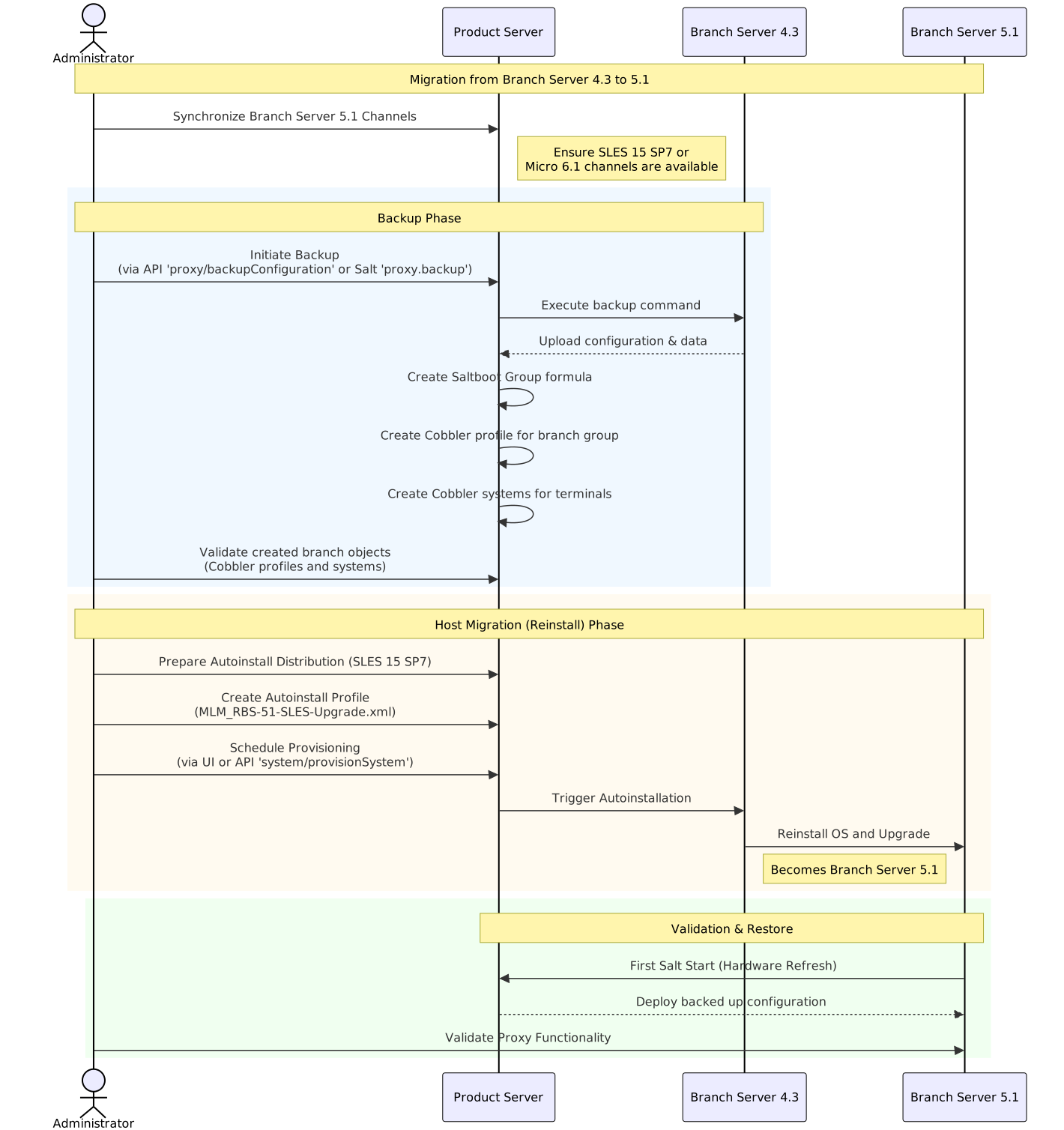
2. Synchronize SUSE Multi-Linux Manager Retail Branch Server channels
See SUSE Multi-Linux Manager 5.2 Beta 1 프록시 배포 how to synchronize product channels for a proxy systems.
Depending on the host operating system:
-
SUSE Linux Micro 6.1usesSUSE Multi-Linux Manager Retail Branch Server Extension 5.1channels -
SUSE Linux Enterprise Server 15 SP7usesSUSE Multi-Linux Manager Retail Branch Server Extension for SLE 5.1channels
3. Backup existing SUSE Multi-Linux Manager Retail Branch Server 4.3
SUSE Multi-Linux Manager for Retail 5.1.2 includes automated backup-migration procedure for both kinds of SUSE Multi-Linux Manager Proxy variants. This procedure collects all required data and uploads them to the SUSE Multi-Linux Manager Server. For SUSE Multi-Linux Manager Retail Branch Server this tool also creates and migrates Saltboot related entities.
|
Squid cache data and POS images are not backed up. Due to change in functionality these data are not migrated and instead redownloaded from the server. See retail-deploy-terminals.adoc#_synchronize_images_to_the_branch_server how to warm up the cache. |
There are multiple ways to initiate SUSE Multi-Linux Manager Retail Branch Server 4.3 migration:
-
API 호출
$proxyid을(를) 브랜치 프록시의 서버 ID 또는 쉼표로 구분된 여러 서버 아이디로 바꿉니다.mgrctl api login mgrctl api post proxy/backupConfiguration '{"sids":[$proxyid]}' -
Salt 호출
아래 명령의
$proxy를 브랜치 프록시 미니언 ID로 바꾸거나, 대상이 여러 브랜치 프록시인 경우-L proxyminionid1,proxyminionid2,…로 바꿉니다.salt $proxy proxy.backup
|
특히 사용자 정의 수정 사항이 있는 경우 프록시도 수동으로 백업하는 것이 좋습니다. |
|
SUSE Multi-Linux Manager Retail Branch Server can still be used after backup step as before, however because some formulas were disabled by the backup/migration step, next highstate or image-sync state application will not work properly. Migrate the server host as soon as possible after backup step is performed. |
4. Validate branch objects were created for migrated branches
Backup/migration step will create new Saltboot objects:
-
Saltboot Groupformula with settings from the original formulas is assigned to the branch group. -
New cobbler profile is created for the branch group:
# mgrctl exec -- cobbler profile report --name $branchid:S:$orgid:$orgname
-
New cobbler systems are created for all assigned terminals:
# mgrctl exec -- cobbler system find --kernel-options "MINION_ID_PREFIX=$branchid"
5. Migrate SUSE Multi-Linux Manager Retail Branch Server host
Create and use AutoYAST profiles to migrate or reinstall the proxy host.
5.1. SUSE Linux Enterprise Server 15 SP7을 기반으로 자동 설치 배포 준비
-
SUSE Linux Enterprise Server 15 SP7 설치 ISO를 서버 호스트에 다운로드하거나 가져옵니다.
-
Use
mgradm distribution copy $path_to_the_isoto copy installation files to the container -
자동 설치 배포 등록에 대해서는 자동 설치 가능한 배포판에서 확인할 수 있습니다.
5.2. 자동 설치 프로파일 준비
자세한 내용은 자동 설치 프로파일에서 확인할 수 있습니다.
Create an autoinstallation profile based previously created distribution. As a profile use profile provided at https://github.com/SUSE/manager-build-profiles/blob/master/AutoYaST/SUSE-Multi-Linux-Manager/SUSE%20Multi-Linux%20Manager%20Proxy/MLM_RBS-51-SLES-Upgrade.xml
- 프로파일이 생성되면 변수 탭으로 전환하여 필요한 변수를 입력합니다.
+
org=organization_id
distrotree=autoinstallation_distribution_label_from_previous_step
channel_prefix=clm_channel_prefix or do not add this variable
registration_key=activation_key_for_post_upgrade
-
[menuitem]
자동 설치 파일탭에서 추가 검사를 위해 렌더링된 전체 프로파일을 볼 수 있습니다.
5.3. 프록시 자동 설치 프로비저닝
Schedule an autoinstallation on the old SUSE Multi-Linux Manager Branch Server 4.3 using the profile created in previous step.
-
Use Web UI interface
Provisioningtab at theSystemview of migrating branch-
During provisioning, the Salt key must be accepted manually. This is required to initiate the connection to the minion after reinstallation.
-
If the provisioning web interface hangs, it is better to check manually with
podmanwhether the proxy is up and running on the migrated host.
-
-
또는 API 호출
system/provisionSystem을 사용하여 마이그레이션을 예약합니다. 예를 들어, SUSE Multi-Linux Manager 호스트에서 다음 코드 조각을 실행하십시오.mgrctl api login mgrctl api post system/provisionSystem '{"sid":$proxyid,"profileName":"$profileName"}'
6. 프록시 기능 확인
After migration is finished and salt is started first time, backed up proxy configuration is automatically deployed during Hardware Refresh step.
After finishing all onboarding steps, validate required proxy functionality. When validating the proxy, it is recommended to verify that minions can be contacted.