
网络要求
本节详细说明 SUSE Multi-Linux Manager 的网络和端口要求。
|
IP 转发将通过容器化安装来实现。这意味着 SUSE Multi-Linux Manager 服务器和代理将充当路由器。此行为由 podman 直接完成。如果禁用 IP 转发,podman 容器将不会运行。 您可以考虑根据您的策略实现 SUSE Multi-Linux Manager 环境的网络隔离。 |
1. Fully qualified domain name (FQDN)
SUSE Multi-Linux Manager 服务器必须正确解析其 FQDN。如果无法解析 FQDN,可能会导致许多不同的组件出现严重问题。
2. Hostname and IP address
为确保 SUSE Multi-Linux Manager 域名可由其客户端解析,服务器和客户端计算机都必须连接到一台正常工作的 DNS 服务器。还需要确保正确配置反向查找。
有关设置 DNS 服务器的详细信息,请参见 https://documentation.suse.com/sles/15-SP7/html/SLES-all/cha-dns.html。
3. 重新启用路由器通告
When the SUSE Multi-Linux Manager is installed using mgradm install or mgrpxy install, it sets up Podman which enables IPv4 and IPv6 forwarding. This is needed for communication from the outside of the container.
However, if your system previously had /proc/sys/net/ipv6/conf/eth0/accept_ra set to 1, it will stop using router advertisements. As a result, the routes are no longer obtained via router advertisements and the default IPv6 route is missing.
要恢复 IPv6 路由的正常功能,请根据以下场景执行相应步骤:
-
服务器和代理基于 15 SP7(无 Network Manager)
-
server and proxy are based on SL Micro 6.2 (with Network manager)
Create a file in
/etc/sysctl.d, for example99-ipv6-ras.conf.向文件中添加以下参数和值:
net.ipv6.conf.eth0.accept_ra = 2重引导。
|
Network management is not working when you have no wicked. |
List your connections with
nmcli connection show.Create or modify the file
/etc/NetworkManager/system-connections/<name of connection>.nmconnectionto add this setting:[ipv6] addr-gen-mode=eui64重引导。
文件示例如下:
[connection]
id=Wired connection 1
type=ethernet
interface-name=eth0

[ethernet]

[ipv4]
dns-priority=20
method=auto

[ipv6]
addr-gen-mode=eui64
method=auto
4. 在 HTTP 或 HTTPS OSI 七层代理后部署
有些环境强制要求通过 HTTP 或 HTTPS 代理(如 Squid 服务器或类似服务器)访问互联网。要在此类配置下允许 SUSE Multi-Linux Manager 服务器访问互联网,需进行以下配置。
For operating system internet access, modify
/etc/sysconfig/proxyaccording to your needs:PROXY_ENABLED="no" HTTP_PROXY="" HTTPS_PROXY="" NO_PROXY="localhost, 127.0.0.1"For
Podmancontainer internet access, modify/etc/systemd/system/uyuni-server.service.d/custom.confaccording to your needs. For example, set:[Service] Environment=TZ=Europe/Berlin Environment="PODMAN_EXTRA_ARGS=" Environment="https_proxy=user:password@http://192.168.10.1:3128"For Java application internet access, modify
/etc/rhn/rhn.confaccording to your needs. On the container host, executemgrctl termto open a command line inside the server container:
Modify
/etc/rhn/rhn.confaccording to your needs. For example, set:# Use proxy FQDN, or FQDN:port server.satellite.http_proxy = server.satellite.http_proxy_username = server.satellite.http_proxy_password = # no_proxy is a comma separated list server.satellite.no_proxy =在容器主机上,重启服务器以强制应用新配置:
systemctl restart uyuni-server.service
5. Air-gapped deployment
如果您在内部网络中操作,无法访问 SUSE Customer Center,可以使用 隔离的部署。
在生产环境中,SUSE Multi-Linux Manager 服务器和客户端始终应使用防火墙。有关所需端口的完整列表,请参见 Required network ports。
6. Required network ports
本节提供了 SUSE Multi-Linux Manager 中各种通信使用的端口的综合列表。
您不需要打开所有这些端口。某些端口只有在您使用需要这些端口的服务时才需打开。
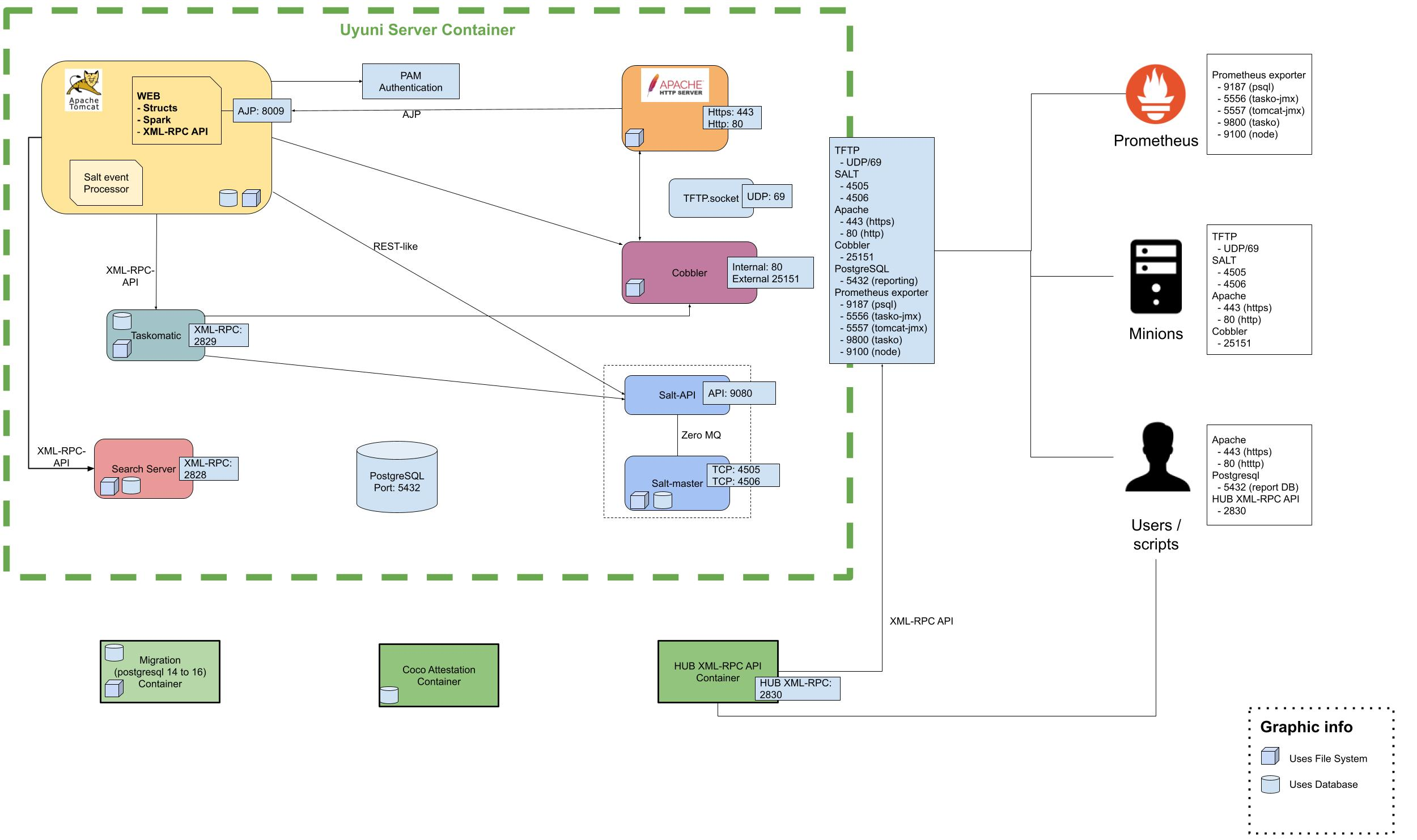
6.2. External inbound server ports
必须打开外部入站端口,以在 SUSE Multi-Linux Manager 服务器上配置防火墙用于防范未经授权访问服务器。
打开这些端口将允许外部网络流量访问 SUSE Multi-Linux Manager 服务器。
| Port number | Protocol | Used By | Notes |
|---|---|---|---|
67 |
TCP/UDP |
DHCP |
Required only if clients are requesting IP addresses from the server. |
69 |
TCP/UDP |
TFTP |
Required if server is used as a PXE server for automated client installation (starting with version 5.2, TFTP is disabled on the server by default and is recommended to run on the proxy). |
80 |
TCP |
HTTP |
Required temporarily for some bootstrap repositories and automated installations. |
443 |
TCP |
HTTPS |
Serves the Web UI, client, and server and proxy ( |
4505 |
TCP |
salt |
Required to accept communication requests from clients. The client initiates the connection, and it stays open to receive commands from the Salt master. |
4506 |
TCP |
salt |
Required to accept communication requests from clients. The client initiates the connection, and it stays open to report results back to the Salt master. |
5432 |
TCP |
PostgreSQL |
Required to access the reporting database. |
5556 |
TCP |
Prometheus |
Required for scraping Taskomatic JMX metrics. |
5557 |
TCP |
Prometheus |
Required for scraping Tomcat JMX metrics. |
9100 |
TCP |
Prometheus |
Required for scraping Node exporter metrics. |
9187 |
TCP |
Prometheus |
Required for scraping PostgreSQL metrics. |
9800 |
TCP |
Prometheus |
Required for scraping Taskomatic metrics. |
6.3. External outbound server ports
必须打开外部出站端口,以在 SUSE Multi-Linux Manager 服务器上配置防火墙用于限制服务器可访问的内容。
打开这些端口将允许来自 SUSE Multi-Linux Manager 服务器的网络流量与外部服务通信。
| Port number | Protocol | Used By | Notes |
|---|---|---|---|
80 |
TCP |
HTTP |
Required for SUSE Customer Center. Port 80 is not used to serve the Web UI. |
443 |
TCP |
HTTPS |
Required for SUSE Customer Center. |
6.4. Internal server ports
Internal ports are used internally by the SUSE Multi-Linux Manager Server. Internal ports are only accessible from localhost.
大多数情况下无需调整这些端口。
| 端口号 | 备注 |
|---|---|
2828 |
Satellite-search API,由 Tomcat 和 Taskomatic 中的 RHN 应用程序使用。 |
2829 |
Taskomatic API,由 Tomcat 中的 RHN 应用程序使用。 |
8005 |
Tomcat 关机端口。 |
8009 |
Tomcat 到 Apache HTTPD (AJP)。 |
8080 |
Tomcat 到 Apache HTTPD (HTTP)。 |
9080 |
Salt-API,由 Tomcat 和 Taskomatic 中的 RHN 应用程序使用。 |
32000 |
与运行 Taskomatic 和 satellite-search 的 Java 虚拟机 (JVM) 建立 TCP 连接时使用的端口。 |
32768 和更高的端口用作临时端口。这些端口往往用于接收 TCP 连接。收到 TCP 连接请求后,发送方将选择其中一个临时端口号来与目标端口进行匹配。
可使用以下命令来确定哪些端口是临时端口:
cat /proc/sys/net/ipv4/ip_local_port_range
6.5. External inbound proxy ports
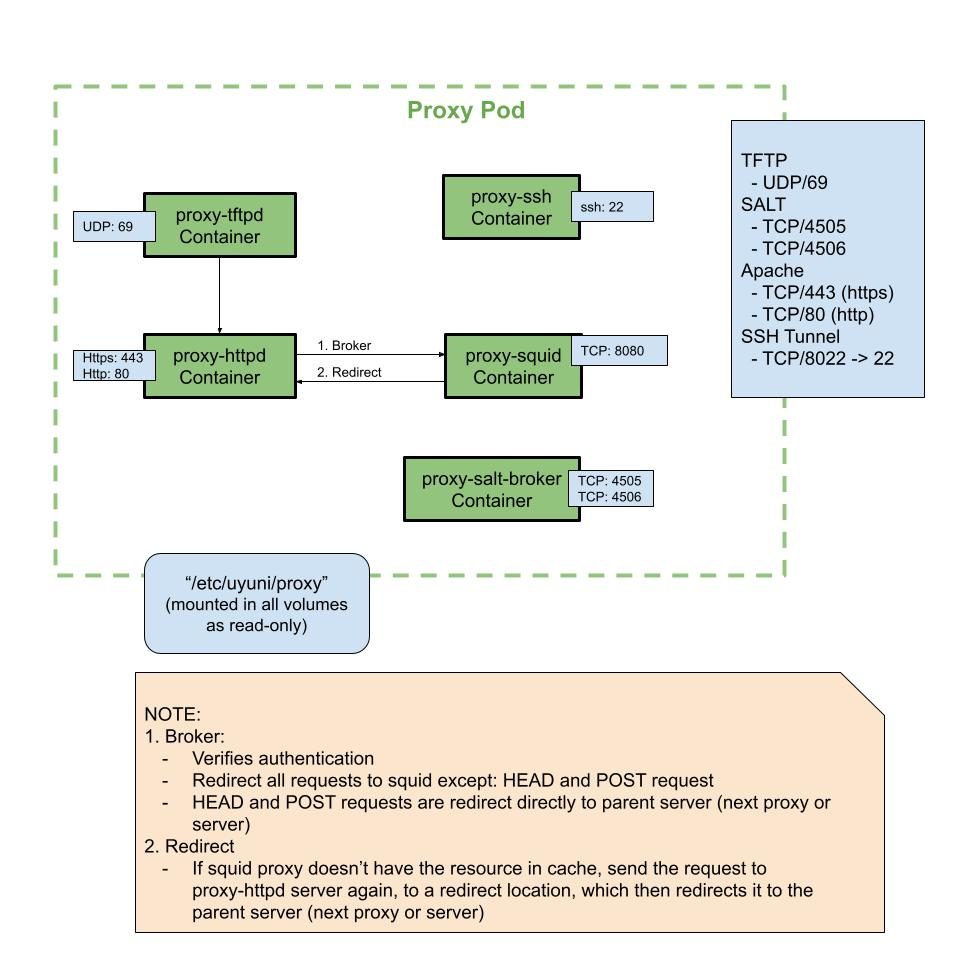
必须打开外部入站端口,以在 SUSE Multi-Linux Manager Proxy 上配置防火墙用于防范未经授权访问代理。
打开这些端口将允许外部网络流量访问 SUSE Multi-Linux Manager Proxy。
| Port number | Protocol | Used By | Notes |
|---|---|---|---|
22 |
Only required if the user wants to manage the proxy host with Salt SSH. |
||
67 |
TCP/UDP |
DHCP |
Required only if clients are requesting IP addresses from the server. |
69 |
TCP/UDP |
TFTP |
Required if the proxy is used as a PXE server for automated client installation (recommended). |
443 |
TCP |
HTTPS |
Web UI, client, and server and proxy ( |
4505 |
TCP |
salt |
Required to accept communication requests from clients. The client initiates the connection, and it stays open to receive commands from the Salt master. |
4506 |
TCP |
salt |
Required to accept communication requests from clients. The client initiates the connection, and it stays open to report results back to the Salt master. |
8022 |
Required for ssh-push and ssh-push-tunnel contact methods. Clients connected to the proxy initiate check in on the server and hop through to clients. |
6.6. External outbound proxy ports
必须打开外部出站端口,以在 SUSE Multi-Linux Manager Proxy 上配置防火墙用于限制代理可访问的内容。
打开这些端口将允许来自 SUSE Multi-Linux Manager Proxy 的网络流量与外部服务通信。
| 端口号 | 协议 | 使用方 | 备注 |
|---|---|---|---|
80 |
用于访问服务器。 |
||
443 |
TCP |
HTTPS |
SUSE Customer Center 需要此端口。 |
4505 |
TCP |
Salt |
直接或通过代理连接到 Salt 主控端时需要此端口。 |
4506 |
TCP |
Salt |
直接或通过代理连接到 Salt 主控端时需要此端口。 |
6.7. External client ports
必须打开外部客户端端口,以在 SUSE Multi-Linux Manager 服务器及其客户端之间配置防火墙。
大多数情况下无需调整这些端口。
| 端口号 | 方向 | 协议 | 备注 |
|---|---|---|---|
22 |
入站 |
SSH |
使用 ssh-push 和 ssh-push-tunnel 联系方法时需要此端口。 |
80 |
出站 |
用于访问服务器或代理。 |
|
443 |
出站 |
用于访问服务器或代理。 |
|
4505 |
出站 |
TCP |
直接或通过代理连接到 Salt 主控端时需要此端口。 |
4506 |
出站 |
TCP |
直接或通过代理连接到 Salt 主控端时需要此端口。 |
9090 |
出站 |
TCP |
Prometheus 用户界面需要此端口。 |
9093 |
出站 |
TCP |
Prometheus 警报管理器需要此端口。 |
9100 |
出站 |
TCP |
Prometheus 节点导出器需要此端口。 |
9117 |
出站 |
TCP |
Prometheus Apache 导出器需要此端口。 |
9187 |
出站 |
TCP |
Prometheus PostgreSQL 需要此端口。 |
6.8. 所需的 URL
SUSE Multi-Linux Manager 必须能够访问某些 URL 才能注册客户端和执行更新。大多数情况下,允许访问以下 URL 便已足够:
-
scc.suse.com -
updates.suse.com -
installer-updates.suse.com -
registry.suse.com -
registry-storage.suse.com -
opensuse.org
此外,您可能需要访问以下非 SUSE 产品的 URL:
-
download.nvidia.com -
public.dhe.ibm.com -
nu.novell.com
You can find additional details on whitelisting the specified URLs and their associated IP addresses in this article: Accessing SUSE Customer Center and SUSE registry behind a firewall and/or through a proxy.
如果您正在使用非 SUSE 客户端,则还可能需要允许访问为这些操作系统提供特定软件包的其他服务器。例如,如果您使用的是 Ubuntu 客户端,则需要能够访问 Ubuntu 服务器。
有关为非 SUSE 客户端排查防火墙访问权限问题的详细信息,请参见 防火墙查错。