
Migrating from SUSE Multi-Linux Manager Retail Branch Server 4.3
This guide describes how to migrate one or more SUSE Multi-Linux Manager Retail Branch Server Servers from SUSE Multi-Linux Manager Branch Server 4.3 to the SUSE Multi-Linux Manager Retail Branch Server 5.1
1. Overview
-
Synchronize SUSE Multi-Linux Manager Retail Branch Server channels
-
Backup existing SUSE Multi-Linux Manager for Retail 4.3 Branch Server Proxy
-
Validate branch objects were created
-
Migrate Branch Server Proxy host
-
验证代理功能
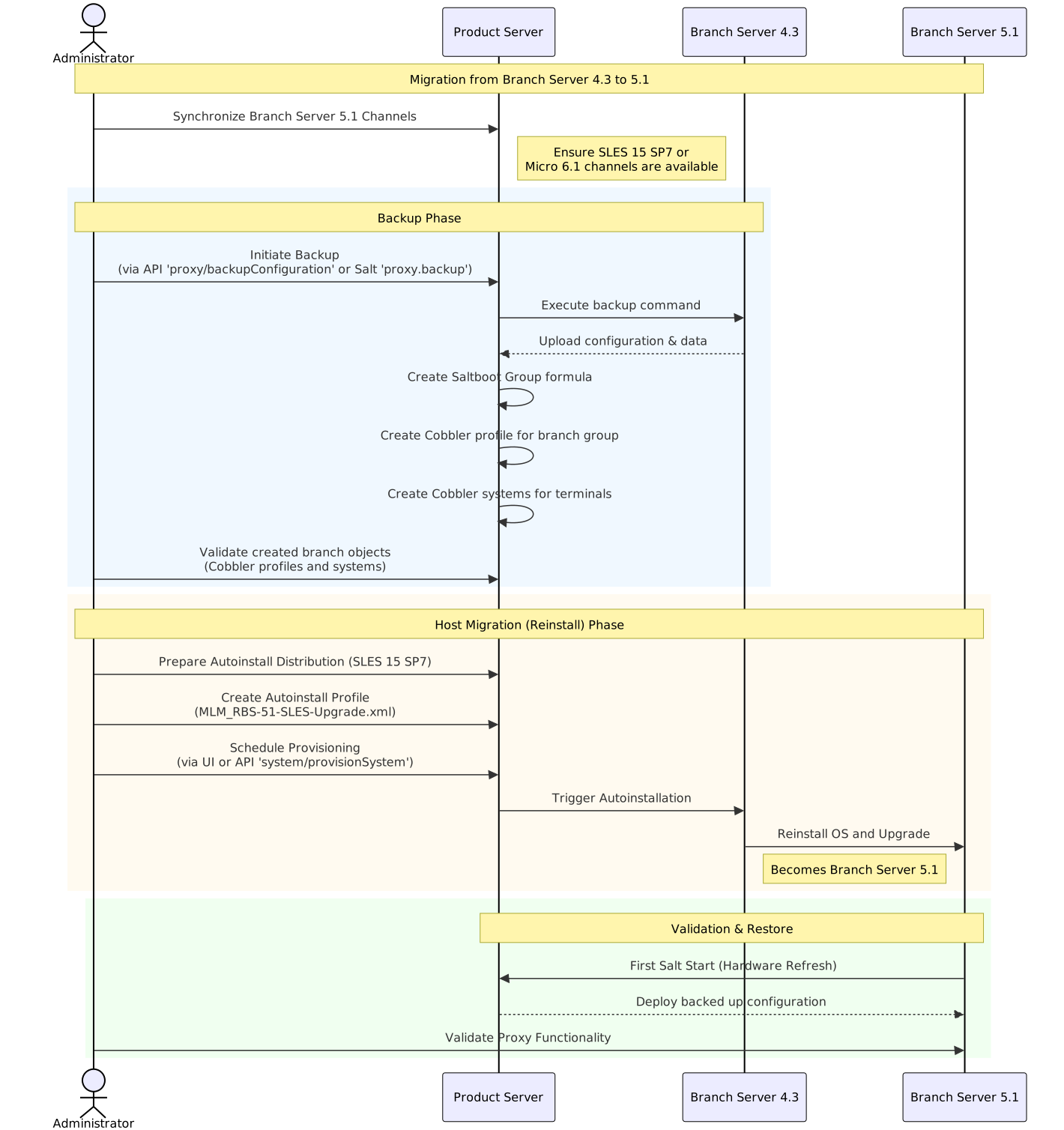
2. Synchronize SUSE Multi-Linux Manager Retail Branch Server channels
See SUSE Multi-Linux Manager 5.2 Beta 1 代理部署 how to synchronize product channels for a proxy systems.
Depending on the host operating system:
-
SUSE Linux Micro 6.1usesSUSE Multi-Linux Manager Retail Branch Server Extension 5.1channels -
SUSE Linux Enterprise Server 15 SP7usesSUSE Multi-Linux Manager Retail Branch Server Extension for SLE 5.1channels
3. Backup existing SUSE Multi-Linux Manager Retail Branch Server 4.3
SUSE Multi-Linux Manager for Retail 5.1.2 includes automated backup-migration procedure for both kinds of SUSE Multi-Linux Manager Proxy variants. This procedure collects all required data and uploads them to the SUSE Multi-Linux Manager Server. For SUSE Multi-Linux Manager Retail Branch Server this tool also creates and migrates Saltboot related entities.
|
Squid cache data and POS images are not backed up. Due to change in functionality these data are not migrated and instead redownloaded from the server. See retail-deploy-terminals.adoc#_synchronize_images_to_the_branch_server how to warm up the cache. |
There are multiple ways to initiate SUSE Multi-Linux Manager Retail Branch Server 4.3 migration:
-
调用 API
将
$proxyid替换为分支代理的服务器 ID,或用逗号分隔的多个服务器 ID。mgrctl api login mgrctl api post proxy/backupConfiguration '{"sids":[$proxyid]}' -
调用 Salt
将以下命令中的
$proxy替换为分支代理受控端 ID;如果需要操作多个分支代理,可使用-L proxyminionid1,proxyminionid2,…。salt $proxy proxy.backup
|
建议您同时手动备份代理,尤其是当存在自定义修改时。 |
|
SUSE Multi-Linux Manager Retail Branch Server can still be used after backup step as before, however because some formulas were disabled by the backup/migration step, next highstate or image-sync state application will not work properly. Migrate the server host as soon as possible after backup step is performed. |
4. Validate branch objects were created for migrated branches
Backup/migration step will create new Saltboot objects:
-
Saltboot Groupformula with settings from the original formulas is assigned to the branch group. -
New cobbler profile is created for the branch group:
# mgrctl exec -- cobbler profile report --name $branchid:S:$orgid:$orgname
-
New cobbler systems are created for all assigned terminals:
# mgrctl exec -- cobbler system find --kernel-options "MINION_ID_PREFIX=$branchid"
5. Migrate SUSE Multi-Linux Manager Retail Branch Server host
Create and use AutoYAST profiles to migrate or reinstall the proxy host.
5.1. 准备基于 SUSE Linux Enterprise Server 15 SP7 的自动安装发行套件
-
将 SUSE Linux Enterprise Server 15 SP7 安装 ISO 下载或放置到服务器主机中
-
Use
mgradm distribution copy $path_to_the_isoto copy installation files to the container -
注册自动安装发行套件,请参见 可自动安装的发行套件。
5.2. 准备自动安装配置文件
有关详细信息,请参见 自动安装配置文件。
Create an autoinstallation profile based previously created distribution. As a profile use profile provided at https://github.com/SUSE/manager-build-profiles/blob/master/AutoYaST/SUSE-Multi-Linux-Manager/SUSE%20Multi-Linux%20Manager%20Proxy/MLM_RBS-51-SLES-Upgrade.xml
- 配置文件创建完毕后,切换至变量选项卡,填写所需变量:
+
org=organization_id
distrotree=autoinstallation_distribution_label_from_previous_step
channel_prefix=clm_channel_prefix or do not add this variable
registration_key=activation_key_for_post_upgrade
-
在
自动安装文件选项卡中,您可以查看完整的渲染配置文件以进行进一步检查
5.3. 置备代理的自动安装
Schedule an autoinstallation on the old SUSE Multi-Linux Manager Branch Server 4.3 using the profile created in previous step.
-
Use Web UI interface
Provisioningtab at theSystemview of migrating branch-
During provisioning, the Salt key must be accepted manually. This is required to initiate the connection to the minion after reinstallation.
-
If the provisioning web interface hangs, it is better to check manually with
podmanwhether the proxy is up and running on the migrated host.
-
-
或通过调用 API (
system/provisionSystem) 安排迁移。例如,在 SUSE Multi-Linux Manager 主机上执行以下命令:mgrctl api login mgrctl api post system/provisionSystem '{"sid":$proxyid,"profileName":"$profileName"}'
6. 验证代理功能
After migration is finished and salt is started first time, backed up proxy configuration is automatically deployed during Hardware Refresh step.
After finishing all onboarding steps, validate required proxy functionality. When validating the proxy, it is recommended to verify that minions can be contacted.